
AppClose alternative · Android, iPhone, computer

An AppClose alternative for Android: shared expenses free for both

Custody Commander runs in the web browser on Android phones, iPhones and computers, with nothing to install. Its shared expense log is free for both parents, and your private case file keeps your records, message logs and calm-reply checks in one place.

Start free

Free plan, no card needed. Organizing software, not a law firm; not legal advice.

See plans: Free, single tools, Full Suite
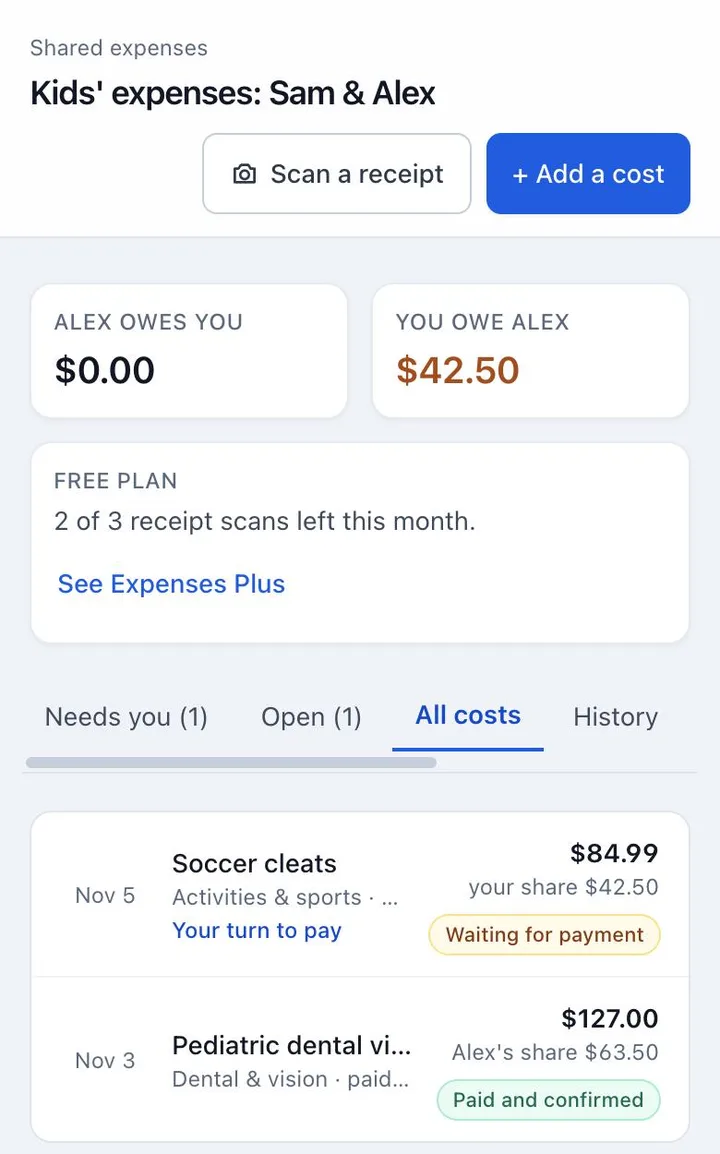
The shared expense log on a phone: Scan a receipt and Add a cost buttons, what each parent owes, and soccer cleats waiting for payment above a dental visit marked Paid and confirmed
App screen from a demo case with made-up names.
  • Works in Android and iPhone browsers
  • Shared expense log free for both parents
  • Not affiliated with AppClose
  • Free plan, no card needed

1of 5

Compare AppClose and Custody Commander by job

AppClose is a shared co-parenting app with messaging, a calendar, expenses, payments and calls. As of October 14, 2026, its pricing page described a paid subscription since January 1, 2026 ($7.99 a month on the web, $8.99 in the app or $83.88 a year prepaid), a 60-day free trial with no card, and a Solo Mode for one parent's own records, schedules and expenses. For the AppClose app on Android, check AppClose's own site or your phone's app store for current details and prices. Custody Commander doesn't send messages and isn't a shared messaging platform, so compare the two by the jobs you need done.

Start my shared expense log

Free for both parents.

In the app

  • Shared expenses: a log built for both parents, free for both, with receipts and payment confirmations
  • Messages: Comms Guard checks a draft before you send it in any channel, AppClose included
  • Records: texts imported from your own phone become a numbered, dated log
  • Your case: a private timeline, evidence and documents the other parent never sees
  • Calendar: Custody Commander keeps dated events and reminders, not a shared calendar

2of 5

Children's costs in one log, free for both parents

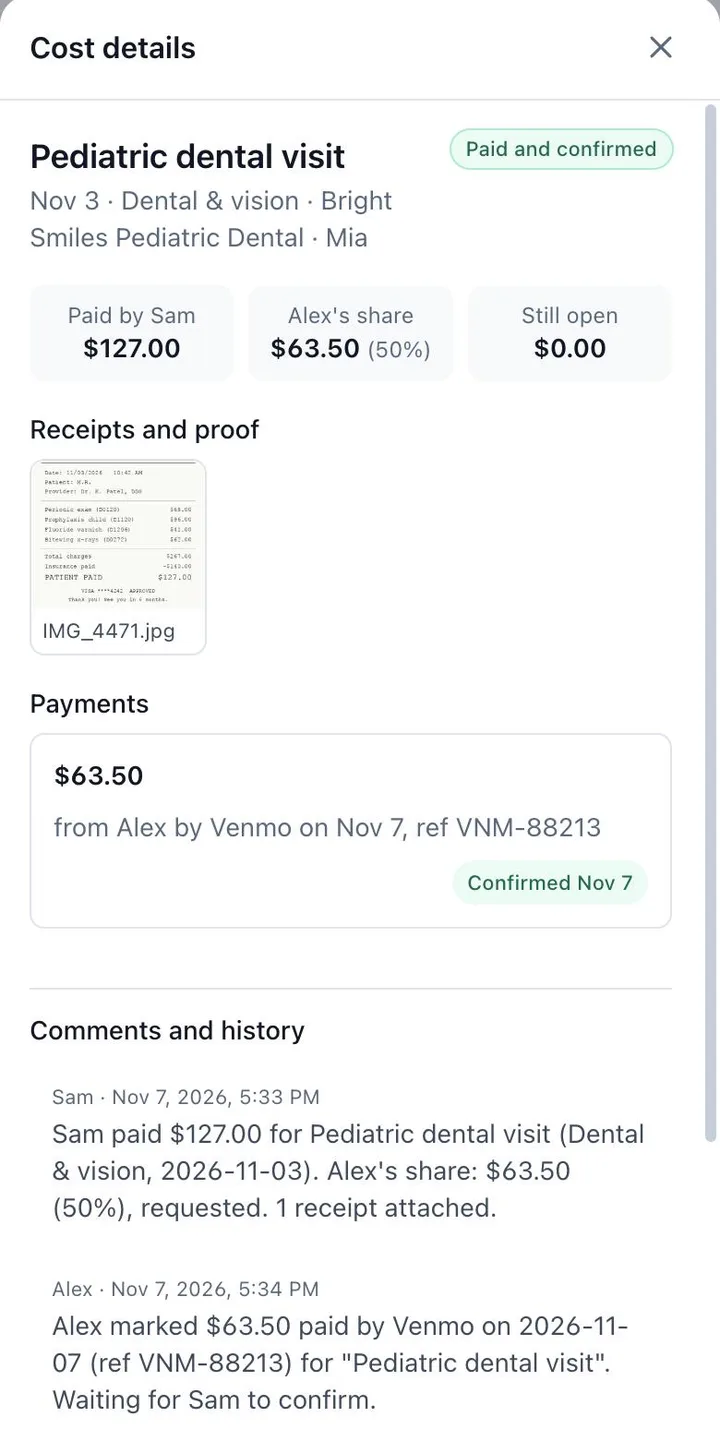
Shared costs go smoother when both parents look at the same entry: the item, the amount, the receipt and the share. In Custody Commander you add a cost with its receipt photo, and the other parent, if you invite them, joins free and sees only the expense log. Nothing in your private case file is visible to them.

Add my first shared cost

Expenses Plus is optional: $3.99 a month or $29 a year, and it covers both parents.

In the app

  • Unlimited expenses and receipt photos on the free plan, for both parents
  • Receipt scanning, with a monthly allowance on the free plan
  • Each cost shows the shares you enter, such as "your share $42.50"
  • Comments on each cost keep the conversation next to the receipt
  • The co-parent sees only the expense log, never your case file

4of 5

A tone check that works in any channel, including AppClose

As of October 14, 2026, AppClose's plan included its own tone tool, Co-Parent Assist. Comms Guard is different: it checks any draft you write, wherever you plan to send it. If a court order names AppClose, keep using it for messages and paste your checked reply in there.

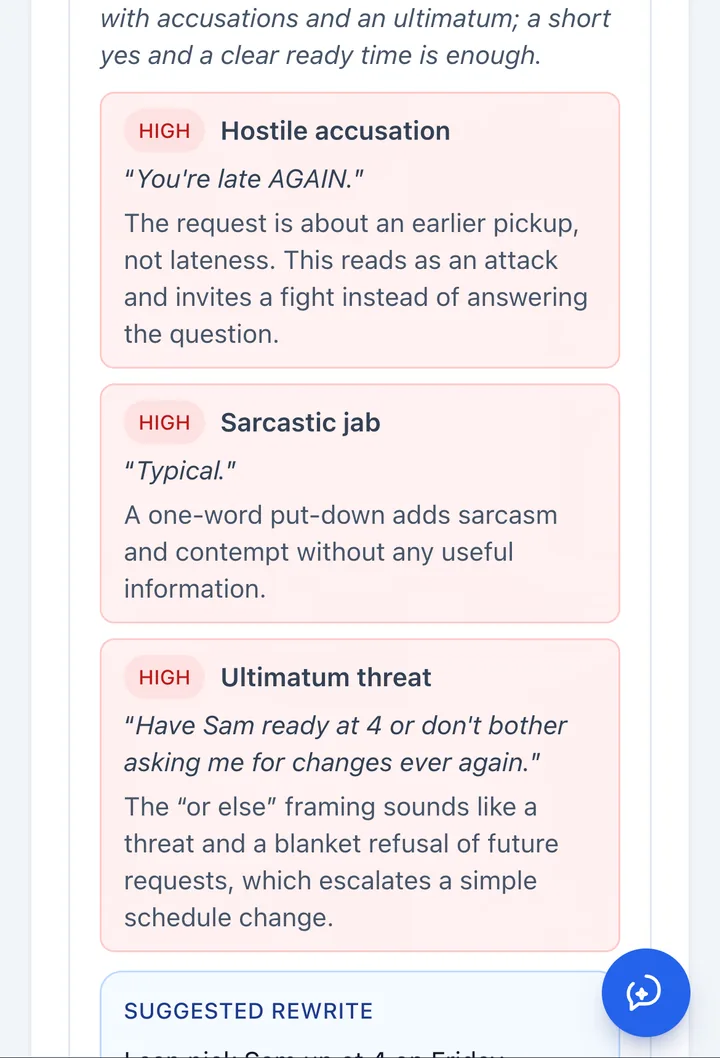
  • Flags tone, escalation, unclear wording and oversharing, with a short reason for each
  • Suggests a calmer BIFF rewrite you can edit
  • You copy the final text and send it yourself; nothing is sent from Custody Commander
  • Log as sent keeps a dated copy in your own private file
Check my next reply

Comms Guard is in the 7-day Full Suite trial and paid plans.

Comms Guard reviewing a draft reply, with plain-language flags and reasons above a suggested calmer rewrite

5of 5

Your Android texts and screenshots, in one private file

Records from an Android phone tend to scatter across the gallery, the messages app and downloads. Custody Commander gathers them in a private case file that the other parent never sees. For a whole text thread, the free SMS Backup & Restore app saves your own messages as an XML file that the app imports and numbers in time order.

Import my Android texts

Free-plan message logs are watermarked DRAFT.

In the app

  • Import Android texts from an SMS Backup & Restore XML file, up to 50 MB per export
  • Every message numbered from MSG-00001 with its date, time, sender and direction
  • Upload screenshots and photos straight from the phone; originals stay unchanged
  • Dated screenshots and photos land on your timeline next to your notes

How it works

3 steps to shared expenses on any phone

  1. Open in your browser

    Sign up free on your Android phone, iPhone or computer; nothing to install.

  2. Add a cost

    Snap the receipt, enter the shares and request reimbursement.

  3. Invite if you like

    The other parent joins the expense log free and sees only that log.

Start free

Start free today — no credit card required.

Free checklist · no sign-up

Keep shared-expense records clean when you change apps

A checklist for moving between AppClose, a spreadsheet, Custody Commander or any other tool.

Tick them off as you go. Nothing you tick is saved or sent.

Start a clean expense log

Organizing tips, not legal advice. Your order and your court's rules come first.

Plans and pricing

Start free. Upgrade only if you need more.

The shared expense log is free for both parents, and Expenses Plus is a separate add-on (see the FAQ). The plans below are for the case tools.

Free

For getting your evidence out of your camera roll and into order.

$0

Free forever — no credit card, nothing to cancel.

  • One case file, unlimited court case numbers
  • 10 evidence items, 1 GB of storage
  • Organize, describe, tag, search
  • Watermarked printable PDF export
  • 6 AI actions to try the tools (one-time, not monthly)

Best fit for your case file

Single Product

Case Builder

Just the one tool you need right now. Switch or upgrade anytime.

$14.99/mo

or $119/yr per product

  • Case Builder on its own: your timeline, documents, hearings, to-dos and the assistant
  • 80 AI actions a month for that tool
  • Unwatermarked exports from that tool
  • Everything still lands in one case file
Get Case Builder

$14.99 a month, renews until you cancel. Cancel online in two clicks.

50% off · 20× the AI

Full Suite Max

Everything in Full Suite, with 20× the AI actions.

$99.99$49.99/mo

or $899/yr $399/yr

  • Everything in Full Suite: all five tools and the assistant
  • 6,000 AI actions a month (20× Full Suite)
  • 50% off (normally $99.99/mo), locked in as long as you don’t cancel
  • Already on Full Suite? Get 20× the AI credits for only +$25/mo more (prorated in place)
  • Clean, printable exports + free attorney & advocate access (on every plan)
Get Full Suite Max

$49.99 a month, renews until you cancel. Cancel online in two clicks.

Hearing Pass · one-time

$49 once for 30 days of hearing prep. Nothing renews.

Everything in Full Suite for 30 days from the day you buy it: all five tools, the assistant, AI included, and exports without a watermark. No subscription and nothing to cancel. When the 30 days end you’re back on the free plan, and nothing you added is deleted.

Get the Hearing Pass — $49
  • No card for the free plan
  • Plans renew until you cancel. Cancel online anytime, in two clicks.
  • Only you pay — the other parent never joins

Compare all plans on the pricing page →

Good to know before you start

  • Private by default

    Your case stays private to your account until you invite someone and choose what they see. Data is encrypted in transit and at rest, and we don’t sell your personal information.

  • Your files stay yours

    Originals are kept unchanged. Download your complete Case Bundle, every original file plus a manifest, free on any plan, before or after you cancel.

  • Cancel anytime, in two clicks

    The free plan has nothing to cancel. Paid plans renew until you cancel online in two clicks, and the Hearing Pass never renews.

  • Organizing software, not a law firm

    It organizes the files, dates and messages you provide. It doesn’t give legal advice, choose what you file or predict what a court will do.

Questions, answered straight

Frequently asked questions

What is AppClose?

AppClose is a shared co-parenting app with messaging, a calendar, expenses, payments and calls. As of October 14, 2026, its pricing page listed a paid subscription with a 60-day free trial and a Solo Mode for one parent. Custody Commander isn't affiliated with AppClose; check its own site for current details.

Is AppClose still free?

Based on its pricing page as of October 14, 2026, AppClose has been a paid subscription since January 1, 2026, with a 60-day free trial that doesn't need a card. It also listed free accounts for parents experiencing financial hardship and a military discount. Prices change, so confirm on AppClose's site.

Does Custody Commander have an Android app?

There's no app-store download. Custody Commander runs in the web browser on Android phones, iPhones and computers. Android text messages can be imported from an XML backup made with the free SMS Backup & Restore app, and screenshots upload straight from the phone.

What if a court order names AppClose?

Keep using AppClose for what the order covers until the order changes. Custody Commander works alongside it: check your drafts in Comms Guard before pasting them into AppClose, and keep your own records in your private case file.

Is the shared expense log really free for both parents?

Yes. Both parents can add unlimited expenses and receipt photos, request reimbursement, mark paid, confirm received, comment and download CSV and PDF reports free. Receipt scanning has a monthly allowance on the free plan. Expenses Plus, at $3.99 a month or $29 a year, is optional and covers both parents.

Does the expense log decide who owes what?

No. It adds up the shares the two of you enter and records what was requested, paid and confirmed. It doesn't decide what anyone owes under an order and doesn't calculate child support.

Is this legal advice?

No. Custody Commander is organizing software, not a law firm, and nothing on this page is legal advice. For questions about what an order requires, ask your court's self-help center or a licensed attorney where you live.

Shared expenses on any phone, free for both of you

Open Custody Commander in your browser, add the first receipt and invite the other parent if you like. Free plan, no card needed.

Start free today — no credit card required