A child custody organizer: one private file from first papers to hearing day
Custody Commander keeps a child custody case together in one place: a setup plan, evidence, message logs, a dated timeline, documents and a hearing binder, all private until you share them.
A child custody case has many moving parts, and it's easier to keep up when they're all in one list. After you sign up, a short setup chat asks about your case and turns your answers into preparation steps, with a What's missing list that shrinks as you add records.
Setup chat questions about your case, turned into a step-by-step plan
A What's missing view of the records and steps not yet in your file
Links to your court's official rules, forms and self-help pages, with the date each was retrieved
One case file per account, with room for every related court case number
2of 5
Evidence and messages, dated and kept as they were
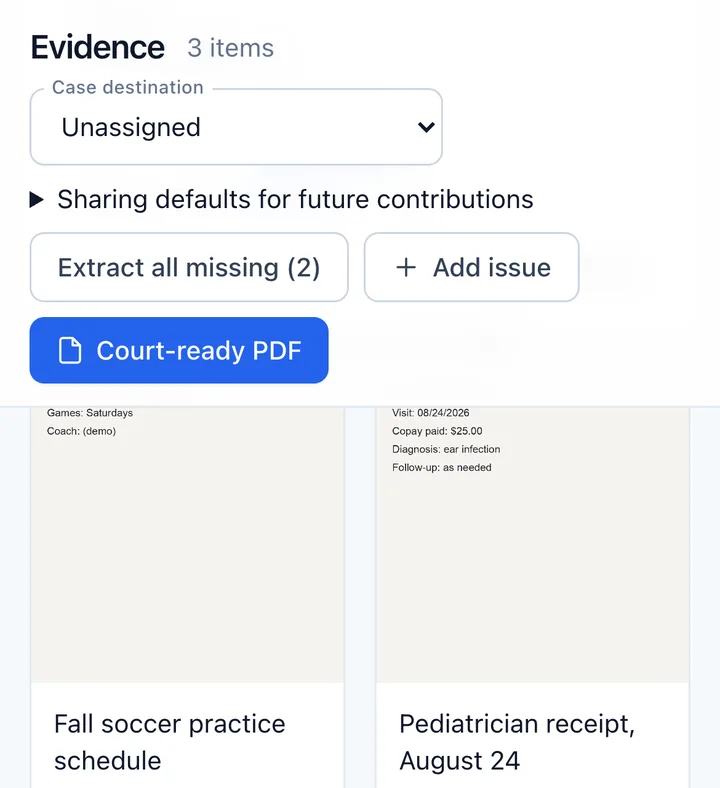
Photos, screenshots, school papers and texts are most useful when each one has a date, a short description and an untouched original. Add files from your phone or computer and import your own message exports, and the app keeps both in order. You don't need to sort anything first; folders, tags and search come later.
Upload screenshots, photos, PDFs, Word files, spreadsheets, saved emails, audio and video
AI reads the text in images and suggests a date and label for you to confirm
A SHA-256 fingerprint recorded for every original when it's added
Imported texts and chats numbered from MSG-00001, with a records declaration template at the end of the log
3of 5
One timeline that ties it all together
A timeline turns a pile of records into a sequence anyone can follow. Every dated event, file and hearing lands on one master timeline, grouped by month, so you can see what happened when and which record shows it.
Events, evidence, key dates and hearings in one place
Filter by case, type, year or month, or search everything
Name issues, write your own summaries and tag the evidence for each
Your court's own forms and local rules come first. For other papers, start from one of 26 templates with [placeholders] for your facts, and keep filings, orders and reports in a searchable library. When a hearing date arrives, a countdown and a tabbed binder keep the final weeks organized.
Templates such as Declaration, Notice of Hearing, Proposed Parenting Plan and Exhibit List
AI drafts grounded in your records leave [placeholders] for anything the app doesn't know
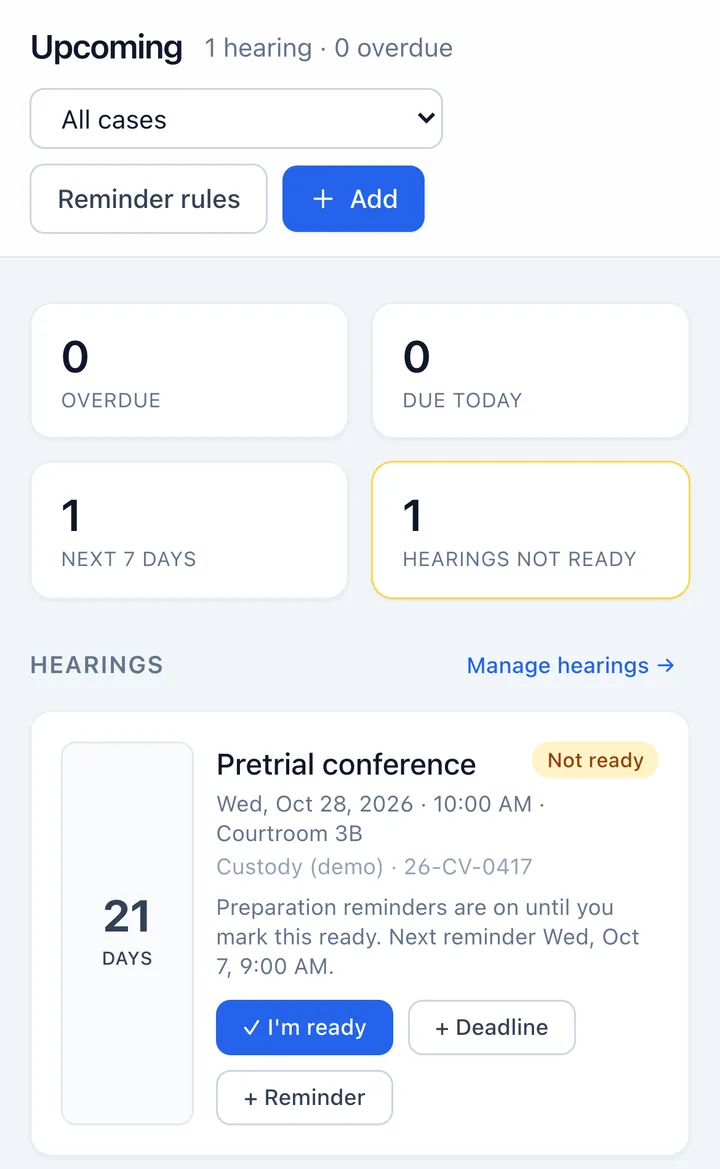
Hearing countdowns with time and courtroom, and preparation reminders until you tap I'm ready
Binders with tabs, a contents page and page numbers, as a court copy and a private copy
The other parent never has to join, install or approve anything, and is never contacted or notified. When an attorney, paralegal, mediator or family member is helping, invite them by email and choose exactly which sections they see.
Organizing tips, not legal advice. Check your court's local rules.
General organizing tips, not legal advice. Your court's own rules come first.
Plans and pricing
Start free. Upgrade only if you need more.
The free plan needs no credit card and never expires. Hearing prep draws on your evidence, documents and timeline, so Full Suite covers all of it; for one hearing, the Hearing Pass is below.
Free
For getting your evidence out of your camera roll and into order.
$0
Free forever — no credit card, nothing to cancel.
One case file, unlimited court case numbers
10 evidence items, 1 GB of storage
Organize, describe, tag, search
Watermarked printable PDF export
6 AI actions to try the tools (one-time, not monthly)
Create your account, then after a short setup you can try Full Suite free for 7 days. Card required; then $24.99/mo or $299/yr (about 82¢ a day) until you cancel. Cancel before day 7 and you pay nothing. Or subscribe now — $299/yr
50% off · 20× the AI
Full Suite Max
Everything in Full Suite, with 20× the AI actions.
$99.99$49.99/mo
or $899/yr$399/yr
Everything in Full Suite: all five tools and the assistant
6,000 AI actions a month (20× Full Suite)
50% off (normally $99.99/mo), locked in as long as you don’t cancel
Already on Full Suite? Get 20× the AI credits for only +$25/mo more (prorated in place)
Clean, printable exports + free attorney & advocate access (on every plan)
$49.99 a month, renews until you cancel. Cancel online in two clicks.
Hearing Pass · one-time
$49 once for 30 days of hearing prep. Nothing renews.
Everything in Full Suite for 30 days from the day you buy it: all five tools, the assistant, AI included, and exports without a watermark. No subscription and nothing to cancel. When the 30 days end you’re back on the free plan, and nothing you added is deleted.
Your case stays private to your account until you invite someone and choose what they see. Data is encrypted in transit and at rest, and we don’t sell your personal information.
Your files stay yours
Originals are kept unchanged. Download your complete Case Bundle, every original file plus a manifest, free on any plan, before or after you cancel.
Cancel anytime, in two clicks
The free plan has nothing to cancel. Paid plans renew until you cancel online in two clicks, and the Hearing Pass never renews.
Organizing software, not a law firm
It organizes the files, dates and messages you provide. It doesn’t give legal advice, choose what you file or predict what a court will do.
Questions, answered straight
Frequently asked questions
What is a child custody organizer?
It's one place to keep everything for a custody case: papers, evidence, messages, a timeline, deadlines and documents. Custody Commander runs in a web browser on a phone or computer and keeps one private case file per account, with room for every related court case number.
Is there a child custody app the other parent doesn't have to join?
Yes. Custody Commander is for one parent's own records. The other parent never has to join, install or approve anything, and is never contacted or notified. The shared expense log is the one optional tool built for both parents, and it's free for both.
Does it work on my phone?
Yes. It runs in a web browser on a phone or a computer, so you can add a screenshot right after you take it and print a binder later from a computer. There is nothing to install.
How does it help before a custody hearing?
Add the hearing date for a countdown and reminders, number your chosen exhibits in date order, and build a tabbed binder with a contents page. Hearing mode shows exhibits one at a time, full screen, with the timeline, for counsel table or a video hearing. It organizes what you choose; it doesn't choose it for you.
Is my case private?
Yes. Your case stays private until you invite someone. Data is encrypted in transit and at rest, two-factor sign-in is available, and we don't sell personal information. Our AI providers may not use your content to train their models.
Is it free?
Yes. The free plan needs no card and never expires: one case, 10 evidence items, 1 GB of storage, 6 AI actions and DRAFT-watermarked exports. Full Suite is $24.99 a month or $299 a year, with 300 AI actions a month and 100 GB of storage.
Is this legal advice?
No. Custody Commander is organizing software made by Firmbinder LLC, not a law firm. It doesn't choose filings, arguments or agreements, and it doesn't predict how a court will decide. For advice, talk to a licensed attorney where you live; many courts also have self-help centers.
Put your child custody case in one place
Answer the setup questions, add what you already have and see what's missing. Free plan, no card needed.