Case management software for your own custody case
Custody Commander is legal case management software built for one parent managing their own family case, not for a law firm. Case numbers, court dates, the timeline, evidence, documents and deadlines live in one private case file.
Two-factor sign-in, encrypted in transit and at rest
Free plan, no card needed
1of 5
One case file, with every related court case inside it
Legal case management software keeps a matter's dates, papers and deadlines in one place. A family matter can involve more than one court case at a time, such as custody and support running side by side. Keep them all in one case file, each with its own case numbers, deadlines and documents, and see what's coming up across all of them.
One case file per account, with unlimited court case numbers inside it
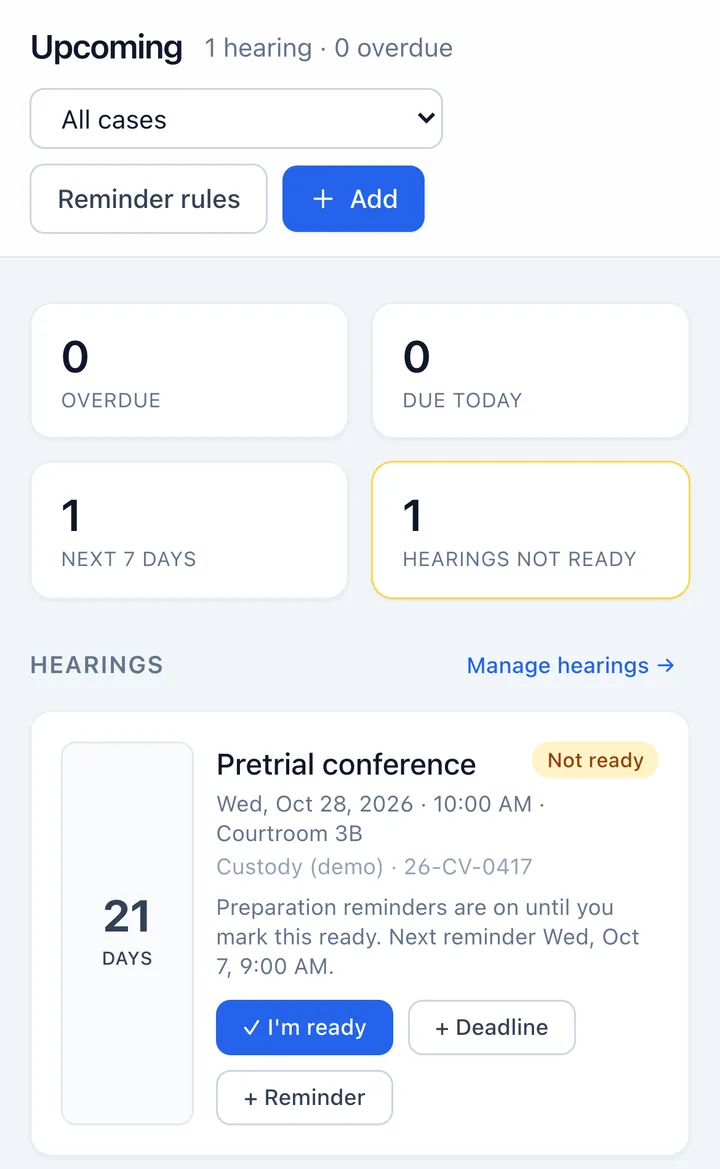
A countdown for each hearing, with its time and courtroom
Deadlines and reminders tied to a specific hearing
Overdue, due today and next 7 days counts on the Upcoming page
Two views do most of the work in managing a case: what happened when, and what each issue rests on. Every dated event, file and hearing lands on one master timeline. You name each issue, write your own summary and tag the evidence behind it. The app keeps it organized and never maps law to your facts.
A master timeline grouped by month, with Past, Next and Upcoming
Search, and filter by case, type, year or month
Issues you name and summarize, each with its tagged evidence
Export the timeline to PDF or Word
3of 5
Documents, exhibits and binders from the same records
When the documents, the evidence and the binder all draw on the same records, nothing has to be copied twice. Store filings, orders, reports and correspondence in a searchable document library. Number exhibits, build a tabbed binder, and keep a court copy and a private copy from the same source.
A document library by category, viewable in the browser and searchable
26 templates, each a starting point with [placeholders] for your facts
Evidence with originals kept unchanged and SHA-256 fingerprints
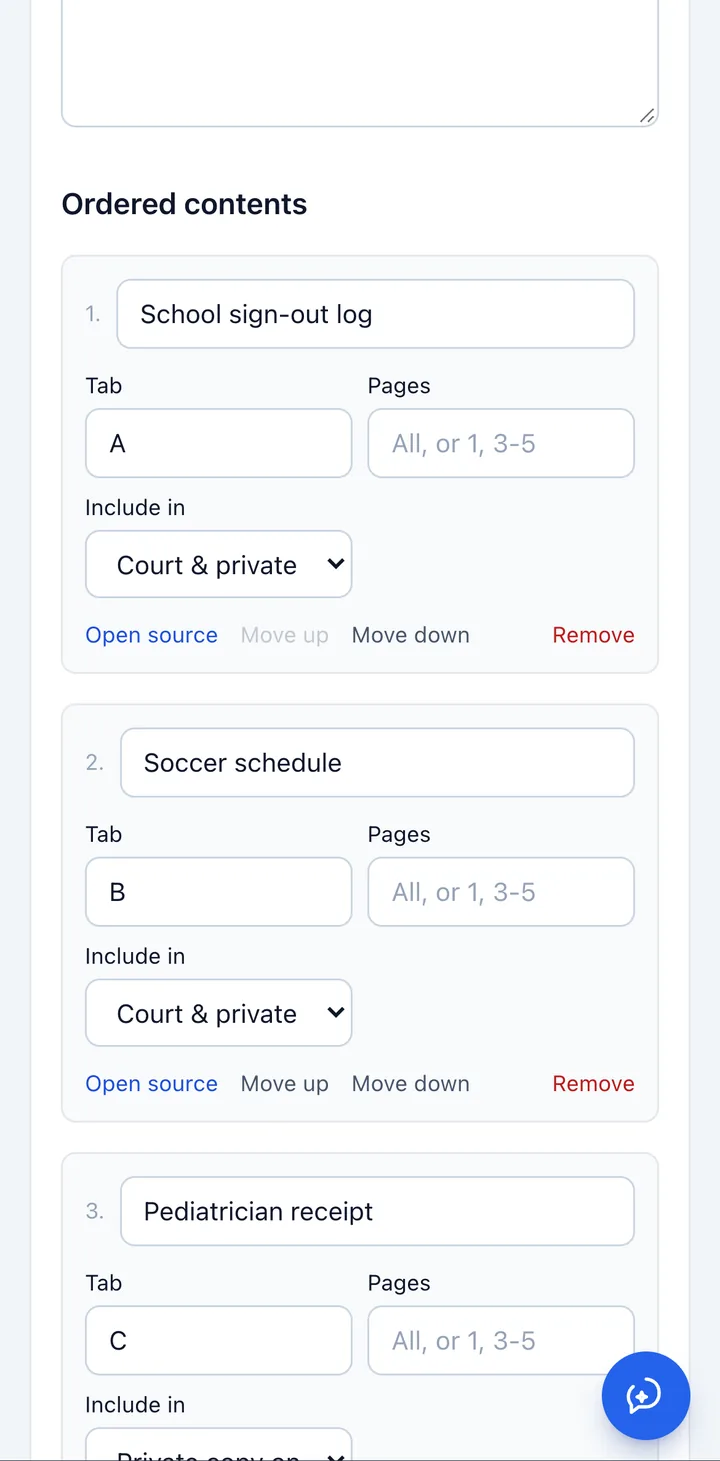
A binder with tabs, a contents page and page numbers, in court and private copies
Hearing mode shows exhibits one at a time, full screen
Free-plan exports are watermarked DRAFT. Paid plans export clean.
4of 5
Section-level access for your attorney or helper
Good case management also means control over who sees what. Invite an attorney, paralegal, advocate, mediator or family member by email and choose the sections and access level for each. When you hand the case to an attorney, the handoff packet puts your summary, issues, timeline and evidence index into one PDF.
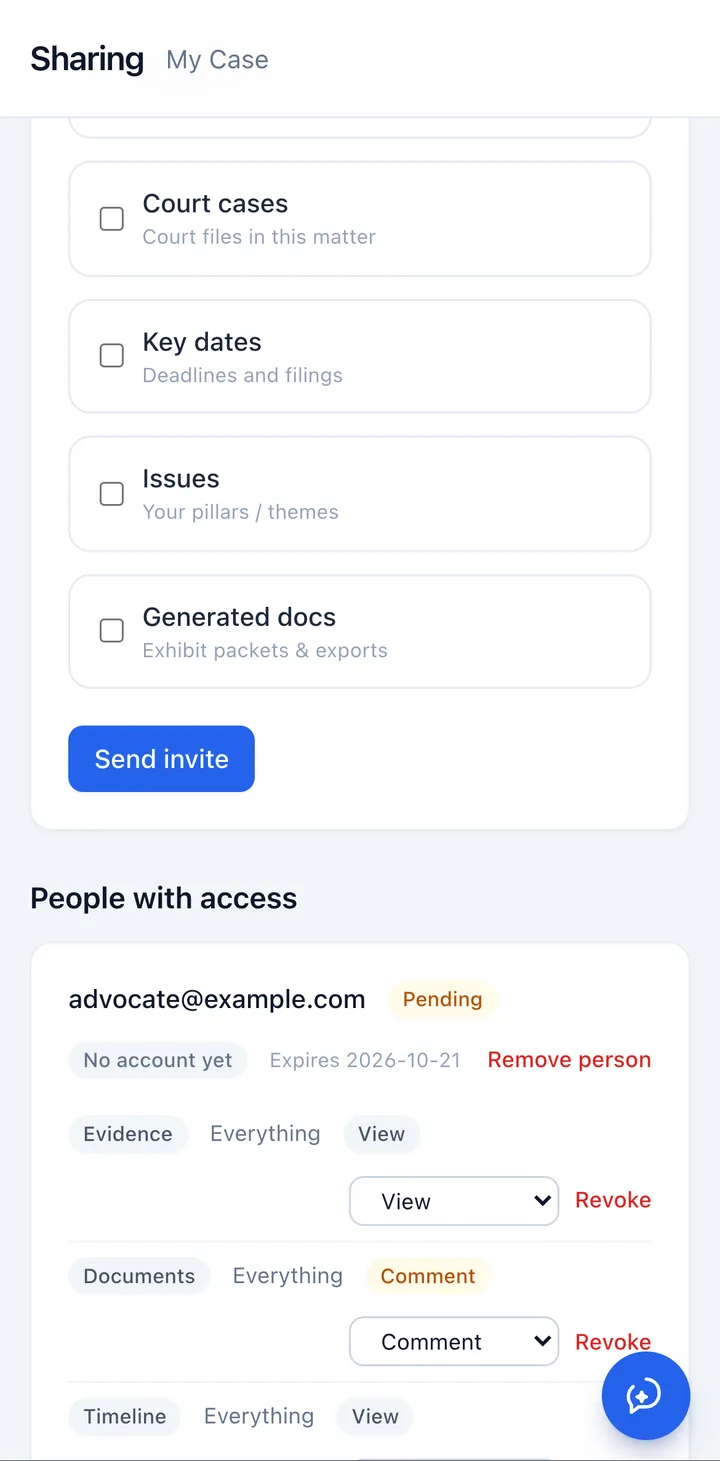
Choose sections: evidence, documents, timeline, hearings, key dates and more
View, comment, download or edit access, revocable any time
A case file holds some of the most personal records a family has, so the basics matter: who can sign in, who can see what, and whether you can leave with everything. Your case stays private until you invite someone. If you ever stop using the app, one export takes every original and record with you.
General organizing tips, not legal advice. Your court's own rules come first.
Plans and pricing
Start free. Upgrade only if you need more.
The free plan needs no credit card and never expires. Case Builder holds your timeline, documents, hearings and the assistant; Full Suite adds every other tool.
Free
For getting your evidence out of your camera roll and into order.
$0
Free forever — no credit card, nothing to cancel.
One case file, unlimited court case numbers
10 evidence items, 1 GB of storage
Organize, describe, tag, search
Watermarked printable PDF export
6 AI actions to try the tools (one-time, not monthly)
Create your account, then after a short setup you can try Full Suite free for 7 days. Card required; then $24.99/mo or $299/yr (about 82¢ a day) until you cancel. Cancel before day 7 and you pay nothing. Or subscribe now — $299/yr
50% off · 20× the AI
Full Suite Max
Everything in Full Suite, with 20× the AI actions.
$99.99$49.99/mo
or $899/yr$399/yr
Everything in Full Suite: all five tools and the assistant
6,000 AI actions a month (20× Full Suite)
50% off (normally $99.99/mo), locked in as long as you don’t cancel
Already on Full Suite? Get 20× the AI credits for only +$25/mo more (prorated in place)
Clean, printable exports + free attorney & advocate access (on every plan)
$49.99 a month, renews until you cancel. Cancel online in two clicks.
Hearing Pass · one-time
$49 once for 30 days of hearing prep. Nothing renews.
Everything in Full Suite for 30 days from the day you buy it: all five tools, the assistant, AI included, and exports without a watermark. No subscription and nothing to cancel. When the 30 days end you’re back on the free plan, and nothing you added is deleted.
Your case stays private to your account until you invite someone and choose what they see. Data is encrypted in transit and at rest, and we don’t sell your personal information.
Your files stay yours
Originals are kept unchanged. Download your complete Case Bundle, every original file plus a manifest, free on any plan, before or after you cancel.
Cancel anytime, in two clicks
The free plan has nothing to cancel. Paid plans renew until you cancel online in two clicks, and the Hearing Pass never renews.
Organizing software, not a law firm
It organizes the files, dates and messages you provide. It doesn’t give legal advice, choose what you file or predict what a court will do.
Questions, answered straight
Frequently asked questions
What is legal case management software?
It's software that keeps a legal matter's dates, documents, deadlines and records in one place. Most of it is built for law offices handling many clients. Custody Commander is case management software for one parent's own family case, and it's organizing software, not a law firm.
Is this case management software for law firms?
No. Custody Commander is built for one parent managing their own family case. Law firms looking for practice software can look at CourtBriefly, at courtbriefly.com. If a parent invites their attorney into a Custody Commander case, the attorney joins free and sees only the sections shared.
Can I manage custody and support cases together?
Yes. Each account has one case file, with unlimited court case numbers inside it. Custody, support and other related cases sit side by side, each with its own numbers, deadlines and documents.
How do deadlines and reminders work?
Add a reminder with a date, an optional time and notes, or attach a deadline to a specific hearing. Push and email notices only say you have a reminder; the details stay in the app. Each hearing also gets preparation reminders until you tap I'm ready.
Does it work on my phone and my computer?
Yes. Custody Commander runs in the web browser on a phone or a computer, so it's the same case file wherever you sign in. Add photos from your phone, drag in a whole folder from a computer, and pick up where you left off on either one.
Is it free?
The free plan needs no card and never expires: one case, 10 evidence items, 1 GB and 6 AI actions, with exports watermarked DRAFT. Full Suite is $24.99 a month or $299 a year with 300 AI actions a month and 100 GB, and a single tool is $14.99 a month.
Is this legal advice?
No. Custody Commander is organizing software made by Firmbinder LLC, not a law firm, and nothing in it is legal advice. It keeps your case in order; it never tells you what to argue or agree to. For advice, talk to a licensed attorney where you live.
Manage your custody case from one place
Start free, add your case numbers and dates, and keep every record in one private case file.