Custody court, step by step, with your dates and records in order
Many custody cases move through the same few stages, though every court runs them its own way. Custody Commander keeps the dates, papers, records and binder for each stage in one private case file.
Filing and service: every paper and deadline in one place
A custody case usually starts when one party files papers with the court and has them formally delivered to the other party, a step called service. The papers often set a deadline to respond, so note it the day they arrive. Your court's self-help center can explain the forms and steps it uses.
A document library for filings, orders, notices and correspondence, categorized and searchable
Links to your court's official rules, forms and self-help pages on the Your court page
Deadlines and reminders with dates and notes, plus overdue, due today and next 7 days counts
Every related court case number in one case file, each with its own deadlines
Or tell the in-app assistant about a new date and it sets the reminder (uses AI actions)
2of 4
Early hearings: the current arrangement, written down
Many courts hold an early or temporary hearing to set arrangements while the case continues, and some hold status conferences to check on progress. These are often brief, so a one-page timeline and a few key records are worth having ready. Write down how the schedule actually runs today, with dates.
A master timeline of events, dated evidence and hearings, grouped by month
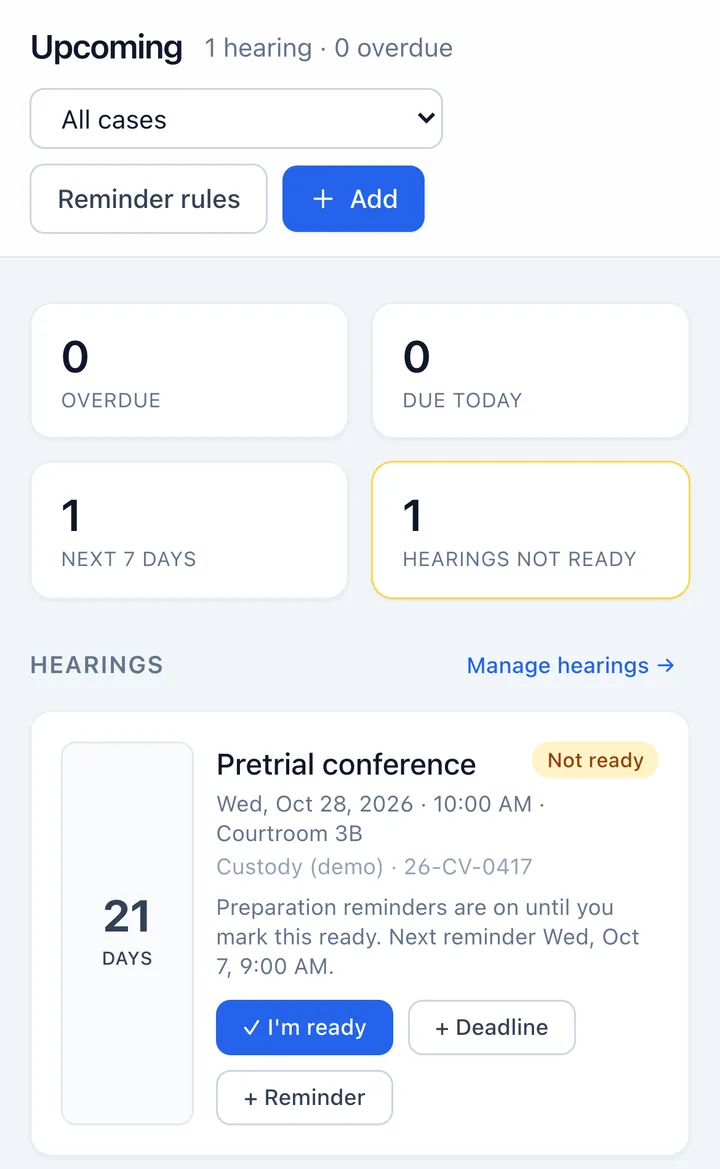
A countdown for each hearing with its time and courtroom
Preparation reminders until you tap I'm ready
Timeline exports to PDF or Word for a printed copy
Many courts send custody disputes to mediation or a parenting class before a contested hearing; the rules vary, so check yours. Mediation is a conversation, and it helps to practice saying your points calmly before the day. Mediation Coach lets you rehearse with an AI playing the mediator and the other parent, with an auto mode that alternates turns.
Mediation Coach is in paid plans and the $49 Hearing Pass, not the free plan or the 7-day trial. Each practice turn uses one AI action.
In the app
Tell it who will be in the room before you start
Live, word-for-word de-escalating lines while you practice
A 1 to 10 dial for how much coaching you get
Practice mode can speak its parts aloud
It coaches how you say things, never what to agree to or settle
4of 4
The final hearing: exhibits, a binder and hearing mode
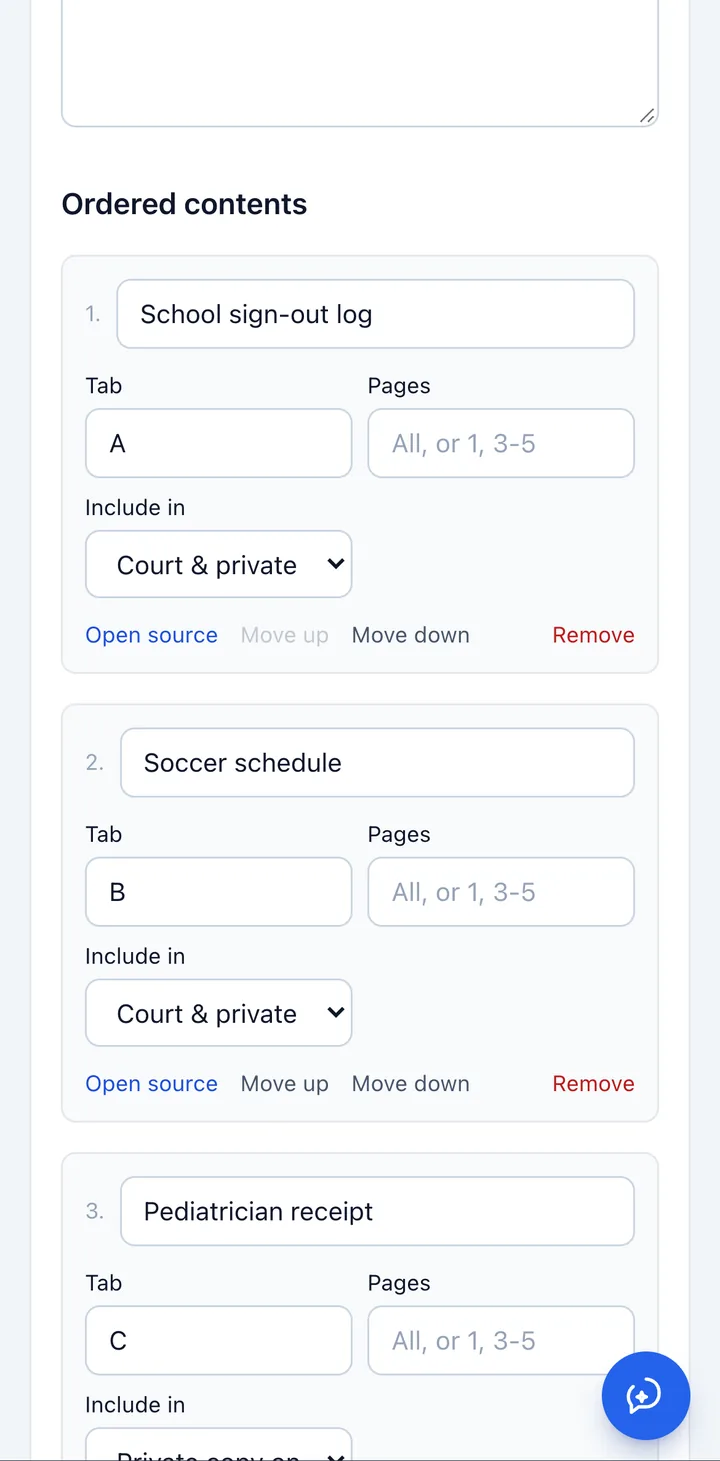
If issues remain after mediation, the court may hold a longer hearing or trial where each side presents evidence and testimony. Check your court's rules on exchanging exhibits beforehand. A tabbed binder with a contents page, matching court and private copies, and exhibits you can show on screen keep the day organized.
Exhibits numbered in the order you set, or with labels you type in yourself
A binder with tab names, page ranges, dividers and page numbers on every page
Items marked private copy only stay out of the court copy
Hearing mode shows exhibits one at a time, full screen, alongside the timeline
General organizing tips, not legal advice. Your court's own rules come first.
Plans and pricing
Start free. Upgrade only if you need more.
The free plan needs no credit card and never expires. Hearing prep draws on your evidence, documents and timeline, so Full Suite covers all of it; for one hearing, the Hearing Pass is below.
Free
For getting your evidence out of your camera roll and into order.
$0
Free forever — no credit card, nothing to cancel.
One case file, unlimited court case numbers
10 evidence items, 1 GB of storage
Organize, describe, tag, search
Watermarked printable PDF export
6 AI actions to try the tools (one-time, not monthly)
Create your account, then after a short setup you can try Full Suite free for 7 days. Card required; then $24.99/mo or $299/yr (about 82¢ a day) until you cancel. Cancel before day 7 and you pay nothing. Or subscribe now — $299/yr
50% off · 20× the AI
Full Suite Max
Everything in Full Suite, with 20× the AI actions.
$99.99$49.99/mo
or $899/yr$399/yr
Everything in Full Suite: all five tools and the assistant
6,000 AI actions a month (20× Full Suite)
50% off (normally $99.99/mo), locked in as long as you don’t cancel
Already on Full Suite? Get 20× the AI credits for only +$25/mo more (prorated in place)
Clean, printable exports + free attorney & advocate access (on every plan)
$49.99 a month, renews until you cancel. Cancel online in two clicks.
Hearing Pass · one-time
$49 once for 30 days of hearing prep. Nothing renews.
Everything in Full Suite for 30 days from the day you buy it: all five tools, the assistant, AI included, and exports without a watermark. No subscription and nothing to cancel. When the 30 days end you’re back on the free plan, and nothing you added is deleted.
Your case stays private to your account until you invite someone and choose what they see. Data is encrypted in transit and at rest, and we don’t sell your personal information.
Your files stay yours
Originals are kept unchanged. Download your complete Case Bundle, every original file plus a manifest, free on any plan, before or after you cancel.
Cancel anytime, in two clicks
The free plan has nothing to cancel. Paid plans renew until you cancel online in two clicks, and the Hearing Pass never renews.
Organizing software, not a law firm
It organizes the files, dates and messages you provide. It doesn’t give legal advice, choose what you file or predict what a court will do.
Questions, answered straight
Frequently asked questions
What happens in custody court?
It varies by court, but many custody cases move from filing and service to a response, an early or temporary hearing, mediation or a parenting class, and, if issues remain, a final hearing or trial. Some cases end by agreement along the way. Your court's self-help center can explain how its process works.
How do I prepare for custody court?
Start with your court's rules and any notice you received. Keep every paper, deadline and hearing date in one place, write a short dated timeline, and organize your records so you can find any page quickly. For questions about strategy or what to present, talk to a licensed attorney where you live.
Do I have to go to mediation before a custody hearing?
Many courts require or offer mediation in custody cases, and some make exceptions. Check your court's local rules or ask the clerk or self-help center. Mediation Coach, in paid plans and the Hearing Pass, lets you practice saying your points calmly, but it never tells you what to agree to.
What should I bring to custody court?
Check your notice and local rules first. Many parents bring copies of the current order and notices, their exhibits in matching sets, a short timeline, and a pen and notepad. The app builds a tabbed binder as a court copy and a private copy, and hearing mode shows exhibits full screen for a video hearing.
Is the other parent notified when I use the app?
No. The other parent never has to join, install or approve anything, and is never contacted or notified. Your case stays private until you invite someone, such as your attorney, and choose which sections they see.
Is it free?
Yes. The free plan needs no card and never expires: one case, up to 10 evidence items and DRAFT-watermarked exports. The Hearing Pass is $49 one time for 30 days of everything and never renews, and Full Suite is $24.99 a month or $299 a year.
Is this legal advice?
No. Custody Commander is organizing software, not a law firm, and nothing here is legal advice. It doesn't choose filings, arguments or agreements, and it doesn't predict how a court will decide. For advice about your case, talk to a licensed attorney where you live.
Keep every stage of your custody case organized
Add your case number and next date, then build the timeline and binder as you go. Free plan, no card needed.