Draft a custody declaration in numbered paragraphs, in your words
Start from the Declaration template: numbered paragraphs, exhibit references and a penalty-of-perjury signature block, with [placeholders] for every fact. AI drafting can build a first version from your own timeline and evidence, and you review every line before you sign.
A declaration is easiest to follow when each paragraph holds one fact, in date order, with the date in the sentence. The Declaration template sets that up for you: an opening paragraph about who you are, numbered paragraphs for each fact, and a closing signature block. Every line you still need to write is a [placeholder].
Caption with your court, case number and parties merged from your case
An opening paragraph stating your role and that you write from personal knowledge
Numbered paragraphs, one fact each, that you add or remove as needed
Exhibit references by number, such as "See Exhibit 1"
A penalty-of-perjury closing line with a [placeholder] for the state name, then your signature block
2of 4
A first draft built from your own timeline and evidence
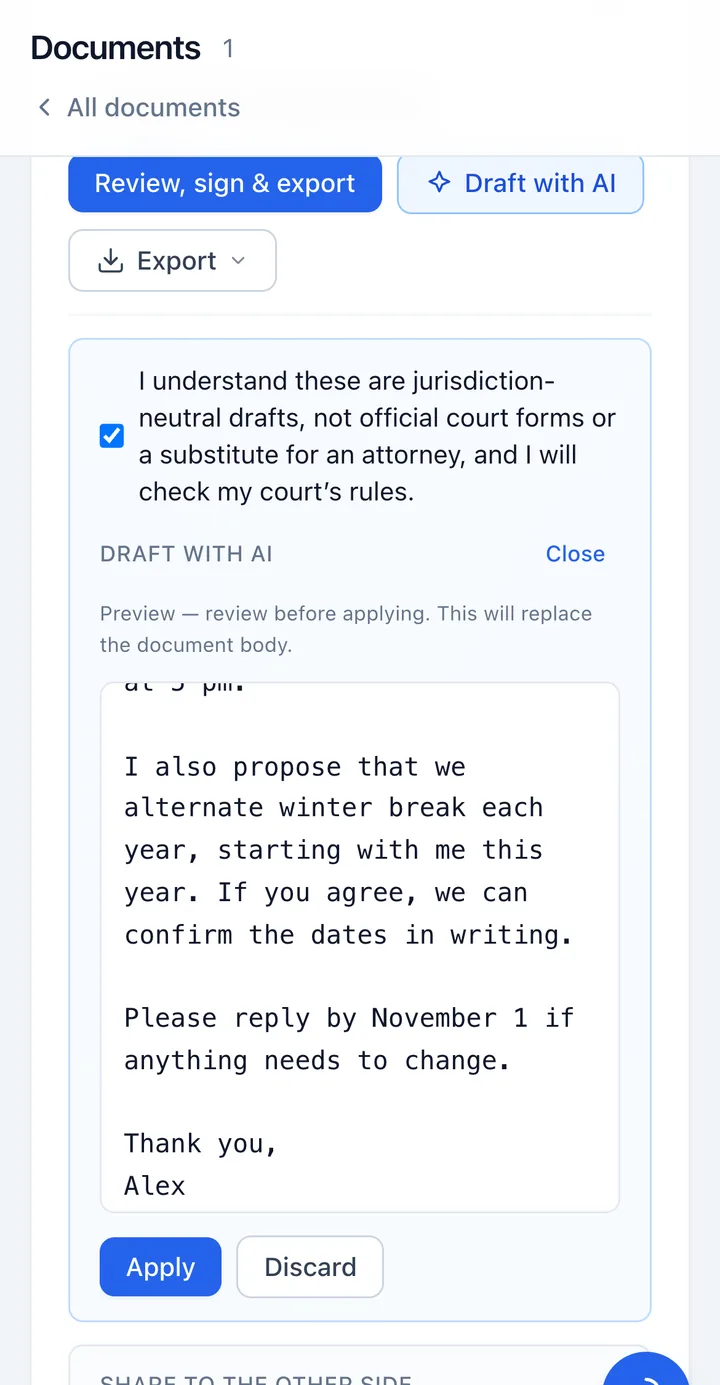
The facts for a declaration are often already spread across your notes, texts and files. Once they're in your case, AI drafting can turn them into numbered paragraphs, drawing only on your records and leaving a [placeholder] wherever a date or detail is missing. It helps with how to phrase what you've recorded; it never decides what to say.
AI drafting uses AI actions. The free plan includes 6 to try it.
In the app
Drafts from your case's own timeline, evidence and notes
Leaves [placeholders] instead of inventing a date, name or detail
Preview the draft, then apply or discard it
A conservative text check flags statements to review; it doesn't judge whether they're true
3of 4
Exhibits numbered to match your paragraphs
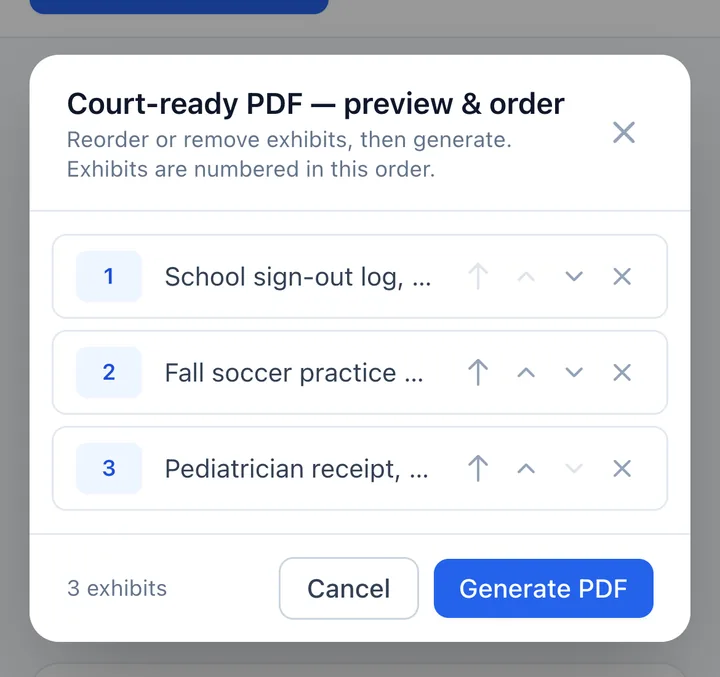
When a paragraph says "See Exhibit 4," the reader should be able to turn straight to it. Number your evidence in the app, then use the same numbers in your declaration. Build one exhibit PDF with a cover and index page, or use the Exhibit List template to list each exhibit's number, description and date.
Exhibit numbers in date order (EX-001, EX-002…) that never renumber once set
Preview, reorder or remove exhibits before you build the PDF
One PDF with a cover, an index page and each file's SHA-256 fingerprint
An Exhibit List template with a row for each exhibit
The free plan holds up to 10 evidence items. Free-plan PDFs are watermarked DRAFT.
4of 4
You review it, you sign it, you export it
A declaration is a statement under penalty of perjury, so every sentence has to be one you can stand behind. Nobody at Custody Commander reads or edits your document. Before you sign or export, the app asks you to confirm, in your own name, that you prepared it and reviewed every statement.
Create your account, then after a short setup you can try Full Suite free for 7 days. Card required; then $24.99/mo or $299/yr (about 82¢ a day) until you cancel. Cancel before day 7 and you pay nothing. Or subscribe now — $299/yr
50% off · 20× the AI
Full Suite Max
Everything in Full Suite, with 20× the AI actions.
$99.99$49.99/mo
or $899/yr$399/yr
Everything in Full Suite: all five tools and the assistant
6,000 AI actions a month (20× Full Suite)
50% off (normally $99.99/mo), locked in as long as you don’t cancel
Already on Full Suite? Get 20× the AI credits for only +$25/mo more (prorated in place)
Clean, printable exports + free attorney & advocate access (on every plan)
$49.99 a month, renews until you cancel. Cancel online in two clicks.
Hearing Pass · one-time
$49 once for 30 days of hearing prep. Nothing renews.
Everything in Full Suite for 30 days from the day you buy it: all five tools, the assistant, AI included, and exports without a watermark. No subscription and nothing to cancel. When the 30 days end you’re back on the free plan, and nothing you added is deleted.
Your case stays private to your account until you invite someone and choose what they see. Data is encrypted in transit and at rest, and we don’t sell your personal information.
Your files stay yours
Originals are kept unchanged. Download your complete Case Bundle, every original file plus a manifest, free on any plan, before or after you cancel.
Cancel anytime, in two clicks
The free plan has nothing to cancel. Paid plans renew until you cancel online in two clicks, and the Hearing Pass never renews.
Organizing software, not a law firm
It organizes the files, dates and messages you provide. It doesn’t give legal advice, choose what you file or predict what a court will do.
Questions, answered straight
Frequently asked questions
What is a custody declaration?
A declaration is a written statement of facts that you sign under penalty of perjury, often submitted with a request or a response in a custody case. Courts differ on when they accept one, what format they require, and whether they want a notarized affidavit instead. Check your court's rules or ask its self-help center.
Is there a free custody declaration template?
Yes. Our Templates page has a free blank custody declaration format in PDF and Word, with [placeholders] only and no signup. In the app, the Declaration template adds your case's caption and lets AI drafting work from your own records. The free plan needs no card, and free-plan exports carry a DRAFT mark.
Will the app tell me what to put in my declaration?
No. You decide which facts to include and how to describe them. The template provides the structure, and AI drafting only rewords what's already in your records, leaving [placeholders] where facts are missing. It doesn't decide what to argue or which facts matter.
How do I refer to exhibits in a declaration?
Give each exhibit one number and cite it in the paragraph it supports, for example "See Exhibit 3." Some courts use letters or a specific label format, so check your local rules. In the app you can number exhibits in date order and print them as one PDF with an index page.
What is a declaration in support of a custody request?
Many courts let a party submit a declaration alongside a motion or response to set out the facts behind it. Its title and format depend on your court, so check the local rules or ask the clerk's office where to find them. The Declaration template has a placeholder paragraph for the request it supports, which you complete or delete.
Does anyone at Custody Commander review my declaration?
No. Nobody at Custody Commander reads, edits or comments on your documents. Before export you confirm that you prepared and reviewed every statement and that the software provider did not review it or give legal advice. If you want someone to look it over, invite your own attorney or helper to view it.
Can I draft documents in every state?
In most states the app drafts jurisdiction-neutral documents from templates, with [placeholders] for your court's details, and they aren't official court forms. In a few states, drafting stays off until that state's review is finished; the app says so when you start a draft. Organizing evidence, the timeline and exports work in every state.
Is this legal advice?
No. Custody Commander is organizing software, not a law firm, and nothing on this page is legal advice. For advice about your declaration or your case, talk to a licensed attorney where you live. Court self-help centers and legal aid offices can also point you to free or low-cost help.
Start your custody declaration from a template
Write one fact per paragraph, cite your exhibits and review every line before you sign. Free plan, no card needed.