Have your records ready for a custody evaluation or home study
Custody Commander keeps the records an evaluator may ask for in one place: a printable timeline, school and medical papers, an evidence index and your documents, ready to print or download one section at a time.
During a custody evaluation, parents are often asked for documents: school reports, medical records, activity schedules and any orders already in place. Ask the evaluator what they want and in what format. Then keep each record labeled, dated and filed, so you can find it and send it without a scramble.
A document library for orders, reports and correspondence, by category and searchable
Folders and subfolders, such as School and Medical, for your evidence
Tags like School and Medical, plus your own custom tags
Filter by type, issue or priority, and sort by date, name or type
Originals kept unchanged, each with a SHA-256 fingerprint
2of 5
A printable timeline of routines, changes and key dates
A plain, dated timeline helps a reader follow years of family events in order. Keep each line short and factual: school changes, moves, medical visits, schedule changes and exchanges, each with the date it happened. Export it to print or to attach when a record is requested.
Events, dated files, key dates and hearings on one timeline
Grouped by month, with search and filters by type, year and month
Tell the assistant what happened and it adds the dated entry (uses AI actions)
A tabbed binder and an evidence index you can hand over
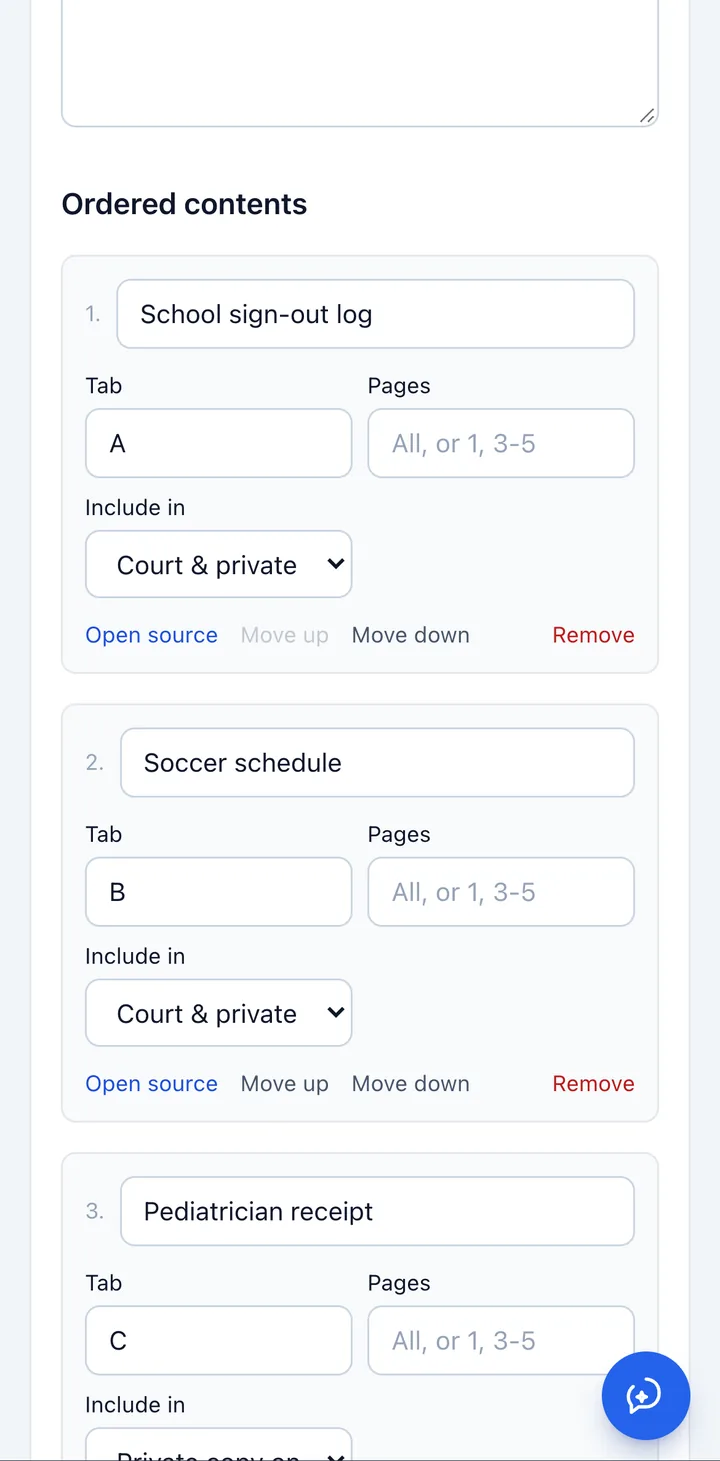
If the evaluator accepts documents from parents, a binder with a tab for each type of record and a contents page up front makes your copies easy to review. An evidence index lists each item's number, date and description on a page or two, so a reader sees everything at a glance.
Free-plan PDFs are watermarked DRAFT. Paid plans export clean.
In the app
A tab name for each item, a contents page with page ranges and page numbers on every page
Pull just the pages you need from a long PDF, such as 1, 3-5
Download the full binder or a single tab as one PDF
Mark an item private copy only to keep it out of the copy you hand over
A printable evidence index with each item's number, date, description and your note
4of 5
Appointments and document requests on one list
An evaluation can stretch over several weeks, with interviews, a home visit and requests for records along the way. Write each appointment and each request down the day it's made, with the date it's due. A single list makes it easy to see what's been sent and what's still open.
Overdue, due today and next 7 days counts at the top of the Upcoming page
Push and email notices only say you have a reminder; the details stay in the app
A timeline entry for each appointment, so the dates sit with everything else
5of 5
Share chosen sections with the people helping you
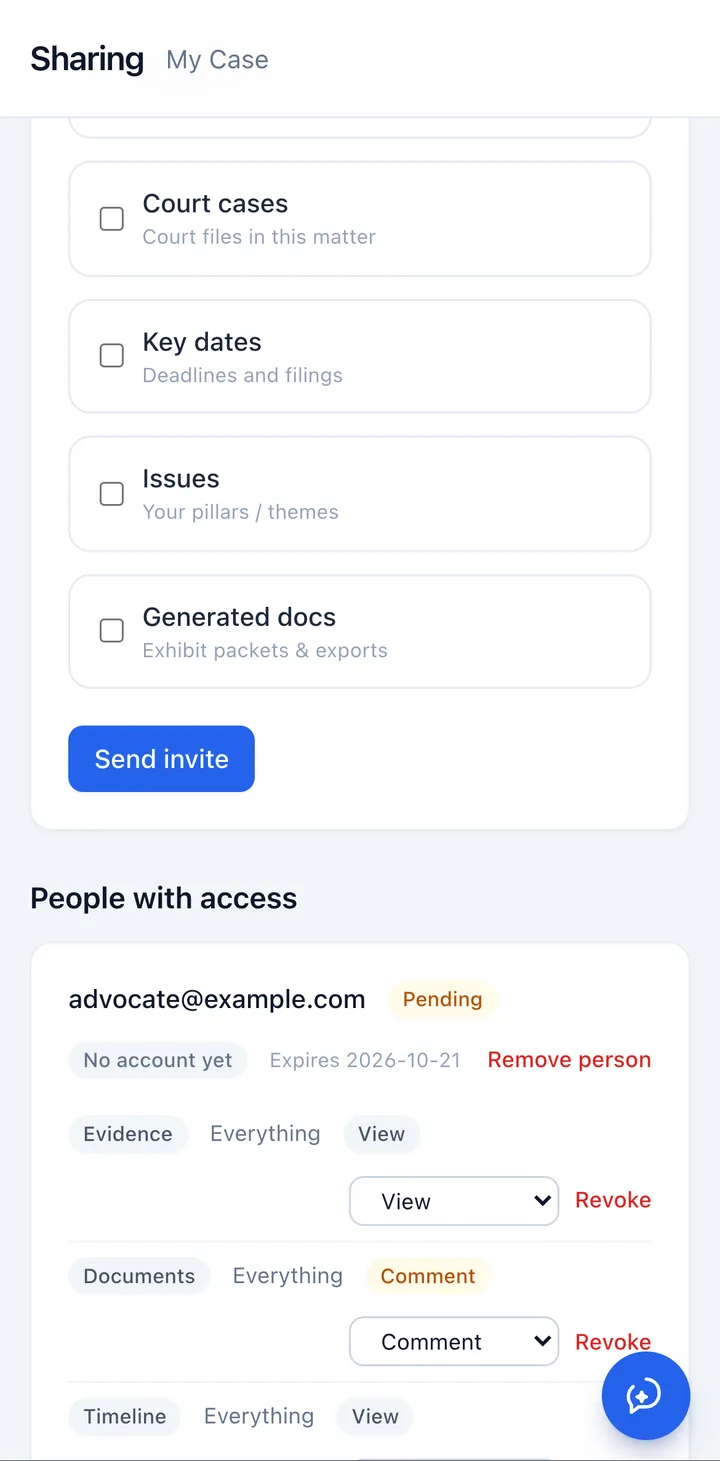
You decide who sees what. If your attorney or someone helping you should look over the records first, invite them by email and choose the sections and access level for each. When the evaluator requests documents, download just those as a PDF of a single tab or the whole binder.
Invite an attorney, paralegal, advocate, mediator or family member by email
Choose sections: evidence, documents, timeline, hearings, key dates and more
View, comment, download or edit access, revocable any time
The other parent never sees your case unless you invite them
General organizing tips, not legal advice. Your court's own rules come first.
Plans and pricing
Start free. Upgrade only if you need more.
The free plan needs no credit card and never expires. Hearing prep draws on your evidence, documents and timeline, so Full Suite covers all of it; for one hearing, the Hearing Pass is below.
Free
For getting your evidence out of your camera roll and into order.
$0
Free forever — no credit card, nothing to cancel.
One case file, unlimited court case numbers
10 evidence items, 1 GB of storage
Organize, describe, tag, search
Watermarked printable PDF export
6 AI actions to try the tools (one-time, not monthly)
Create your account, then after a short setup you can try Full Suite free for 7 days. Card required; then $24.99/mo or $299/yr (about 82¢ a day) until you cancel. Cancel before day 7 and you pay nothing. Or subscribe now — $299/yr
50% off · 20× the AI
Full Suite Max
Everything in Full Suite, with 20× the AI actions.
$99.99$49.99/mo
or $899/yr$399/yr
Everything in Full Suite: all five tools and the assistant
6,000 AI actions a month (20× Full Suite)
50% off (normally $99.99/mo), locked in as long as you don’t cancel
Already on Full Suite? Get 20× the AI credits for only +$25/mo more (prorated in place)
Clean, printable exports + free attorney & advocate access (on every plan)
$49.99 a month, renews until you cancel. Cancel online in two clicks.
Hearing Pass · one-time
$49 once for 30 days of hearing prep. Nothing renews.
Everything in Full Suite for 30 days from the day you buy it: all five tools, the assistant, AI included, and exports without a watermark. No subscription and nothing to cancel. When the 30 days end you’re back on the free plan, and nothing you added is deleted.
Your case stays private to your account until you invite someone and choose what they see. Data is encrypted in transit and at rest, and we don’t sell your personal information.
Your files stay yours
Originals are kept unchanged. Download your complete Case Bundle, every original file plus a manifest, free on any plan, before or after you cancel.
Cancel anytime, in two clicks
The free plan has nothing to cancel. Paid plans renew until you cancel online in two clicks, and the Hearing Pass never renews.
Organizing software, not a law firm
It organizes the files, dates and messages you provide. It doesn’t give legal advice, choose what you file or predict what a court will do.
Questions, answered straight
Frequently asked questions
What is a custody evaluation?
It's a process in which a professional, appointed by the court or agreed by the parents, gathers information about a family and reports to the court. Who does it, what it includes and how it's used depend on your court, so ask the evaluator or a licensed attorney where you live. Custody Commander helps you keep the records you're asked for in order.
How do I prepare for a custody evaluation?
On the organizing side: ask the evaluator which records they want, gather school, medical and activity records, make a short dated timeline, and keep copies of everything you hand over. What you say is up to you. Custody Commander doesn't coach answers; for advice about the process, talk to a licensed attorney where you live.
What should I bring to a custody evaluation?
It depends on the evaluator, so ask them first. Requests often include school and medical records, activity schedules, and copies of any current orders or agreements. Bring copies, keep the originals, and note what you gave and when.
What questions does a custody evaluator ask?
It varies by evaluator and court. Many ask about the children's routines, school and health, and about each parent's schedule, and they may ask for records. Custody Commander doesn't prepare answers or tell you what to say; it keeps your records and dates in order so you can find what you're asked for.
What is a home study in a custody case?
A home study usually includes a visit to each parent's home, sometimes as part of a wider evaluation. Ask the person doing it what they'll want to see and which papers to have ready. The checklist on this page covers common records.
Is it free?
Yes. The free plan needs no card and never expires: one case, up to 10 evidence items, 1 GB of storage and exports watermarked DRAFT. Paid plans remove the item limit and the watermark, and the one-time Hearing Pass gives 30 days of everything for $49.
Is this legal advice?
No. Custody Commander is organizing software made by Firmbinder LLC, not a law firm, and nothing in it is legal advice. It helps you keep your own records in order and print or share them. For questions about an evaluation, talk to a licensed attorney where you live.
Get your evaluation records in order
Start free, add the school and medical records you already have, and print an evidence index. Organizing software, not legal advice.