Prepare for custody mediation: practice, a proposal and your records
Mediation Coach lets you rehearse custody mediation with an AI playing the mediator and the other parent, and offers calm lines when you get stuck. Draft a proposed schedule from a template and bring your records in date order.
Proposed Parenting Plan template with [placeholders]
Organizing software, not a law firm
1of 4
Rehearse the session before the real one
In custody mediation, a neutral mediator helps two parents talk through a parenting plan. Depending on the program, sessions may happen in one room, in separate rooms or by video. Saying your points out loud ahead of time makes them easier to say clearly on the day, even when the conversation turns sharp.
Mediation Coach is on paid plans and the Hearing Pass, not the free plan or the 7-day trial.
In the app
The AI takes the mediator's seat and the other parent's, so you can run the whole conversation alone
Auto mode alternates turns and waits for your answer
Tell it who will be in the room, and the role-play follows that setting
Practice mode can speak its parts aloud, so you hear the hard questions before the day
Each practice turn uses one AI action
2of 4
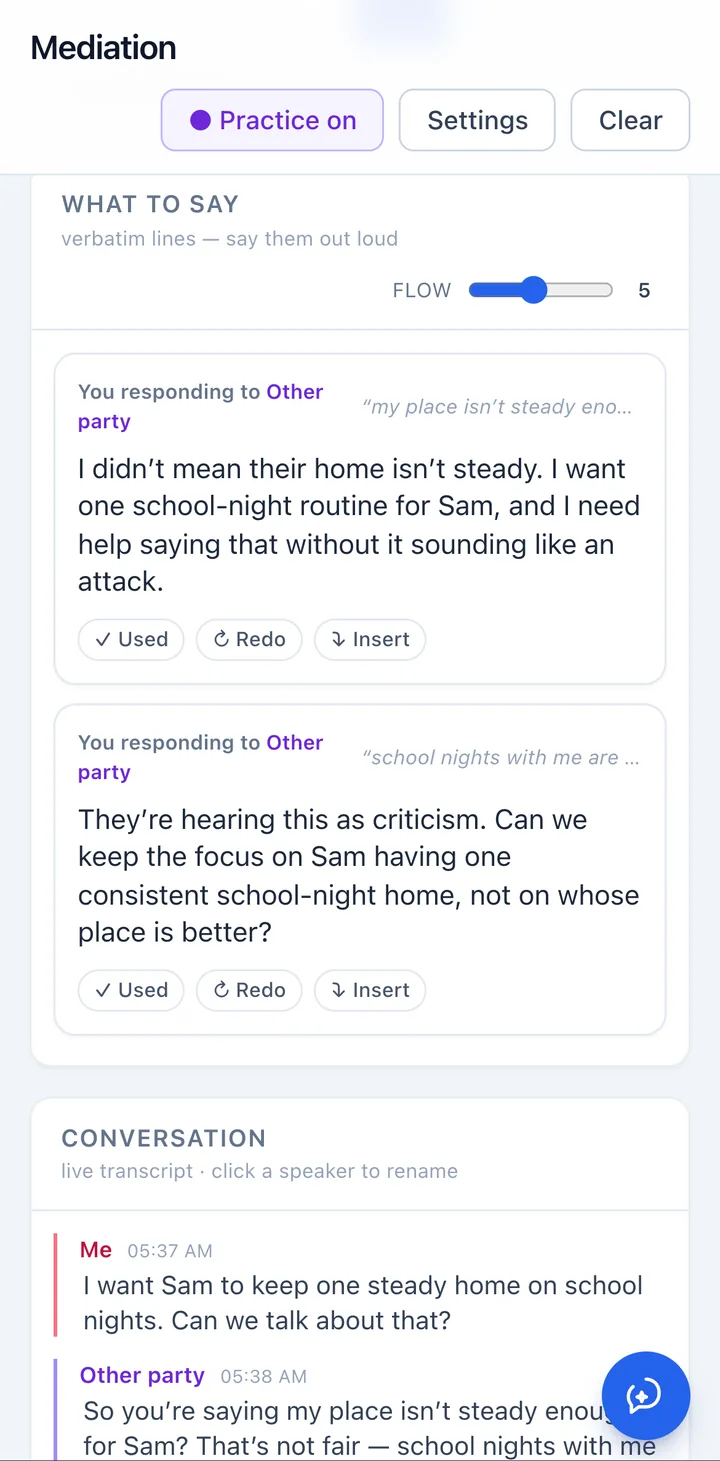
A calm next sentence when a question lands hard
Most people know what they want to say until the moment someone challenges it. The live What to say panel offers short, word-for-word lines that keep the conversation on the children's routine. Use one as written, or let it steer you toward your own steadier words.
Mediation Coach on its own is $14.99/mo or $119/yr; Full Suite is $24.99/mo or $299/yr.
In the app
Calm, de-escalating lines you can say exactly as written
A 1–10 dial sets how much the coach offers
It coaches tone and clarity; it never suggests what to agree to or settle
Transcripts only for conversations you're legally allowed to capture; never secretly record a mediation
3of 4
A proposed schedule you can put on the table
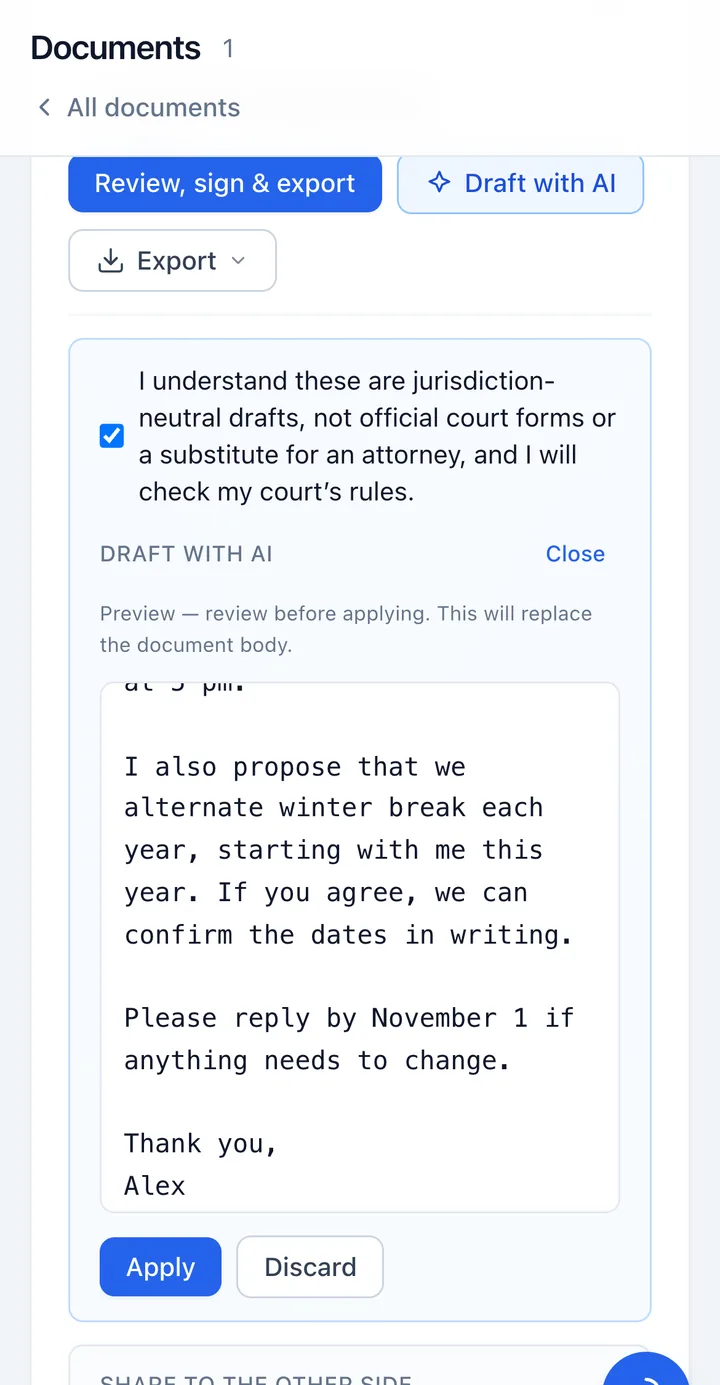
A written proposal gives everyone the same thing to look at. The Proposed Parenting Plan template lays out the usual headings with [placeholders] for your details, and your case information fills in automatically. You decide what goes in it; Custody Commander never suggests terms.
Headings for the school-year schedule, summer and holidays, decision-making, exchanges and communication
Your caption, court case number and contacts merged in
AI drafting from your case records leaves [placeholders] for facts it doesn't have (uses AI actions)
Export to PDF or Word; your court's own forms and local rules come first
Templates are starting points, not official court forms. You complete and review every line.
4of 4
Your records in date order, ready to point to
Questions about how the schedule works now are easier to answer with a date than from memory. Put school calendars, schedule changes and past exchanges on one timeline, then print a copy or keep it on your phone. If the mediator asks for records, you can share just the parts they want.
Events, dated files and key dates in one master timeline
Name each issue, write your own summary and tag the records that support it
Export the timeline to PDF or Word (free-plan exports carry a DRAFT mark)
Invite a mediator or attorney by email to view chosen sections, and revoke access any time
Create your account, then after a short setup you can try Full Suite free for 7 days. Card required; then $24.99/mo or $299/yr (about 82¢ a day) until you cancel. Cancel before day 7 and you pay nothing. Or subscribe now — $299/yr
50% off · 20× the AI
Full Suite Max
Everything in Full Suite, with 20× the AI actions.
$99.99$49.99/mo
or $899/yr$399/yr
Everything in Full Suite: all five tools and the assistant
6,000 AI actions a month (20× Full Suite)
50% off (normally $99.99/mo), locked in as long as you don’t cancel
Already on Full Suite? Get 20× the AI credits for only +$25/mo more (prorated in place)
Clean, printable exports + free attorney & advocate access (on every plan)
$49.99 a month, renews until you cancel. Cancel online in two clicks.
Hearing Pass · one-time
$49 once for 30 days of hearing prep. Nothing renews.
Everything in Full Suite for 30 days from the day you buy it: all five tools, the assistant, AI included, and exports without a watermark. No subscription and nothing to cancel. When the 30 days end you’re back on the free plan, and nothing you added is deleted.
Your case stays private to your account until you invite someone and choose what they see. Data is encrypted in transit and at rest, and we don’t sell your personal information.
Your files stay yours
Originals are kept unchanged. Download your complete Case Bundle, every original file plus a manifest, free on any plan, before or after you cancel.
Cancel anytime, in two clicks
The free plan has nothing to cancel. Paid plans renew until you cancel online in two clicks, and the Hearing Pass never renews.
Organizing software, not a law firm
It organizes the files, dates and messages you provide. It doesn’t give legal advice, choose what you file or predict what a court will do.
Questions, answered straight
Frequently asked questions
What happens in custody mediation?
A neutral mediator meets with both parents to help them talk through a parenting plan: the schedule, holidays, exchanges, decisions and how they'll communicate. Sessions may be together, in separate rooms or by video, and the format varies by court and program. If the parents reach agreement, it is often written down; what happens next depends on your court's rules.
Does the custody mediator decide who gets custody?
In many programs the mediator doesn't decide anything: the parents work out what they can, and the court decides whether to approve an agreement. In some courts, a mediator may make a recommendation when parents don't agree. Ask your program how its mediators work so you know what to expect.
What should I bring to custody mediation?
Start with whatever your notice or mediator asks for. It can also help to bring a calendar with school breaks and work shifts, a one-page list of topics, a sketch of the schedule you'd propose and a notebook. Bring copies of records only if the mediator wants them, and ask ahead of time if you're unsure.
Can I use Mediation Coach during the actual session?
It's built for practice before the session. Mediations are often confidential, so never record or transcribe one in secret; the transcript feature is only for conversations you're legally allowed to capture. If you'd like notes or support in the room, ask the mediator what's allowed.
Is custody mediation prep free in Custody Commander?
The free plan, with no card, covers one case, the timeline and up to 10 evidence items, with DRAFT-marked exports. Mediation Coach is on paid plans: on its own for $14.99/mo or $119/yr, or in Full Suite for $24.99/mo or $299/yr. A one-time Hearing Pass ($49) gives 30 days of everything and never renews.
Will it tell me what to agree to?
No. Mediation Coach works on how you say things: tone, clarity and staying on topic. It never suggests what to agree to, give up or settle, and it doesn't predict how anyone will respond. For advice about the terms themselves, talk to a licensed attorney where you live.
Is this legal advice?
No. Custody Commander is organizing and practice software made by Firmbinder LLC, not a law firm, and nothing here is legal advice. Mediation rules differ from court to court, so read your notice and your local rules. For advice about your situation, talk to a licensed attorney where you live; many courts also have self-help centers.
Walk into custody mediation prepared
Practice the conversation, draft your proposed schedule and put your dates in order. Start free; Mediation Coach is on paid plans.