Trial exhibit stickers and labels, kept the same on every copy
Give every exhibit one label and keep it identical on the sticker, the cover sheet, the index and each copy. Custody Commander numbers exhibits in date order, keeps a label you type in a binder exactly as written, and prints a numbered exhibit PDF.
Labels cause trouble when they drift: a photo called Exhibit 4 in your notes, C on the trial exhibit sticker and "the soccer photo" in your declaration. Pick one label per item and use it every time you mention it. In the app, each new evidence item gets the next free exhibit number in date order, and a number already given never changes. The number follows the item into the exhibit PDF and the evidence index.
The next free number for each new item: EX-001, EX-002, EX-003, in date order
Items already numbered are never renumbered when you add more
A short, factual description drafted for each item, which you can edit
Tags such as School, Medical and Expense to group related exhibits; you tap to apply them
2of 4
Use your court's label format exactly as written
Courts label exhibits in different ways. Some use numbers for one side and letters for the other, some add the party's name, and some leave the marking to the clerk. Once you know your court's format, build a hearing binder and type that label in as the exhibit number; it is used as-is. With no set format, the binder numbers exhibits 1, 2, 3 in the order you choose.
Check your local rules for the label format before you print.
In the app
Type an existing label, such as Petitioner 4 or Exhibit B, and it is kept as-is
Or let the binder number exhibits 1, 2, 3 in the order you set
A tab name for each item, with a divider page for each tab in the PDF
Links to your court's official rules, forms and self-help pages on the Your court page
3of 4
Cover sheets and an index that match your labels
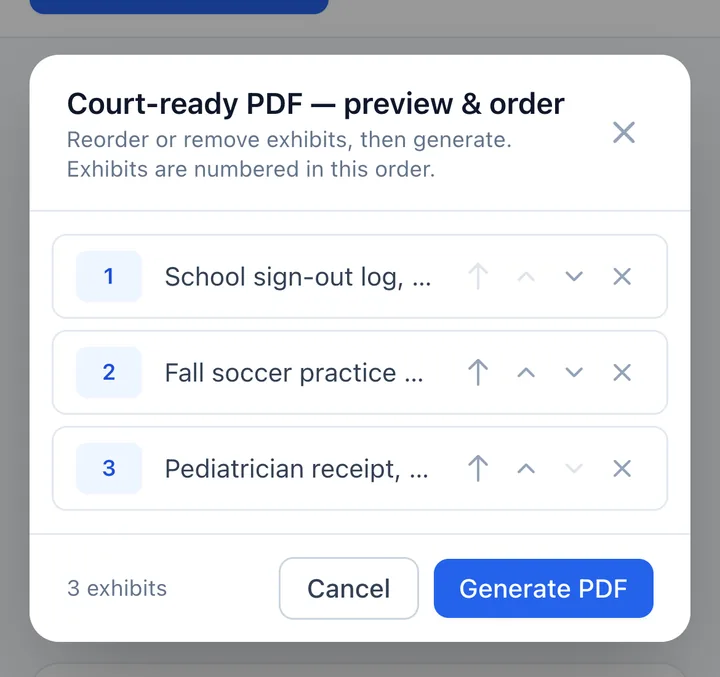
An exhibit cover sheet is a plain page in front of an exhibit that shows its label, so it's easy to find in a stack. Our free exhibit cover sheets and label guide work for a printed binder with no sign-up. In the app, the exhibit PDF opens with a cover and index page, and the printable evidence index lists every exhibit by number.
Free printable exhibit cover sheets and a label guide on our Templates page
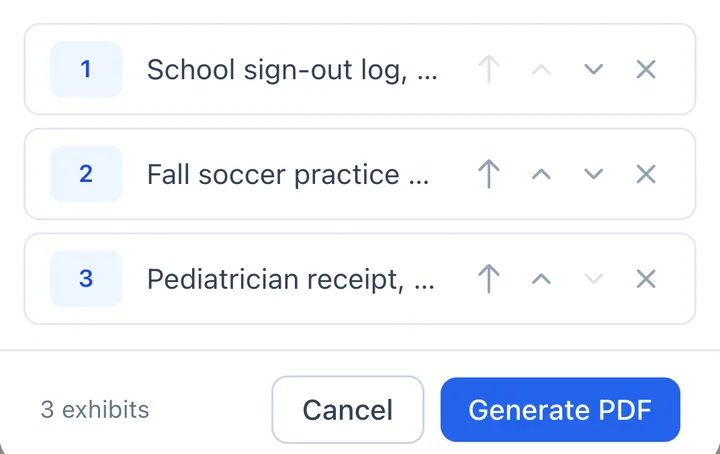
An exhibit PDF with a cover page, an index page and numbered exhibits
A printable evidence index: number, date, description, fingerprint and your note
Free-plan PDFs are watermarked DRAFT. Paid plans export clean.
4of 4
Stickers on paper, the same numbers on screen
If your court wants physical exhibit stickers, put them on the printed copies using the same labels as your index, so paper and screen always agree. For a video hearing or a quick look at the counsel table, hearing mode shows each exhibit full screen, one at a time, in exhibit order.
Create your account, then after a short setup you can try Full Suite free for 7 days. Card required; then $24.99/mo or $299/yr (about 82¢ a day) until you cancel. Cancel before day 7 and you pay nothing. Or subscribe now — $299/yr
50% off · 20× the AI
Full Suite Max
Everything in Full Suite, with 20× the AI actions.
$99.99$49.99/mo
or $899/yr$399/yr
Everything in Full Suite: all five tools and the assistant
6,000 AI actions a month (20× Full Suite)
50% off (normally $99.99/mo), locked in as long as you don’t cancel
Already on Full Suite? Get 20× the AI credits for only +$25/mo more (prorated in place)
Clean, printable exports + free attorney & advocate access (on every plan)
$49.99 a month, renews until you cancel. Cancel online in two clicks.
Hearing Pass · one-time
$49 once for 30 days of hearing prep. Nothing renews.
Everything in Full Suite for 30 days from the day you buy it: all five tools, the assistant, AI included, and exports without a watermark. No subscription and nothing to cancel. When the 30 days end you’re back on the free plan, and nothing you added is deleted.
Your case stays private to your account until you invite someone and choose what they see. Data is encrypted in transit and at rest, and we don’t sell your personal information.
Your files stay yours
Originals are kept unchanged. Download your complete Case Bundle, every original file plus a manifest, free on any plan, before or after you cancel.
Cancel anytime, in two clicks
The free plan has nothing to cancel. Paid plans renew until you cancel online in two clicks, and the Hearing Pass never renews.
Organizing software, not a law firm
It organizes the files, dates and messages you provide. It doesn’t give legal advice, choose what you file or predict what a court will do.
Questions, answered straight
Frequently asked questions
Where do I get trial exhibit stickers?
Custody Commander doesn't print sticker sheets. Office supply stores and online shops sell exhibit stickers, and some courts provide their own or have the clerk mark exhibits. Check your local rules for any color or format your court uses before you buy.
How do I label exhibits for court?
Start with the format your court sets, if it has one. Then give each exhibit a single label, use it everywhere you mention that exhibit, and place it where it covers nothing. Our free exhibit cover sheets and label guide walk through a simple setup for a printed binder. Write each label on your exhibit list first, then on the sticker, so the two always match.
Do I need exhibit cover sheets?
It depends on your court. Some courts or judges prefer a cover sheet in front of each exhibit, and many say nothing about them. Cover sheets can make a paper binder easier to flip through either way. Check your local rules, or ask a licensed attorney where you live.
Can the app use the labels my court requires?
Yes, in a hearing binder: type your court's label in as the exhibit number and it is used exactly as written. In your evidence list, items are numbered EX-001, EX-002 and so on in date order. Your court's rules decide the format, so check them before you print.
Is it free?
The exhibit cover sheets and label guide are free downloads with no sign-up. The app's free plan needs no card and never expires: one case, up to 10 evidence items, 1 GB of storage, and PDF exports watermarked DRAFT. Paid plans and the one-time Hearing Pass export clean copies.
Is this legal advice?
No. Custody Commander is organizing software, not a law firm. It keeps your labels consistent and prints the files you choose; it doesn't pick your exhibits or tell you how to present them. For that, check your local rules or talk to a licensed attorney where you live.
Label every exhibit once, and keep it that way
Add your exhibits, set the labels and print a numbered PDF with an index. Start free, no card needed.