Export Android text messages to a numbered, dated log
Back up your texts with the free SMS Backup & Restore app, import the XML file it saves, and Custody Commander numbers every message with its date, time and sender, ready to search or save as a PDF.
Save your texts as one XML file, right on your phone
To export Android text messages, the app relies on SMS Backup & Restore, a free app from SyncTech on Google Play. It saves your texts as an XML file, a structured format that keeps each message with its date and time. That file is what Custody Commander imports. Menu names can change a little between versions, and the app shows these steps when you import.
Install SMS Backup & Restore by SyncTech from the Google Play Store and open it
Tap Set up a backup, and make sure Messages is turned on
Choose a local backup saved on the phone, and keep the format as XML
Run the backup and note the folder it saves to, often one named SMSBackupRestore
Move the .xml file to your computer and import it into Custody Commander
2of 4
Turn the backup file into a log you can read and print
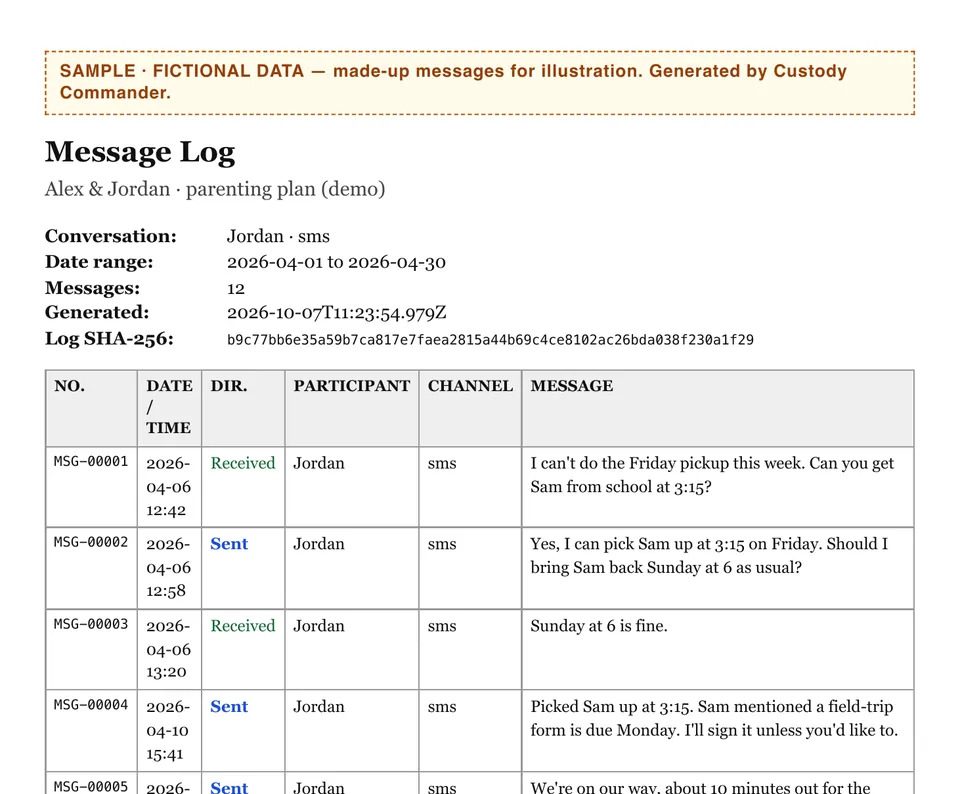
Opened on its own, an XML backup looks like thousands of lines of code. Imported, it becomes a conversation you can scroll, with one entry per message in time order, each numbered from MSG-00001. If the backup holds more than one conversation, the participant index lists each person in it and the range of message numbers that belongs to them.
Date and time, sent or received, participant and channel for every message
A display name you choose for each person, which never changes the messages
The source file listed with the SHA-256 fingerprint recorded at import, plus a fingerprint for the whole log
Page numbers on every page of the PDF, and a records declaration template at the end for you to complete
Search, tag and save only the dates you need as a PDF
A phone backup can cover years of texts. Search for a word, tag the messages you want to find again, and export a from-and-to date range so the PDF covers only the stretch that matters. The imported text stays exactly as it was in the backup, because it can't be edited in the app.
Search with AI uses AI actions, in the 7-day Full Suite trial and paid plans.
In the app
Search a conversation with every match highlighted
Tag messages and filter the conversation by tag
Search with AI: ask a question and get answers that quote the exact messages
Export any date range as a page-numbered PDF
4of 4
What to know before you rely on an Android export
Regular texts come in from the backup. Picture and group messages (MMS) aren't imported yet, so save any image you need on its own. In the PDF, times are listed in UTC, which can differ from your phone's clock. The free plan imports, reads, searches and tags your texts and exports a DRAFT log; a clean log comes with a one-time purchase or a paid plan.
Create your account, then after a short setup you can try Full Suite free for 7 days. Card required; then $24.99/mo or $299/yr (about 82¢ a day) until you cancel. Cancel before day 7 and you pay nothing. Or subscribe now — $299/yr
50% off · 20× the AI
Full Suite Max
Everything in Full Suite, with 20× the AI actions.
$99.99$49.99/mo
or $899/yr$399/yr
Everything in Full Suite: all five tools and the assistant
6,000 AI actions a month (20× Full Suite)
50% off (normally $99.99/mo), locked in as long as you don’t cancel
Already on Full Suite? Get 20× the AI credits for only +$25/mo more (prorated in place)
Clean, printable exports + free attorney & advocate access (on every plan)
$49.99 a month, renews until you cancel. Cancel online in two clicks.
$39 — just your texts
Need your messages as a PDF without a subscription? One message log from Message Extractor: chronological, Bates-numbered (MSG-00001…), with a SHA-256 fingerprint and a declaration template you complete. One-time, no subscription. See a sample (PDF)
$49 once for 30 days of hearing prep. Nothing renews.
Everything in Full Suite for 30 days from the day you buy it: all five tools, the assistant, AI included, and exports without a watermark. No subscription and nothing to cancel. When the 30 days end you’re back on the free plan, and nothing you added is deleted.
Your case stays private to your account until you invite someone and choose what they see. Data is encrypted in transit and at rest, and we don’t sell your personal information.
Your files stay yours
Originals are kept unchanged. Download your complete Case Bundle, every original file plus a manifest, free on any plan, before or after you cancel.
Cancel anytime, in two clicks
The free plan has nothing to cancel. Paid plans renew until you cancel online in two clicks, and the Hearing Pass never renews.
Organizing software, not a law firm
It organizes the files, dates and messages you provide. It doesn’t give legal advice, choose what you file or predict what a court will do.
Questions, answered straight
Frequently asked questions
How do I export text messages from an Android phone?
Install the free SMS Backup & Restore app by SyncTech, back up your Messages to a local XML file, and move that file to your computer. Then import it into Custody Commander, which numbers every message in time order with its date, time and sender. The app shows these export steps when you import.
Is SMS Backup & Restore free?
The app is free on Google Play. It's made by SyncTech, not by Custody Commander, so check its own listing for its current terms. Custody Commander only reads the XML file it saves.
Can I turn Android texts into a PDF?
Yes. After you import the XML, open the conversation, choose Export conversation and, if you like, a from and to date. The log downloads as a PDF with page numbers on every page. Times in the PDF are listed in UTC, so note your local time difference on copies.
Does it include picture messages?
Not yet. Regular texts are imported; picture and group messages (MMS) aren't included yet. Save any image you need from the conversation on its own, and you can add it to your evidence list, where the app reads it and suggests a date for you to check.
Can I export texts from a phone that isn't mine?
Use only your own phone and accounts. Custody Commander organizes the exports you make yourself, and it never connects to anyone else's device. The other person in a conversation is never contacted or notified.
Is this legal advice?
No. Custody Commander is organizing software, not a law firm, and it doesn't give legal advice. How text messages are presented, and whether a court considers them, depends on your court's rules. Check your local rules or talk to a licensed attorney where you live.
What does it cost?
The free plan needs no card: import, read, search and tag your texts and export a log watermarked DRAFT. A clean log comes with the $39 one-time Message Log package for your case, the $49 Hearing Pass or a paid plan. The free Text Message Log Preview on our site needs no account.
Your Android texts, numbered and dated
Back up to XML with SMS Backup & Restore, import the file free, and save a PDF log whenever you need one.