Find your court's official family court forms and keep them in order
Custody Commander gathers links to your court's official forms, rules and self-help pages for your state and county, and keeps every copy you file or receive in one library. Its templates are drafts with [placeholders], not official forms; your court's own forms come first.
Official forms come from your court, not a template site
Many family courts post the forms they accept on an official website, and they revise them from time to time. Starting from the current official version, when one exists, saves redoing paperwork later. The Your court page gathers links to your court's official forms, rules and self-help pages for the case's state and county, with the date each was retrieved. If you can't find a form online, the clerk's office can tell you where it is.
Official forms listed next to your court's rules and self-help pages
A saved copy where one was kept, with its retrieval date
The app points to the official source; it doesn't fill in or review court forms
2of 4
Every form you file or receive, kept in one library
Custody paperwork piles up fast: the forms you filed, the papers you were served, notices and orders. Save a copy of each one the day it goes out or arrives, labeled with the date it was filed or received. When a question comes up about your case, the right page is a search away instead of somewhere in a pile.
A document library for filings, orders, reports and correspondence, in categories
Upload a PDF or a photo of a paper and view it in your browser
Search across your documents to find a page fast
Unlimited court case numbers in one case file, each with its own documents and deadlines
3of 4
Templates for drafts, with [placeholders] for your facts
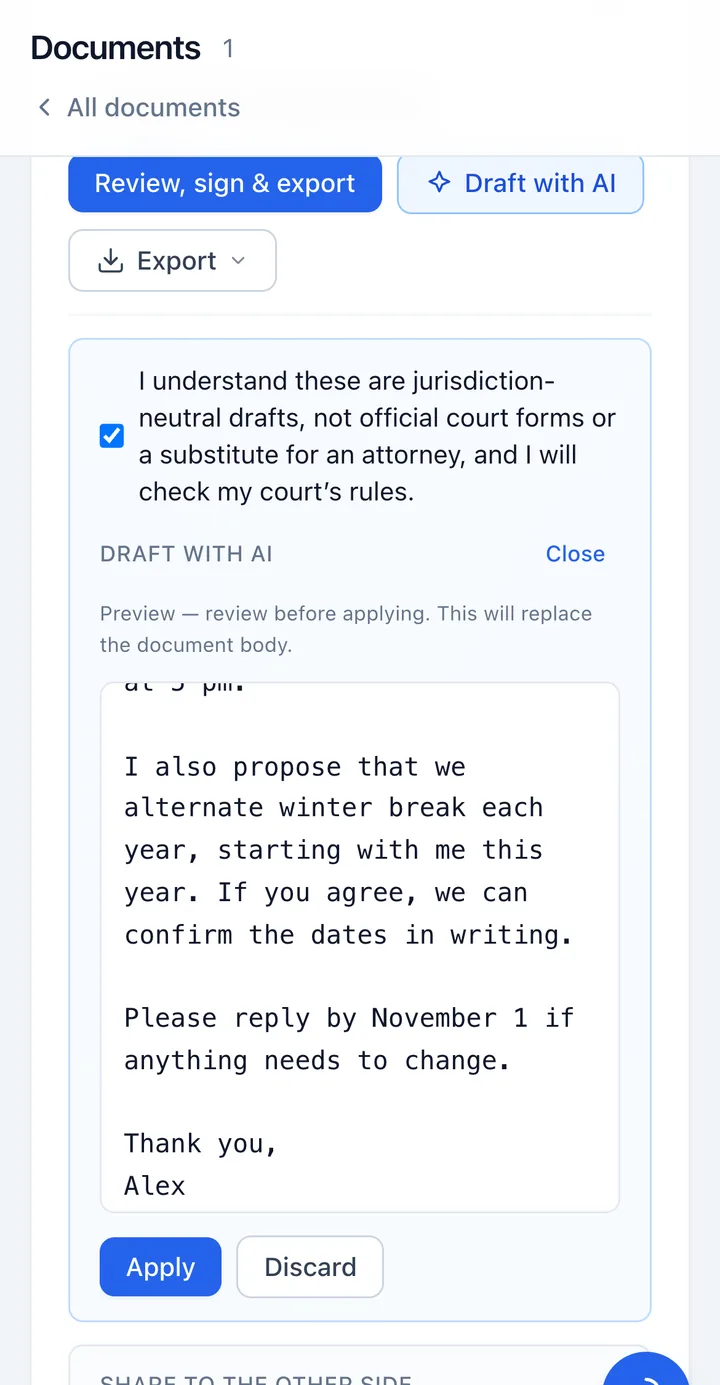
Some papers, such as a declaration or an exhibit list, may not have an official form in every court. Custody Commander has 26 templates, each a skeleton with headings and [bracketed placeholders] for facts you supply, with your caption and case number merged in. They are starting points for you to complete and review; check your court's forms and local rules first.
Templates are not official court forms. Nobody at Custody Commander reviews documents.
In the app
Templates include a declaration, a proposed parenting plan, a notice of address change and an exhibit list
AI drafting works from your own case records and leaves [placeholders] for facts it doesn't have (uses AI actions)
A text check flags statements to review; it isn't a truth checker or legal analysis
You attest that you prepared and reviewed the document before you sign or export it
Export to PDF or Word
4of 4
Filing dates and served papers on one timeline
The date a paper was filed or served can start another clock, such as a time to respond or a hearing date. Put each one on your timeline the day it happens, and copy any deadline from your papers or your court's rules into your reminders.
Key dates, hearings and events on one master timeline
Reminders with a date, an optional time and notes
Deadlines and reminders tied to a specific hearing
Create your account, then after a short setup you can try Full Suite free for 7 days. Card required; then $24.99/mo or $299/yr (about 82¢ a day) until you cancel. Cancel before day 7 and you pay nothing. Or subscribe now — $299/yr
50% off · 20× the AI
Full Suite Max
Everything in Full Suite, with 20× the AI actions.
$99.99$49.99/mo
or $899/yr$399/yr
Everything in Full Suite: all five tools and the assistant
6,000 AI actions a month (20× Full Suite)
50% off (normally $99.99/mo), locked in as long as you don’t cancel
Already on Full Suite? Get 20× the AI credits for only +$25/mo more (prorated in place)
Clean, printable exports + free attorney & advocate access (on every plan)
$49.99 a month, renews until you cancel. Cancel online in two clicks.
Hearing Pass · one-time
$49 once for 30 days of hearing prep. Nothing renews.
Everything in Full Suite for 30 days from the day you buy it: all five tools, the assistant, AI included, and exports without a watermark. No subscription and nothing to cancel. When the 30 days end you’re back on the free plan, and nothing you added is deleted.
Your case stays private to your account until you invite someone and choose what they see. Data is encrypted in transit and at rest, and we don’t sell your personal information.
Your files stay yours
Originals are kept unchanged. Download your complete Case Bundle, every original file plus a manifest, free on any plan, before or after you cancel.
Cancel anytime, in two clicks
The free plan has nothing to cancel. Paid plans renew until you cancel online in two clicks, and the Hearing Pass never renews.
Organizing software, not a law firm
It organizes the files, dates and messages you provide. It doesn’t give legal advice, choose what you file or predict what a court will do.
Questions, answered straight
Frequently asked questions
Where do I find family court forms?
Start with your court's official website or the clerk's office; many courts also have a self-help center that can point you to forms. In Custody Commander, the Your court page gathers links to your court's official forms, rules and self-help pages for your state and county, with retrieval dates.
Are Custody Commander's templates official court forms?
No. The templates are drafts: skeletons with headings and [bracketed placeholders] for your facts. They are not official court forms, and your court's own forms and local rules come first. Nobody at Custody Commander reviews documents.
Which custody forms do I need?
That depends on your court, your case and the step you're taking, and the app doesn't choose filings for you. The clerk or a self-help center can explain which forms exist for a given step. For advice about your filings, talk to a licensed attorney where you live.
Can the app fill in my court's forms for me?
No. The app doesn't fill in or file official court forms. It keeps your completed copies organized, and its templates and AI drafting help with supporting papers that you complete and review. Check your court's formatting rules before you file anything you drafted.
How do I keep track of what I filed?
Save a copy of every form the day you file it, with its stamp or filing confirmation, and note the filing date. In Custody Commander, the document library holds filings, orders, reports and correspondence in categories, and the filing date goes on your timeline. Search finds any page later.
Is it free?
Yes. The free plan needs no card: one case, 10 evidence items, 1 GB and 6 AI actions, and exports carry a DRAFT watermark. Clean exports and more AI come with the Full Suite ($24.99 a month or $299 a year), a single tool plan, or the one-time Hearing Pass ($49 for 30 days).
Is this legal advice?
No. Custody Commander is organizing software, not a law firm, and nothing in it is legal advice. It points you to official sources and keeps your paperwork in order. For advice about your forms or filings, talk to a licensed attorney where you live.
Keep your family court paperwork in order
Start free, find your court's official forms, and keep every filed copy and deadline in one case file. Organizing software, not a law firm; not legal advice.