Full custody case preparation: records, timeline and exhibits in order
When a parent asks a court for full custody, the court decides based on its own law and the facts. Custody Commander helps either parent organize theirs: a plan of what's missing, a dated timeline, numbered exhibits and drafts from templates.
Originals kept unchanged with SHA-256 fingerprints
Organizing software, not a law firm
1of 4
What "full custody" usually means, and who decides
"Full custody" is an everyday phrase. Court orders often use terms such as sole legal custody (major decisions) and sole or primary physical custody (where the child lives), and the terms vary by state. Custody decisions are generally made under a best-interests-of-the-child standard, applied by the court to the facts in front of it. The app doesn't predict how that goes; it helps you keep your own facts clear.
A setup chat after signup asks about your case and builds a preparation plan
A What's missing list shows the steps and records not yet in your file
The Your court page gathers links to your court's official rules, forms and self-help pages
Unlimited court case numbers in one case file, each with its own deadlines and documents
2of 4
The facts in date order, on one master timeline
Hearing time is often short, so a clear chronology helps everyone follow events in order. Write each entry as a fact with a date: what happened, where and who was there. Include the ordinary days as well as the difficult ones, and describe the other parent's involvement as accurately as your own.
Events, dated evidence, key dates and hearings on one timeline, grouped by month
Search, or filter by case, type, year or month
Issues you name yourself, each with your own summary and the evidence you tag to it
Export to PDF or Word for a hearing or an attorney meeting
3of 4
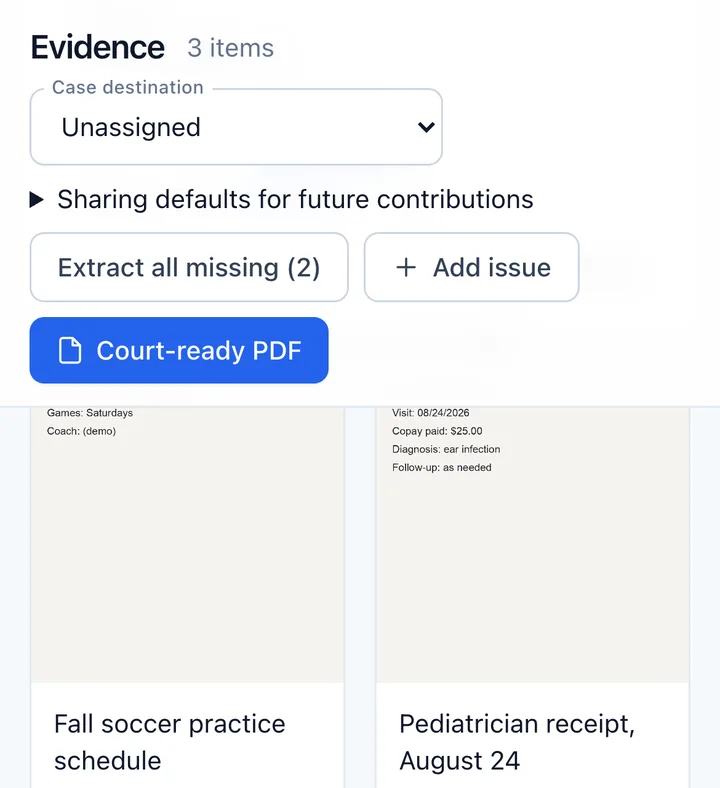
School, medical and household records, numbered as exhibits
Records made at the time, such as attendance notes, medical visit summaries, activity schedules and messages, are often clearer than memories written down months later. Add them as they arrive. When a hearing is set, number the items you choose in date order and print one PDF with an index.
Add files one at a time, in batches or as a whole folder, up to 25 MB each
AI reads screenshots and scanned pages and suggests a date and label, marked unverified until you review
Exhibit numbers EX-001, EX-002 and on, in date order; items already numbered are never renumbered
One PDF with a cover and index page and each file's SHA-256; location data removed from photos
The free plan holds up to 10 evidence items; free PDFs are watermarked DRAFT.
4of 4
Drafts from templates and a binder for the hearing
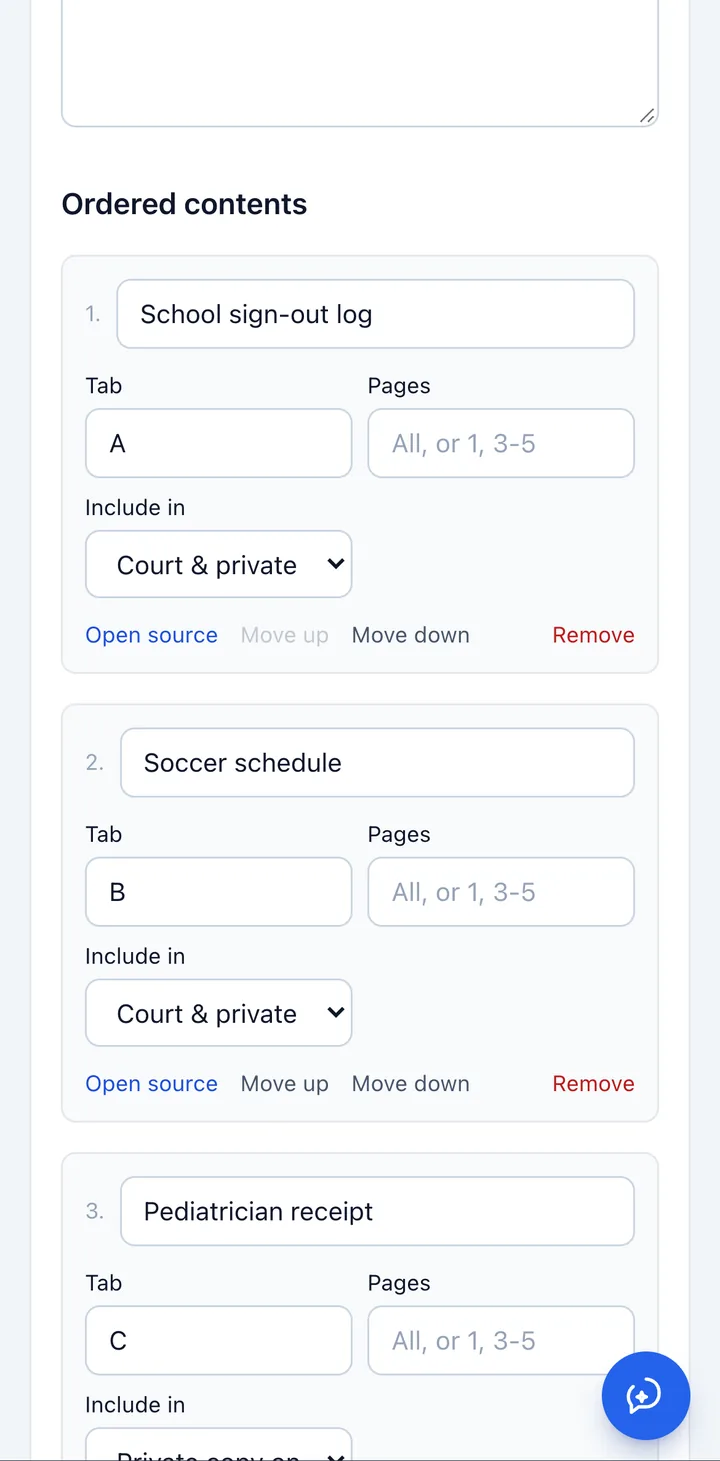
Your court's own forms and local rules come first. Where a paper isn't a court form, such as a declaration or a proposed parenting plan, the app gives you a template with headings and [placeholders] to complete. A binder then puts what you've chosen in order, with tabs, a contents page and page numbers.
26 templates, including Declaration, Proposed Parenting Plan, Exhibit List and Hearing Prep Sheet
AI drafts grounded in your own records, with [placeholders] for facts the app doesn't have
You read and attest to every statement before export; nobody at Custody Commander reviews your documents
Binder tabs, a contents page with page ranges, and a private copy for your own notes
Free plan, no card needed. Organizing tips, not legal advice.
General organizing tips, not legal advice. Your court's own rules come first.
Plans and pricing
Start free. Upgrade only if you need more.
The free plan needs no credit card and never expires. Hearing prep draws on your evidence, documents and timeline, so Full Suite covers all of it; for one hearing, the Hearing Pass is below.
Free
For getting your evidence out of your camera roll and into order.
$0
Free forever — no credit card, nothing to cancel.
One case file, unlimited court case numbers
10 evidence items, 1 GB of storage
Organize, describe, tag, search
Watermarked printable PDF export
6 AI actions to try the tools (one-time, not monthly)
Create your account, then after a short setup you can try Full Suite free for 7 days. Card required; then $24.99/mo or $299/yr (about 82¢ a day) until you cancel. Cancel before day 7 and you pay nothing. Or subscribe now — $299/yr
50% off · 20× the AI
Full Suite Max
Everything in Full Suite, with 20× the AI actions.
$99.99$49.99/mo
or $899/yr$399/yr
Everything in Full Suite: all five tools and the assistant
6,000 AI actions a month (20× Full Suite)
50% off (normally $99.99/mo), locked in as long as you don’t cancel
Already on Full Suite? Get 20× the AI credits for only +$25/mo more (prorated in place)
Clean, printable exports + free attorney & advocate access (on every plan)
$49.99 a month, renews until you cancel. Cancel online in two clicks.
Hearing Pass · one-time
$49 once for 30 days of hearing prep. Nothing renews.
Everything in Full Suite for 30 days from the day you buy it: all five tools, the assistant, AI included, and exports without a watermark. No subscription and nothing to cancel. When the 30 days end you’re back on the free plan, and nothing you added is deleted.
Your case stays private to your account until you invite someone and choose what they see. Data is encrypted in transit and at rest, and we don’t sell your personal information.
Your files stay yours
Originals are kept unchanged. Download your complete Case Bundle, every original file plus a manifest, free on any plan, before or after you cancel.
Cancel anytime, in two clicks
The free plan has nothing to cancel. Paid plans renew until you cancel online in two clicks, and the Hearing Pass never renews.
Organizing software, not a law firm
It organizes the files, dates and messages you provide. It doesn’t give legal advice, choose what you file or predict what a court will do.
Questions, answered straight
Frequently asked questions
What does full custody mean?
It's an everyday phrase rather than a single legal term. Orders often speak of legal custody (who makes major decisions) and physical custody (where the child lives), each of which can be sole, joint or primary, and the terms vary by state. Read your own order and check your state's law, or ask a licensed attorney where you live.
How do courts decide full custody requests?
Custody is generally decided under a best-interests-of-the-child standard, applied under your state's law to the facts of the case. Custody Commander can't predict how a court will decide or tell you what to request. A licensed attorney, your court's self-help center or legal aid can explain how it works where you live.
What records do parents organize for a full custody case?
Many parents keep current orders and filings, a dated timeline, school and medical records, written messages, photos and a parenting time log. Which of these matter, and how they're presented, depends on your court's rules and the issues in your case. The app keeps them dated, fingerprinted and ready to number as exhibits.
Does it work for the parent responding to a full custody request?
Yes. The tools are the same for either parent: a plan of what's missing, a timeline, evidence, message logs, templates and a binder. The app never takes a side, and the other parent is never contacted or notified.
Can I share my case file with an attorney?
Yes. Invite them by email and choose sections, such as evidence, documents and the timeline, with view, comment, download or edit access. Attorney accounts join free, and an attorney handoff packet puts your summary, issues, timeline and evidence index in one PDF.
Is it free?
Yes. The free plan needs no card and never expires, with one case, up to 10 evidence items and DRAFT-watermarked exports. With a hearing coming up, the Hearing Pass is $49 one time for 30 days of everything and never renews. Full Suite is $24.99 a month or $299 a year.
Is this legal advice?
No. Custody Commander is organizing software, not a law firm, and nothing in it is legal advice. It doesn't choose filings or predict results. For advice about a custody request, talk to a licensed attorney where you live.
Get your full custody case file in order
Answer a few setup questions, see what's missing and start your timeline today. Free plan, no card needed.