Organized for the guardian ad litem: timeline, documents and contacts
A guardian ad litem may ask for documents, names and dates on short notice. Custody Commander keeps them ready: a short dated timeline, your documents in one library, and view access to only the sections you choose.
A guardian ad litem, often called a GAL, is generally someone a court appoints to look into a child's situation and represent the child's best interests in the case. Depending on the court, a GAL may be an attorney or a trained volunteer, and the role differs from place to place. Many GALs interview parents, visit homes, talk with teachers or doctors and review documents before reporting to the court. The order appointing the GAL and your local rules describe the role in your case.
Keep the appointment order and any letters or reports from the GAL in your document library
Add meetings, home visits and deadlines to Upcoming, with reminders
A countdown for each hearing with its time and courtroom
Every related court case number in one case file, each with its own deadlines and documents
2of 4
A short timeline a busy reader can follow
A GAL may be reading files from many families, so a concise, dated timeline is easier to use than a long narrative. Keep each line to one fact: the date, what happened and which document shows it. Leave out commentary about the other parent; a plain list of dates and records is easier to read. Filters let you pull out one stretch of months or one type of entry when you review it.
One master timeline of events, dated evidence, key dates and hearings
Filter by case, type, year or month, or search everything
Issues you name, each with your own short summary and tagged evidence
Export to PDF or Word; free-plan exports carry a DRAFT mark
A request may arrive by email with a deadline: report cards, medical visit summaries, the current schedule, past orders. When those papers already sit in one library, sorted by category and date, answering is a matter of finding and sending, not searching through drawers and inboxes.
A document library for orders, filings, reports and correspondence, viewable in the browser
Evidence files with an untouched original and a SHA-256 fingerprint for each
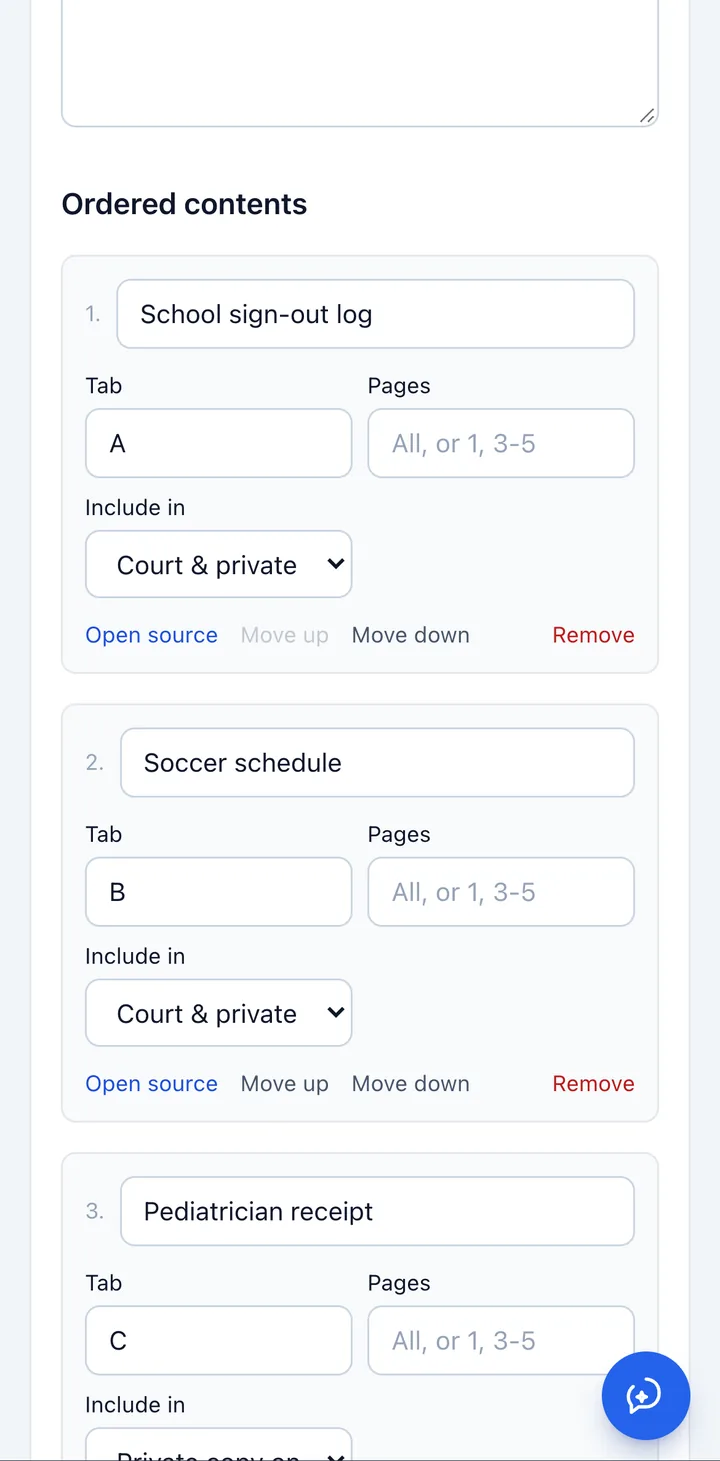
Number chosen items as exhibits and print one PDF with an index page
A binder with tabs and a contents page if the GAL prefers paper
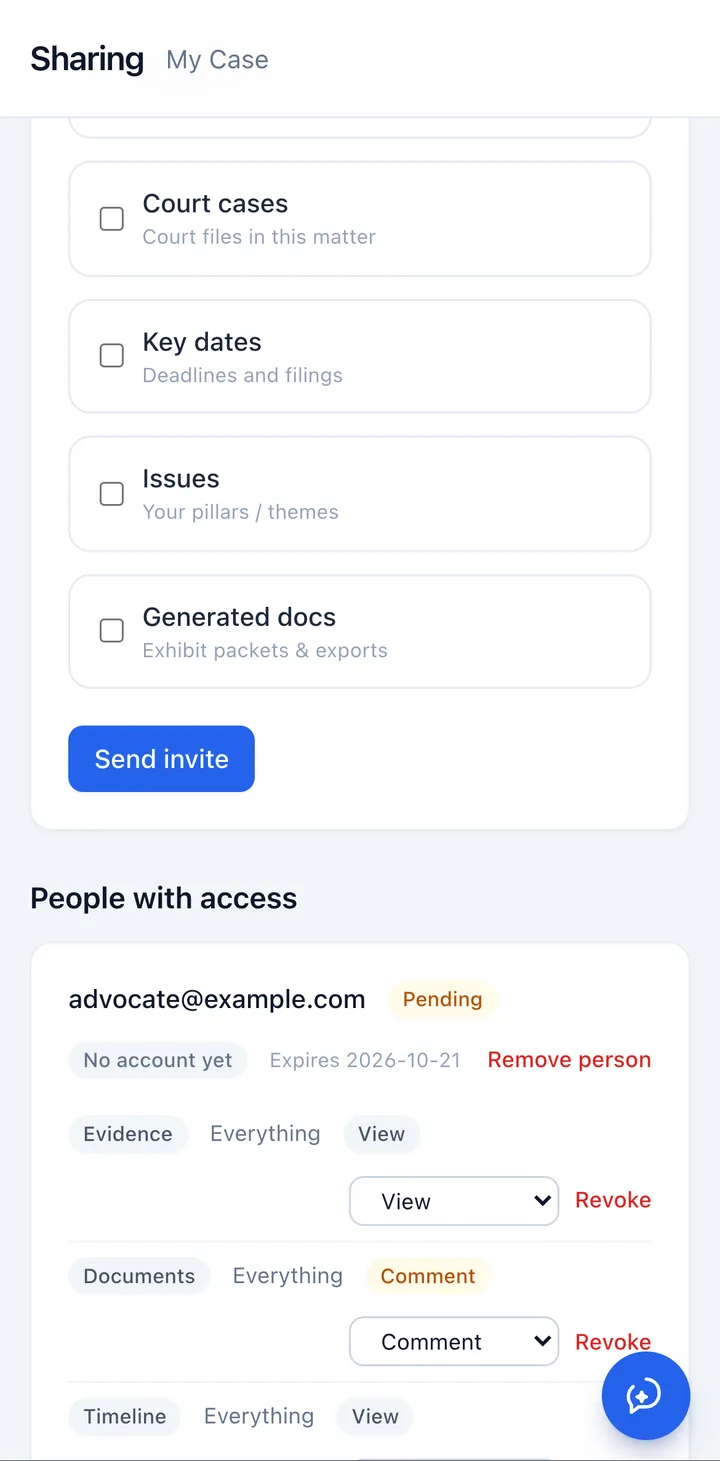
Ask the GAL how they prefer to receive information. Some want printed copies; some accept email or a shared link. If a link works for them, invite them by email and choose exactly which sections they can open, view-only if you prefer. Check your court's rules, or ask your attorney if you have one, before sharing anything.
Create your account, then after a short setup you can try Full Suite free for 7 days. Card required; then $24.99/mo or $299/yr (about 82¢ a day) until you cancel. Cancel before day 7 and you pay nothing. Or subscribe now — $299/yr
50% off · 20× the AI
Full Suite Max
Everything in Full Suite, with 20× the AI actions.
$99.99$49.99/mo
or $899/yr$399/yr
Everything in Full Suite: all five tools and the assistant
6,000 AI actions a month (20× Full Suite)
50% off (normally $99.99/mo), locked in as long as you don’t cancel
Already on Full Suite? Get 20× the AI credits for only +$25/mo more (prorated in place)
Clean, printable exports + free attorney & advocate access (on every plan)
$49.99 a month, renews until you cancel. Cancel online in two clicks.
Hearing Pass · one-time
$49 once for 30 days of hearing prep. Nothing renews.
Everything in Full Suite for 30 days from the day you buy it: all five tools, the assistant, AI included, and exports without a watermark. No subscription and nothing to cancel. When the 30 days end you’re back on the free plan, and nothing you added is deleted.
Your case stays private to your account until you invite someone and choose what they see. Data is encrypted in transit and at rest, and we don’t sell your personal information.
Your files stay yours
Originals are kept unchanged. Download your complete Case Bundle, every original file plus a manifest, free on any plan, before or after you cancel.
Cancel anytime, in two clicks
The free plan has nothing to cancel. Paid plans renew until you cancel online in two clicks, and the Hearing Pass never renews.
Organizing software, not a law firm
It organizes the files, dates and messages you provide. It doesn’t give legal advice, choose what you file or predict what a court will do.
Questions, answered straight
Frequently asked questions
What does a guardian ad litem do?
Generally, a guardian ad litem is appointed by the court to look into the child's situation and represent the child's best interests. Many interview parents, visit homes, talk with teachers or doctors, review records and make a report or recommendation to the court. The exact role depends on your court and the order appointing them.
What questions does a guardian ad litem ask?
It varies with the GAL and the case. Many ask about the child's routine, school, health and activities, how the parents communicate and share decisions, and each home. Custody Commander doesn't script answers; it helps you have the dates and documents in front of you so you can answer accurately.
What should I bring to a meeting with a guardian ad litem?
Ask the GAL first; they may send a list. Many parents bring a short timeline, a contact list for school and medical providers, recent school and medical records, and copies of orders. Keep a note of what you hand over and when.
Can I share my case file with the GAL?
You can invite anyone by email, choose which sections they see, make access view-only, and revoke it any time. Ask the GAL how they prefer to receive information, and check your court's rules or ask your attorney before sharing. Printed copies and PDF exports are always an option.
How do I keep track of what I've sent the GAL?
Add a dated timeline entry for each request and each delivery, such as "Sent report cards and visit summaries by email," and keep the documents themselves in your library. If you share sections in the app, the Sharing screen lists each person's access by section, and you can revoke it at any time.
Is it free?
Yes. The free plan needs no card and never expires: one case, up to 10 evidence items, 1 GB of storage and sharing, with DRAFT-watermarked exports. Full Suite is $24.99 a month or $299 a year, and the Hearing Pass is $49 one time for 30 days of everything.
Is this legal advice?
No. Custody Commander is organizing software, not a law firm. It doesn't tell you what to say to a guardian ad litem, what to hand over or how they or the court will see your case. For advice, talk to a licensed attorney where you live.
Be ready when the guardian ad litem asks
Put your orders, records and a short timeline in one place, and share only what you choose. Free plan, no card needed.