

Hearing binder builder

Custody hearing binder: numbered exhibits, an index and a timeline

Number, order and print your exhibits for court. Build a tabbed binder from your own files, with a contents page up front and a dated timeline to print alongside it.

Start my binder free

Start free today — no credit card required. Organizing software, not a law firm; not legal advice.

See plans: Free, single tools, Full Suite
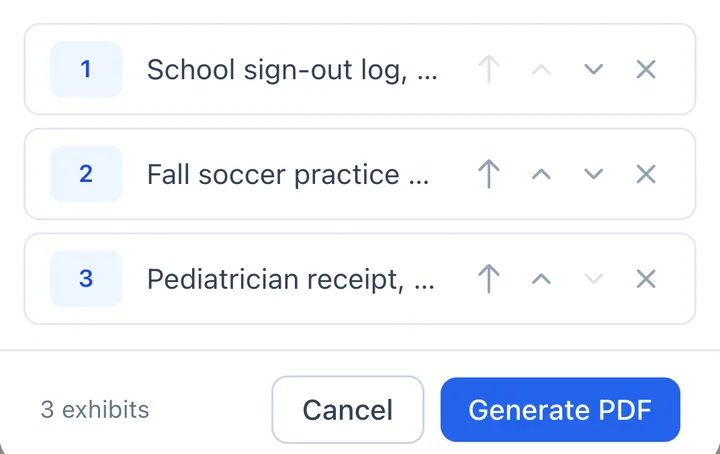
Three exhibits numbered 1, 2 and 3 (a school sign-out log, a fall soccer practice schedule and a pediatrician receipt) with arrows to reorder them and a Generate PDF button
App screen from a demo case with made-up names.
  • Start free — no credit card required
  • Court copy and private copy from the same binder
  • Binder and exhibits export to PDF; timeline to PDF or Word
  • Organizing software, not a law firm

1of 5

Every page in the order you'll reach for it

A binder is easiest to use when every page has a place: a tab for each topic, items in the order you expect to mention them, and a contents page up front. Build it from the photos, PDFs and documents you've already added, then move items up or down until it reads right.

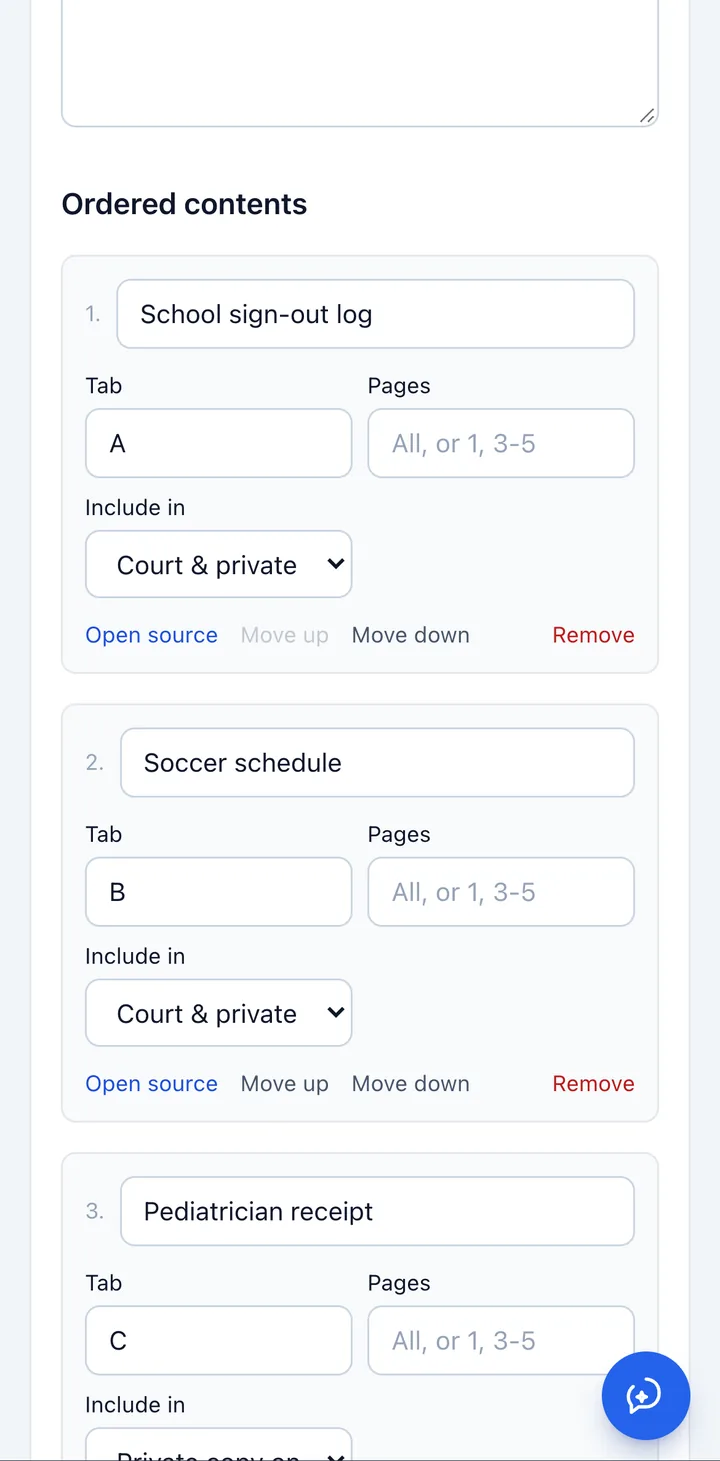
  • Ordered contents with a tab name for each item
  • Pull just the pages you need from a long PDF (for example 1, 3-5)
  • Mark an item private copy only and it stays out of the court copy
  • Download the full binder or a single tab as one PDF
  • A contents page with page ranges, a divider for each tab, and page numbers on every page
Start my binder free

Free-plan PDFs are watermarked DRAFT. Paid plans export clean.

The binder builder's ordered contents: a school sign-out log under tab A, a soccer schedule under tab B and a pediatrician receipt under tab C, each with page selection, copy options and Move up and Move down links

2of 5

Exhibits numbered in the order you set

Many courts have their own rules for how exhibits are labeled, so check your local rules first. Once you know the format, set the order one time and let the numbering follow it, instead of relabeling every page by hand when something moves.

Number my exhibits free

The free plan holds up to 10 evidence items.

In the app

  • Move exhibits up, down or to the top, or leave one out, then generate
  • Exhibits are numbered 1, 2, 3 in that order
  • Already have a label? Type it in as the exhibit number and it is used as-is
  • One exhibit PDF with a cover and index page, and a SHA-256 fingerprint listed for each file
  • A printable evidence index with each exhibit's number, date, description and your note

3of 5

A dated timeline you can print or put on screen

A short, dated timeline helps anyone reading your binder follow events in order. Keep each line factual: the date, what happened, and which exhibit shows it.

  • Events, evidence, key dates and hearings in one timeline
  • Search, and filter by case, type or month
  • Export the timeline to PDF or Word
  • Hearing mode shows your exhibits one at a time, and the timeline, full screen for a screen-share
A timeline with 12 entries, including an on-time school exchange on August 3, a pickup time change agreed by text on August 10, and a linked school sign-out log

4of 5

See what's left before the hearing date

Add the hearing date once and the countdown, reminders and deadlines line up behind it. When your papers are together, tap I'm ready and the preparation reminders stop.

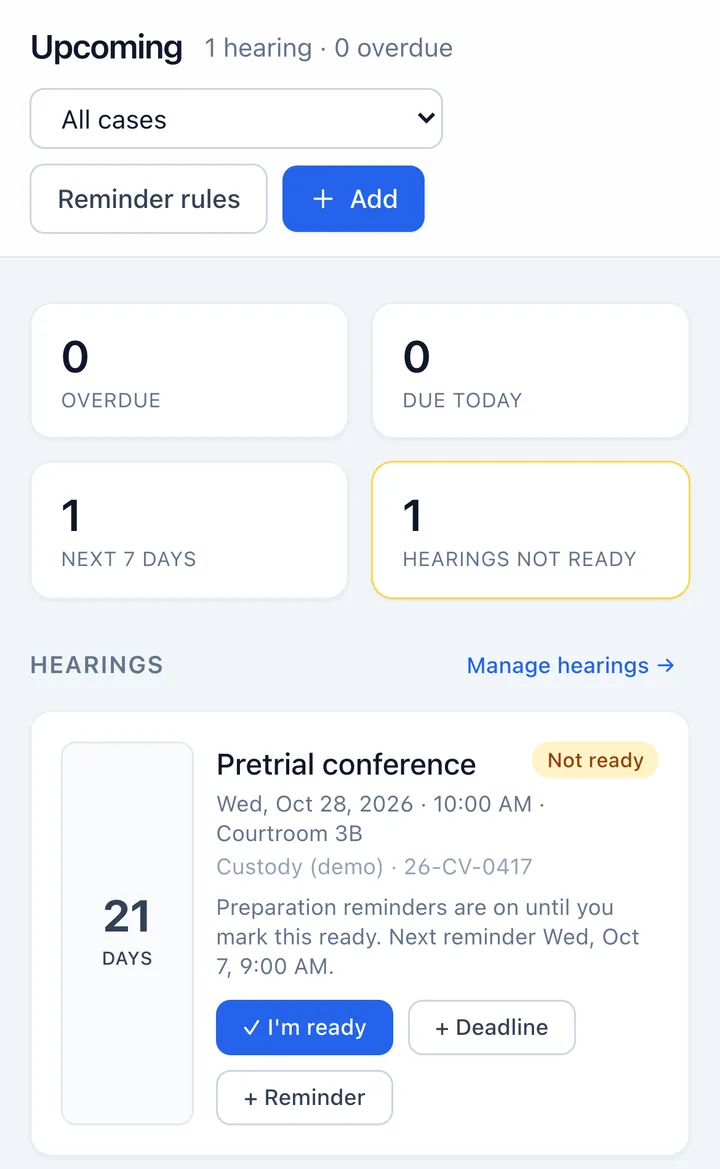
  • A countdown for each hearing, with its time and courtroom
  • Preparation reminders until you mark the hearing ready
  • Deadlines and reminders tied to a specific hearing
  • Mark a binder version printed, and see if it changed since you printed it
The Upcoming page with a pretrial conference 21 days away, marked Not ready, with I'm ready, Deadline and Reminder buttons

5of 5

Your notes and reading order, kept private

Write your points in the order you plan to cover them, and link each one to the exhibit it refers to. On the day, open them in a large-text reading view. Your private notes never go into court binder exports.

  • A hearing desk for each hearing, linked to its date
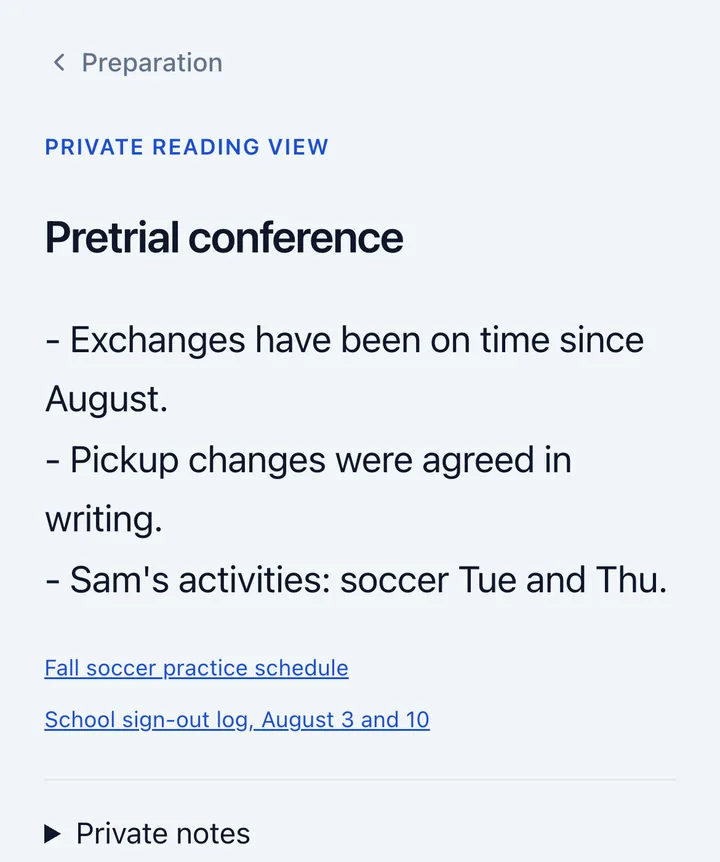
  • Reading order and short notes in large, easy-to-read text
  • Links from each note to the exhibits it mentions
  • Finish a desk to keep a snapshot, or carry it forward to the next hearing
A private reading view for a pretrial conference: three short points in large text, links to a soccer practice schedule and a school sign-out log, and a collapsed Private notes section

How it works

3 steps from scattered files to one organized file

  1. Add your files

    Upload photos, screenshots and PDFs to Evidence or Documents.

  2. Order and tab

    Set the exhibit order and tabs; the numbering follows the order.

  3. Download and print

    Export one PDF with a contents page, then mark the version you printed.

Start my binder free

Start free today — no credit card required.

Free checklist · no sign-up

What to put in a hearing binder: a free checklist

Use this organizing checklist with or without the app; your court's own rules always come first.

Tick them off as you go. Nothing you tick is saved or sent.

Turn this checklist into a binder

Free plan, no credit card required.

Plans and pricing

Start free. Upgrade only if you need more.

The free plan needs no credit card and never expires. A binder draws on your evidence, documents and timeline, so Full Suite covers all of it; for one hearing, the Hearing Pass is below.

Free

For getting your evidence out of your camera roll and into order.

$0

Free forever — no credit card, nothing to cancel.

  • One case file, unlimited court case numbers
  • 10 evidence items, 1 GB of storage
  • Organize, describe, tag, search
  • Watermarked printable PDF export
  • 6 AI actions to try the tools (one-time, not monthly)

Single Product

Case Builder

Just the one tool you need right now. Switch or upgrade anytime.

$14.99/mo

or $119/yr per product

  • Case Builder on its own: your timeline, documents, hearings, to-dos and the assistant
  • 80 AI actions a month for that tool
  • Unwatermarked exports from that tool
  • Everything still lands in one case file
Get Case Builder

$14.99 a month, renews until you cancel. Cancel online in two clicks.

50% off · 20× the AI

Full Suite Max

Everything in Full Suite, with 20× the AI actions.

$99.99$49.99/mo

or $899/yr $399/yr

  • Everything in Full Suite: all five tools and the assistant
  • 6,000 AI actions a month (20× Full Suite)
  • 50% off (normally $99.99/mo), locked in as long as you don’t cancel
  • Already on Full Suite? Get 20× the AI credits for only +$25/mo more (prorated in place)
  • Clean, printable exports + free attorney & advocate access (on every plan)
Get Full Suite Max

$49.99 a month, renews until you cancel. Cancel online in two clicks.

Hearing Pass · one-time

$49 once for 30 days of hearing prep. Nothing renews.

Everything in Full Suite for 30 days from the day you buy it: all five tools, the assistant, AI included, and exports without a watermark. No subscription and nothing to cancel. When the 30 days end you’re back on the free plan, and nothing you added is deleted.

Get the Hearing Pass — $49
  • No card for the free plan
  • Plans renew until you cancel. Cancel online anytime, in two clicks.
  • Only you pay — the other parent never joins

Compare all plans on the pricing page →

Good to know before you start

  • Private by default

    Your case stays private to your account until you invite someone and choose what they see. Data is encrypted in transit and at rest, and we don’t sell your personal information.

  • Your files stay yours

    Originals are kept unchanged. Download your complete Case Bundle, every original file plus a manifest, free on any plan, before or after you cancel.

  • Cancel anytime, in two clicks

    The free plan has nothing to cancel. Paid plans renew until you cancel online in two clicks, and the Hearing Pass never renews.

  • Organizing software, not a law firm

    It organizes the files, dates and messages you provide. It doesn’t give legal advice, choose what you file or predict what a court will do.

Questions, answered straight

Frequently asked questions

Is it free?

Yes. The free plan needs no credit card and never expires. It holds one case file and up to 10 evidence items, with 1 GB of storage and 6 AI actions to try the tools, and free exports carry a DRAFT watermark. For clean copies and more room, choose a paid plan or the one-time Hearing Pass.

Do I need a credit card to start?

No. You sign up for the free plan with your name, email and a password, and nothing is ever charged on it. A card is needed only if you choose to pay: a paid plan, the $49 Hearing Pass or the 7-day Full Suite trial. The trial screen shows the price and the date of the first charge before you confirm, we email you 3 days and 1 day before it, and if you cancel online before then you pay nothing.

Which plan fits a hearing binder?

Start on the free plan to build and preview the binder. For clean copies, Full Suite ($24.99 a month or $299 a year) covers every part of a binder in one case file: evidence, documents, the timeline and hearings, with 300 AI actions a month. If you need it for one hearing, the $49 Hearing Pass gives 30 days of everything in Full Suite and never renews. Case Builder on its own is $14.99 a month.

What goes in a custody hearing binder?

It depends on your court's rules and the material you plan to present, so check your local rules first. Many binders start with a contents page, then tabbed sections of exhibits, a dated timeline, and copies of any orders or notices for the hearing. Custody Commander helps you organize and print the material you choose; it doesn't pick your exhibits or tell you what to argue.

How does exhibit numbering work?

You set the order: move exhibits up or down, and they are numbered 1, 2, 3 in that order when you generate the PDF. If you already use a label, such as a letter or a format your court asks for, type it in as the exhibit number and it is used as-is. Your court's rules decide the labeling format, so check them before you print.

Can I print it or save it as a PDF?

Yes. Download the whole binder or a single tab as one PDF, with a contents page, a divider for each tab and page numbers on every page. Make a court copy that leaves out anything you marked private, or a private copy with everything in it. The timeline exports to PDF or Word as well.

Can I share it with my attorney?

Yes. Invite your attorney, a paralegal or someone helping you by email, and choose what they can see, such as evidence, documents, the timeline and hearings. Each person gets view, download, comment or edit access, and you can revoke it at any time.

Does it work when the hearing date is close?

Yes. It runs in your web browser on a phone or computer, so you can upload files, set the order and download a PDF as soon as you sign up. Add the hearing date to see a countdown and get preparation reminders. Print early so there's time to fix a missing page, and check your court's deadline for exchanging or filing exhibits.

Is this legal advice?

No. Custody Commander is organizing software, not a law firm, and nothing in it is legal advice. It helps you put your own records in order and print them. For questions about what to present or how your court handles exhibits, check your local rules or talk to a licensed attorney where you live.

Put your hearing binder together

Start free with no credit card, add your files, and download a numbered, tabbed PDF when everything is in order. Organizing software, not a law firm; not legal advice.

Start free today — no credit card required