How to prepare for a custody hearing, counted down to the date
Add the hearing date and Custody Commander lines up the countdown, deadlines and reminders behind it. Reminders keep coming until you tap I'm ready, and your notes wait in reading order for the day itself.
The hearing date becomes the anchor for everything else
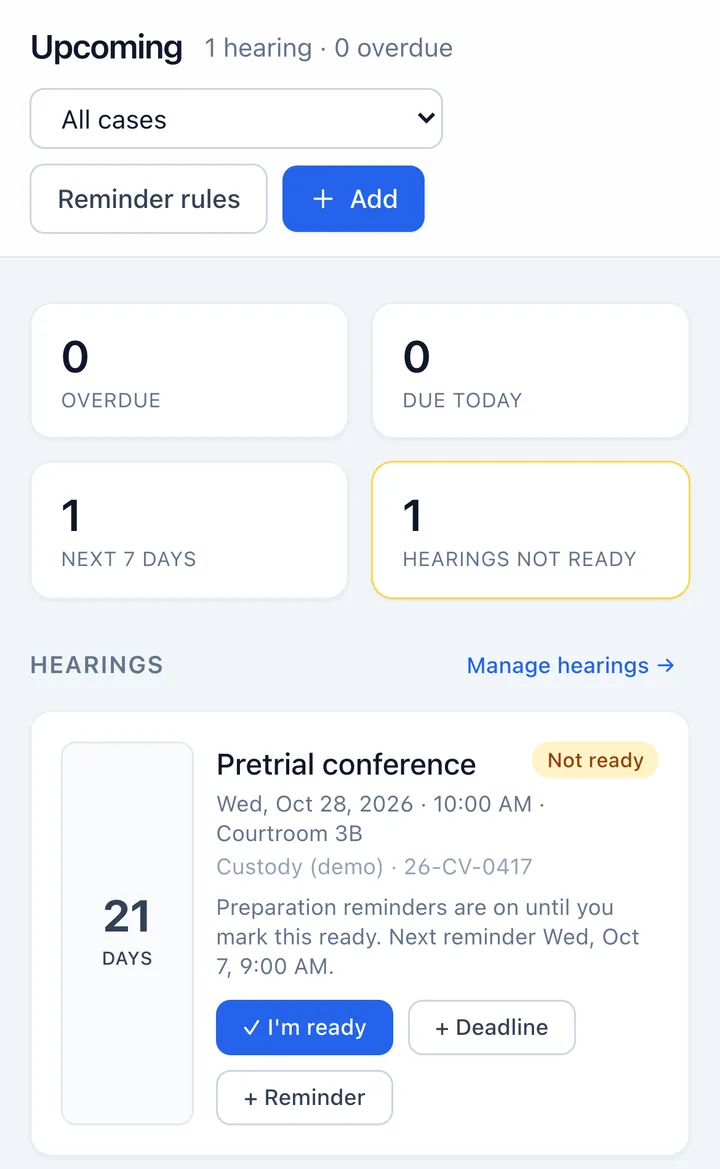
Preparing for a custody hearing is easier when every task hangs off one date. Add the date, time and courtroom once. The Upcoming page then shows how many days are left, and what's overdue, due today or due in the next 7 days, across every hearing in your case.
A countdown for each hearing, with its time and courtroom
Overdue, due today and next 7 days counts at the top of the page
Every related court case number in one case file, each with its own deadlines
Runs in a web browser on your phone or computer
2of 5
Earlier deadlines, attached to the hearing they belong to
A hearing often comes with earlier dates: exchanging exhibits, handing in a document, confirming who will attend. Your notice and your local rules say which apply. Add each one as a deadline or reminder on that hearing, so its whole list sits in one place instead of across sticky notes and a phone calendar.
Deadlines and reminders attached to a specific hearing
Reminders with a date, an optional time and notes
Push and email notices only say you have a reminder; the details stay in the app
Hearings and key dates also show on your case timeline
3of 5
Exhibits in order, then one tap on I'm ready
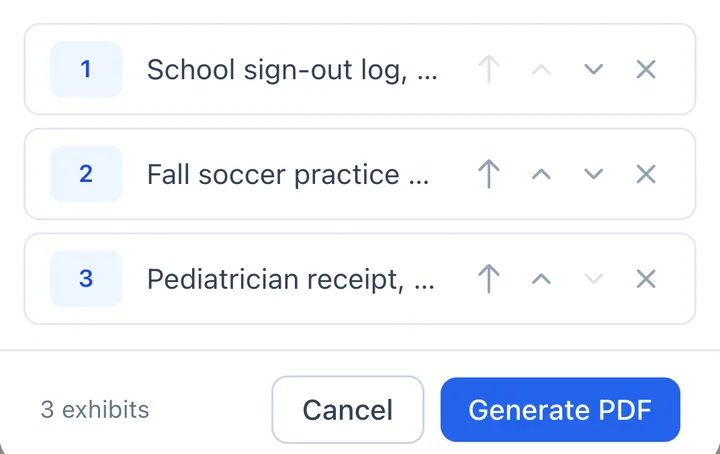
Being ready usually means your papers are together: exhibits chosen and in order, copies printed, and a dated timeline to hand. Set the exhibit order once and the numbering follows it. When everything is together, tap I'm ready and the preparation reminders for that hearing stop.
Preparation reminders for each hearing until you tap I'm ready
Move exhibits up, down or to the top; they're numbered 1, 2, 3 in that order
One exhibit PDF with a cover and index page
Mark a binder version printed and see whether it changed since
Free-plan PDFs are watermarked DRAFT. Paid plans and the Hearing Pass export clean.
4of 5
Your notes in reading order, in text large enough to glance at
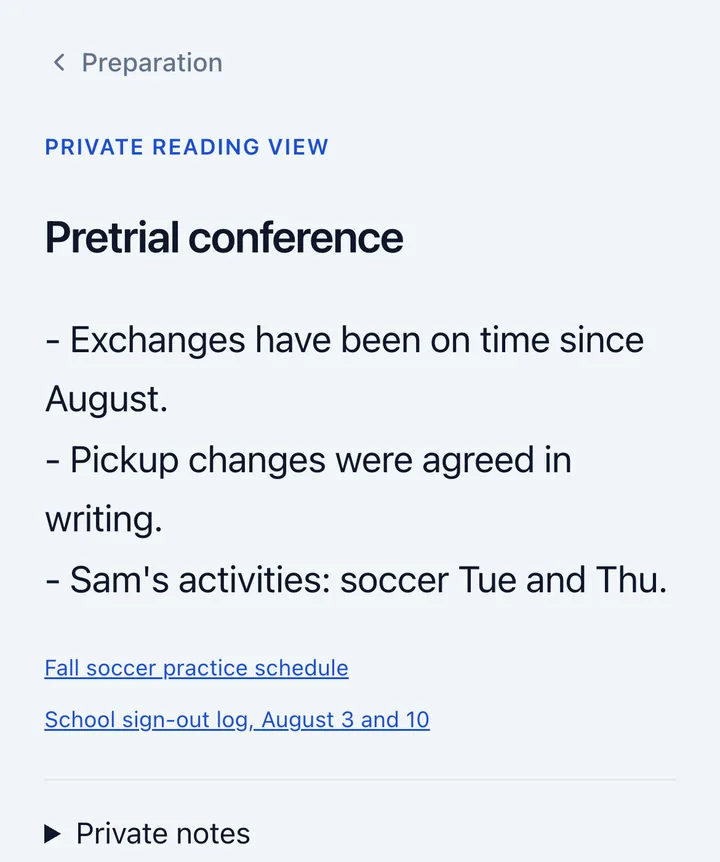
In the courtroom there's little time to search for a sentence. Put your points in the order you plan to raise them, keep each one short, and link it to the exhibit it mentions. The hearing desk shows them in large type, and your private notes stay out of every court export.
A hearing desk linked to each hearing date
Reading order and short notes in large, easy-to-read text
Links from each note to its exhibits
Finish a desk to keep a snapshot, or carry it forward to the next hearing
Not ready to sign up? Start with the free hearing-prep plan
Two free tools on our site need no account. The hearing-prep plan asks three questions and gives you a week-by-week printable checklist, with no AI. The hearing organization check asks 11 questions and suggests your next three organizing steps. When you want reminders and a countdown, add your hearing in the app.
General organizing tips, not legal advice. Your court's own rules come first.
Plans and pricing
Start free. Upgrade only if you need more.
The free plan needs no credit card and never expires. Hearing prep draws on your evidence, documents and timeline, so Full Suite covers all of it; for one hearing, the Hearing Pass is below.
Free
For getting your evidence out of your camera roll and into order.
$0
Free forever — no credit card, nothing to cancel.
One case file, unlimited court case numbers
10 evidence items, 1 GB of storage
Organize, describe, tag, search
Watermarked printable PDF export
6 AI actions to try the tools (one-time, not monthly)
Create your account, then after a short setup you can try Full Suite free for 7 days. Card required; then $24.99/mo or $299/yr (about 82¢ a day) until you cancel. Cancel before day 7 and you pay nothing. Or subscribe now — $299/yr
50% off · 20× the AI
Full Suite Max
Everything in Full Suite, with 20× the AI actions.
$99.99$49.99/mo
or $899/yr$399/yr
Everything in Full Suite: all five tools and the assistant
6,000 AI actions a month (20× Full Suite)
50% off (normally $99.99/mo), locked in as long as you don’t cancel
Already on Full Suite? Get 20× the AI credits for only +$25/mo more (prorated in place)
Clean, printable exports + free attorney & advocate access (on every plan)
$49.99 a month, renews until you cancel. Cancel online in two clicks.
Hearing Pass · one-time
$49 once for 30 days of hearing prep. Nothing renews.
Everything in Full Suite for 30 days from the day you buy it: all five tools, the assistant, AI included, and exports without a watermark. No subscription and nothing to cancel. When the 30 days end you’re back on the free plan, and nothing you added is deleted.
Your case stays private to your account until you invite someone and choose what they see. Data is encrypted in transit and at rest, and we don’t sell your personal information.
Your files stay yours
Originals are kept unchanged. Download your complete Case Bundle, every original file plus a manifest, free on any plan, before or after you cancel.
Cancel anytime, in two clicks
The free plan has nothing to cancel. Paid plans renew until you cancel online in two clicks, and the Hearing Pass never renews.
Organizing software, not a law firm
It organizes the files, dates and messages you provide. It doesn’t give legal advice, choose what you file or predict what a court will do.
Questions, answered straight
Frequently asked questions
How should I prepare for a custody hearing?
Start with the notice and your local rules, then work backward from the date: gather and date your records, put exhibits in order, print early and write a short outline. Many courts post hearing information and self-help guides on their websites. Custody Commander organizes the steps and your material; what to present is your decision, or a question for a licensed attorney where you live.
What should I bring to a custody hearing?
It depends on your court and the type of hearing, so check the notice and your local rules. Many parents bring the notice, copies of current orders, their exhibits in the number of copies the court asks for, a dated timeline and a short outline. The printable checklist on this page covers the basics.
How early should I start preparing for custody court?
As soon as you have the date. Gathering records and printing often take longer than expected, and some courts set exchange or filing deadlines well before the hearing. The free hearing-prep plan on our site builds a week-by-week checklist from three questions, with no signup.
What does the I'm ready button do?
Each hearing gets preparation reminders until you tap I'm ready, and then those reminders stop. It's a simple way to mark that your papers are together. You can still add deadlines and reminders to the hearing whenever you need them.
Can someone helping me see my hearing prep?
Yes, if you invite them. Share chosen sections, such as hearings, the timeline, evidence and documents, with an attorney, advocate or family member by email, with view, comment, download or edit access. Attorneys and advocates join free, and you can revoke access at any time.
Is it free?
The free plan needs no card and never expires. It includes the countdown, reminders and timeline for one case, up to 10 evidence items, and exports watermarked DRAFT. For clean exhibit PDFs, choose a paid plan or the $49 Hearing Pass: 30 days of everything, one time, with no renewal.
Is this legal advice?
No. Custody Commander is organizing software, not a law firm, and it doesn't give legal advice or predict how a hearing will go. It keeps your dates, records and notes in order. For advice about your case, talk to a licensed attorney where you live.
Put your hearing date on the countdown
Add the date, attach the deadlines, and let the reminders run until you're ready. Free plan, no card needed.