How to testify in family court: calm, clear and organized
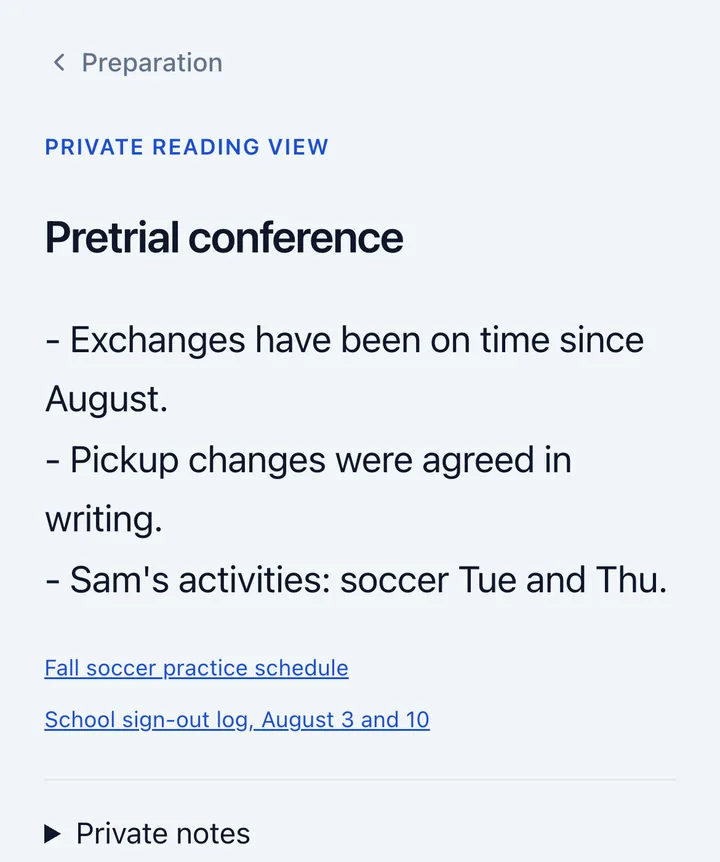
Custody Commander's hearing desk keeps your points in reading order, in large text, with each note linked to the exhibit it mentions. Practice out loud at home, then bring the same notes to the hearing if your court allows them.
Testimony is easiest to follow when it's specific: the date, the time, what you saw or heard, and the exhibit that shows it. Before the hearing, write each point as one short line in the order you expect it to come up. The aim is to remember facts on the stand, not to recite a speech. If a detail is uncertain, write it that way in your notes, so you don't state it more firmly on the stand than you remember it.
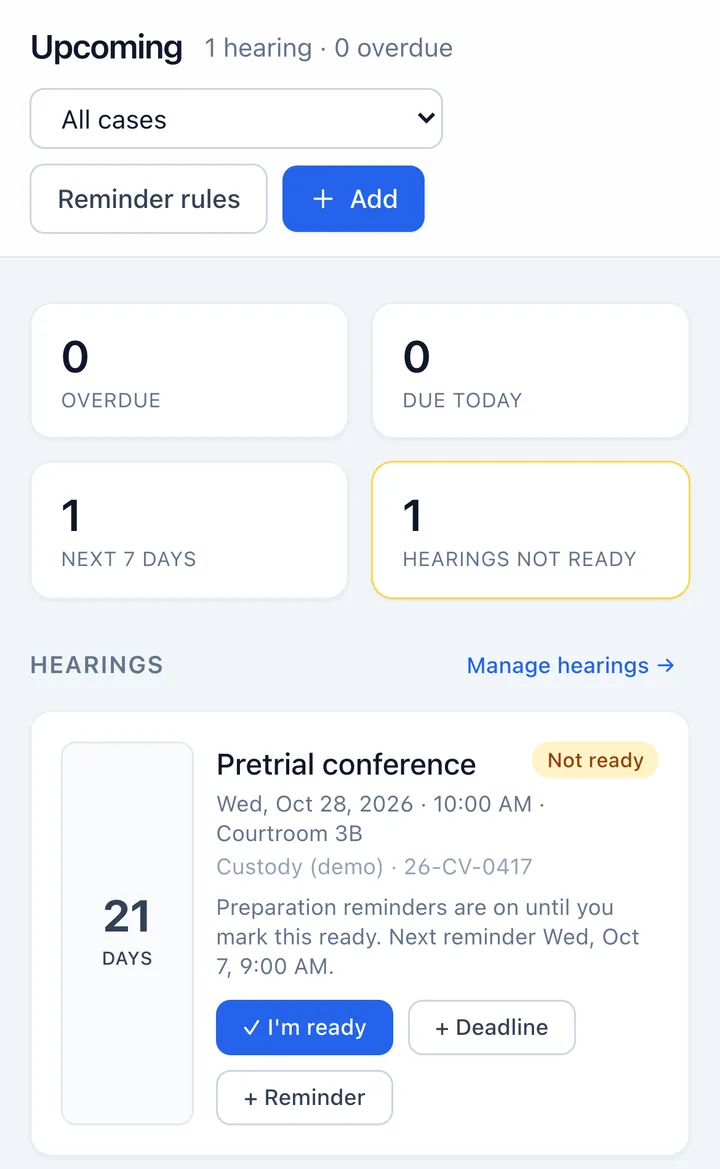
A hearing desk for each hearing, linked to its date
Reading order and short notes in large, easy-to-read text
Links from each note to the exhibits it mentions
Private notes that never go into court exports
Runs in a web browser on a phone or computer; check your court's rules on phones in the courtroom
2of 4
Know which exhibit goes with each point
When you mention a document or photo while testifying, you may be asked what it is, when it was made and how you know. A note that names the exhibit number makes that quick to answer. Check your local rules or ask the clerk how exhibits are marked and handed up in your court.
Exhibits numbered 1, 2, 3 in the order you set, or with a label you type
A printable evidence index with each exhibit's number, date and description
Hearing mode shows one exhibit at a time, full screen, in exhibit order
Arrow keys move between exhibits at counsel table or on a screen-share
3of 4
Practice out loud in the days before
Reading your notes aloud a few times shows where a point runs long or a date is missing. Practice answering a question in one or two sentences, then stopping. A short pause before each answer gives you time to think and makes you easier to follow. Set a few practice sessions on your calendar so they actually happen.
A countdown for each hearing, with its time and courtroom
Preparation reminders until you tap I'm ready
Reminders with a date, an optional time and notes for each practice session
Finish a desk to keep a snapshot, or carry it forward to the next hearing
Much of staying calm on the stand comes down to preparation and pace. Listen to the whole question, answer only that question, and say so if you don't know or don't remember. Speak to the judge rather than the other parent, and keep your tone level even when a question feels unfair. Knowing your timeline well means you aren't searching your memory under pressure.
General organizing tips, not legal advice. Your court's own rules come first.
Plans and pricing
Start free. Upgrade only if you need more.
The free plan needs no credit card and never expires. Hearing prep draws on your evidence, documents and timeline, so Full Suite covers all of it; for one hearing, the Hearing Pass is below.
Free
For getting your evidence out of your camera roll and into order.
$0
Free forever — no credit card, nothing to cancel.
One case file, unlimited court case numbers
10 evidence items, 1 GB of storage
Organize, describe, tag, search
Watermarked printable PDF export
6 AI actions to try the tools (one-time, not monthly)
Create your account, then after a short setup you can try Full Suite free for 7 days. Card required; then $24.99/mo or $299/yr (about 82¢ a day) until you cancel. Cancel before day 7 and you pay nothing. Or subscribe now — $299/yr
50% off · 20× the AI
Full Suite Max
Everything in Full Suite, with 20× the AI actions.
$99.99$49.99/mo
or $899/yr$399/yr
Everything in Full Suite: all five tools and the assistant
6,000 AI actions a month (20× Full Suite)
50% off (normally $99.99/mo), locked in as long as you don’t cancel
Already on Full Suite? Get 20× the AI credits for only +$25/mo more (prorated in place)
Clean, printable exports + free attorney & advocate access (on every plan)
$49.99 a month, renews until you cancel. Cancel online in two clicks.
Hearing Pass · one-time
$49 once for 30 days of hearing prep. Nothing renews.
Everything in Full Suite for 30 days from the day you buy it: all five tools, the assistant, AI included, and exports without a watermark. No subscription and nothing to cancel. When the 30 days end you’re back on the free plan, and nothing you added is deleted.
Your case stays private to your account until you invite someone and choose what they see. Data is encrypted in transit and at rest, and we don’t sell your personal information.
Your files stay yours
Originals are kept unchanged. Download your complete Case Bundle, every original file plus a manifest, free on any plan, before or after you cancel.
Cancel anytime, in two clicks
The free plan has nothing to cancel. Paid plans renew until you cancel online in two clicks, and the Hearing Pass never renews.
Organizing software, not a law firm
It organizes the files, dates and messages you provide. It doesn’t give legal advice, choose what you file or predict what a court will do.
Questions, answered straight
Frequently asked questions
What happens when you testify in family court?
In many courts you're sworn in, then answer questions, usually first from the side that called you and then from the other side. If you represent yourself, the judge may ask you to tell what happened in your own words. The format varies by court and by judge, so it's fine to ask the judge how they want your testimony presented.
Can I bring notes when I testify?
It depends on your court and the judge. Some allow short notes, and some limit what you can have at the witness stand. Check your local rules or ask the clerk before the hearing. In Custody Commander, your hearing desk notes stay private and never go into court exports.
What should I say in custody court?
The app can't tell you what to say or argue, and neither can this page. What it can do is help you keep your own facts in order: the dates, what you saw or heard, and the exhibit that shows it. For advice about what to present, talk to a licensed attorney where you live.
How do I talk to a judge in family court?
Be polite and direct, speak clearly, and address the judge the way your court does, often as "Your Honor." Don't interrupt, wait to be invited before you speak, and keep your tone level. Short answers that stick to facts are the easiest to follow.
What if I get emotional while testifying?
That's common and understandable. Pause, take a breath, and ask for a moment or some water if you need it. Practicing your points aloud beforehand makes the facts easier to reach when you're under stress.
Is it free?
Yes, there's a free plan with no card needed: one case, 10 evidence items, 1 GB and 6 AI actions, with DRAFT-watermarked exports. The Hearing Pass is $49 once for 30 days of everything and never renews.
Is this legal advice?
No. Custody Commander is organizing software, not a law firm, and nothing on this page is legal advice. The tips here are general courtroom habits, not strategy for your case. For advice, talk to a licensed attorney where you live.
Get your testimony notes in order
Start free, add your hearing date, and write short notes linked to your exhibits. Organizing software, not a law firm; not legal advice.