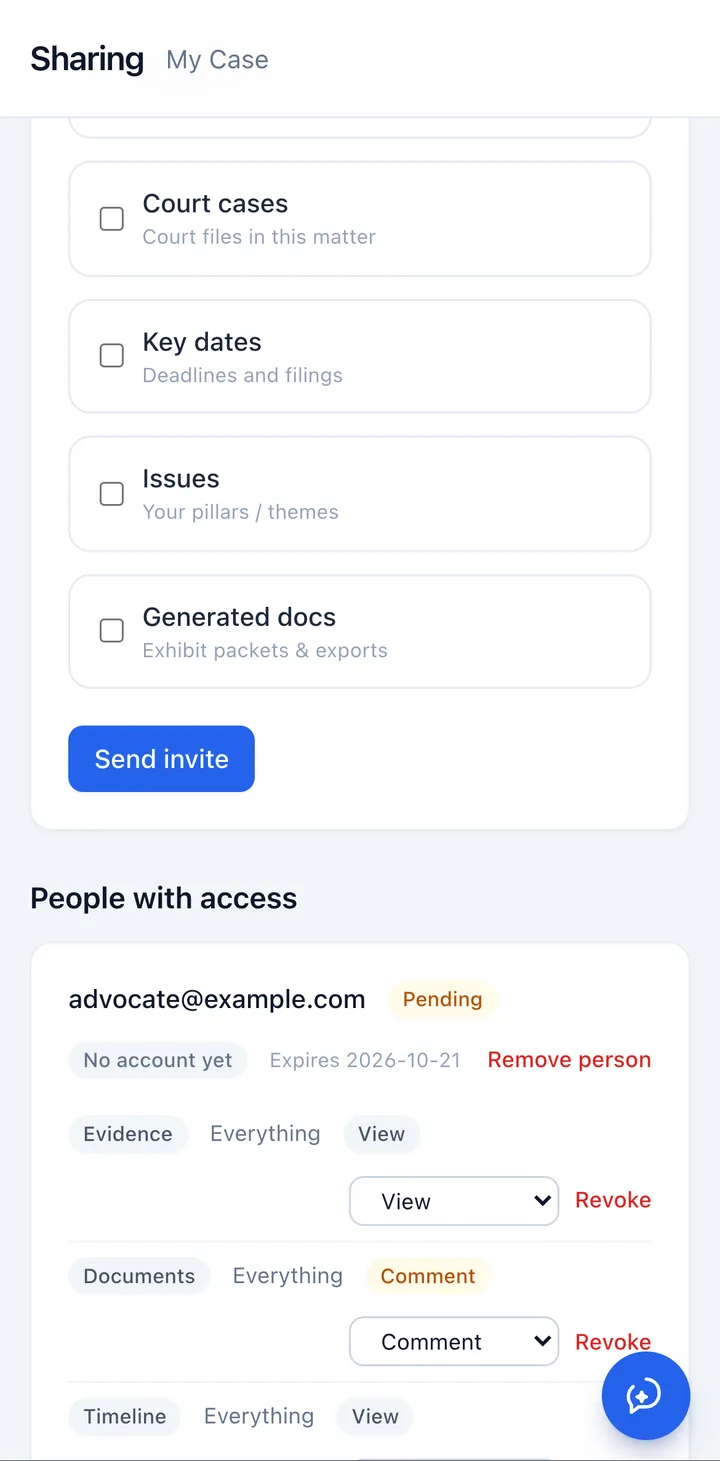
Limited scope representation: share exactly what your attorney needs
When an attorney handles part of a case, Custody Commander lets you share only the sections that task needs, with view, comment or download access. Send a one-PDF handoff packet, and revoke access when the work is done.
Part of the case with an attorney, the rest organized by you
Limited scope representation, also called unbundled legal services, is an arrangement where an attorney takes on defined tasks, such as advice on a document, preparation for a hearing or an appearance at one hearing, while you handle the rest. Whether and how it's offered depends on the rules where you live and on the attorney, and a written agreement usually spells out what's included. Organized records make each task easier to hand over.
Choose sections to share: evidence, documents, timeline, hearings, key dates and more
Set each section to view, comment, download or edit
Attorney accounts join free
2of 5
One handoff packet for the task at hand
An attorney working on one piece of a case needs the background fast. The attorney handoff packet puts it in a single PDF: a case summary, each issue with your own summary and tagged evidence, the timeline and the evidence index. You write the issue summaries; the app never maps law to facts. Send it ahead of the meeting so the attorney can read it first.
Each issue with your own summary and the evidence you tagged to it
The full timeline and the evidence index
One PDF to send ahead or bring to a meeting
3of 5
A timeline an attorney can read in minutes
A dated timeline answers the first questions in any consultation: what happened, when, and what shows it. Keep each entry short and factual, with the related file attached, so the attorney can scan the whole history before you meet. If the task is a single hearing, filter the timeline to the stretch that matters. Attach the file that shows each event, so the attorney sees the source and not only your summary.
Events, evidence, key dates and hearings on one timeline
Limited scope meetings are often short and focused on one task. Have the documents for that task in one place, with the next hearing and its deadlines in view, so the time goes to the task itself rather than to finding papers. Bring your questions written down, in priority order. Afterward, add any new deadline to your reminders the same day.
A document library for filings, orders, reports and correspondence, searchable
A countdown for each hearing, with its time and courtroom
Deadlines and reminders tied to a hearing
Download a single binder tab as one PDF for the task at hand
5of 5
Access that ends when the task does
When the agreed task is finished, you decide what happens to access. Revoke a section or remove a person at any time, and invite them back if you work together again later. Attorneys can keep private work-product notes, which you see only if they release them. Nothing is shared until you send an invite, and each person sees only the sections you chose.
Create your account, then after a short setup you can try Full Suite free for 7 days. Card required; then $24.99/mo or $299/yr (about 82¢ a day) until you cancel. Cancel before day 7 and you pay nothing. Or subscribe now — $299/yr
50% off · 20× the AI
Full Suite Max
Everything in Full Suite, with 20× the AI actions.
$99.99$49.99/mo
or $899/yr$399/yr
Everything in Full Suite: all five tools and the assistant
6,000 AI actions a month (20× Full Suite)
50% off (normally $99.99/mo), locked in as long as you don’t cancel
Already on Full Suite? Get 20× the AI credits for only +$25/mo more (prorated in place)
Clean, printable exports + free attorney & advocate access (on every plan)
$49.99 a month, renews until you cancel. Cancel online in two clicks.
Hearing Pass · one-time
$49 once for 30 days of hearing prep. Nothing renews.
Everything in Full Suite for 30 days from the day you buy it: all five tools, the assistant, AI included, and exports without a watermark. No subscription and nothing to cancel. When the 30 days end you’re back on the free plan, and nothing you added is deleted.
Your case stays private to your account until you invite someone and choose what they see. Data is encrypted in transit and at rest, and we don’t sell your personal information.
Your files stay yours
Originals are kept unchanged. Download your complete Case Bundle, every original file plus a manifest, free on any plan, before or after you cancel.
Cancel anytime, in two clicks
The free plan has nothing to cancel. Paid plans renew until you cancel online in two clicks, and the Hearing Pass never renews.
Organizing software, not a law firm
It organizes the files, dates and messages you provide. It doesn’t give legal advice, choose what you file or predict what a court will do.
Questions, answered straight
Frequently asked questions
What is limited scope representation?
It's an arrangement where an attorney handles specific parts of a case rather than the whole thing, also called unbundled legal services. Examples include advice sessions, help with a document, or an appearance at one hearing. How it works varies by where you live, and the attorney's written agreement sets the scope.
What tasks can a limited scope attorney help with?
It depends on the attorney and the rules where you live. Common examples include reviewing a document you drafted, advising before a hearing or mediation, explaining how a hearing usually runs, or appearing at one hearing. The written agreement should list exactly which tasks are covered.
How do I find a limited scope family law attorney?
Ask attorneys directly whether they offer limited scope or unbundled services. A bar association referral service, a court self-help center or a legal aid office may also know who does. Custody Commander doesn't refer, recommend or rate attorneys.
What can I share with the attorney?
You choose the sections, such as evidence, documents, the timeline, hearings and key dates, and set each one to view, comment, download or edit. Attorney accounts join free. You can revoke a section or remove a person at any time.
Can the attorney's notes stay private?
Yes. Attorneys can keep private work-product notes in the shared case, and you see them only if the attorney releases them. Your own private hearing notes also stay out of court exports.
Is it free?
Yes. The free plan needs no card and includes sharing for one case, with up to 10 evidence items and DRAFT-watermarked exports. Attorneys and advocates join free. The Full Suite is $24.99 a month or $299 a year.
Is this legal advice?
No. Custody Commander is organizing software, not a law firm, and nothing in it is legal advice. It helps you organize your records and share them with the attorney you choose. For advice about your case, talk to a licensed attorney where you live.
Share exactly what your attorney needs
Start free, organize your case file, and invite an attorney to only the sections the task needs. Organizing software, not a law firm; not legal advice.