A long distance custody schedule: travel, calls and costs in one place
Long distance schedules run on travel dates, longer blocks of time and video calls. Custody Commander keeps those dates on one Upcoming list, logs each call on a dated timeline, and tracks travel costs in an expense log built for both parents.
With hours of travel between homes, plans often trade frequent short exchanges for fewer, longer blocks of time. These are common building blocks, described neutrally. The schedule that applies is the one in your order or written agreement, or the one the court decides.
Extended summer time: several weeks in a row with the parent who lives farther away
School breaks: winter, spring and other breaks shared or alternated by year
Long weekends: three-day weekends joined to school holidays
Visits near the child's home: the traveling parent spending time in the child's area
Scheduled calls: set days and times for phone or video calls between visits
2of 4
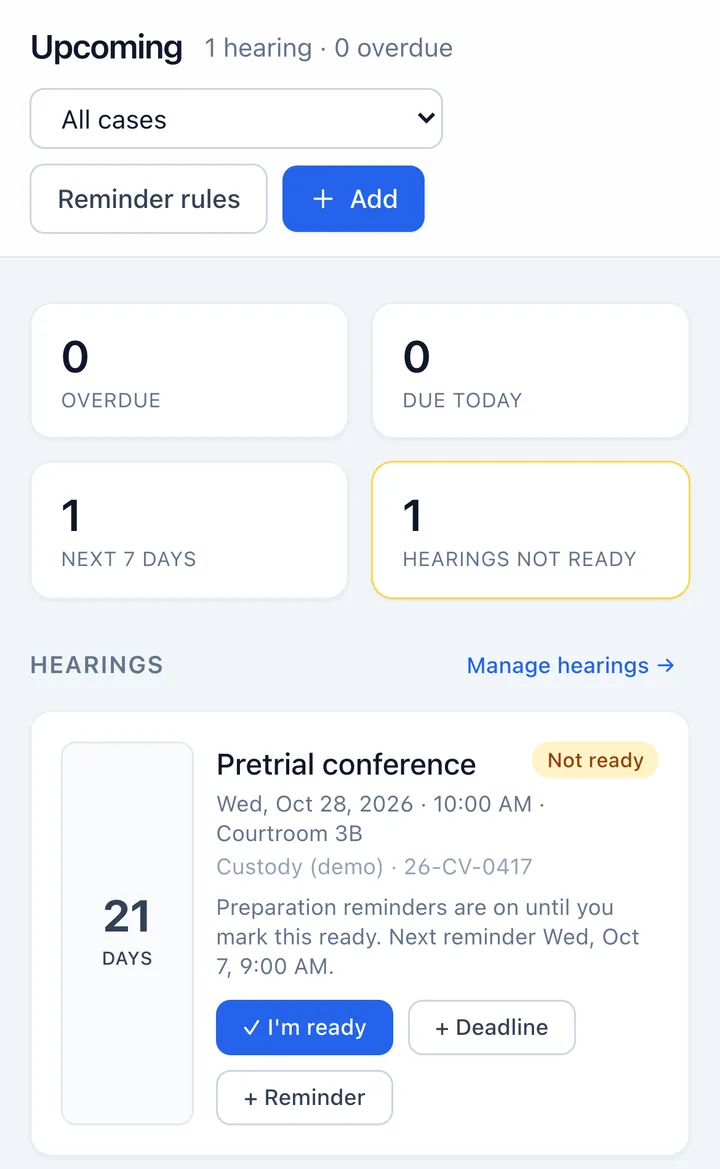
Travel dates, handoffs and booking deadlines on one list
A long distance schedule has more moving parts: travel days, the handoff point, the return date, and the dates by which travel has to be booked or confirmed. Put each one on the Upcoming list so nothing depends on memory.
Reminders with a date, an optional time and a note for flight details or the meeting point
Deadlines you set yourself, such as the date to confirm summer travel, with overdue and due-today counts
Notices only say a reminder is due; the travel details stay in the app
Ask the assistant in plain English to set a reminder (uses AI actions)
Any hearings sit on the same list, each with a countdown
Every phone and video call, logged with the date and time
Between visits, calls carry much of the contact. A short log shows the pattern over time: the scheduled time, whether the call connected and how long it lasted. When the two homes are in different time zones, write each time with its zone.
A timeline entry for each call, such as "Scheduled 7 pm video call; no answer; tried again 7:15"
Entries group by month and can be filtered by year and month
Upload a screenshot of your own call history and set its date
The free phone and video call log on our Templates page has columns for date, time, who called, duration, whether the child was reached and what was said
Export the timeline to PDF or Word; free-plan exports carry a DRAFT mark
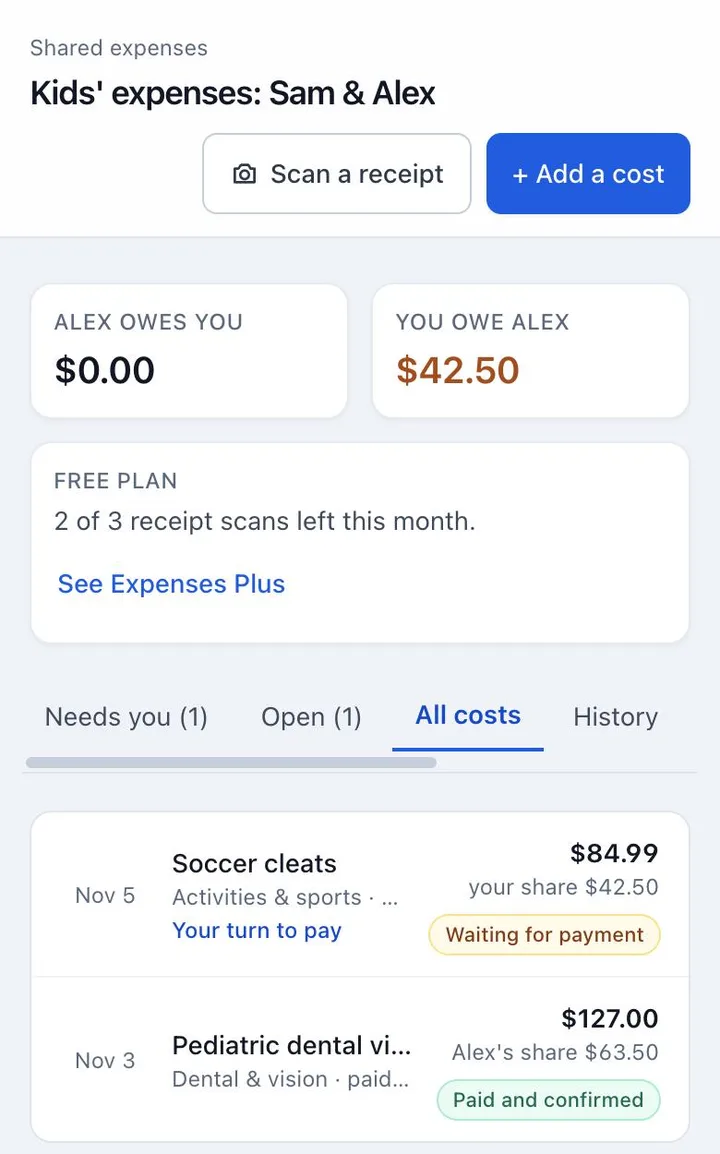
Flights, gas and travel fees add up, and a record of who paid what is easier to keep in one shared place. The shared expense log is built for both parents and free for both. It records costs and receipts; it never decides what either parent owes.
Add a cost with a receipt photo, and request reimbursement of the share you enter
The other parent marks it paid, and you confirm it was received
Comments on each cost, and a history that can't be edited
CSV and PDF reports; Expenses Plus is $3.99 a month or $29 a year and covers both parents
A co-parent who joins sees only the expense log, never your case file
Organizing tips, not legal advice. Your order controls travel and time.
General organizing tips, not legal advice. Your court's own rules come first.
Plans and pricing
Start free. Upgrade only if you need more.
The free plan needs no credit card and never expires. Hearing prep draws on your evidence, documents and timeline, so Full Suite covers all of it; for one hearing, the Hearing Pass is below.
Free
For getting your evidence out of your camera roll and into order.
$0
Free forever — no credit card, nothing to cancel.
One case file, unlimited court case numbers
10 evidence items, 1 GB of storage
Organize, describe, tag, search
Watermarked printable PDF export
6 AI actions to try the tools (one-time, not monthly)
Create your account, then after a short setup you can try Full Suite free for 7 days. Card required; then $24.99/mo or $299/yr (about 82¢ a day) until you cancel. Cancel before day 7 and you pay nothing. Or subscribe now — $299/yr
50% off · 20× the AI
Full Suite Max
Everything in Full Suite, with 20× the AI actions.
$99.99$49.99/mo
or $899/yr$399/yr
Everything in Full Suite: all five tools and the assistant
6,000 AI actions a month (20× Full Suite)
50% off (normally $99.99/mo), locked in as long as you don’t cancel
Already on Full Suite? Get 20× the AI credits for only +$25/mo more (prorated in place)
Clean, printable exports + free attorney & advocate access (on every plan)
$49.99 a month, renews until you cancel. Cancel online in two clicks.
Hearing Pass · one-time
$49 once for 30 days of hearing prep. Nothing renews.
Everything in Full Suite for 30 days from the day you buy it: all five tools, the assistant, AI included, and exports without a watermark. No subscription and nothing to cancel. When the 30 days end you’re back on the free plan, and nothing you added is deleted.
Your case stays private to your account until you invite someone and choose what they see. Data is encrypted in transit and at rest, and we don’t sell your personal information.
Your files stay yours
Originals are kept unchanged. Download your complete Case Bundle, every original file plus a manifest, free on any plan, before or after you cancel.
Cancel anytime, in two clicks
The free plan has nothing to cancel. Paid plans renew until you cancel online in two clicks, and the Hearing Pass never renews.
Organizing software, not a law firm
It organizes the files, dates and messages you provide. It doesn’t give legal advice, choose what you file or predict what a court will do.
Questions, answered straight
Frequently asked questions
What does a long distance custody schedule look like?
It varies. Long distance plans often use fewer, longer blocks of time, such as extended summer time, alternating school breaks and long weekends, plus scheduled calls between visits. These are common patterns, not recommendations; your order or agreement, or the court, decides the schedule.
How do I keep track of video calls?
Log each call as a dated entry: the scheduled time with its time zone, whether it connected and how long it lasted. Add a screenshot of your own call history if you like, with its date. Paper works too: the free phone and video call log has a column for each of these.
Can both parents track travel costs?
Yes. The shared expense log is free for both parents, with unlimited expenses and receipt photos, reimbursement requests and a history that can't be edited. It records what each parent enters; it doesn't decide what anyone owes under an order. Expenses Plus is $3.99 a month or $29 a year and covers both of you.
Can I use it if the parents live in different states?
Yes. Custody Commander works the same wherever you live, in a web browser on your phone or computer. One case file can hold more than one court case number, each with its own deadlines and documents. Questions about which court's rules apply go to a licensed attorney where you live.
What if one parent plans to move farther away?
Moves are governed by your court's rules and your state's law, and many orders have their own notice terms. Custody Commander can't advise on that. A licensed attorney where you live or your court's self-help center can explain the options, and your records stay organized in the meantime.
Is it free?
Yes, there's a free plan with no card needed for one case, with the Upcoming list, the timeline and up to 10 evidence items; its exports carry a DRAFT mark. The shared expense log is free for both parents. Full Suite is $24.99 a month or $299 a year.
Is this legal advice?
No. Custody Commander is organizing software, not a law firm. It keeps your schedule, calls and costs in order; it doesn't suggest a schedule or predict how a court will handle distance. For advice, talk to a licensed attorney where you live.
Keep a long distance schedule in one place
Put each trip on your list, log each call and share travel costs in one log. Free plan, no card needed.