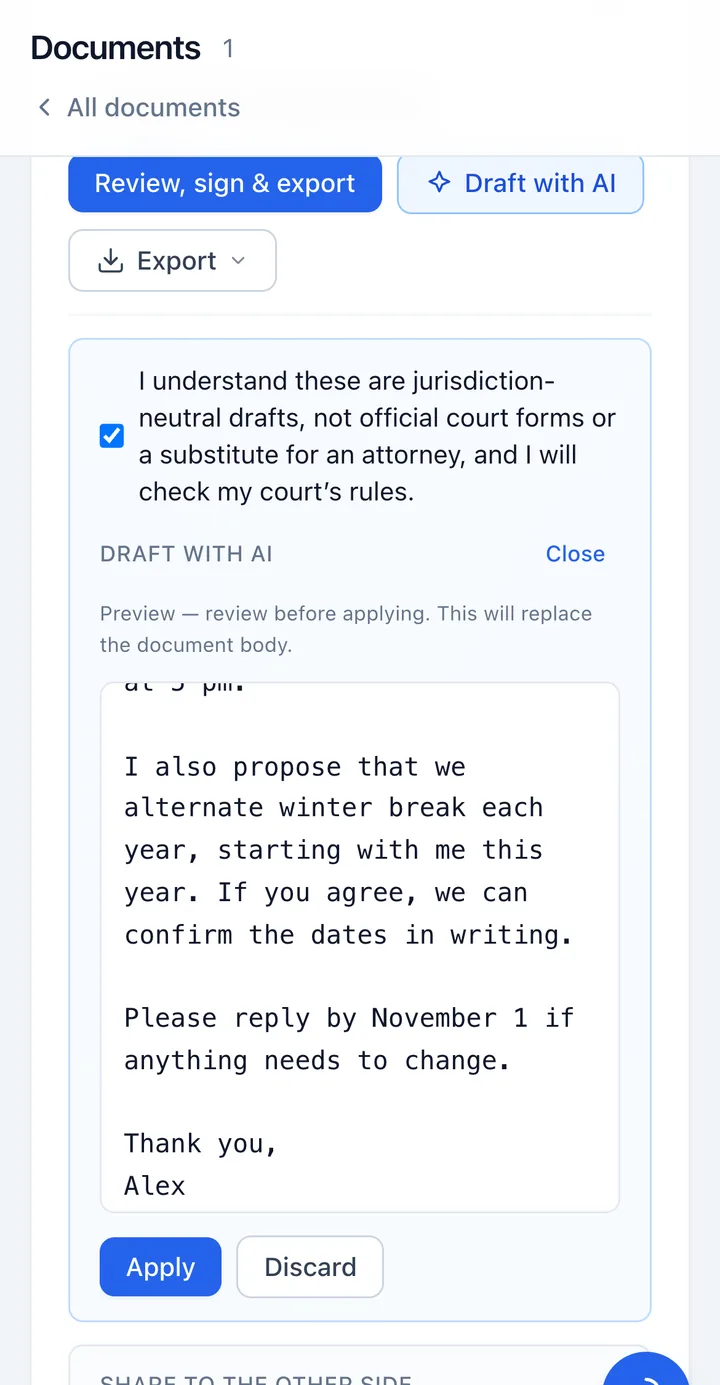
Start from a template or an AI draft built from your case timeline and documents, with [placeholders] for anything it doesn't know. You review every line, finish it and send it the way your mediator asks.
A mediation statement, sometimes called a mediation brief, gives the mediator background before the first session: the children, how the schedule works now, which topics are open and what you'd like to discuss. Not every mediator asks for one, and formats differ, so follow the instructions you're given. Writing one also helps you sort out your own priorities before the session.
Templates are starting points, not official court forms.
In the app
Real case details like the caption and court case number merged into templates
Headings and [placeholders] so you can see what's still missing
Export to PDF or Word
A free mediation statement template on our Templates page, in Word and PDF, with no signup
2of 5
A first draft built from what you've already recorded
The hardest part of a statement is often the blank page. AI drafting writes a first pass grounded in your own case records and leaves [placeholders] for facts it doesn't have, instead of filling them in. Then you edit it until every sentence is accurate and in your own words.
AI drafting uses AI actions: the free plan has 6 to try; Full Suite includes 300 a month.
In the app
Drafts or revises a document using your case's own records (uses AI actions)
A conservative text check flags statements to review; it isn't a truth checker or legal analysis
At sign and export you confirm you prepared and reviewed it, and that the software provider didn't review it
Nobody at Custody Commander reviews or edits your document
3of 5
Background in date order
A statement's background section works best as a short, dated list rather than a long story. The Case Timeline Summary template gives you that list to attach or paste in. Keep each line to a date and a plain fact, and leave out anything the mediator didn't ask for. If a date matters, note where it comes from.
Case Timeline Summary template with [placeholders]
A master timeline of events, dated files, key dates and hearings to pull from
Filter by type, year or month to find the dates that matter for mediation
Mediators collect statements in different ways: by email, through a program's own system or on paper. Export your finished statement and send it exactly as instructed, by the deadline you were given. If the mediator would rather look at records directly, you can invite them to chosen sections instead.
Free-plan exports carry a DRAFT watermark; paid plans export clean.
In the app
Export to PDF or Word for email or printing
Invite a mediator by email to view chosen sections, such as documents or the timeline
Set access to view, comment or download, and revoke it any time
Keep the version you sent in your document library
5of 5
Be ready to talk about it
Once the statement is written, the mediator may ask you about it in the session. Practicing your main points out loud with Mediation Coach helps you explain them briefly and calmly, without reading from the page.
Check these against your mediator's instructions, which come first.
Tick them off as you go. Nothing you tick is saved or sent.
Want a layout to start from? The free Mediation Statement Template has eight numbered parts with [brackets] to replace with your own words, from the children and the current arrangement to the questions still open. No sign-up.
Create your account, then after a short setup you can try Full Suite free for 7 days. Card required; then $24.99/mo or $299/yr (about 82¢ a day) until you cancel. Cancel before day 7 and you pay nothing. Or subscribe now — $299/yr
50% off · 20× the AI
Full Suite Max
Everything in Full Suite, with 20× the AI actions.
$99.99$49.99/mo
or $899/yr$399/yr
Everything in Full Suite: all five tools and the assistant
6,000 AI actions a month (20× Full Suite)
50% off (normally $99.99/mo), locked in as long as you don’t cancel
Already on Full Suite? Get 20× the AI credits for only +$25/mo more (prorated in place)
Clean, printable exports + free attorney & advocate access (on every plan)
$49.99 a month, renews until you cancel. Cancel online in two clicks.
Hearing Pass · one-time
$49 once for 30 days of hearing prep. Nothing renews.
Everything in Full Suite for 30 days from the day you buy it: all five tools, the assistant, AI included, and exports without a watermark. No subscription and nothing to cancel. When the 30 days end you’re back on the free plan, and nothing you added is deleted.
Your case stays private to your account until you invite someone and choose what they see. Data is encrypted in transit and at rest, and we don’t sell your personal information.
Your files stay yours
Originals are kept unchanged. Download your complete Case Bundle, every original file plus a manifest, free on any plan, before or after you cancel.
Cancel anytime, in two clicks
The free plan has nothing to cancel. Paid plans renew until you cancel online in two clicks, and the Hearing Pass never renews.
Organizing software, not a law firm
It organizes the files, dates and messages you provide. It doesn’t give legal advice, choose what you file or predict what a court will do.
Questions, answered straight
Frequently asked questions
What is a mediation statement?
It's a short written summary for the mediator, sometimes called a mediation brief. In custody mediation it usually covers the children, the current schedule, the open topics and what each parent hopes to discuss. Formats vary, so follow your mediator's instructions.
How do I prepare a mediation statement?
Start with the mediator's instructions on content, length and deadline. Then gather the basics, list the open topics, describe your proposal in neutral words and add a short dated timeline. The checklist on this page walks through each step. Follow any page limit you're given; without one, a few pages with only the attachments requested is easier for a mediator to read.
Is there a free mediation statement template?
Yes. A free mediation statement template is on our Templates page in Word and PDF, with no signup. In the app, the Case Timeline Summary template and AI drafting can help you fill in background from your own records.
Is a custody mediation statement shared with the other parent?
It depends on the mediator and your court's rules. Some statements stay with the mediator; others are exchanged. Ask before you write, since the answer may change what you include. If it will be shared, write every line as if the other parent is reading it with you.
Can AI write my mediation statement?
AI drafting can produce a starting point from records you've added, with [placeholders] for anything it doesn't know. The text check flags statements worth a second look, but it can't tell you whether something is true. You complete it, review every statement and confirm at export that you prepared it. Nobody at Custody Commander reviews it.
Is it free?
The free plan needs no card: one case, up to 10 evidence items, 6 AI actions to try drafting and DRAFT-watermarked exports. Full Suite ($24.99/mo or $299/yr) includes 300 AI actions a month and clean exports. Mediation Coach practice is on paid plans, not the free plan or the 7-day trial.
Can I draft documents in every state?
In most states the app drafts jurisdiction-neutral documents from templates, with [placeholders] for your court's details, and they aren't official court forms. In a few states, drafting stays off until that state's review is finished; the app says so when you start a draft. Organizing evidence, the timeline and exports work in every state.
Is this legal advice?
No. Custody Commander is organizing software, not a law firm. Templates aren't official court forms, and the app doesn't tell you what to propose. For advice about what to include, talk to a licensed attorney where you live.
Start your mediation statement
Open the template or ask for a first draft from your records, then finish it in your own words.