The Motion to Continue template fills in the hearing already set in your case and leaves [placeholders] for your reason and the new date you're asking for. Every hearing, deadline and reminder stays on one Upcoming list, so dates don't get crossed.
The parts of a continuance request, laid out for you
A request to reschedule usually says which hearing is set and when, why more time is needed, and what new date is proposed. The Motion to Continue template follows that order and pulls the hearing's purpose, date, time and place from your case. Your court may have its own form or a deadline for asking, so check its rules first. Where the template and the court's form differ, follow the court's form.
The current setting: the hearing's purpose, date and time, merged from your case
A reason section with a [placeholder] for your specific, factual explanation
A good-faith statement, with room to say whether you asked the other party and what they said
Your request for a new date, or a date convenient to the court
Caption and signature block
2of 4
Every hearing and deadline on one list
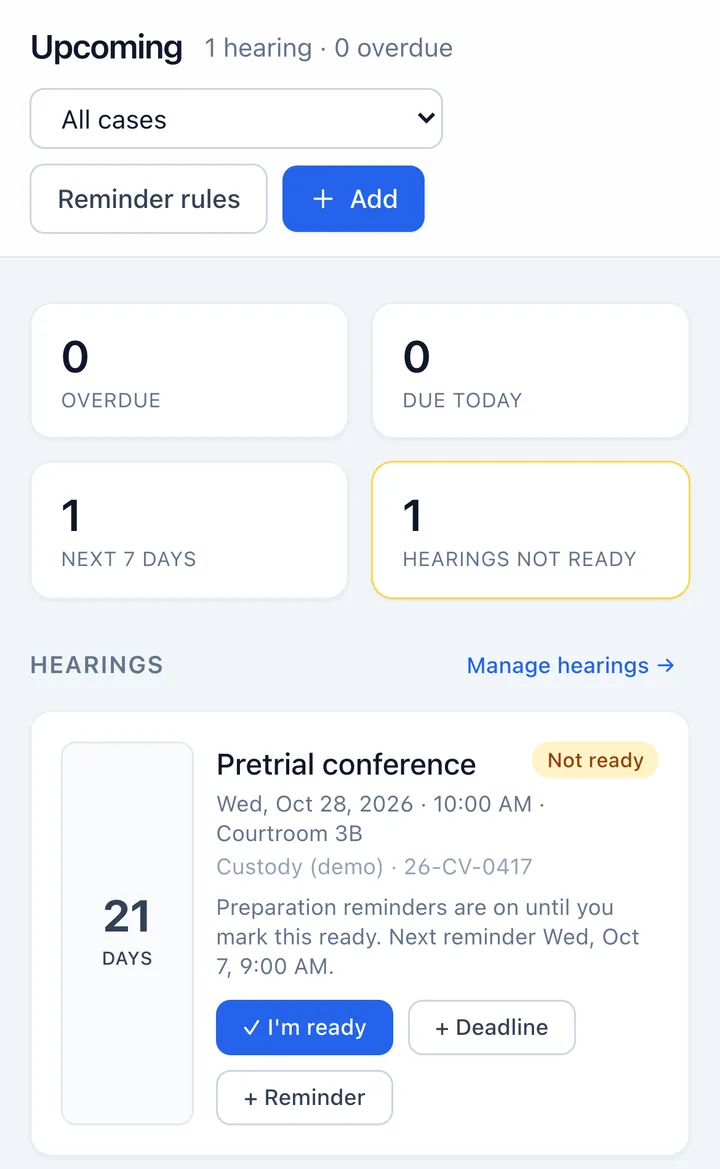
When a hearing date changes, every reminder and deadline you set around it needs a second look, and it's easy to keep working from the old date. Keep each hearing on the Upcoming list with its countdown, time and courtroom, and attach its deadlines and reminders to it. If the date moves, you update it in one place.
A countdown for each hearing, with its time and courtroom
Deadlines and reminders tied to a specific hearing
Preparation reminders until you tap I'm ready
Push and email notices only say you have a reminder; the details stay in the app
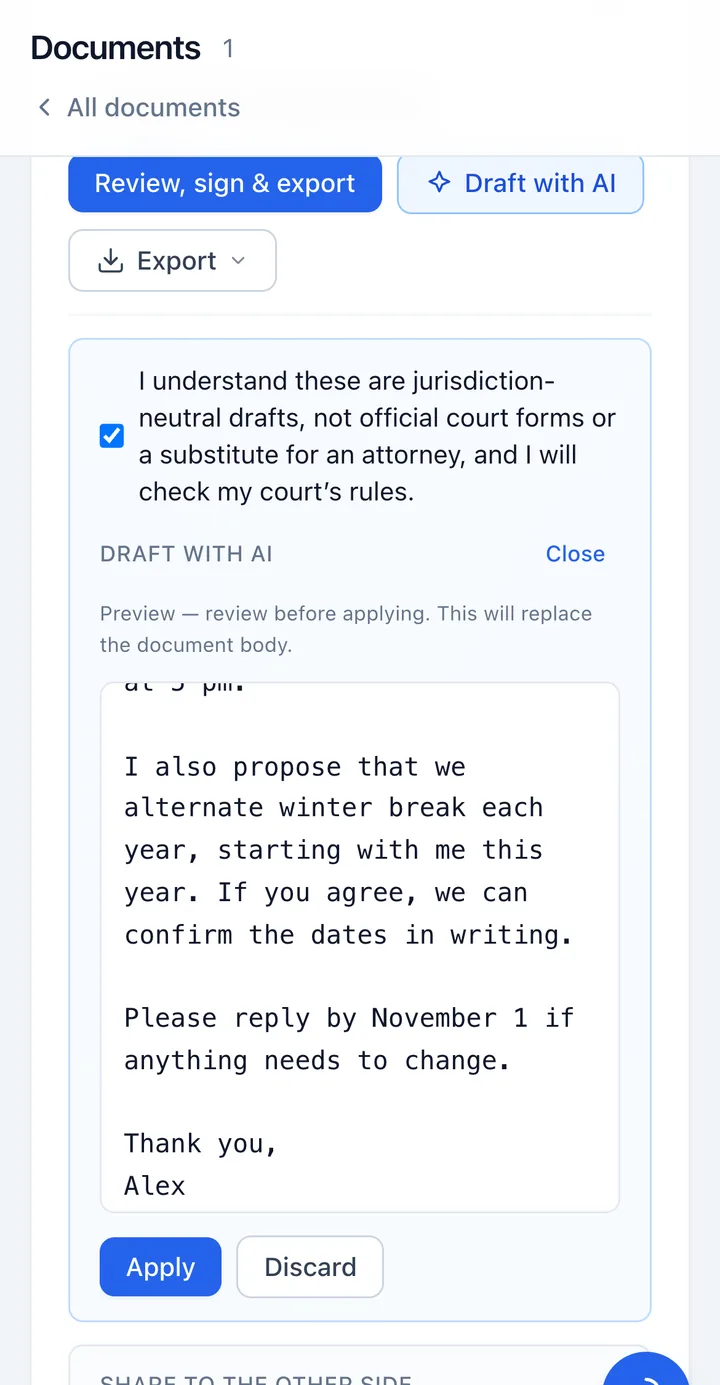
The reason is the part only you can write. Say what happened, when you learned of it and what you've done about it, with dates. If a document backs it up, such as a work schedule or a notice that reached you late, add it to your evidence and cite it by number. AI drafting can turn your notes into the reason paragraph and leaves [placeholders] for anything it doesn't know.
AI drafting uses AI actions. The free plan includes 6 to try it.
In the app
AI drafting from your own notes and records
Preview the draft, then apply or discard it
Upload a supporting document, up to 25 MB, and give it an exhibit number
A text check flags statements to review; it isn't legal analysis
4of 4
Related templates and a final read-through
If your court uses a proposed order or a notice of a new hearing date, the same template menu has those too, so each paper starts with the same caption and case number. Read everything once more against the hearing notice before you export. Nobody at Custody Commander reviews your documents.
Create your account, then after a short setup you can try Full Suite free for 7 days. Card required; then $24.99/mo or $299/yr (about 82¢ a day) until you cancel. Cancel before day 7 and you pay nothing. Or subscribe now — $299/yr
50% off · 20× the AI
Full Suite Max
Everything in Full Suite, with 20× the AI actions.
$99.99$49.99/mo
or $899/yr$399/yr
Everything in Full Suite: all five tools and the assistant
6,000 AI actions a month (20× Full Suite)
50% off (normally $99.99/mo), locked in as long as you don’t cancel
Already on Full Suite? Get 20× the AI credits for only +$25/mo more (prorated in place)
Clean, printable exports + free attorney & advocate access (on every plan)
$49.99 a month, renews until you cancel. Cancel online in two clicks.
Hearing Pass · one-time
$49 once for 30 days of hearing prep. Nothing renews.
Everything in Full Suite for 30 days from the day you buy it: all five tools, the assistant, AI included, and exports without a watermark. No subscription and nothing to cancel. When the 30 days end you’re back on the free plan, and nothing you added is deleted.
Your case stays private to your account until you invite someone and choose what they see. Data is encrypted in transit and at rest, and we don’t sell your personal information.
Your files stay yours
Originals are kept unchanged. Download your complete Case Bundle, every original file plus a manifest, free on any plan, before or after you cancel.
Cancel anytime, in two clicks
The free plan has nothing to cancel. Paid plans renew until you cancel online in two clicks, and the Hearing Pass never renews.
Organizing software, not a law firm
It organizes the files, dates and messages you provide. It doesn’t give legal advice, choose what you file or predict what a court will do.
Questions, answered straight
Frequently asked questions
What is a motion to continue in family court?
It's a request asking the court to move a hearing or trial to a later date. Courts call it different things, such as a motion for continuance or a request to reschedule, and many have their own forms and deadlines. Check your court's rules or ask the clerk's office how yours handles it.
Will the court grant my continuance?
Only the court decides, under its own rules and the facts. Custody Commander doesn't predict outcomes or tell you whether to ask. It helps you state your reason clearly, keep the dates straight and organize any supporting documents.
What should the reason say?
That's yours to decide and write. The template asks for a specific, factual explanation in your own words and a statement that the request is made in good faith. A licensed attorney where you live can advise on your situation.
Can a custody hearing be rescheduled by agreement with the other parent?
Courts handle agreed requests differently, and some still require a written motion or the judge's approval. The template has room to say whether you asked the other party and what they said. Check your court's rules or ask the clerk's office.
What happens to my other deadlines if the hearing moves?
It depends on your court and on the notice or order that resets the hearing; some deadlines are tied to the hearing date and some aren't. Check the new notice and your court's rules, then update each deadline on Upcoming. Because deadlines and reminders can be tied to a hearing, you can see at a glance which ones to recheck.
Does the template fill in my hearing date?
Yes, when the hearing is saved in your case. The template pulls in the hearing's purpose, date, time and location, and leaves a [placeholder] for anything missing. Every hearing also appears on Upcoming with a countdown and reminders.
Is it free?
Yes. The free plan needs no card and includes the document templates, the Upcoming list and reminders, with exports marked DRAFT and 6 AI actions to try drafting. Paid plans export clean; Full Suite is $24.99 a month or $299 a year.
Can I draft documents in every state?
In most states the app drafts jurisdiction-neutral documents from templates, with [placeholders] for your court's details, and they aren't official court forms. In a few states, drafting stays off until that state's review is finished; the app says so when you start a draft. Organizing evidence, the timeline and exports work in every state.
Is this legal advice?
No. Custody Commander is organizing software, not a law firm, and nothing here is legal advice. Nobody at Custody Commander reviews your documents. For advice about your hearing, talk to a licensed attorney where you live or ask your court's self-help center about free help.
Start your continuance request
Pull in the hearing date, write your reason in your own words and keep every date on one list. Free plan, no card needed.