
Opening and closing notes

Opening statement notes for a custody hearing, linked to exhibits

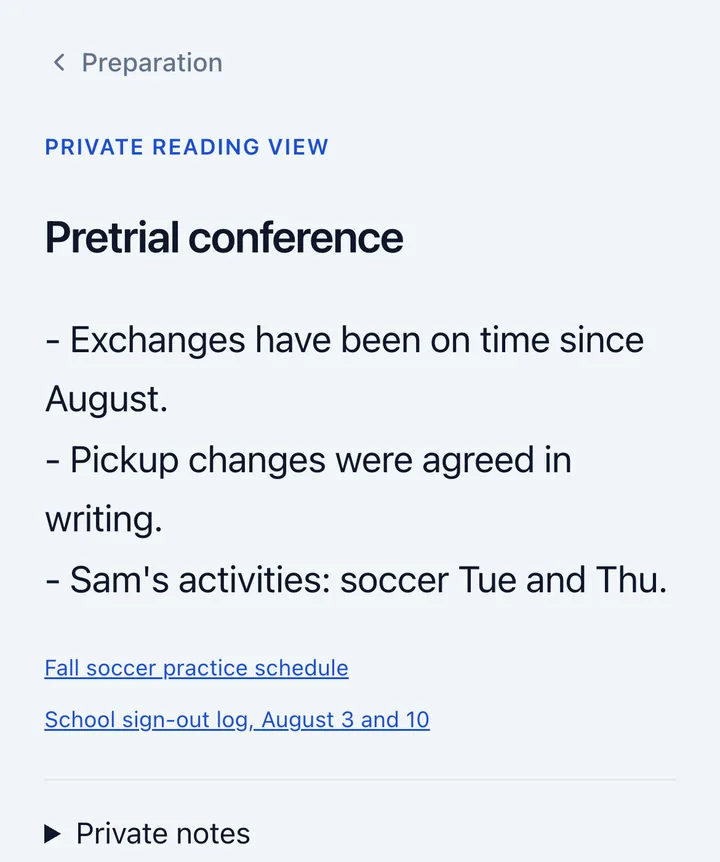
Write a short opening statement and closing notes in your own words in the hearing desk. Each point shows in large text, in reading order, with a link to the numbered exhibit it mentions.

Start free

Free plan, no card needed. Organizing software, not a law firm; not legal advice.

See plans: Free, single tools, Full Suite
A private reading view titled Pretrial conference: three short points in large text about on-time exchanges, pickup changes agreed in writing and soccer practice days, with links to two exhibits below
App screen from a demo case with made-up names.
  • Free plan, no card needed
  • Your notes stay private, out of court exports
  • Exhibits numbered in the order you set
  • Organizing software, not a law firm

1of 5

A short opening, in an order the judge can follow

An opening statement is usually a brief preview, not testimony or argument, and some judges ask for it to be very short or skip it. A simple structure keeps it brief: who you are and your relationship to the child, what you're asking the court to consider, and which exhibits or witnesses relate to each point. What you ask for is your decision, made with a licensed attorney's advice if you have one.

Write my opening notes

Free plan, no card needed.

In the app

  • A hearing desk for each hearing, with your points in reading order
  • Large text that's easy to read at a glance
  • Links from each point to the exhibit it mentions
  • Private notes that never go into court exports

2of 5

Every point paired with an exhibit you actually have

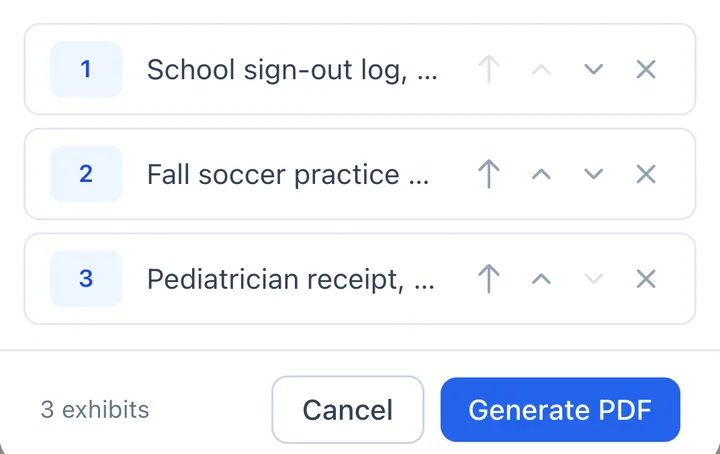
A preview is only as useful as what backs it up. When a note says what the evidence will show, link it to the exhibit that shows it, and confirm that exhibit is in your binder. A point with no exhibit or witness behind it is worth spotting before the hearing, not during it. After any reorder, check the exhibit numbers in your notes against the final PDF.

  • Exhibits numbered 1, 2, 3 in the order you set, or with a label you type
  • Reorder exhibits until they follow the order of your notes
  • One exhibit PDF with a cover and index page
  • A printable evidence index with number, date and description for each exhibit
Match my notes to exhibits

Free-plan PDFs are watermarked DRAFT.

Three exhibits numbered 1, 2 and 3 (a school sign-out log, a fall soccer practice schedule and a pediatrician receipt) with arrows to reorder them and a Generate PDF button

3of 5

Closing notes that look back at what was shown

A closing is usually a short summary of what the judge actually heard and saw, pointing back to specific exhibits and testimony. Keep your closing points apart from your opening, and leave room to add or cross out lines as the hearing goes, since plans can change once it starts.

In the app

  • Write opening and closing points as separate short notes in your reading order
  • Finish a desk to keep a snapshot of what you prepared
  • Carry a desk forward to the next hearing instead of starting over
  • Hearing mode shows exhibits one at a time, full screen, with your timeline

4of 5

A dated timeline behind every sentence

An opening often walks through events in order. A dated timeline makes that order easy to check: each line has the date, what happened and which exhibit shows it. If a date in your notes doesn't match the timeline, fix it before you say it out loud in court.

In the app

  • Events, dated evidence, key dates and hearings on one timeline
  • Filter by type, year or month to see one stretch of time
  • Export the timeline to PDF or Word
  • The in-app assistant adds a dated entry when you describe what happened

5of 5

Practice time, counted down to the hearing

An opening gets clearer with a few run-throughs spread over several days, not one late-night read. Add the hearing date, set a reminder for each practice session, and tap I'm ready once your notes and exhibits line up.

In the app

  • A countdown for each hearing, with its time and courtroom
  • Preparation reminders until you tap I'm ready
  • Reminders with a date, an optional time and notes
  • Push and email notices only say there's a reminder; the details stay in the app

How it works

3 steps to opening and closing notes

  1. Outline

    Write a few short points in the order you'll say them.

  2. Link exhibits

    Connect each point to the numbered exhibit that shows it.

  3. Practice

    Read it aloud from the large-text view and time yourself.

Start free

Start free today — no credit card required.

Free checklist · no sign-up

How to structure an opening statement for a custody hearing

Structure and delivery tips only; what you ask the court for is your decision.

Tick them off as you go. Nothing you tick is saved or sent.

Write my notes in the hearing desk

Organizing tips, not legal advice.

Plans and pricing

Start free. Upgrade only if you need more.

The free plan needs no credit card and never expires. Hearing prep draws on your evidence, documents and timeline, so Full Suite covers all of it; for one hearing, the Hearing Pass is below.

Free

For getting your evidence out of your camera roll and into order.

$0

Free forever — no credit card, nothing to cancel.

  • One case file, unlimited court case numbers
  • 10 evidence items, 1 GB of storage
  • Organize, describe, tag, search
  • Watermarked printable PDF export
  • 6 AI actions to try the tools (one-time, not monthly)

Single Product

Case Builder

Just the one tool you need right now. Switch or upgrade anytime.

$14.99/mo

or $119/yr per product

  • Case Builder on its own: your timeline, documents, hearings, to-dos and the assistant
  • 80 AI actions a month for that tool
  • Unwatermarked exports from that tool
  • Everything still lands in one case file
Get Case Builder

$14.99 a month, renews until you cancel. Cancel online in two clicks.

50% off · 20× the AI

Full Suite Max

Everything in Full Suite, with 20× the AI actions.

$99.99$49.99/mo

or $899/yr $399/yr

  • Everything in Full Suite: all five tools and the assistant
  • 6,000 AI actions a month (20× Full Suite)
  • 50% off (normally $99.99/mo), locked in as long as you don’t cancel
  • Already on Full Suite? Get 20× the AI credits for only +$25/mo more (prorated in place)
  • Clean, printable exports + free attorney & advocate access (on every plan)
Get Full Suite Max

$49.99 a month, renews until you cancel. Cancel online in two clicks.

Hearing Pass · one-time

$49 once for 30 days of hearing prep. Nothing renews.

Everything in Full Suite for 30 days from the day you buy it: all five tools, the assistant, AI included, and exports without a watermark. No subscription and nothing to cancel. When the 30 days end you’re back on the free plan, and nothing you added is deleted.

Get the Hearing Pass — $49
  • No card for the free plan
  • Plans renew until you cancel. Cancel online anytime, in two clicks.
  • Only you pay — the other parent never joins

Compare all plans on the pricing page →

Good to know before you start

  • Private by default

    Your case stays private to your account until you invite someone and choose what they see. Data is encrypted in transit and at rest, and we don’t sell your personal information.

  • Your files stay yours

    Originals are kept unchanged. Download your complete Case Bundle, every original file plus a manifest, free on any plan, before or after you cancel.

  • Cancel anytime, in two clicks

    The free plan has nothing to cancel. Paid plans renew until you cancel online in two clicks, and the Hearing Pass never renews.

  • Organizing software, not a law firm

    It organizes the files, dates and messages you provide. It doesn’t give legal advice, choose what you file or predict what a court will do.

Questions, answered straight

Frequently asked questions

What should a custody hearing opening statement include?

Commonly: who you are, what you're asking the court to consider, and a short preview of the facts and exhibits you'll present. The app doesn't tell you what to ask for; that decision is yours, ideally with advice from a licensed attorney where you live. Custody Commander helps you write and organize the notes.

How long should an opening statement be in family court?

Often a few minutes or less, and some judges skip openings or ask for a quick summary instead. Ask the clerk how your court usually handles them, and keep a short version ready. Practice with a timer so you know how long yours runs.

What's the difference between an opening statement and a closing argument?

An opening previews what you expect to show; a closing sums up what was actually presented and points back to it. Neither is testimony. Many people keep separate notes for each and update the closing during the hearing.

What if the judge skips opening statements?

That happens, especially at shorter hearings. Keep a 30-second version of your main points ready, and be prepared to move straight to your evidence or testimony. Your full notes stay in the hearing desk, so you can still follow your reading order.

Can I read my opening statement from notes?

Many people speak from short notes, but practice varies by court and judge, so check your local rules. The hearing desk shows your points in large text in reading order, so a glance is enough. Speaking from points rather than a full script usually sounds more natural.

Is it free?

Yes, there's a free plan with no card needed: one case, 10 evidence items, 1 GB and 6 AI actions, with DRAFT-watermarked exports. For clean exhibit PDFs, choose a paid plan or the one-time Hearing Pass ($49 for 30 days of everything, never renews).

Is this legal advice?

No. Custody Commander is organizing software, not a law firm, and nothing on this page is legal advice. It helps you write, order and practice your own notes. For advice about what to present or request, talk to a licensed attorney where you live.

Write your opening and closing notes

Start free, add your hearing, and keep short notes linked to your numbered exhibits. Organizing software, not a law firm; not legal advice.

Start free today — no credit card required