Draft a response to a custody motion, point by point
Outline each request in the motion and your factual answer to it, then draft from the Response to Motion template with [placeholders] for your position and facts. Put the response deadline on your Upcoming list as soon as you've read the papers.
A private outline of their points and your answers
Export to Word or PDF
1of 4
Find the deadline first, then put it where you'll see it
Response deadlines are set by court rules and sometimes by the papers or a court order, and they can be short. Read everything you were served, look for a date or a time limit, and confirm it with the clerk's office or your court's rules. Then add it to the app with a reminder, so the date is in front of you each time you open your case.
Add a deadline with a date, an optional time and notes
Push or email reminders only say you have a reminder; the details stay in the app
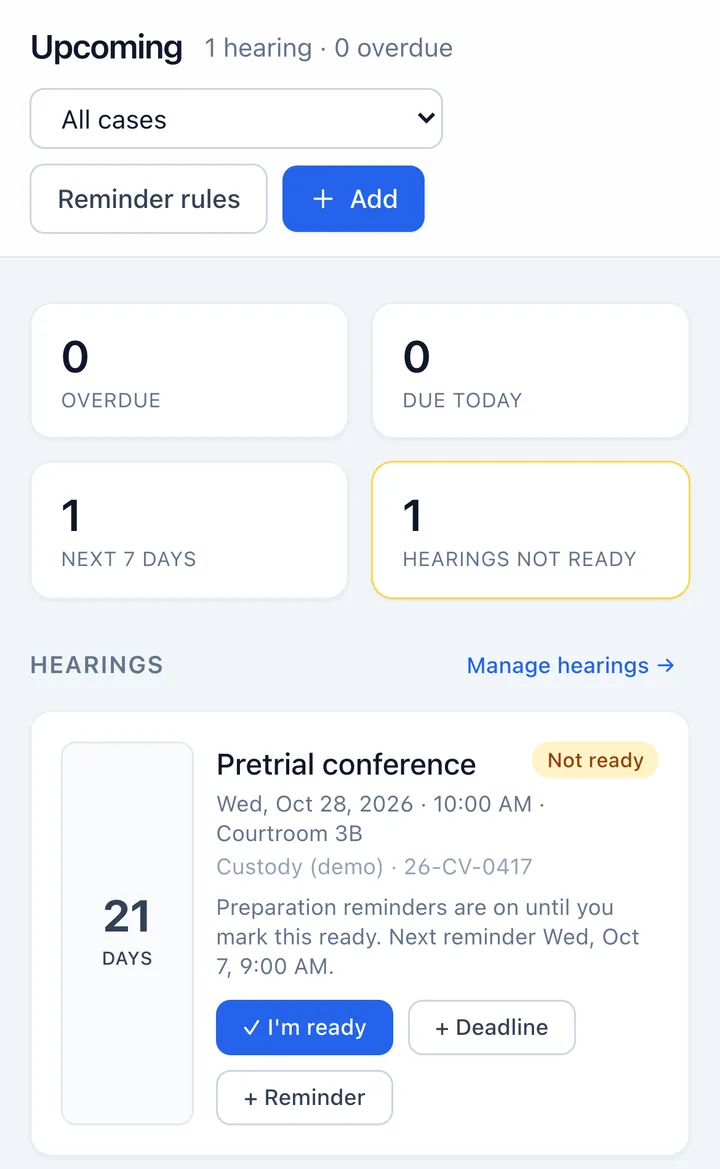
Overdue, due today and next 7 days counts at the top of Upcoming
Each hearing gets a countdown with its time and courtroom
Their points on one side, your factual answers on the other
A response is easier to write once you've broken the motion into its separate requests and claims. The Response/Reply Outline is a private working page for exactly that: what the other side is asking for, each of their points, and your factual answer with a date or an exhibit. Nothing in it goes anywhere unless you move it into your response.
"What they are asking for," summarized in your own words
Each point paired as "They say" and "My response"
A list of exhibits to cite and the point each one supports
Kept as a private working document in your case
3of 4
A response draft with your position on each request
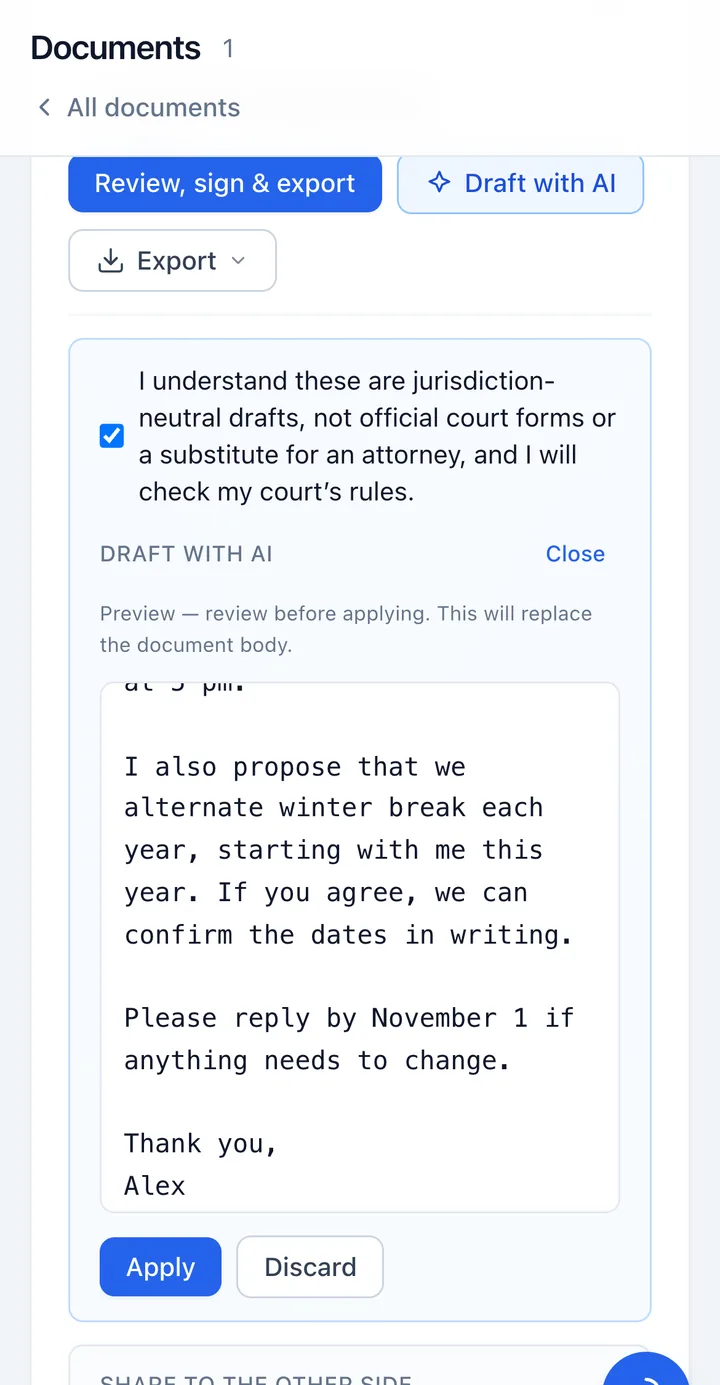
The Response to Motion template names the motion you're answering, who filed it and when, then gives you room to state your position on each request (agree, disagree or agree in part) and the facts, one per paragraph. AI drafting can turn your outline and records into a first draft, leaving [placeholders] wherever you still need to decide something or add a fact.
AI drafting uses AI actions. The free plan includes 6 to try it.
In the app
The motion's title, the filing party and the filing date as [placeholders]
Your position on each request, in your own words
Numbered facts in date order, citing exhibits by number
Your request to the court, a signature block and a certificate of service
AI drafting from your outline and records, previewed before you apply it
4of 4
Exhibits ready to cite and attach
A factual answer is easier for anyone to check when it points to a record. Add your messages, photos and documents, number them in date order, and use those numbers in both your outline and your response. Build one exhibit PDF with an index when you're ready, then read the whole response once more before you export.
Create your account, then after a short setup you can try Full Suite free for 7 days. Card required; then $24.99/mo or $299/yr (about 82¢ a day) until you cancel. Cancel before day 7 and you pay nothing. Or subscribe now — $299/yr
50% off · 20× the AI
Full Suite Max
Everything in Full Suite, with 20× the AI actions.
$99.99$49.99/mo
or $899/yr$399/yr
Everything in Full Suite: all five tools and the assistant
6,000 AI actions a month (20× Full Suite)
50% off (normally $99.99/mo), locked in as long as you don’t cancel
Already on Full Suite? Get 20× the AI credits for only +$25/mo more (prorated in place)
Clean, printable exports + free attorney & advocate access (on every plan)
$49.99 a month, renews until you cancel. Cancel online in two clicks.
Hearing Pass · one-time
$49 once for 30 days of hearing prep. Nothing renews.
Everything in Full Suite for 30 days from the day you buy it: all five tools, the assistant, AI included, and exports without a watermark. No subscription and nothing to cancel. When the 30 days end you’re back on the free plan, and nothing you added is deleted.
Your case stays private to your account until you invite someone and choose what they see. Data is encrypted in transit and at rest, and we don’t sell your personal information.
Your files stay yours
Originals are kept unchanged. Download your complete Case Bundle, every original file plus a manifest, free on any plan, before or after you cancel.
Cancel anytime, in two clicks
The free plan has nothing to cancel. Paid plans renew until you cancel online in two clicks, and the Hearing Pass never renews.
Organizing software, not a law firm
It organizes the files, dates and messages you provide. It doesn’t give legal advice, choose what you file or predict what a court will do.
Questions, answered straight
Frequently asked questions
How long do I have to respond to a custody motion?
It depends on your court, the type of papers and sometimes a court order. Look for a deadline in the papers you were served, then confirm it with the clerk's office, your court's rules or a licensed attorney where you live. Once you know the date, add it to Upcoming with a reminder.
Is responding to a motion different from responding to a petition?
Often, yes. A petition usually starts a case or a new request, and a motion usually asks for something within an existing case, but courts use these words differently and many have their own answer or response forms. The app's Response to Motion template is a starting point for answering a motion, and your court's own forms come first.
Does the app tell me what to say in my response?
No. The outline and the template give you a structure, and AI drafting rewords facts already in your records, leaving [placeholders] for your position and anything missing. Custody Commander never suggests what to argue, agree to or ask for.
Can I agree with part of the motion?
The Response to Motion template has room to state, request by request, whether you agree, disagree or agree in part, in your own words. Whether any of those positions fits your situation is a question for a licensed attorney where you live.
Will anyone review my response before I submit it?
Nobody at Custody Commander reviews or edits your documents. Before export you confirm that you prepared and reviewed every statement. You can invite your own attorney, paralegal or advocate to view or comment on the sections you choose, and they join free.
Is it free?
Yes. The free plan needs no card: the document templates, the Upcoming list and reminders, up to 10 evidence items and 6 AI actions, with exports marked DRAFT. Full Suite ($24.99 a month or $299 a year) exports clean, and the one-time $49 Hearing Pass covers 30 days of everything and never renews.
Can I draft documents in every state?
In most states the app drafts jurisdiction-neutral documents from templates, with [placeholders] for your court's details, and they aren't official court forms. In a few states, drafting stays off until that state's review is finished; the app says so when you start a draft. Organizing evidence, the timeline and exports work in every state.
Is this legal advice?
No. Custody Commander is organizing software, not a law firm. It helps you keep the deadline, organize the facts and draft from a template; it doesn't choose your filings or predict how a court will respond. For advice, talk to a licensed attorney where you live, or ask your court's self-help center about free help.
Start your response with the deadline
Add the date, outline their points and draft from the Response to Motion template. Free plan, no card needed.