How to submit evidence in family court: get the set ready first
Every court has its own steps and deadlines for submitting evidence, so its rules come first. Custody Commander helps with the preparation: numbered exhibits, a court copy and a private copy from one binder, and matching PDFs to print for every party.
How you submit evidence in family court depends on your court. Some expect exhibits to be shared with the other side days before a hearing, some want them filed or uploaded, and some want paper copies handed up in the courtroom. Find the rule for your type of hearing before you print anything, and put each deadline on your calendar. If you can't find the rule, the clerk's office or your court's self-help center can usually tell you where it's written.
Reminder notices only say there's a reminder; the details stay in the app.
In the app
The Your court page links to your court's official rules, forms and self-help pages
A countdown for each hearing, with its time and courtroom
Deadlines and reminders tied to a specific hearing
Preparation reminders that keep coming until you tap I'm ready
2of 4
One binder, two copies: the court's and yours
The set you hand over and the set you work from are rarely the same. Yours may hold notes, drafts and items you've decided not to use. Build one binder, mark anything personal as private copy only, and download a court copy without it and a private copy with everything. Then check the court copy page by page before you print it.
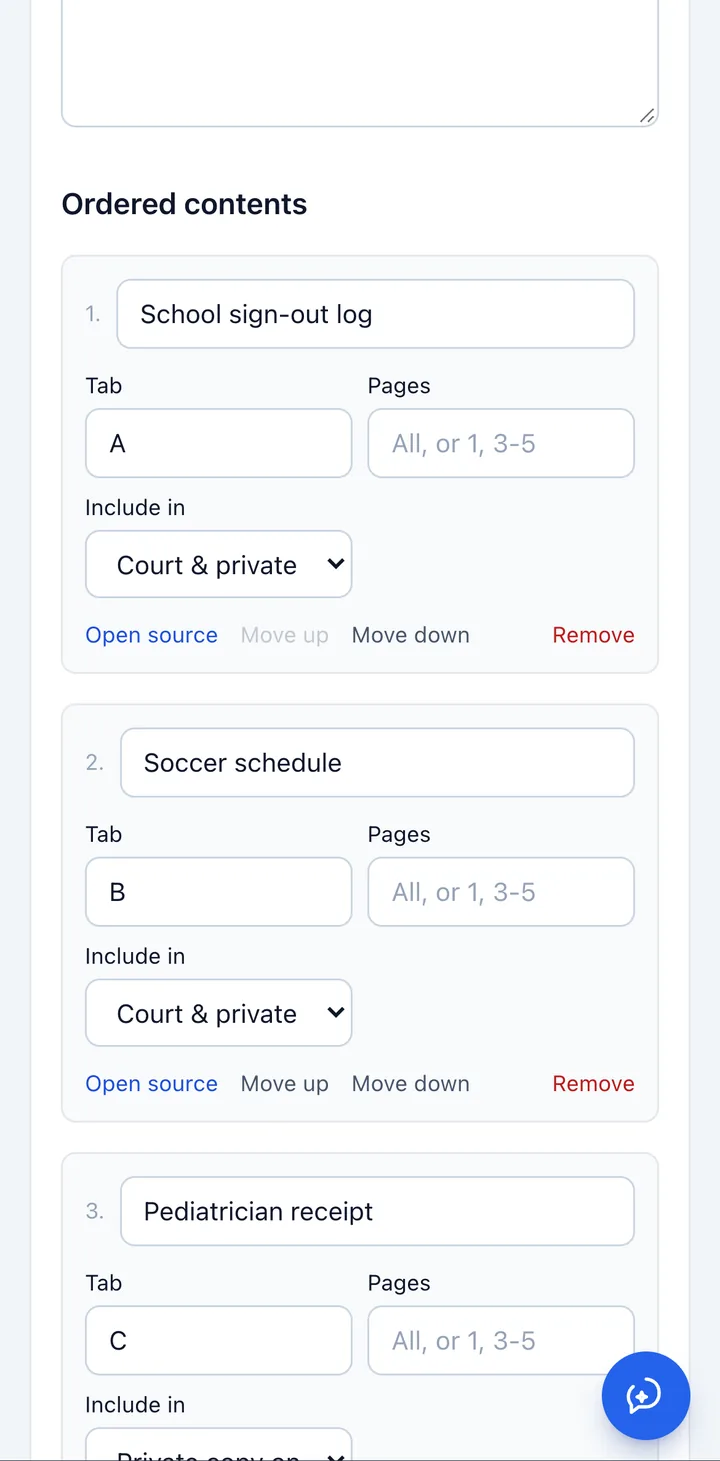
Mark any item private copy only and it stays out of the court copy
A tab name for each item, with a divider page for each tab
A contents page with page ranges, and page numbers on every page
Pull just the pages you need from a long PDF, such as 1, 3-5
Mark a version printed, and see whether it changed since
Free-plan PDFs are watermarked DRAFT. Paid plans export clean.
3of 4
One numbered set that everyone can follow
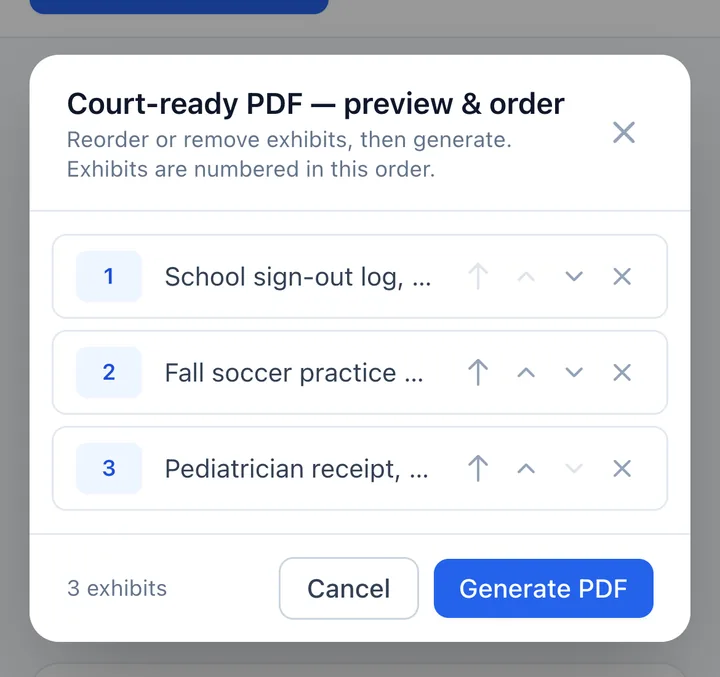
When the judge, the other side and you all hold the same numbered set, anyone can say "Exhibit 4, page 2" and everyone finds it. Set the order in a preview, generate one PDF with a cover and index page, and print that same file once for each party.
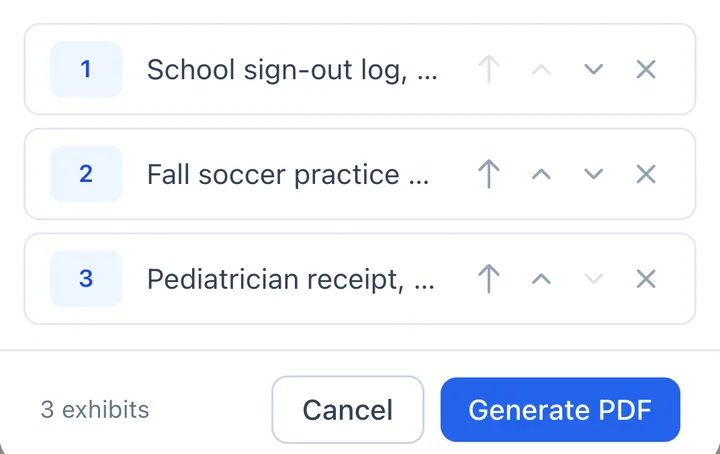
Preview, reorder or remove exhibits before you generate
Exhibits numbered in the order you set, or your court's label typed in and kept as-is
Each file's SHA-256 fingerprint listed in the PDF
Optional Bates page numbers; very large sets split into parts
Present exhibits at the table or on a video hearing
At the hearing you may need to find an exhibit quickly or share your screen. Hearing mode shows your exhibits one at a time, full screen and in exhibit order, with the timeline beside them. Your hearing desk keeps a reading order and short notes in large text, and private notes never go into court exports. Practice with hearing mode before the day, so moving between exhibits feels familiar.
General organizing tips, not legal advice. Your court's own rules come first.
Plans and pricing
Start free. Upgrade only if you need more.
The free plan needs no credit card and never expires. Hearing prep draws on your evidence, documents and timeline, so Full Suite covers all of it; for one hearing, the Hearing Pass is below.
Free
For getting your evidence out of your camera roll and into order.
$0
Free forever — no credit card, nothing to cancel.
One case file, unlimited court case numbers
10 evidence items, 1 GB of storage
Organize, describe, tag, search
Watermarked printable PDF export
6 AI actions to try the tools (one-time, not monthly)
Create your account, then after a short setup you can try Full Suite free for 7 days. Card required; then $24.99/mo or $299/yr (about 82¢ a day) until you cancel. Cancel before day 7 and you pay nothing. Or subscribe now — $299/yr
50% off · 20× the AI
Full Suite Max
Everything in Full Suite, with 20× the AI actions.
$99.99$49.99/mo
or $899/yr$399/yr
Everything in Full Suite: all five tools and the assistant
6,000 AI actions a month (20× Full Suite)
50% off (normally $99.99/mo), locked in as long as you don’t cancel
Already on Full Suite? Get 20× the AI credits for only +$25/mo more (prorated in place)
Clean, printable exports + free attorney & advocate access (on every plan)
$49.99 a month, renews until you cancel. Cancel online in two clicks.
Hearing Pass · one-time
$49 once for 30 days of hearing prep. Nothing renews.
Everything in Full Suite for 30 days from the day you buy it: all five tools, the assistant, AI included, and exports without a watermark. No subscription and nothing to cancel. When the 30 days end you’re back on the free plan, and nothing you added is deleted.
Your case stays private to your account until you invite someone and choose what they see. Data is encrypted in transit and at rest, and we don’t sell your personal information.
Your files stay yours
Originals are kept unchanged. Download your complete Case Bundle, every original file plus a manifest, free on any plan, before or after you cancel.
Cancel anytime, in two clicks
The free plan has nothing to cancel. Paid plans renew until you cancel online in two clicks, and the Hearing Pass never renews.
Organizing software, not a law firm
It organizes the files, dates and messages you provide. It doesn’t give legal advice, choose what you file or predict what a court will do.
Questions, answered straight
Frequently asked questions
How do I submit evidence in family court?
It depends on your court. Many courts set deadlines for sharing exhibits with the other side before a hearing, and some want exhibits filed, uploaded or brought on paper. Check your local rules, ask the clerk's office where to find them, or talk to a licensed attorney where you live. Custody Commander helps you prepare the set; it doesn't file anything for you.
Do I have to exchange exhibits with the other parent before the hearing?
Many courts expect it, but the timing and method vary from court to court and hearing to hearing. Check your court's rules for your type of hearing. The app's court copy lets you print or share the same numbered set you'll use, while your private copy stays with you.
How many copies of my evidence should I bring to court?
Your court's rules decide. Many people prepare one set for the judge, one for each other party and one for themselves. Download the court copy once and print it as many times as you need, so every set matches. An extra copy can help if the clerk or a witness needs one.
How do I present evidence at a video hearing?
Ask your court how it wants exhibits shared, whether sent ahead, uploaded or shown on screen, and test your setup the day before. Hearing mode shows your exhibits full screen, one at a time and in order, which works well for screen-sharing. Keep your printed set nearby too, in case the connection drops.
Can I share the set with my attorney first?
Yes. Invite your attorney, a paralegal or someone helping you by email, choose the sections they can see, and give each person view, comment, download or edit access. You can revoke access at any time, and invited attorneys and advocates join free.
Is it free?
Yes, the free plan needs no card: one case, up to 10 evidence items and exports watermarked DRAFT. For clean copies with a hearing coming up, the one-time Hearing Pass ($49) gives 30 days of everything and never renews, or choose a paid plan.
Is this legal advice?
No. Custody Commander is organizing software, not a law firm. It doesn't choose your evidence, tell you what to submit or file anything for you. It helps you put your own records in order and print them, with or without a lawyer.
Get your evidence ready to hand over
Build one binder, print a court copy for every party and keep your private copy for yourself. Start free, no card needed.