
Custody mediation, explained

What is mediation for custody? How it usually works, stage by stage

Custody mediation is a meeting where a neutral mediator helps parents work out a parenting plan. Here's how it commonly runs, from intake to a possible written agreement, and how Custody Commander helps you prepare for each stage.

Start free

Free plan, no card needed; Mediation Coach is on paid plans. Organizing software, not a law firm; not legal advice.

See plans: Free, single tools, Full Suite
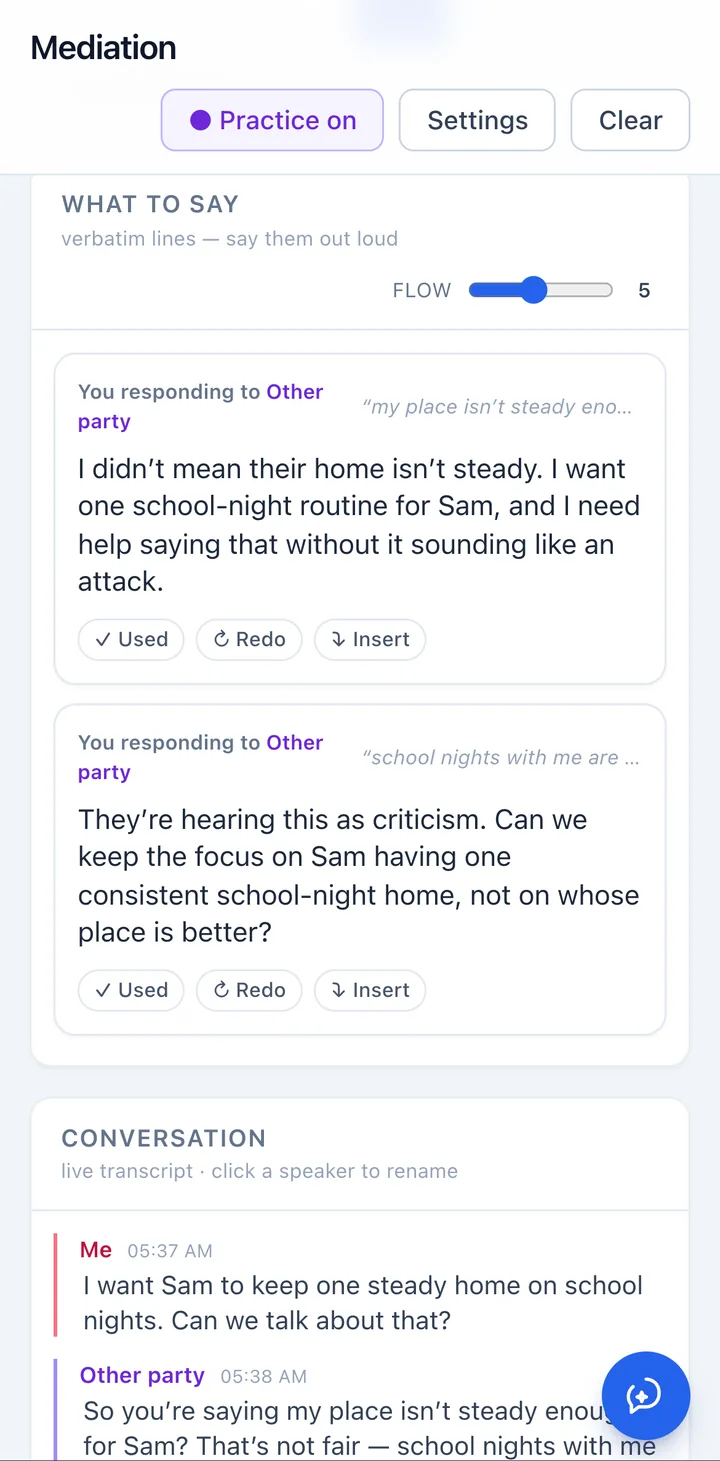
Mediation practice: What to say cards with calm, word-for-word replies, above a live transcript of the practice conversation
App screen from a demo case with made-up names.
  • Plain-language and jurisdiction-neutral
  • Practice sessions with an AI mediator
  • Reminders for every mediation date
  • Organizing software, not a law firm

1of 4

Stage one: getting mediation set up

Mediation for custody may be ordered by the court or chosen by the parents. Some courts run their own program and assign a mediator; in other cases parents pick a private one. Either way, there's usually an intake step, such as a form, an orientation or a short call, and then a date for the first session.

  • A court page with links to your court's official rules, forms and self-help pages
  • Add the intake date and each session as a reminder with a time and notes
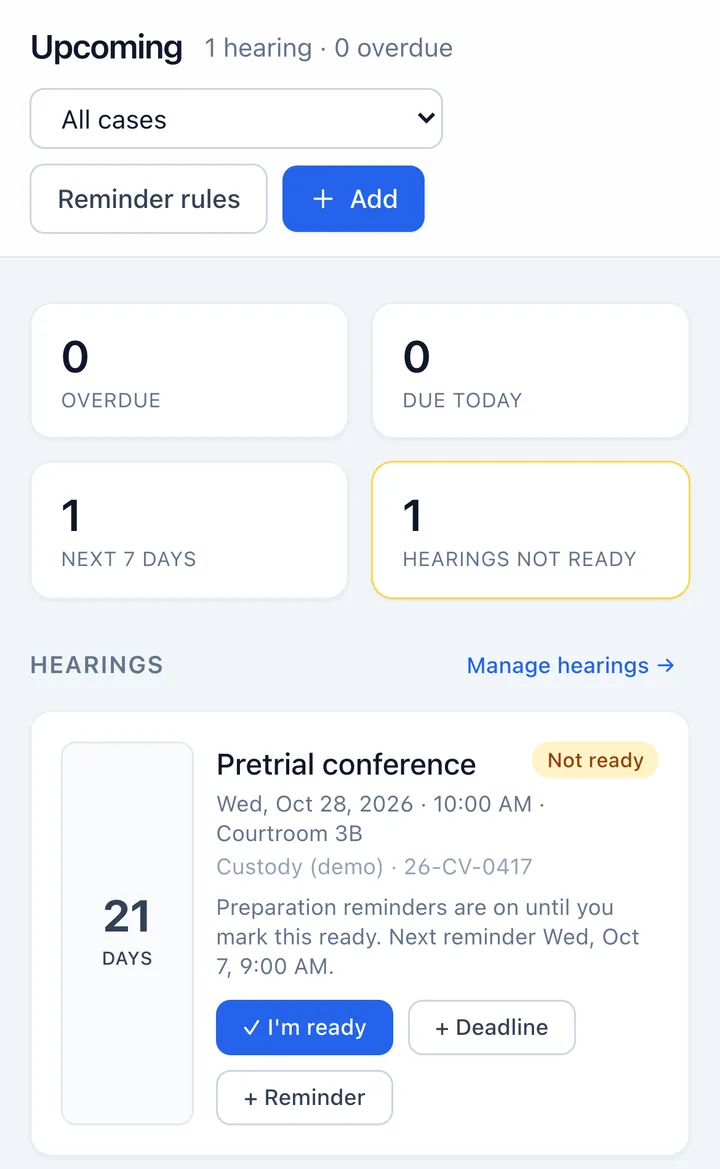
  • Overdue, due today and next 7 days counts keep deadlines in view
  • Keep any order or notice about mediation in your document library
Add my mediation dates

Free plan, no card needed.

The Upcoming screen: counters for overdue, due today and next 7 days, and a pretrial conference card 21 days away with I'm ready, Deadline and Reminder buttons

2of 4

Stage two: the sessions

Sessions are where the talking happens. The mediator guides the conversation, usually keeps it focused on the children, and helps parents test ideas. Some sessions are joint, some keep parents in separate rooms, and many run by video. There may be one session or several.

Rehearse a session

Mediation Coach is on paid plans and the Hearing Pass, not the free plan or the 7-day trial.

In the app

  • Mediation Coach plays the mediator and the other parent so you can rehearse
  • Tell it who will be in the room: the mediator alone, or the mediator and the other parent
  • Auto mode alternates turns like a real session
  • The live panel offers calm, word-for-word lines when you stall
  • It coaches how you speak, never what to agree to

3of 4

Stage three: a possible written agreement

If parents agree on some or all topics, the points are usually written down. Depending on the court, the agreement may be signed and submitted for a judge to review, and the court decides whether to make it an order. If parents don't agree, the case typically goes back to the court's regular process.

  • Proposed Parenting Plan template with headings and [placeholders] for your proposal
  • Proposed Consent Order template for courts that use one
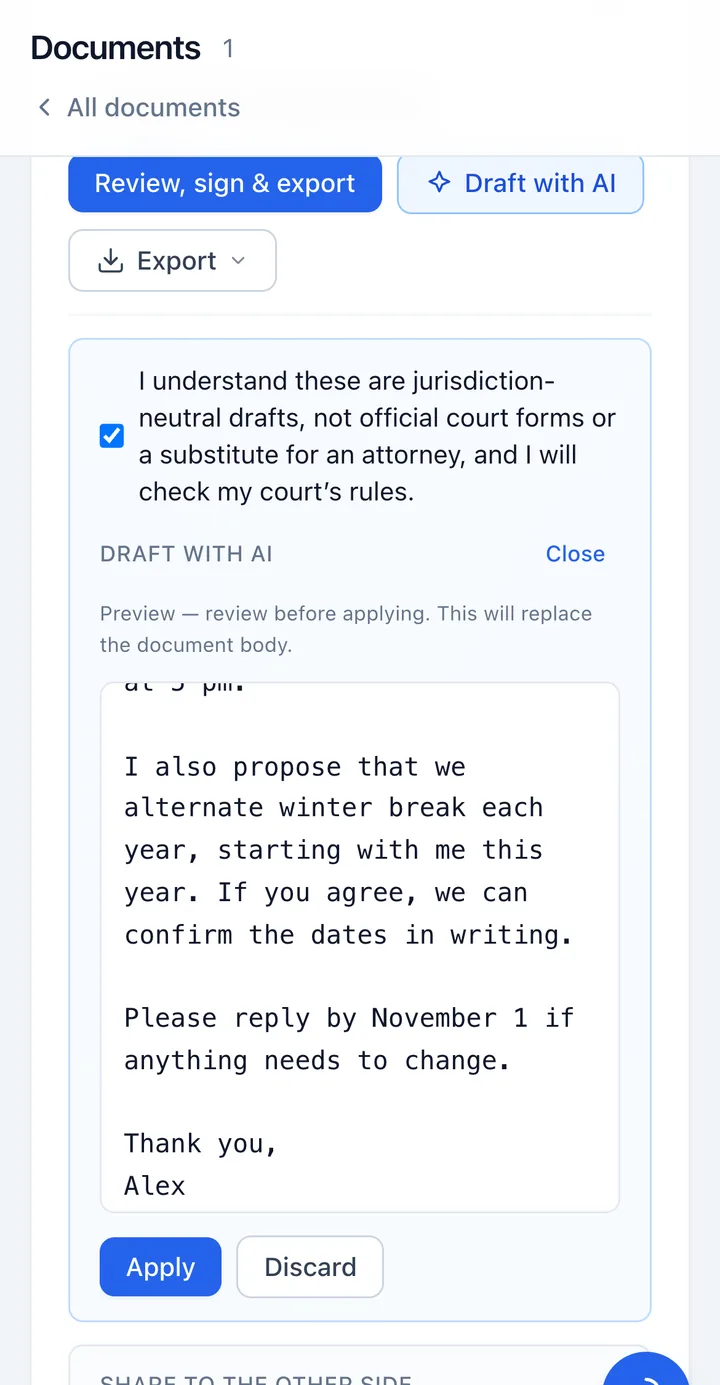
  • AI drafting from your own records marks unknown facts as [placeholders] (uses AI actions)
  • You review and confirm every document at export; templates aren't official court forms
Draft a proposal for mediation

Your court's own forms and local rules come first.

A document with Draft with AI open: a preview of a revised letter with Apply and Discard buttons, under a checkbox confirming these are general drafts, not official court forms

4of 4

After mediation: keep the record going

Whatever comes out of mediation, the dates that follow matter: a follow-up session, a deadline to return paperwork, a hearing if one is set. Keep them on the same timeline as everything else. If a new schedule starts, logging how it actually runs gives you a clear record from the first week.

In the app

  • A master timeline of events, files, key dates and hearings
  • Reminders for follow-up sessions and paperwork deadlines
  • A hearing countdown with the time and courtroom, if a hearing is set
  • Timeline exports to PDF or Word (DRAFT mark on the free plan)

How it works

Prepare for each stage of custody mediation in three steps

  1. Set the dates

    Add intake, each session and any deadline as reminders.

  2. Practice

    Rehearse a session with an AI mediator and other parent.

  3. Write it down

    Draft your proposal from a template, ready to review and bring.

Start free

Start free today — no credit card required.

Free checklist · no sign-up

Questions to ask before your first custody mediation session

Ask the court, the program or the mediator; the answers vary from place to place.

Tick them off as you go. Nothing you tick is saved or sent.

Track my mediation answers

General information, not legal advice. Check your local rules.

Plans and pricing

Start free. Upgrade only if you need more.

The free plan needs no credit card and never expires. Mediation Coach is part of Full Suite on a paid plan; it is not in the free trial.

Free

For getting your evidence out of your camera roll and into order.

$0

Free forever — no credit card, nothing to cancel.

  • One case file, unlimited court case numbers
  • 10 evidence items, 1 GB of storage
  • Organize, describe, tag, search
  • Watermarked printable PDF export
  • 6 AI actions to try the tools (one-time, not monthly)

Single Product

Case Builder

Just the one tool you need right now. Switch or upgrade anytime.

$14.99/mo

or $119/yr per product

  • Case Builder on its own: your timeline, documents, hearings, to-dos and the assistant
  • 80 AI actions a month for that tool
  • Unwatermarked exports from that tool
  • Everything still lands in one case file
Get Case Builder

$14.99 a month, renews until you cancel. Cancel online in two clicks.

50% off · 20× the AI

Full Suite Max

Everything in Full Suite, with 20× the AI actions.

$99.99$49.99/mo

or $899/yr $399/yr

  • Everything in Full Suite: all five tools and the assistant
  • 6,000 AI actions a month (20× Full Suite)
  • 50% off (normally $99.99/mo), locked in as long as you don’t cancel
  • Already on Full Suite? Get 20× the AI credits for only +$25/mo more (prorated in place)
  • Clean, printable exports + free attorney & advocate access (on every plan)
Get Full Suite Max

$49.99 a month, renews until you cancel. Cancel online in two clicks.

Hearing Pass · one-time

$49 once for 30 days of hearing prep. Nothing renews.

Everything in Full Suite for 30 days from the day you buy it: all five tools, the assistant, AI included, and exports without a watermark. No subscription and nothing to cancel. When the 30 days end you’re back on the free plan, and nothing you added is deleted.

Get the Hearing Pass — $49
  • No card for the free plan
  • Plans renew until you cancel. Cancel online anytime, in two clicks.
  • Only you pay — the other parent never joins

Compare all plans on the pricing page →

Good to know before you start

  • Private by default

    Your case stays private to your account until you invite someone and choose what they see. Data is encrypted in transit and at rest, and we don’t sell your personal information.

  • Your files stay yours

    Originals are kept unchanged. Download your complete Case Bundle, every original file plus a manifest, free on any plan, before or after you cancel.

  • Cancel anytime, in two clicks

    The free plan has nothing to cancel. Paid plans renew until you cancel online in two clicks, and the Hearing Pass never renews.

  • Organizing software, not a law firm

    It organizes the files, dates and messages you provide. It doesn’t give legal advice, choose what you file or predict what a court will do.

Questions, answered straight

Frequently asked questions

What is mediation for custody?

It's a process where a neutral mediator helps parents talk through a parenting plan: the schedule, holidays, exchanges, decisions and communication. The aim is for parents to reach their own agreement where they can. The mediator doesn't represent either parent.

How does custody mediation work?

It commonly runs in three stages: intake, one or more sessions, and a written agreement if parents agree on anything. Some parents finish in one meeting; others return several times as they work through the topics. Details such as session length, format and confidentiality vary by court and program. Your notice, your local rules or the mediator will have the specifics.

How do I set up custody mediation?

It depends on your court. Some courts order mediation and assign a program; in other cases parents choose and schedule a private mediator together. Your court's website or self-help center is a good place to start, and the app's court page links to your court's official rules, forms and self-help pages.

What happens at mediation for custody if parents don't agree?

Usually the case continues through the court's regular process, which may include a hearing. In some courts, the mediator may share a recommendation. Ask your program how it handles sessions that end without agreement.

Is custody mediation confidential?

Often, but the rules vary by court and program, and there can be exceptions. Ask the mediator at the start what stays private and what may be shared with the court. Never record or transcribe a mediation without permission; Mediation Coach is for practice beforehand.

Is mediation prep in Custody Commander free?

The free plan, with no card, includes one case, reminders, the timeline and up to 10 evidence items, with DRAFT-marked exports. Mediation Coach is on paid plans, from $14.99/mo or $119/yr on its own, and in the one-time Hearing Pass. It isn't in the free plan or the 7-day trial.

Is this legal advice?

No. This page is general information, and Custody Commander is organizing software, not a law firm. Mediation rules vary by court, so rely on your local rules and your program's instructions. For advice about your situation, talk to a licensed attorney where you live. Free or low-cost help may be available through your court's self-help center or a legal aid office.

Get ready for each stage of custody mediation

Put the dates on one list, practice the sessions and draft a proposal you can bring.

Start free today — no credit card required