Organize your witness list for family court in one case file
Keep contact details, the dates each person was present, and the exhibits they can speak to in one place. Draft the list from your own records with [placeholders] for anything missing, then check it against your court's witness rules.
Drafts with [placeholders], not official court forms
Export to PDF or Word
Organizing software, not a law firm
1of 4
See who was there, entry by entry
A witness list starts from events, not names. When each timeline entry notes who was present, you can search a name and see every date that person saw firsthand: a teacher at pickup, a coach at practice, a relative at an exchange. Deciding who to list is your call, ideally with a licensed attorney's advice; the app keeps the record that helps you think it through.
Timeline entries with optional detail for times, place and who was there
Search the timeline for a name to find every entry that mentions it
Filter by type, year or month
Dated evidence lands on the same timeline as your notes
Their account in their words, kept as they gave it
If someone writes down what they saw, the statement should be in their words, not yours. Upload a signed statement, letter or email exactly as you received it, and keep your own notes about it separate. Whether a written statement can be used, or the person needs to testify in person, depends on your court's rules. Note the date you received each statement and how it reached you.
Upload PDFs, Word documents, photos of papers and saved emails
Each original kept unchanged, with a SHA-256 fingerprint recorded when added
Add your own note to an item without changing the file
Tag items by issue and filter to see them together
3of 4
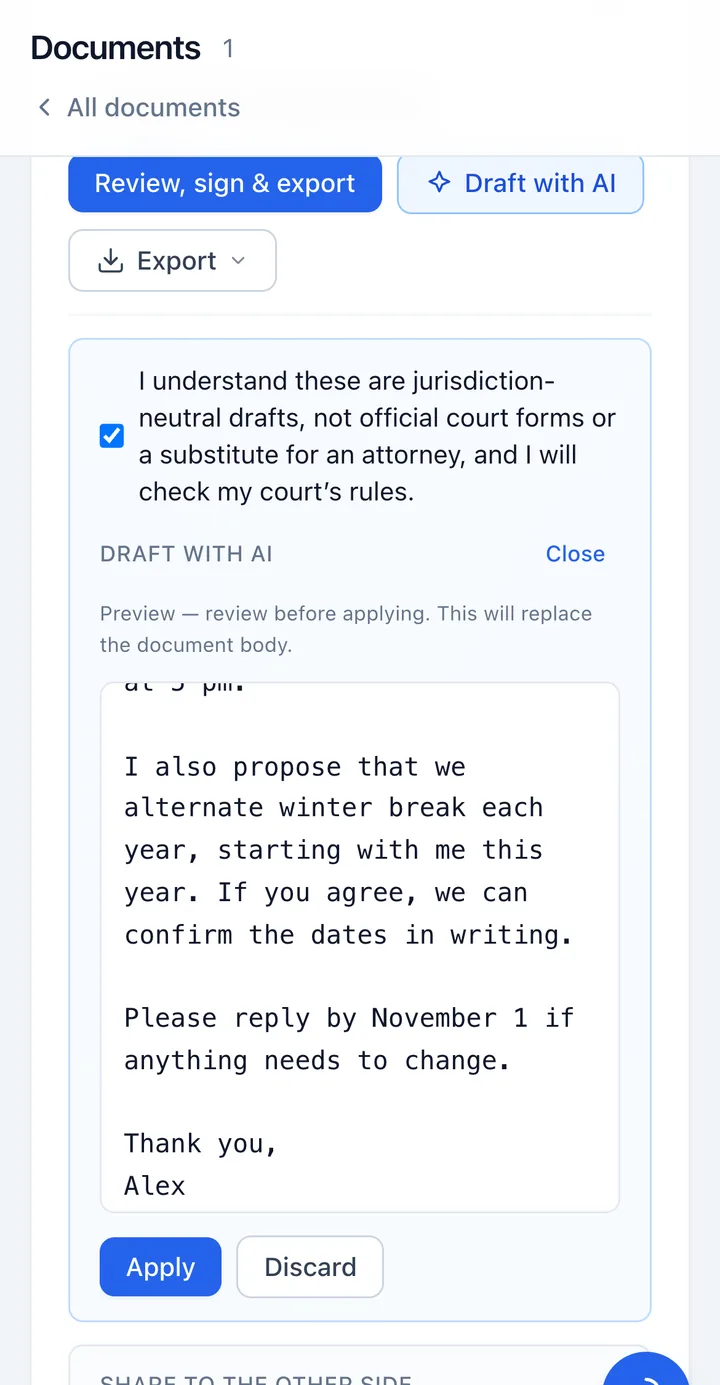
A witness list drafted from your own records
Many courts ask for a witness list by a deadline set in a scheduling order or local rule, often with each person's contact details and a short summary of what they may speak about. AI drafting can lay out a draft list from your own case records, leaving [placeholders] for anything it doesn't have. You complete and review every line, and match the format your court asks for.
A draft for you to complete, not an official court form. Nobody at Custody Commander reviews documents.
In the app
AI drafting grounded in your case's records, with [placeholders] for missing facts (uses AI actions)
Your caption and court case number merged in
An Exhibit List template to keep exhibits in step with your witnesses
A text check flags statements to review; you attest that you prepared the document at export
Export to PDF or Word
4of 4
Contact details and deadlines where you'll find them
Putting a name on a list doesn't make that person come to court. Someone who may not come on their own may need a subpoena, which is a separate step with its own rules, so ask the clerk or a self-help center how it works in your court. Keep each person's contact details current, note when you spoke with them about the date, and put the list deadline where you'll see it. A short dated entry each time you speak with someone keeps that history in one place.
Create your account, then after a short setup you can try Full Suite free for 7 days. Card required; then $24.99/mo or $299/yr (about 82¢ a day) until you cancel. Cancel before day 7 and you pay nothing. Or subscribe now — $299/yr
50% off · 20× the AI
Full Suite Max
Everything in Full Suite, with 20× the AI actions.
$99.99$49.99/mo
or $899/yr$399/yr
Everything in Full Suite: all five tools and the assistant
6,000 AI actions a month (20× Full Suite)
50% off (normally $99.99/mo), locked in as long as you don’t cancel
Already on Full Suite? Get 20× the AI credits for only +$25/mo more (prorated in place)
Clean, printable exports + free attorney & advocate access (on every plan)
$49.99 a month, renews until you cancel. Cancel online in two clicks.
Hearing Pass · one-time
$49 once for 30 days of hearing prep. Nothing renews.
Everything in Full Suite for 30 days from the day you buy it: all five tools, the assistant, AI included, and exports without a watermark. No subscription and nothing to cancel. When the 30 days end you’re back on the free plan, and nothing you added is deleted.
Your case stays private to your account until you invite someone and choose what they see. Data is encrypted in transit and at rest, and we don’t sell your personal information.
Your files stay yours
Originals are kept unchanged. Download your complete Case Bundle, every original file plus a manifest, free on any plan, before or after you cancel.
Cancel anytime, in two clicks
The free plan has nothing to cancel. Paid plans renew until you cancel online in two clicks, and the Hearing Pass never renews.
Organizing software, not a law firm
It organizes the files, dates and messages you provide. It doesn’t give legal advice, choose what you file or predict what a court will do.
Questions, answered straight
Frequently asked questions
What goes on a witness list for family court?
Courts differ, so check your local rules and any scheduling order. Many lists include each person's name, contact details and a short summary of what they may speak about, sometimes with an estimated time. Custody Commander helps you organize and draft the list; it doesn't choose your witnesses.
Who should I list as a witness?
That's a decision about your case, and the app can't make it for you. A licensed attorney where you live can advise you. What the app can show you is who was present at each event you logged, so you can see who saw what firsthand.
Is there a witness list template?
AI drafting can lay out a draft list from your own records, with [placeholders] for anything it doesn't have, and the Exhibit List template helps keep exhibits in step. These are drafts for you to complete, not official court forms. If your court has its own witness list form, use that first.
Can I use written witness statements in a custody case?
It depends on your court's rules and the type of hearing. Some courts accept written statements in some situations; others expect witnesses to testify in person. Ask the clerk or a self-help center, or talk to a licensed attorney where you live. Either way, the statement should be in the witness's own words.
Will my witnesses see my case file?
No. Your case is private to your account, and nobody sees it unless you invite them. You share only what you choose, section by section, and you can revoke access at any time.
Is it free?
Yes. The free plan needs no card: one case, 10 evidence items, 1 GB and 6 AI actions, with DRAFT-watermarked exports. AI drafting uses AI actions; the Full Suite includes 300 a month, at $24.99 a month or $299 a year.
Can I draft documents in every state?
In most states the app drafts jurisdiction-neutral documents from templates, with [placeholders] for your court's details, and they aren't official court forms. In a few states, drafting stays off until that state's review is finished; the app says so when you start a draft. Organizing evidence, the timeline and exports work in every state.
Is this legal advice?
No. Custody Commander is organizing software, not a law firm, and nothing on this page is legal advice. It helps you keep your own records and draft documents you complete and review. For advice about witnesses, talk to a licensed attorney where you live.
Organize your witness list
Start free, note who was present at each event, and draft your list with [placeholders] for anything missing. Organizing software, not a law firm; not legal advice.