An AI assistant that keeps your custody case file in order
An AI assistant for the paperwork side of a custody case, not a lawyer and not legal advice. Tell it what happened in plain English and it adds the dated timeline entry, finds messages, reads screenshots, sets reminders and drafts from templates with [placeholders] for you to check.
Every AI reading marked unverified until you check it
Drafts leave [placeholders] for facts it doesn't have
AI providers may not train on your content
Organizing software, not a law firm
1of 5
Say what happened in a sentence; it adds the dated entry
Records fall behind when every entry means filling in a form. With the assistant, type something like "Saturday pickup was 45 minutes late" and it adds a dated entry to your timeline. Ask for a reminder the same way, or ask it to pull key dates out of your messages onto the timeline.
Adds dated timeline entries from plain English
Sets reminders with a date, an optional time and notes
Adds key dates from your imported messages to the timeline
Each request uses AI actions: 6 on the free plan, 300 a month on Full Suite
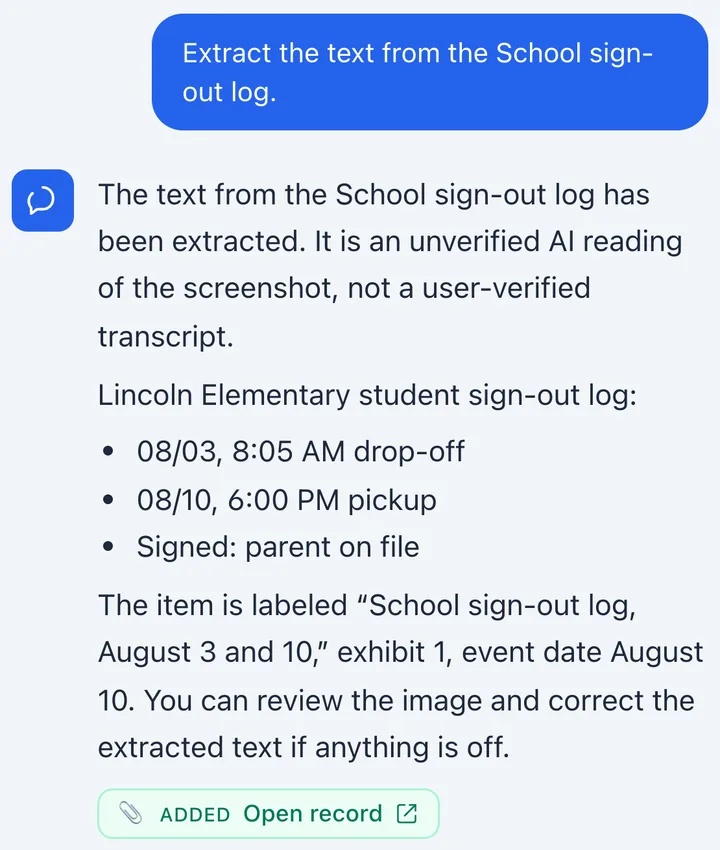
Screenshots and PDFs read, with every reading marked unverified
AI can misread a blurry photo or guess the wrong year. So every reading starts out marked as an unverified AI reading, and nothing is final until you check it against the image. Your original file is kept unchanged either way, with a fingerprint recorded when you add it.
Reads the text in screenshots, photos of papers and PDFs
Suggests a likely date and a short factual label for you to confirm or fix
Suggests tags like Late, Medical or School; nothing is applied until you tap
Plain-text and Word (.docx) files are read exactly as written, with no AI
Originals kept unchanged, each with a SHA-256 fingerprint
In a long thread, the one message you need is easy to lose. Import the conversation from your own phone or account, and Search with AI lets you ask a question across every message. Its answers quote the exact messages, so you can check each one in the numbered log.
Search with AI is in the 7-day Full Suite trial and paid plans.
In the app
Imports exports you make from your own phone and accounts: iPhone (via iMazing), Android, WhatsApp, Messenger and Instagram
Every message numbered from MSG-00001 with its date, time and sender
Search with AI answers quote the exact messages
Imported message text can't be edited in the app
4of 5
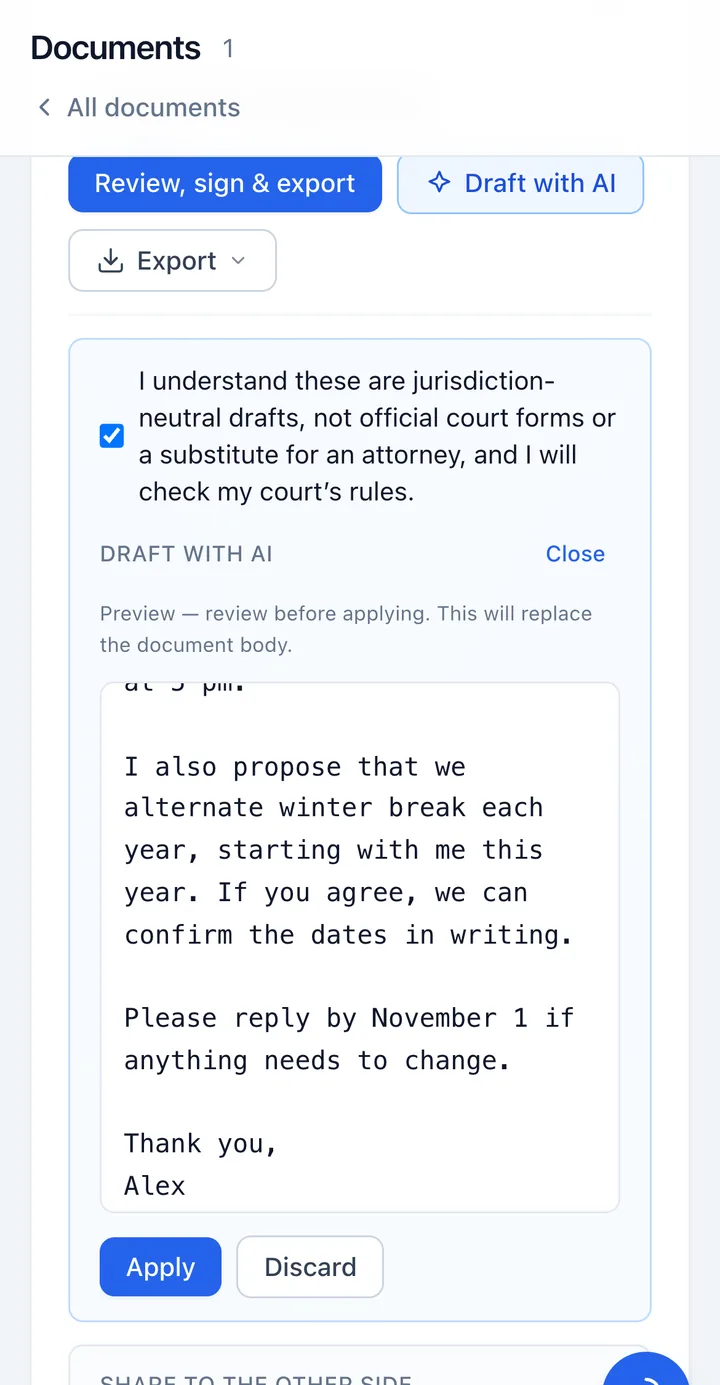
Drafts from templates, with [placeholders] for your facts
The assistant can draft or revise a document from one of 26 templates, grounded in your case's own records. Where it doesn't have a fact, it leaves a [placeholder] for you to fill in. Templates are starting points, not official court forms: your court's own forms and local rules come first, and you read, edit and sign every word.
Nobody at Custody Commander reviews your documents.
In the app
Templates such as a declaration, an exhibit list, a notice of hearing and a proposed parenting plan
Your caption, court case number, hearing and contacts merged in
A conservative text check flags statements to review; it isn't a truth checker or legal analysis
You attest at sign or export that you prepared and reviewed the document
Export to PDF or Word
5of 5
What the assistant won't do
It's an organizing tool, not a lawyer. It doesn't give legal advice, choose your filings, tell you what to argue or agree to, or predict how a court will see anything. For advice about your case, talk to a licensed attorney where you live, a legal aid office or your court's self-help center.
Create your account, then after a short setup you can try Full Suite free for 7 days. Card required; then $24.99/mo or $299/yr (about 82¢ a day) until you cancel. Cancel before day 7 and you pay nothing. Or subscribe now — $299/yr
50% off · 20× the AI
Full Suite Max
Everything in Full Suite, with 20× the AI actions.
$99.99$49.99/mo
or $899/yr$399/yr
Everything in Full Suite: all five tools and the assistant
6,000 AI actions a month (20× Full Suite)
50% off (normally $99.99/mo), locked in as long as you don’t cancel
Already on Full Suite? Get 20× the AI credits for only +$25/mo more (prorated in place)
Clean, printable exports + free attorney & advocate access (on every plan)
$49.99 a month, renews until you cancel. Cancel online in two clicks.
Hearing Pass · one-time
$49 once for 30 days of hearing prep. Nothing renews.
Everything in Full Suite for 30 days from the day you buy it: all five tools, the assistant, AI included, and exports without a watermark. No subscription and nothing to cancel. When the 30 days end you’re back on the free plan, and nothing you added is deleted.
Your case stays private to your account until you invite someone and choose what they see. Data is encrypted in transit and at rest, and we don’t sell your personal information.
Your files stay yours
Originals are kept unchanged. Download your complete Case Bundle, every original file plus a manifest, free on any plan, before or after you cancel.
Cancel anytime, in two clicks
The free plan has nothing to cancel. Paid plans renew until you cancel online in two clicks, and the Hearing Pass never renews.
Organizing software, not a law firm
It organizes the files, dates and messages you provide. It doesn’t give legal advice, choose what you file or predict what a court will do.
Questions, answered straight
Frequently asked questions
What does the AI assistant in Custody Commander do?
It handles the organizing side of a custody case: it adds timeline entries from plain English, reads screenshots, finds messages, sets reminders and drafts from templates with [placeholders]. It isn't a lawyer, and nothing it produces is legal advice.
Can the AI tell me which documents to submit or what to say in court?
No. It doesn't choose filings, tell you what to argue or agree to, or predict outcomes. Templates are starting points, your court's forms and local rules come first, and nobody at Custody Commander reviews your documents. For advice, talk to a licensed attorney where you live.
How accurate is the AI?
AI can make mistakes, so every screenshot reading is marked as an unverified AI reading until you review it, and drafts leave [placeholders] where facts are missing. A conservative text check flags statements to review, but it isn't a truth checker. You are the final check on everything.
What are AI actions?
AI tasks, such as reading a screenshot, asking Search with AI a question or drafting a document, use AI actions. The free plan includes 6 to try it, Full Suite includes 300 a month, and Full Suite Max includes 6,000 a month. Plain-text and Word files are read without AI.
Is my case data used to train AI?
Our AI providers may not use your content to train their models. Your data is encrypted in transit and at rest, and your case stays private until you invite someone. You can delete an import or a conversation at any time.
Is it free?
Yes. The free plan needs no card and never expires, with 6 AI actions to try the assistant, one case and up to 10 evidence items. Full Suite is $24.99 a month or $299 a year with 300 AI actions a month. New accounts can try Full Suite for 7 days with a card, and you see the price and first charge date before you start.
Let the assistant handle the busywork
Start free with 6 AI actions. Log an event, read a screenshot, and check every result yourself. Organizing software, not legal advice.