How to choose the best co-parenting app for your family
The best co-parenting app is the one that fits the job, the people involved and any court order. Here is a checklist for comparing apps, and where Custody Commander fits: a private, one-parent case file with calm-reply checks and an expense log that's free for both parents.
Two kinds of co-parenting app do two different jobs
The best co-parenting app depends on the job, so sort the apps by how they work before comparing features. Shared apps hold one record that both parents write to, so they only work when both of you join. One-parent apps keep your own records and help with what you send, so they work even when the other parent never signs up. Some families use one of each. As of October 14, 2026, the major shared apps in our dated comparisons (AppClose, TalkingParents and OurFamilyWizard) listed no free plan for parents on their pricing pages; check each company's site for current terms.
Custody Commander is a one-parent app: you sign up alone and the other parent is never notified
It doesn't send messages, so it never replaces the channel you and the other parent use
It keeps your private case file: timeline, evidence, message logs, documents and hearing prep
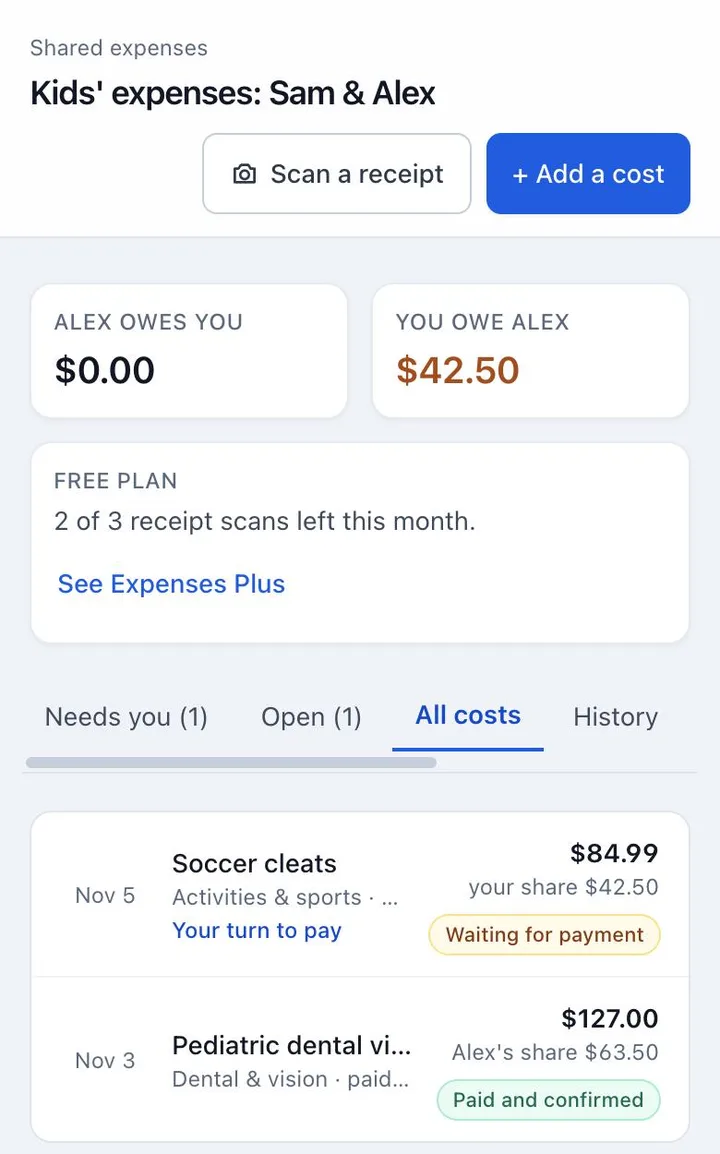
Its one shared feature is the expense log, built for both parents and free for both
2of 4
If a court order names an app, that app comes first
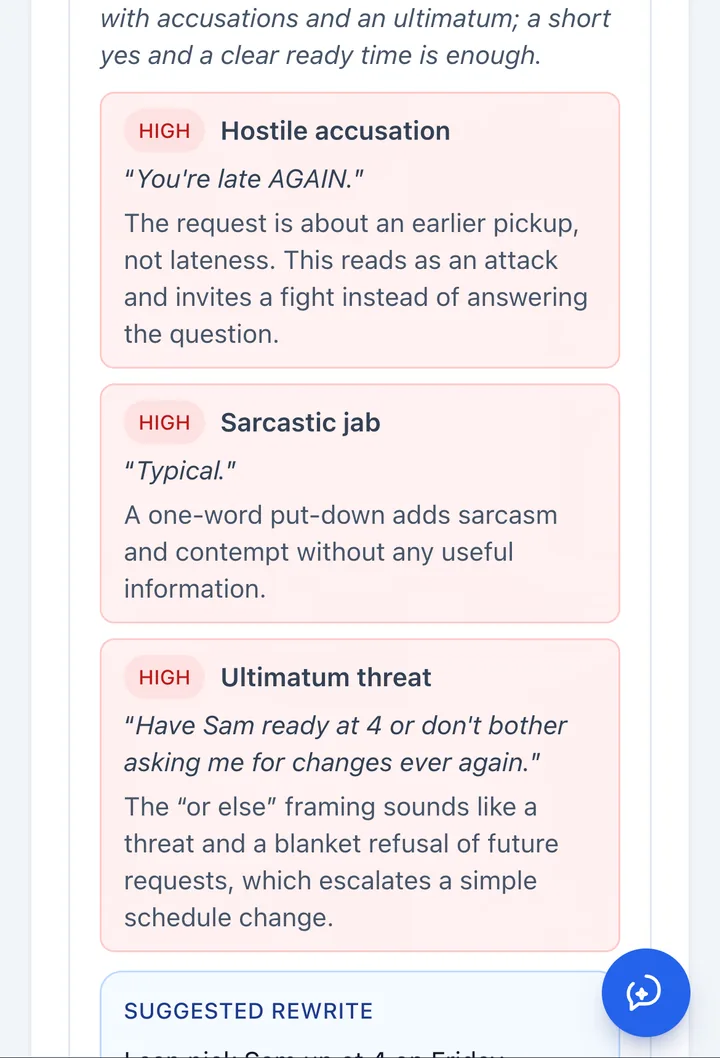
Courts sometimes name a specific co-parenting app in an order. When that happens, the choice is already made: keep using the named app for the communication the order covers until the order changes. You can still add private tools around it. Comms Guard checks a draft before you send it, and you paste the final text into the ordered app yourself.
Comms Guard is in the 7-day Full Suite trial and paid plans.
In the app
Write or paste a draft and get plain-language flags for tone, escalation and unclear wording
Get a suggested BIFF rewrite (Brief, Informative, Friendly, Firm) that you edit
Copy the result into the court-ordered app and send it there yourself
Log as sent keeps a dated copy in your own private file
Never says whether a message will help or hurt your case
3of 4
What free covers here, in plain numbers
"Free" means different things on different apps: a trial, a hardship waiver or a plan that never ends. Custody Commander's free plan has no end date and needs no card. The limits are stated up front, so you can judge whether it covers what you need before you pay for anything.
Free plan: one case, up to 10 evidence items, 1 GB of storage and 6 AI actions to try the tools
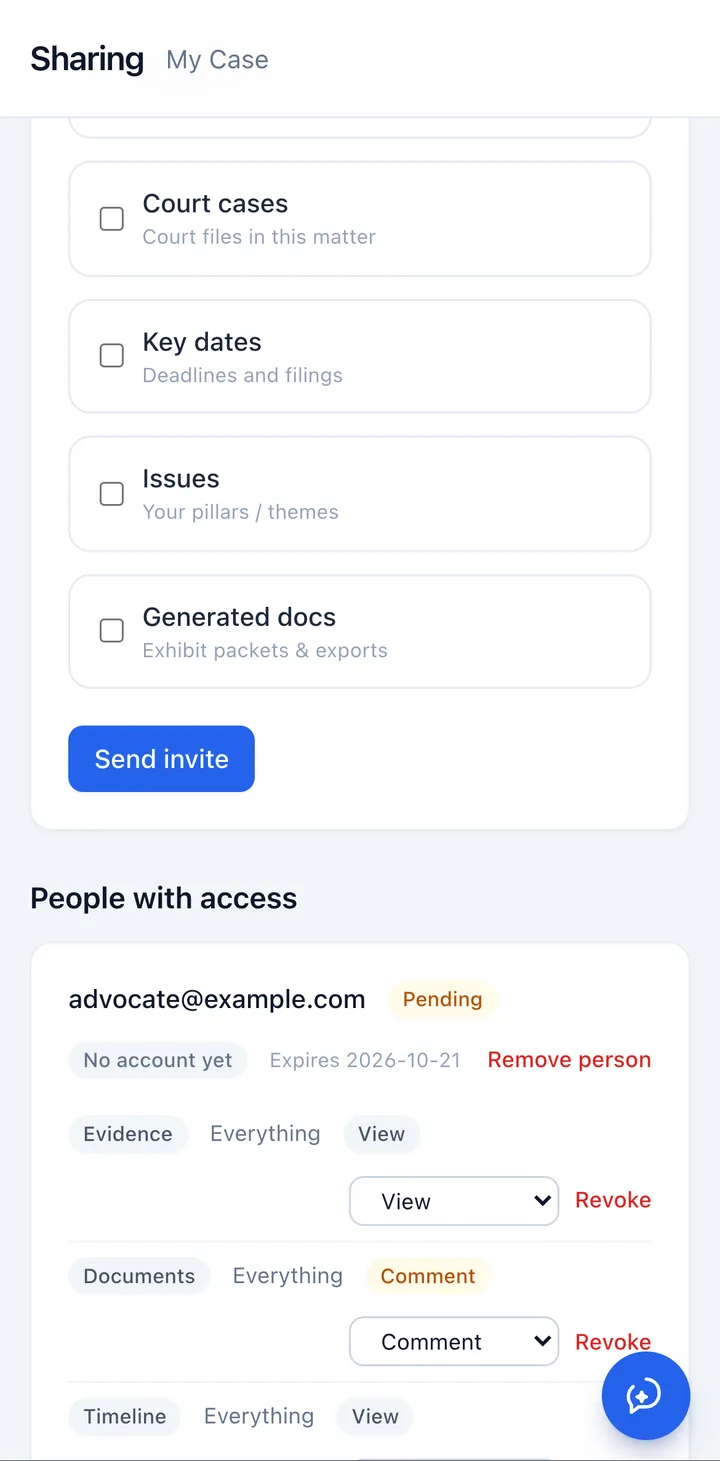
Privacy is easy to overlook when choosing a co-parenting app. In a shared app, both parents usually see the shared record. In Custody Commander, your case file is private to your account. You can invite an attorney, paralegal, advocate, mediator or family member, and choose exactly which sections each person sees.
Share by section: evidence, documents, timeline, hearings, key dates and more
Set each section to view, comment, download or edit
Revoke a section or remove a person any time
Attorney and advocate accounts join free
A co-parent invited to the expense log sees only that log, never the case file
Create your account, then after a short setup you can try Full Suite free for 7 days. Card required; then $24.99/mo or $299/yr (about 82¢ a day) until you cancel. Cancel before day 7 and you pay nothing. Or subscribe now — $299/yr
50% off · 20× the AI
Full Suite Max
Everything in Full Suite, with 20× the AI actions.
$99.99$49.99/mo
or $899/yr$399/yr
Everything in Full Suite: all five tools and the assistant
6,000 AI actions a month (20× Full Suite)
50% off (normally $99.99/mo), locked in as long as you don’t cancel
Already on Full Suite? Get 20× the AI credits for only +$25/mo more (prorated in place)
Clean, printable exports + free attorney & advocate access (on every plan)
$49.99 a month, renews until you cancel. Cancel online in two clicks.
Hearing Pass · one-time
$49 once for 30 days of hearing prep. Nothing renews.
Everything in Full Suite for 30 days from the day you buy it: all five tools, the assistant, AI included, and exports without a watermark. No subscription and nothing to cancel. When the 30 days end you’re back on the free plan, and nothing you added is deleted.
Your case stays private to your account until you invite someone and choose what they see. Data is encrypted in transit and at rest, and we don’t sell your personal information.
Your files stay yours
Originals are kept unchanged. Download your complete Case Bundle, every original file plus a manifest, free on any plan, before or after you cancel.
Cancel anytime, in two clicks
The free plan has nothing to cancel. Paid plans renew until you cancel online in two clicks, and the Hearing Pass never renews.
Organizing software, not a law firm
It organizes the files, dates and messages you provide. It doesn’t give legal advice, choose what you file or predict what a court will do.
Questions, answered straight
Frequently asked questions
What is the best co-parenting app?
It depends on the job. If a court order names an app, that app is the one to use for the communication it covers. If both parents will use a shared app, compare shared apps on price per parent, exports and privacy. If only one parent will use an app, a one-parent tool like Custody Commander works without the other parent joining.
Are there free co-parenting apps?
As of October 14, 2026, our dated comparisons found that AppClose, TalkingParents and OurFamilyWizard listed no free plan for parents, though they offered trials or fee waivers; check their sites for current terms. Custody Commander has a free plan with no end date and no card, and its shared expense log is free for both parents.
Does the other parent have to join Custody Commander?
No. You sign up alone, and the other parent is never contacted, notified or asked to approve anything. If you want to share costs, you can invite them to the expense log; they join free and see only that log.
Can I use two co-parenting apps at the same time?
Yes. A shared or court-ordered app handles messages between parents, and Custody Commander keeps your private records and checks your drafts before you paste them in. Keep using any app named in an order for what the order covers.
Can I get my records out if I stop using it?
Yes. Export your timeline as PDF or Word and expense reports as CSV or PDF. The full Case Bundle export, with every original file, a SHA-256 manifest and all your records, is free any time. You can also delete an import or conversation whenever you like.
Is this legal advice?
No. Custody Commander is organizing software, not a law firm, and this checklist is general information, not legal advice. Whether an order requires a particular app, and what it covers, depends on its wording and your court. A court self-help center or a licensed attorney where you live can help you read it.
Try a co-parenting app only you need to join
Start free with no card, keep your records private, and add the shared expense log when it helps.