Keep your own dated record of child support payments
Log each support payment you send or receive as a dated timeline entry, attach the bank or payment-app confirmation, and print the timeline when you need it. Custody Commander keeps records only: it doesn't calculate, collect or enforce child support.
A record of support payments is most useful when every line has the same shape: the date, the amount, the method and whether it was on time, late, partial or missed. Add a timeline entry for each payment as it happens, sent or received. Keep the title short and put the details in the entry, so the whole record reads cleanly month by month.
Add an entry with the date, a one-line title like "June support received, partial" and details
Put the amount, the method and any reference number in the entry's details
Entries group by month, with search and filters by type, year and month
Tell the in-app assistant about a payment in plain English and it adds the dated entry (uses AI actions)
Export the timeline to PDF or Word (free-plan exports carry a DRAFT mark)
2of 4
Attach the confirmation that shows each payment
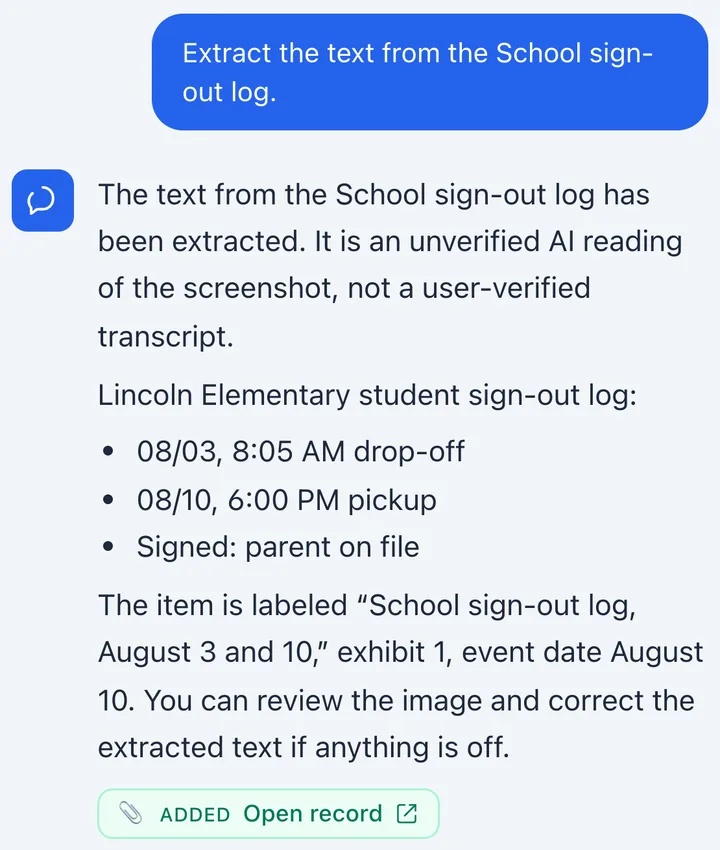
An entry says a payment happened; a bank statement line or a payment-app screenshot shows it. Upload the confirmation from your own account and give it the payment date. The app reads the text in the screenshot and suggests a date and a short label, marked as an unverified AI reading until you check it against the image.
Upload screenshots, photos and PDFs from your phone or computer
Your original file is kept unchanged, with a SHA-256 fingerprint recorded when you add it
AI suggests a likely date and a factual label for you to confirm or edit
Tag each confirmation Expense, or add your own tag such as Support, to find them later
Dated files land on the timeline next to your payment entries
The free plan holds up to 10 evidence items and 6 AI actions to try reading.
3of 4
What Custody Commander doesn't do with child support
Your own record is a personal log, not an official one. Custody Commander isn't connected to any child support agency, court, bank or payment app, and it never moves money. Where payments go through your state's child support agency or a court system, their records are the official account; ask the agency whether it can give you a payment history, and keep that with your own log.
Doesn't calculate child support or what anyone owes
Doesn't collect, process or enforce payments
Isn't connected to any agency, bank or payment app; you add each payment yourself
Doesn't give legal or financial advice about support
4of 4
Shared extra costs, kept apart from support
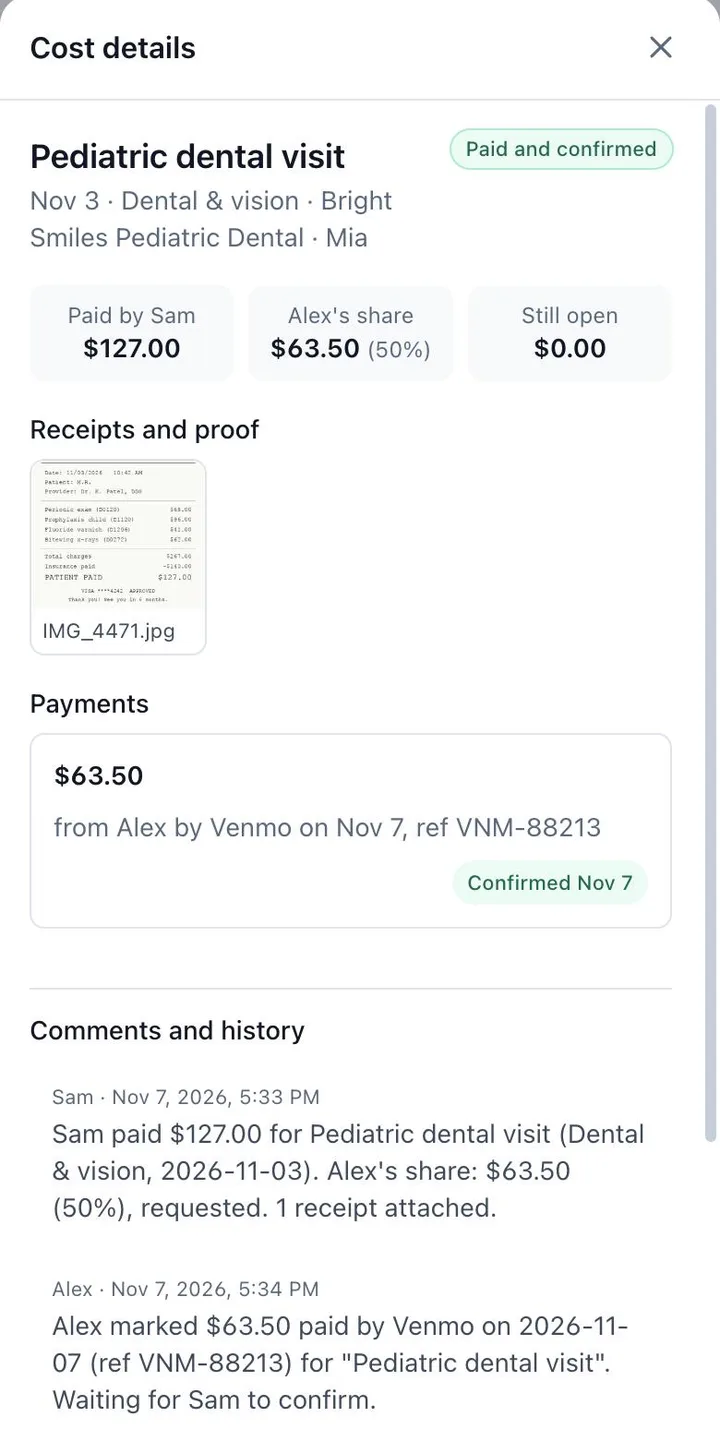
If you and the other parent also split extra child costs, such as school fees or co-pays, those can go in the shared expense log, separate from support payments. It's free for both parents. Each cost has its receipt, a reimbursement request and a paid-and-confirmed status, with a history neither parent can edit.
Unlimited expenses and receipt photos, free for both parents
Request reimbursement, mark paid and confirm received
The co-parent joins free and sees only the expense log, never your case file
Records only: it adds up the shares you enter and never decides what anyone owes
A simple ledger you can keep in any notebook, spreadsheet or app (general information, not legal or financial advice).
Tick them off as you go. Nothing you tick is saved or sent.
Want this ledger as a file? The free child support payment tracker has one row per due date: what was due, what was paid, how it was paid, the confirmation number and where the proof is kept. No sign-up. See what's in it
Organizing tips only. The agency's and the court's records are the official ones.
General organizing tips, not legal advice. Your court's own rules come first.
Plans and pricing
Start free. Upgrade only if you need more.
The free plan needs no credit card and never expires. Case Builder holds the timeline and the assistant; Full Suite adds AI reading of your screenshots and every other tool.
Free
For getting your evidence out of your camera roll and into order.
$0
Free forever — no credit card, nothing to cancel.
One case file, unlimited court case numbers
10 evidence items, 1 GB of storage
Organize, describe, tag, search
Watermarked printable PDF export
6 AI actions to try the tools (one-time, not monthly)
Create your account, then after a short setup you can try Full Suite free for 7 days. Card required; then $24.99/mo or $299/yr (about 82¢ a day) until you cancel. Cancel before day 7 and you pay nothing. Or subscribe now — $299/yr
50% off · 20× the AI
Full Suite Max
Everything in Full Suite, with 20× the AI actions.
$99.99$49.99/mo
or $899/yr$399/yr
Everything in Full Suite: all five tools and the assistant
6,000 AI actions a month (20× Full Suite)
50% off (normally $99.99/mo), locked in as long as you don’t cancel
Already on Full Suite? Get 20× the AI credits for only +$25/mo more (prorated in place)
Clean, printable exports + free attorney & advocate access (on every plan)
$49.99 a month, renews until you cancel. Cancel online in two clicks.
Hearing Pass · one-time
$49 once for 30 days of hearing prep. Nothing renews.
Everything in Full Suite for 30 days from the day you buy it: all five tools, the assistant, AI included, and exports without a watermark. No subscription and nothing to cancel. When the 30 days end you’re back on the free plan, and nothing you added is deleted.
Your case stays private to your account until you invite someone and choose what they see. Data is encrypted in transit and at rest, and we don’t sell your personal information.
Your files stay yours
Originals are kept unchanged. Download your complete Case Bundle, every original file plus a manifest, free on any plan, before or after you cancel.
Cancel anytime, in two clicks
The free plan has nothing to cancel. Paid plans renew until you cancel online in two clicks, and the Hearing Pass never renews.
Organizing software, not a law firm
It organizes the files, dates and messages you provide. It doesn’t give legal advice, choose what you file or predict what a court will do.
Questions, answered straight
Frequently asked questions
Does Custody Commander calculate child support?
No. It doesn't calculate support or decide what anyone owes. The amount comes from your order or agency. The free parenting time calculator on our site counts overnights for common schedules and doesn't calculate child support either.
Can it track support payments automatically?
No. It isn't connected to any bank, payment app, agency or court, so you add each payment yourself. Attach the confirmation from your own account as proof, and the entry and the file sit together on your timeline.
Can I use it to keep a record of child support I've paid?
Yes. It works the same for the parent who pays and the parent who receives. Add a dated entry for each payment you send and attach the confirmation, so you have your own record of child support paid alongside any official statement.
What if child support isn't being paid?
Custody Commander only keeps your record; it can't collect anything. Collection and enforcement go through official channels, such as your state's child support agency or the court that issued the order. Your court's self-help center or a licensed attorney where you live can explain the options, and a clear, dated payment record is useful to bring.
Who can see my payment records?
Only you, plus anyone you invite to chosen sections, such as an attorney. The other parent is never contacted or notified. If you invite them to the shared expense log for extra costs, they see only that log, not your timeline.
Is it free?
The free plan needs no card and never expires: one case, up to 10 evidence items, 1 GB and 6 AI actions, with DRAFT-marked exports. Full Suite is $24.99 a month or $299 a year, with a 7-day trial (card required). The shared expense log is free for both parents.
Is this legal advice?
No. Custody Commander is organizing software, not a law firm, and nothing on this page is legal or financial advice. For questions about support amounts, payments owed or enforcement, contact your state's child support agency, your court's self-help center or a licensed attorney where you live.
Start your support payment record today
Add this month's payment, attach the confirmation, and keep every date in one place. Free plan, no card needed.