
Co-parenting communication app

A communication app for divorced parents that only you need

Custody Commander is a family communication app for divorced and separated parents that works on your side only. Check each message before you send it, send it through the channel you already use, and keep a dated log of the conversation.

Start free

Free plan, no card needed. Comms Guard comes with the 7-day Full Suite trial. Organizing software, not a law firm; not legal advice.

See plans: Free, single tools, Full Suite
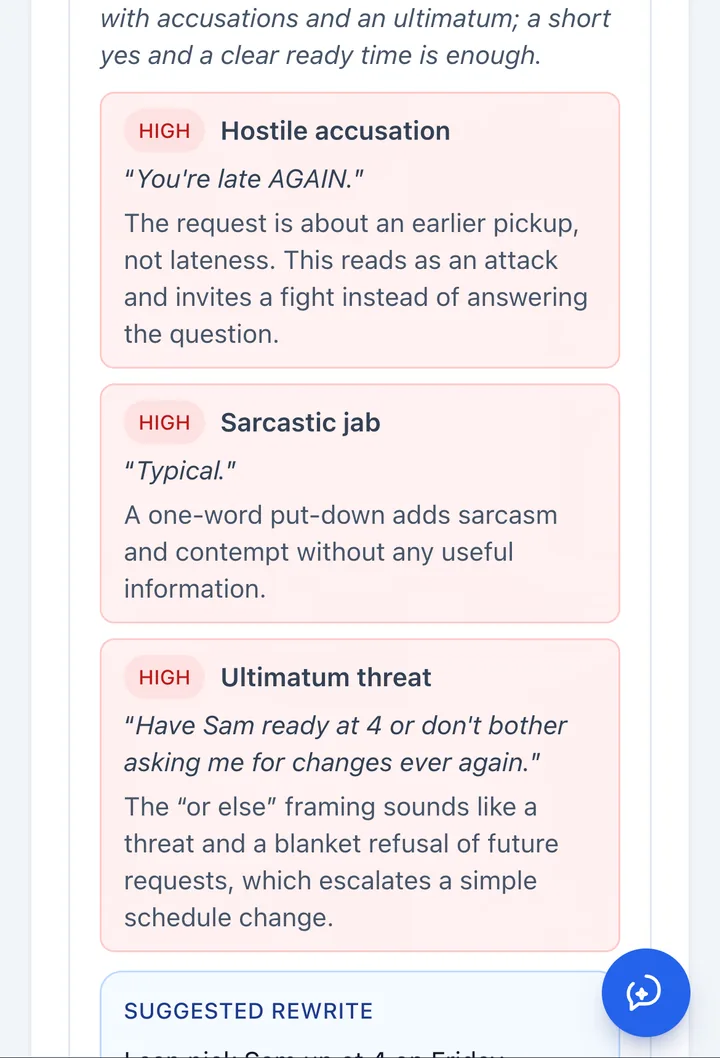
Comms Guard's review of a draft message: three flags marked High, called Hostile accusation, Sarcastic jab and Ultimatum threat, each quoting the problem words with a one-line reason, and the start of a suggested rewrite
App screen from a demo case with made-up names.
  • Runs in your web browser on phone or computer
  • The other parent never has to join or approve anything
  • Works with text, email or any co-parenting app
  • Free plan, no card needed

1of 5

Built for one parent, so nobody has to agree to use it

Many co-parenting messaging apps only work once both parents sign up. Custody Commander takes a different approach: it's a private workspace for one parent, and the other parent is never contacted or notified. You keep the phone number, email address or court-ordered app you already use; Custody Commander helps with the wording and the record.

Open my private workspace

Free plan, no card needed.

In the app

  • No invitation, download or approval needed from the other parent
  • Runs in a web browser on your phone or computer
  • Your case stays private until you choose to invite someone
  • Encrypted in transit and at rest, with two-factor sign-in and one-click sign-out of every device

2of 5

Draft, check, then send it your usual way

A messaging app moves words from one phone to another. Comms Guard works one step earlier, on the words themselves. It looks over your draft, flags anything likely to escalate or confuse, and suggests a calmer version. You make the final edits, copy the message and send it from wherever you normally would.

Check my next message

Comms Guard is in the 7-day Full Suite trial and paid plans.

In the app

  • Flags tone, escalation, possible admissions, ambiguity and oversharing, ranked by severity
  • A plain-language reason under every flag
  • A suggested BIFF rewrite (Brief, Informative, Friendly, Firm) that you can edit
  • Paste the message you received and the reply check uses it as context
  • Nothing is ever sent from the app

3of 5

A dated log of both sides of the conversation

Because messages go out through your own channel, Custody Commander keeps the record on your side. Click Log as sent and your reply is saved with the date and time to that person's thread; paste in what you received and it lands in the same thread. For a long history, import an export of the whole conversation from your own phone or account.

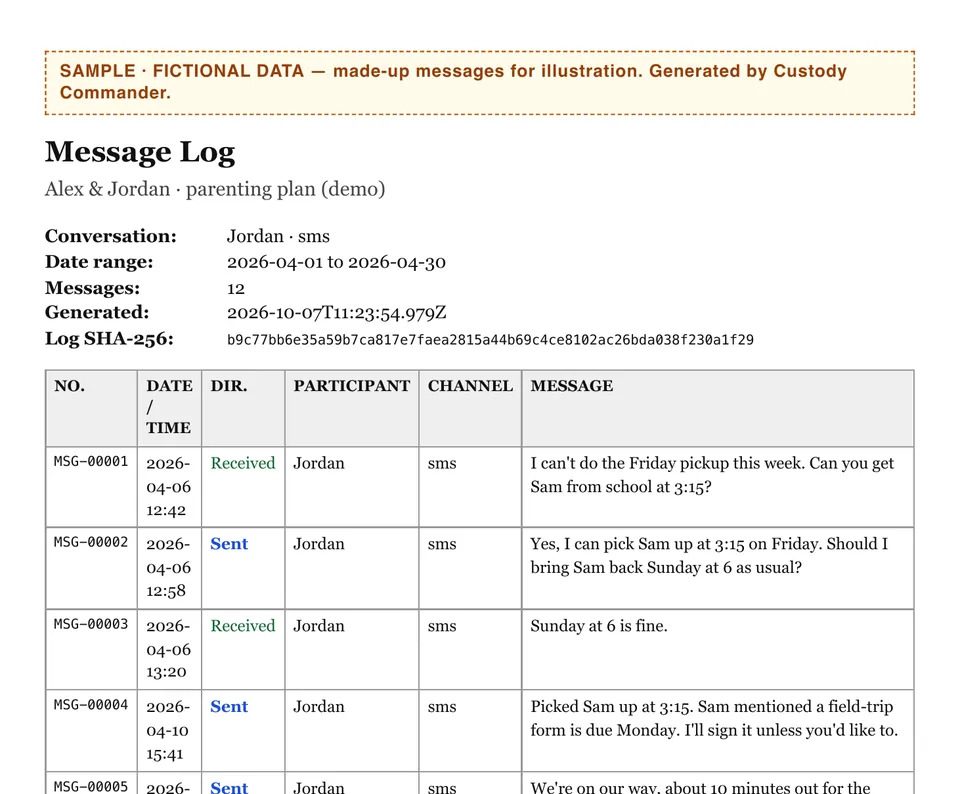
  • Each logged message is saved with its date and time
  • Logged messages go into the numbered message log, from MSG-00001
  • Import iPhone texts exported with iMazing, Android texts from SMS Backup & Restore, or WhatsApp, Messenger and Instagram downloads
  • Imported message text can't be edited in the app; tags and display names never change it
Log my messages

Free-plan message logs are watermarked DRAFT.

A sample message log built from fictional data, listing messages MSG-00001 onward with their date and time, direction, participant, channel and text, below the log's SHA-256 fingerprint

4of 5

The one part built for both parents: shared expenses

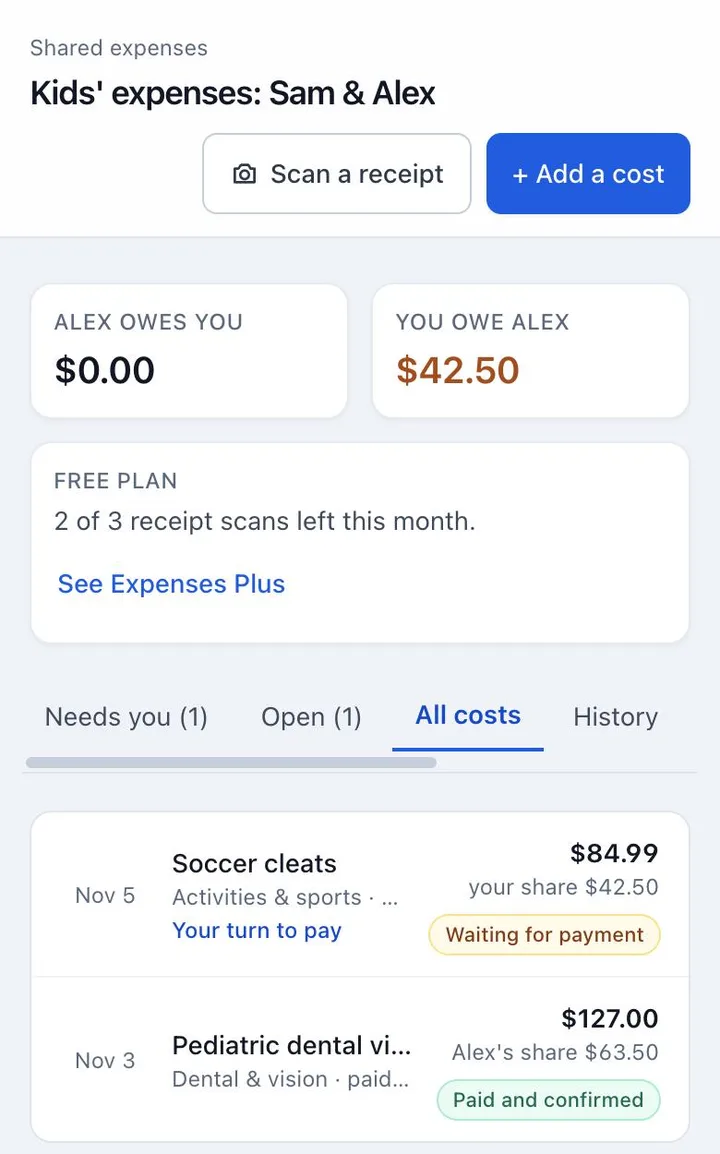
Money is the exception to the one-parent rule. The shared expense log is a family app for both divorced parents to use, and it's free for both. Each cost gets its own entry with the receipt, a reimbursement request and a paid-and-confirmed trail, so payment questions stay out of the message thread.

  • Unlimited expenses and receipt photos, free for both parents
  • Request reimbursement, mark paid and confirm received
  • Comments on each expense and a history that can't be edited
  • The co-parent joins free and sees only the expense log, never your case file
  • CSV and PDF reports; it records shares you enter and never decides what anyone owes
Start our shared expense log

Free for both parents. Expenses Plus is $3.99/month or $29/year and covers both.

The shared expense log: Scan a receipt and Add a cost buttons, a card showing each parent's balance, and two costs, one waiting for payment and one marked Paid and confirmed

5of 5

What it is not: a shared inbox

It helps to be clear about the limits. Custody Commander doesn't host a conversation between parents, doesn't sit inside your messaging apps and doesn't read messages automatically. If an order names a specific co-parenting app, keep using it; Comms Guard works alongside it.

Check a message before I send it

Try one without an account: the free calm reply checker gives 3 checks a day.

In the app

  • No shared message thread between parents
  • Doesn't connect to your messaging apps or pull messages on its own
  • Doesn't monitor anyone; it works only with what you paste or import from your own accounts
  • Never says a message will help or hurt your case

How it works

How it fits the channel you already use

  1. Paste and write

    Paste the message you received, if there is one, and write your reply in Comms Guard.

  2. Edit and send

    Review the flags, adjust the rewrite, then send it from your phone, email or app.

  3. Log as sent

    Save your reply with its date and time to that person's thread.

Start free

Start free today — no credit card required.

Free checklist · no sign-up

Checklist: choosing a co-parenting communication setup

Questions to answer before you settle on any app or channel (general information, not legal advice).

Tick them off as you go. Nothing you tick is saved or sent.

Try it on my next message

Free plan, no card needed.

Plans and pricing

Start free. Upgrade only if you need more.

The free plan needs no credit card and never expires. Comms Guard is part of Full Suite, along with every other tool.

Free

For getting your evidence out of your camera roll and into order.

$0

Free forever — no credit card, nothing to cancel.

  • One case file, unlimited court case numbers
  • 10 evidence items, 1 GB of storage
  • Organize, describe, tag, search
  • Watermarked printable PDF export
  • 6 AI actions to try the tools (one-time, not monthly)

Single Product

Message Extractor

Just the one tool you need right now. Switch or upgrade anytime.

$14.99/mo

or $119/yr per product

  • Message Extractor on its own: imports, numbers, searches and tags your message threads
  • 80 AI actions a month for that tool
  • Unwatermarked exports from that tool
  • Everything still lands in one case file
Get Message Extractor

$14.99 a month, renews until you cancel. Cancel online in two clicks.

50% off · 20× the AI

Full Suite Max

Everything in Full Suite, with 20× the AI actions.

$99.99$49.99/mo

or $899/yr $399/yr

  • Everything in Full Suite: all five tools and the assistant
  • 6,000 AI actions a month (20× Full Suite)
  • 50% off (normally $99.99/mo), locked in as long as you don’t cancel
  • Already on Full Suite? Get 20× the AI credits for only +$25/mo more (prorated in place)
  • Clean, printable exports + free attorney & advocate access (on every plan)
Get Full Suite Max

$49.99 a month, renews until you cancel. Cancel online in two clicks.

Hearing Pass · one-time

$49 once for 30 days of hearing prep. Nothing renews.

Everything in Full Suite for 30 days from the day you buy it: all five tools, the assistant, AI included, and exports without a watermark. No subscription and nothing to cancel. When the 30 days end you’re back on the free plan, and nothing you added is deleted.

Get the Hearing Pass — $49
  • No card for the free plan
  • Plans renew until you cancel. Cancel online anytime, in two clicks.
  • Only you pay — the other parent never joins

Compare all plans on the pricing page →

Good to know before you start

  • Private by default

    Your case stays private to your account until you invite someone and choose what they see. Data is encrypted in transit and at rest, and we don’t sell your personal information.

  • Your files stay yours

    Originals are kept unchanged. Download your complete Case Bundle, every original file plus a manifest, free on any plan, before or after you cancel.

  • Cancel anytime, in two clicks

    The free plan has nothing to cancel. Paid plans renew until you cancel online in two clicks, and the Hearing Pass never renews.

  • Organizing software, not a law firm

    It organizes the files, dates and messages you provide. It doesn’t give legal advice, choose what you file or predict what a court will do.

Questions, answered straight

Frequently asked questions

Is this a family communication app both parents use?

Mostly no. Custody Commander is a one-parent app: you check, send and log your own messages, and the other parent is never contacted. The exception is the shared expense log, which both parents can use free. A co-parent who joins it sees only the expense log, never your case file.

Can I message the other parent from the app?

No. Nothing is ever sent from Custody Commander. You write and check your message in Comms Guard, then copy it and send it by text, email or any co-parenting app. Click Log as sent to save it with its date and time.

Does it read my texts automatically?

No. It doesn't sit inside your messaging apps or read anything on its own. You paste messages into Comms Guard, or import an export of a whole thread from your own phone or account, such as an iPhone export made with iMazing or an Android backup from SMS Backup & Restore.

Can I use it with a court-ordered co-parenting app?

Yes. Check and edit your message in Comms Guard, then paste it into the app your order names. Custody Commander doesn't replace that app or connect to it; it gives you a calmer draft and your own dated copy.

Does it work on iPhone and Android?

Yes, in the web browser. Custody Commander runs in a browser on your phone or computer, so there's nothing to download from an app store. Sign in with two-factor sign-in, and sign out of every device with one click when you need to.

Is there a free version?

Yes. The free plan needs no card and includes one case, message log imports with DRAFT-watermarked exports, and the shared expense log, which is free for both parents. Comms Guard comes with the 7-day Full Suite trial (card required) and paid plans; Full Suite is $24.99/month or $299/year. The free calm reply checker on our site gives 3 checks a day without an account.

Is this legal advice?

No. Custody Commander is organizing software, not a law firm, and nothing here is legal advice. It helps with the wording of your own messages and keeps your records in order; it never predicts how a message will be read. For advice about your situation, talk to a licensed attorney where you live.

Keep your channel. Add a calmer draft and a dated record.

Start free with no card. Check your next message with the 7-day Full Suite trial, and invite the other parent only to shared expenses, if you choose.

Start free today — no credit card required