
Co-parenting tone checker

Check the tone of a co-parent message before you send it

Comms Guard is a co-parenting tone checker for texts and emails. It flags what may escalate, ranks each flag by severity with a plain reason, and suggests a calmer version you edit and send yourself.

Start free

Free plan, no card needed. Comms Guard comes with the 7-day Full Suite trial. Organizing software, not a law firm; not legal advice.

See plans: Free, single tools, Full Suite
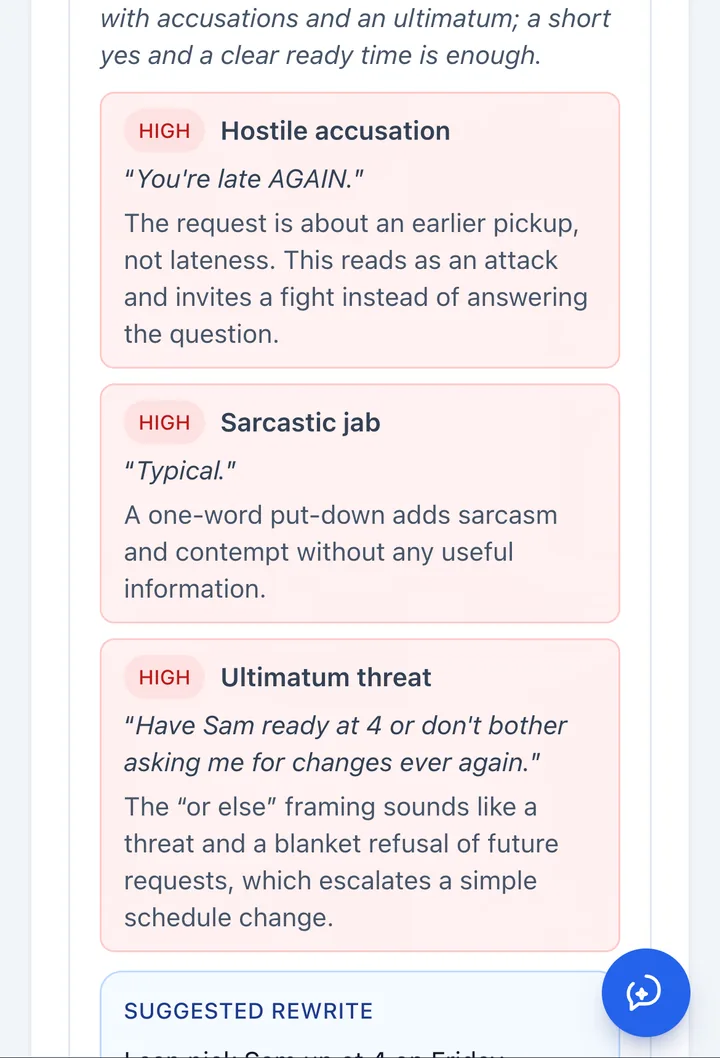
Tone check results in Comms Guard: three flags labeled High (Hostile accusation, Sarcastic jab, Ultimatum threat), each showing the quoted words and why they may escalate a pickup question, then a suggested rewrite
App screen from a demo case with made-up names.
  • Five kinds of flags, ranked by severity
  • A plain-language reason for every flag
  • Never says a message will help or hurt your case
  • Try 3 free checks a day, no signup

1of 5

Five things the tone checker looks for

Tone is only one way a message can go wrong. A calm-sounding text can still concede something you didn't mean, leave a time open to two readings, or share more than the other parent needs to know. Comms Guard checks each draft for five kinds of problems and explains every one it finds.

Check my message's tone

Comms Guard is in the 7-day Full Suite trial and paid plans.

In the app

  • Tone: sarcasm, blame, insults and hostile wording
  • Escalation: ultimatums, threats and lines that invite a fight
  • Possible admissions: wording that concedes something you may not mean
  • Ambiguity: times, places or promises that could be read two ways
  • Oversharing: side topics and personal details the message doesn't need

2of 5

Ranked by severity, with a reason you can act on

A list of problems is only useful if you know where to start. Each flag gets a severity level and a short explanation in plain language, so you can see which line matters most and why. The suggested rewrite follows the BIFF method: Brief, Informative, Friendly and Firm.

In the app

  • Severity labels on every flag, so you know where to start
  • A plain-language reason sits under every flag
  • A suggested BIFF rewrite you can edit, keep or ignore
  • Write the draft in Comms Guard or paste it from anywhere

3of 5

An AI tone check built for co-parent messages

General writing tools look at grammar and style. A co-parenting tone check looks for different things: whether a pickup question turned into a complaint, whether a reply quietly concedes a point, whether a time and place are clear. Comms Guard is built around those everyday co-parenting problems, and it shows a reason for every flag so you can judge it yourself.

Try the AI tone check

Comms Guard is in the 7-day Full Suite trial and paid plans.

In the app

  • Made for texts and emails between co-parents, not general writing
  • Every flag quotes your exact words, so you can see what it's reacting to
  • You accept, change or ignore each suggestion; nothing changes without you
  • Works the same whether the message goes by text, email or a co-parenting app

4of 5

What the tone check never tells you

Comms Guard looks at wording, not at the law. It never says a message will help or hurt your case, and it never sends anything for you. Like any AI suggestion, a flag can be wrong, so read each one and decide for yourself; the final words are always yours.

Check a draft privately

Encrypted in transit and at rest. AI providers may not use your content to train models.

In the app

  • No case predictions: it never says a message helps or hurts
  • Doesn't sit inside your messaging apps or read messages automatically
  • Doesn't monitor anyone; it checks only what you paste in
  • Nothing is ever sent from the app

5of 5

Check a reply against the message it answers

Tone depends on context. A reply that looks fine on its own can still pick up a fight the other message started. Paste the message you received and log it to that person's thread; when you draft your answer, Comms Guard uses it as context and flags a reply that takes the bait.

Check my reply in context

The other parent is never contacted or notified.

In the app

  • Paste a received message and log it to the right person's thread
  • Reply drafting uses that message as context
  • Flags replies that take the bait, with the reason
  • Log as sent saves your final version with the date and time
  • Logged messages join the numbered message log, from MSG-00001

How it works

How the tone check works

  1. Paste your draft

    Write or paste the text or email you're about to send.

  2. Read the flags

    Each flag shows its severity, the words it's about and a plain reason.

  3. Edit and send

    Adjust the suggested rewrite, copy it and send it through your own channel.

Start free

Start free today — no credit card required.

Free checklist · no sign-up

A tone check you can do yourself in one minute

Run through these before sending any co-parent text or email (general communication tips, not legal advice).

Tick them off as you go. Nothing you tick is saved or sent.

Run a full tone check

Or try the free calm reply checker: 3 checks a day, no signup, nothing saved.

Plans and pricing

Start free. Upgrade only if you need more.

The free plan needs no credit card and never expires. Comms Guard is part of Full Suite, along with every other tool.

Free

For getting your evidence out of your camera roll and into order.

$0

Free forever — no credit card, nothing to cancel.

  • One case file, unlimited court case numbers
  • 10 evidence items, 1 GB of storage
  • Organize, describe, tag, search
  • Watermarked printable PDF export
  • 6 AI actions to try the tools (one-time, not monthly)

Single Product

Message Extractor

Just the one tool you need right now. Switch or upgrade anytime.

$14.99/mo

or $119/yr per product

  • Message Extractor on its own: imports, numbers, searches and tags your message threads
  • 80 AI actions a month for that tool
  • Unwatermarked exports from that tool
  • Everything still lands in one case file
Get Message Extractor

$14.99 a month, renews until you cancel. Cancel online in two clicks.

50% off · 20× the AI

Full Suite Max

Everything in Full Suite, with 20× the AI actions.

$99.99$49.99/mo

or $899/yr $399/yr

  • Everything in Full Suite: all five tools and the assistant
  • 6,000 AI actions a month (20× Full Suite)
  • 50% off (normally $99.99/mo), locked in as long as you don’t cancel
  • Already on Full Suite? Get 20× the AI credits for only +$25/mo more (prorated in place)
  • Clean, printable exports + free attorney & advocate access (on every plan)
Get Full Suite Max

$49.99 a month, renews until you cancel. Cancel online in two clicks.

Hearing Pass · one-time

$49 once for 30 days of hearing prep. Nothing renews.

Everything in Full Suite for 30 days from the day you buy it: all five tools, the assistant, AI included, and exports without a watermark. No subscription and nothing to cancel. When the 30 days end you’re back on the free plan, and nothing you added is deleted.

Get the Hearing Pass — $49
  • No card for the free plan
  • Plans renew until you cancel. Cancel online anytime, in two clicks.
  • Only you pay — the other parent never joins

Compare all plans on the pricing page →

Good to know before you start

  • Private by default

    Your case stays private to your account until you invite someone and choose what they see. Data is encrypted in transit and at rest, and we don’t sell your personal information.

  • Your files stay yours

    Originals are kept unchanged. Download your complete Case Bundle, every original file plus a manifest, free on any plan, before or after you cancel.

  • Cancel anytime, in two clicks

    The free plan has nothing to cancel. Paid plans renew until you cancel online in two clicks, and the Hearing Pass never renews.

  • Organizing software, not a law firm

    It organizes the files, dates and messages you provide. It doesn’t give legal advice, choose what you file or predict what a court will do.

Questions, answered straight

Frequently asked questions

What does a co-parenting tone checker do?

It reads a draft message before you send it and points out wording that may escalate or be misread. Comms Guard checks for tone, escalation, possible admissions, ambiguity and oversharing, ranks each flag by severity with a plain reason, and suggests a calmer BIFF rewrite. You edit it and send it yourself.

Is there a free tone checker for texts?

Yes. The free calm reply checker on our site gives 3 checks a day with no signup, and it doesn't save your text. Comms Guard, the full tone check inside Custody Commander, comes with the 7-day Full Suite trial (card required) and paid plans; Full Suite is $24.99/month or $299/year.

Can it check emails as well as texts?

Yes. Comms Guard works on any draft you write or paste in, whether it's a text, an email or a message for a co-parenting app. Once you're happy with it, copy it into that channel and send it from there.

Will it tell me if a message will hurt my case?

No. It flags wording, not legal consequences, and it never says a message will help or hurt a case. That's a legal question; for it, talk to a licensed attorney where you live.

Does it read my messages automatically?

No. It doesn't sit inside your messaging apps or pull messages on its own. It checks only the drafts and received messages you paste in yourself, and it never contacts the other parent.

Is what I paste kept private?

Your case is private to your account and encrypted in transit and at rest, with two-factor sign-in available. Custody Commander doesn't sell personal information, and AI providers may not use your content to train models. The free calm reply checker doesn't save what you paste at all.

Is this legal advice?

No. Custody Commander is organizing software, not a law firm, and the tone check is communication help, not legal advice. It doesn't tell you what to admit, deny or file. For advice about your situation, talk to a licensed attorney where you live.

Check the tone before anyone else reads it

Start free, then run your next draft through Comms Guard with the 7-day Full Suite trial.

Start free today — no credit card required