

Custody schedule examples

Custody schedule examples, explained night by night

See how common custody schedule patterns repeat, count the overnights with a free calculator and print a filled-in calendar. Then keep the schedule, and every change to it, in date order in Custody Commander.

Start free

Free plan, no card needed. Organizing software, not a law firm; not legal advice.

See plans: Free, single tools, Full Suite
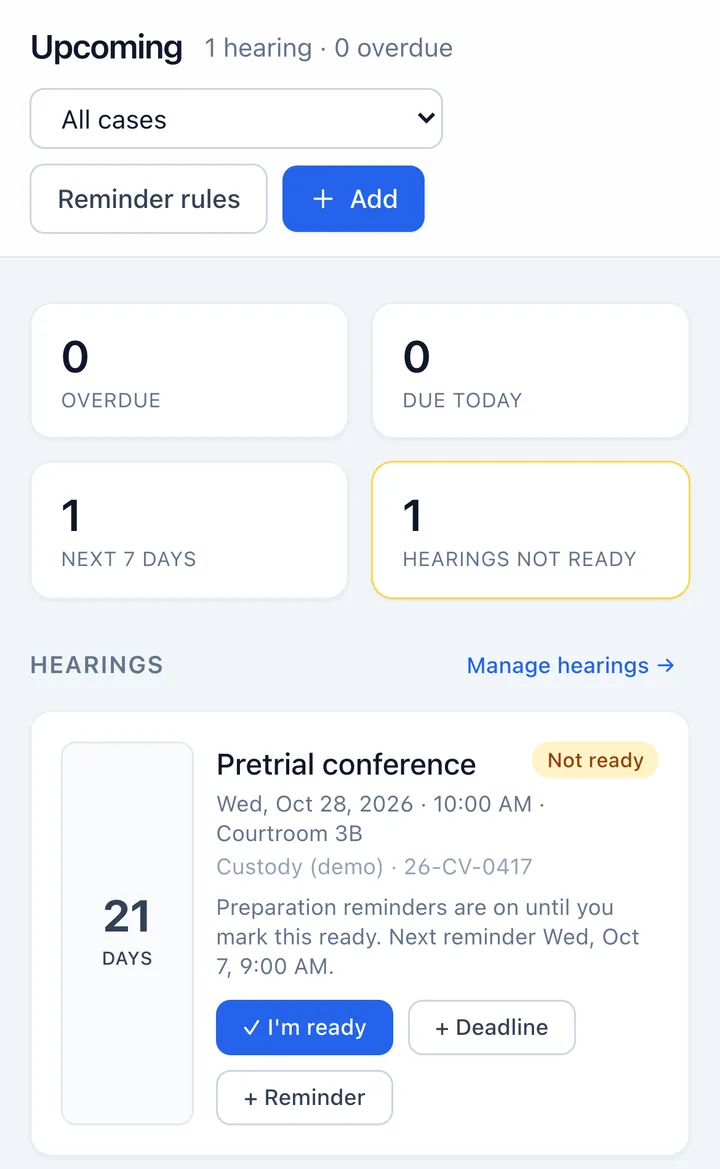
The Upcoming screen in Custody Commander with overdue, due today and next 7 days counts, an Add button for reminders, and a hearing card with a 21-day countdown
App screen from a demo case with made-up names.
  • Neutral examples, not recommendations
  • Free calculator and pattern calendars
  • Free app plan, no card needed
  • Organizing software, not a law firm

1of 4

Common custody schedule patterns, side by side

Most regular schedules are built on a two-week cycle. Below are four patterns often seen in plans and orders, described only by how the nights fall. None of them suits every family, and the schedule that applies to you is the one in your order or written agreement, or the one the court decides.

In the app

  • 2-2-3: two nights with one parent, two with the other, then three, and the order flips the next week; 7 of every 14 nights each
  • 2-2-5-5: each parent keeps the same two weeknights every week and the weekends alternate, which makes a five-night stretch every other week; 7 of every 14 each
  • Alternating weeks: one full week with each parent and one exchange a week; 7 of every 14 each
  • Every other weekend: Friday and Saturday nights every second weekend is 2 of every 14 nights; adding Sunday night makes it 3
  • Many plans add a separate schedule for holidays, school breaks and summer on top of the regular pattern

2of 4

Count the overnights and print the pattern

A pattern is easier to understand on a calendar, where you can see which days the exchanges fall on and how weekends and school nights split. Our free tools do the counting and the filling in, with no signup.

Put my schedule on a timeline

The calculator and calendars are free downloads. The app's free plan needs no card.

In the app

  • The free parenting time calculator shows overnights per year and each parent's percentage for all four patterns
  • Free pattern calendars for 2-2-3, week on week off and every other weekend, filled in night by night for 2026 and 2027
  • The Excel versions re-fill from your own start date and count each parent's nights
  • A blank year-at-a-glance calendar for any other pattern
  • Arithmetic only: no state rules, no child support and no recommendation

3of 4

The next exchange, where you'll see it

Once the schedule is set, the job becomes keeping each date in view. Add the coming exchanges as future-dated entries and they appear as Next or Upcoming. Reminders on the Upcoming page give you a nudge before each one.

  • Future-dated entries show as Next or Upcoming on the timeline
  • A reminder for any exchange, with a time and a note about the place or who drives
  • Notices say only that a reminder is due, so exchange details aren't shown in the notice itself
  • Counts for overdue items, items due today and the next 7 days
Upcoming page counts showing 0 overdue, 0 due today and 1 in the next 7 days, with Reminder rules and Add buttons at the top

4of 4

Every change to the schedule, dated and backed up

Schedules shift: a swapped weekend, a moved pickup, a make-up night. Each change is easier to account for later when it's logged on the day it's agreed, together with the message that confirms it.

  • Log each swap or moved exchange as a dated entry, with what was agreed and how
  • Import your own text message exports, and the assistant can add key dates from them to the timeline
  • Upload a screenshot of the agreement; the original is kept with a SHA-256 fingerprint
  • Check a swap request for tone in Comms Guard, get a calmer rewrite, then send it yourself (trial and paid plans)
  • Export the timeline to PDF or Word; free-plan exports carry a DRAFT mark
A timeline entry for August 10 reading Pickup moved to 6 pm by text, Jordan asked by text, agreed in writing, next to a school sign-out log saved as evidence

How it works

From a pattern on paper to a schedule you can follow

  1. Understand the pattern

    Compare the examples and count the nights in the free calculator.

  2. Add the dates

    Put the coming exchanges on your timeline and set reminders.

  3. Log the changes

    Record each swap the day it's agreed, with the message that confirms it.

Start free

Start free today — no credit card required.

Free checklist · no sign-up

How to read any custody schedule pattern: a 10-point check

Use these checks to understand an example, a proposal or your own order. They describe patterns; they don't pick one.

Tick them off as you go. Nothing you tick is saved or sent.

Keep my schedule on a timeline

Reading tips, not legal advice. Your order, or the court, decides the schedule.

Plans and pricing

Start free. Upgrade only if you need more.

The free plan needs no credit card and never expires. Case Builder holds the timeline and the assistant; Full Suite adds AI reading of your screenshots and every other tool.

Free

For getting your evidence out of your camera roll and into order.

$0

Free forever — no credit card, nothing to cancel.

  • One case file, unlimited court case numbers
  • 10 evidence items, 1 GB of storage
  • Organize, describe, tag, search
  • Watermarked printable PDF export
  • 6 AI actions to try the tools (one-time, not monthly)

Best fit for a dated record

Single Product

Case Builder

Just the one tool you need right now. Switch or upgrade anytime.

$14.99/mo

or $119/yr per product

  • Case Builder on its own: your timeline, documents, hearings, to-dos and the assistant
  • 80 AI actions a month for that tool
  • Unwatermarked exports from that tool
  • Everything still lands in one case file
Get Case Builder

$14.99 a month, renews until you cancel. Cancel online in two clicks.

50% off · 20× the AI

Full Suite Max

Everything in Full Suite, with 20× the AI actions.

$99.99$49.99/mo

or $899/yr $399/yr

  • Everything in Full Suite: all five tools and the assistant
  • 6,000 AI actions a month (20× Full Suite)
  • 50% off (normally $99.99/mo), locked in as long as you don’t cancel
  • Already on Full Suite? Get 20× the AI credits for only +$25/mo more (prorated in place)
  • Clean, printable exports + free attorney & advocate access (on every plan)
Get Full Suite Max

$49.99 a month, renews until you cancel. Cancel online in two clicks.

Hearing Pass · one-time

$49 once for 30 days of hearing prep. Nothing renews.

Everything in Full Suite for 30 days from the day you buy it: all five tools, the assistant, AI included, and exports without a watermark. No subscription and nothing to cancel. When the 30 days end you’re back on the free plan, and nothing you added is deleted.

Get the Hearing Pass — $49
  • No card for the free plan
  • Plans renew until you cancel. Cancel online anytime, in two clicks.
  • Only you pay — the other parent never joins

Compare all plans on the pricing page →

Good to know before you start

  • Private by default

    Your case stays private to your account until you invite someone and choose what they see. Data is encrypted in transit and at rest, and we don’t sell your personal information.

  • Your files stay yours

    Originals are kept unchanged. Download your complete Case Bundle, every original file plus a manifest, free on any plan, before or after you cancel.

  • Cancel anytime, in two clicks

    The free plan has nothing to cancel. Paid plans renew until you cancel online in two clicks, and the Hearing Pass never renews.

  • Organizing software, not a law firm

    It organizes the files, dates and messages you provide. It doesn’t give legal advice, choose what you file or predict what a court will do.

Questions, answered straight

Frequently asked questions

What are some common custody schedule examples?

Patterns often seen in plans include 2-2-3, 2-2-5-5 and alternating weeks, which split nights evenly, and every other weekend, which gives one parent 2 or 3 of every 14 nights. Many plans add a separate holiday and summer schedule. These are examples only; your order, your written agreement or the court decides the schedule that applies.

Which custody schedule is best for my child?

Custody Commander can't answer that, and neither can a calculator. Schedules are set by agreement between the parents or by the court, under your state's law and the facts of the family. A licensed attorney where you live, a mediator or your court's self-help center can explain the options in your area.

What does a 2-2-5-5 schedule mean?

Each parent has the same two weeknights every week, for example one parent Monday and Tuesday and the other Wednesday and Thursday, and the weekends alternate. That gives each parent a five-night stretch every other week and 7 of every 14 nights. It's one example pattern, not a recommendation.

How do I keep track of schedule changes?

Log each change on the day it's agreed: the date, what moved and how it was agreed. Keep the text or email that confirms it. In Custody Commander, the change goes on the timeline as a dated entry, and the confirming screenshot sits right next to it.

Is it free?

The calculator and pattern calendars are free with no signup. The app's free plan needs no card and covers one case with the timeline, reminders and up to 10 evidence items; its exports carry a DRAFT mark. Full Suite, with every tool and AI included, is $24.99 a month or $299 a year.

Is this legal advice?

No. Custody Commander is organizing software, not a law firm. The examples on this page describe how patterns repeat; they don't recommend one or say what a court would order. For advice about a schedule, talk to a licensed attorney where you live.

Keep your custody schedule, and its changes, in one place

Count the nights for free, add the coming exchanges and log each change as it's agreed. Free plan, no card needed.

Start free today — no credit card required