Arrive at a family lawyer consultation with your case organized
Whether the consultation is free or paid, the meeting goes further when your facts are easy to follow. Custody Commander builds an attorney handoff packet from your own records: a case summary, your issues with tagged evidence, the timeline and an evidence index.
A free consultation with a family lawyer is often brief, and the background can take up much of it. A short written summary of who's involved, the case numbers, any current orders and what you want to discuss lets the conversation reach your questions sooner. In the app, you name each issue, write your own summary of it, and tag the evidence that goes with it.
Court case numbers, related cases and upcoming dates in one case file
Your words, not the app's: it never maps law to your facts
2of 5
A dated timeline, so the lawyer sees events in order
Events told from memory tend to jump around. A one-page timeline, one line per event with a date, lets the lawyer follow along and ask about specific moments. Add entries as you remember them; the timeline sorts itself by date and groups by month.
Events, dated evidence, key dates and hearings on one master timeline
Tell the assistant what happened and it adds the dated entry (uses AI actions)
An evidence index in place of a stack of screenshots
A first meeting rarely has time to go through hundreds of images. An evidence index lists each item's number, date and one-line description, so they can see what exists and ask for what matters. Keep the originals safe and bring the index plus a few key items.
Add screenshots, photos, PDFs and documents from your phone or computer
Originals kept unchanged, each with a SHA-256 fingerprint
A printable evidence index with each item's number, date, description and your note
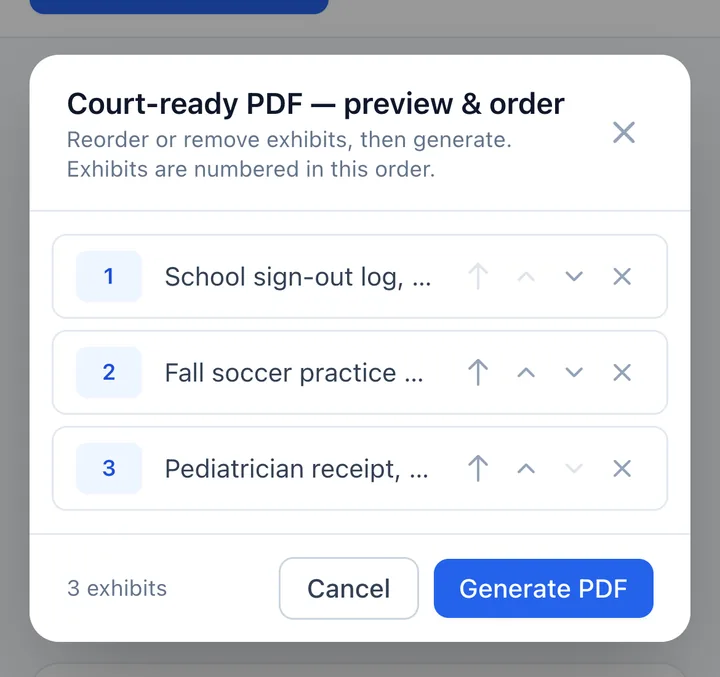
A numbered exhibit PDF with a cover and index page when you need one
One handoff packet now, and sharing if you hire them
The attorney handoff packet puts the case summary, each issue with its tagged evidence, the timeline and the evidence index into one PDF you can email ahead or print. If you go on to work with the lawyer, invite them to the sections they need instead of forwarding attachments one by one.
Free-plan exports are watermarked DRAFT. Paid plans export clean.
In the app
One PDF: case summary, issues with tagged evidence, timeline and evidence index
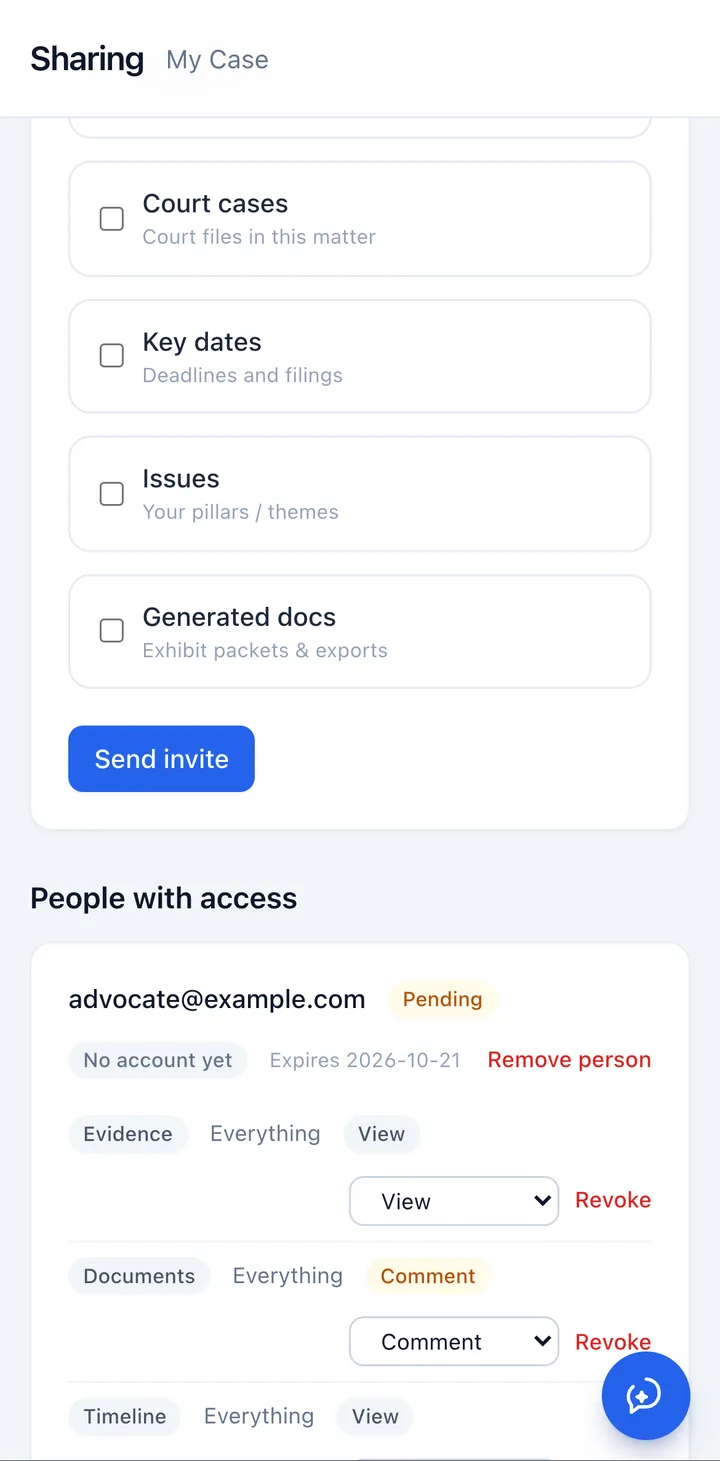
Invite by email and choose sections: evidence, documents, timeline, hearings, key dates
View, comment, download or edit access per section, revocable any time
Attorneys join free and can keep private work-product notes you see only if released
5of 5
After the meeting, keep the answers and next dates together
A consultation often ends with a few next steps: a document to find, a date to confirm, a decision to think over. Write them down the same day, while the conversation is fresh. Store the lawyer's letter or fee agreement with your other case papers, and set a reminder for anything you promised to send.
General organizing tips, not legal advice. Your court's own rules come first.
Plans and pricing
Start free. Upgrade only if you need more.
The free plan needs no credit card and never expires. Case Builder holds your timeline, documents, hearings and the assistant; Full Suite adds every other tool.
Free
For getting your evidence out of your camera roll and into order.
$0
Free forever — no credit card, nothing to cancel.
One case file, unlimited court case numbers
10 evidence items, 1 GB of storage
Organize, describe, tag, search
Watermarked printable PDF export
6 AI actions to try the tools (one-time, not monthly)
Create your account, then after a short setup you can try Full Suite free for 7 days. Card required; then $24.99/mo or $299/yr (about 82¢ a day) until you cancel. Cancel before day 7 and you pay nothing. Or subscribe now — $299/yr
50% off · 20× the AI
Full Suite Max
Everything in Full Suite, with 20× the AI actions.
$99.99$49.99/mo
or $899/yr$399/yr
Everything in Full Suite: all five tools and the assistant
6,000 AI actions a month (20× Full Suite)
50% off (normally $99.99/mo), locked in as long as you don’t cancel
Already on Full Suite? Get 20× the AI credits for only +$25/mo more (prorated in place)
Clean, printable exports + free attorney & advocate access (on every plan)
$49.99 a month, renews until you cancel. Cancel online in two clicks.
Hearing Pass · one-time
$49 once for 30 days of hearing prep. Nothing renews.
Everything in Full Suite for 30 days from the day you buy it: all five tools, the assistant, AI included, and exports without a watermark. No subscription and nothing to cancel. When the 30 days end you’re back on the free plan, and nothing you added is deleted.
Your case stays private to your account until you invite someone and choose what they see. Data is encrypted in transit and at rest, and we don’t sell your personal information.
Your files stay yours
Originals are kept unchanged. Download your complete Case Bundle, every original file plus a manifest, free on any plan, before or after you cancel.
Cancel anytime, in two clicks
The free plan has nothing to cancel. Paid plans renew until you cancel online in two clicks, and the Hearing Pass never renews.
Organizing software, not a law firm
It organizes the files, dates and messages you provide. It doesn’t give legal advice, choose what you file or predict what a court will do.
Questions, answered straight
Frequently asked questions
Do family lawyers offer free consultations?
Some do and some charge a consultation fee; it varies by office. Ask when you book how long the meeting is, whether there's a fee and what to bring. Custody Commander doesn't refer you to lawyers; it helps you arrive at the meeting organized.
What should I bring to a family lawyer consultation?
Offices often ask for the case number, copies of current orders and any papers you've received, and the names of the people involved. A short case summary, a dated timeline and an evidence index help too. Ask the office what it wants, since some send a questionnaire ahead of time.
What questions should I ask a custody lawyer?
Common ones cover experience with your court, fees and retainers, who handles your file, how updates are shared and whether limited-scope help is offered. The list on this page is a starting point. Bring your questions written down so nothing gets missed.
What is an attorney handoff packet?
It's one PDF the app builds from your own records: a case summary, each issue you named with its summary and tagged evidence, the timeline and the evidence index. Everything in it is what you wrote or added; the app doesn't add legal analysis. Email it ahead or bring a printed copy.
Can the lawyer see my case file in the app?
Only if you invite them. Choose the sections they can see and their access level for each, and revoke it any time. Attorneys join free, and they can keep private work-product notes that you see only if they release them.
Is this legal advice?
No. Custody Commander is organizing software, not a law firm, and nothing in it is legal advice. It helps you organize and present your own records to the lawyer you meet. Advice about your case comes from a licensed attorney where you live.
Is it free?
Yes. The free plan needs no card and never expires, and it covers one case with up to 10 evidence items; its exports carry a DRAFT watermark. Paid plans export clean, and a one-time Hearing Pass gives 30 days of everything for $49.
Bring an organized case to your consultation
Start free, write your summary, log the key dates and download one handoff packet. Organizing software, not a law firm.