A father's custody record: school, medical, activities and parenting time
Fathers' legal rights in custody come from your state's law and your court, not from an app. Custody Commander keeps your record of everyday involvement on one dated timeline: school, appointments, practices, exchanges and messages.
Fathers' legal rights in a custody matter are set by your state's law and your court's orders, and the court applies them to the facts. Custody decisions are generally made under a best-interests-of-the-child standard that applies to both parents alike. The part any parent controls is the record: a plain, dated account of school runs, appointments, practices and bedtimes, written as it happens instead of rebuilt from memory months later.
One master timeline for exchanges, school events, appointments, practices and calls
Each entry holds a date, a short title and the detail: times, place and who was there
Entries group by month and show as Past, Next or Upcoming
Tell the in-app assistant what happened in plain English and it adds the dated entry (uses AI actions)
Export the timeline to PDF or Word; free-plan exports carry a DRAFT mark
2of 5
School, medical and activity papers, each with its date
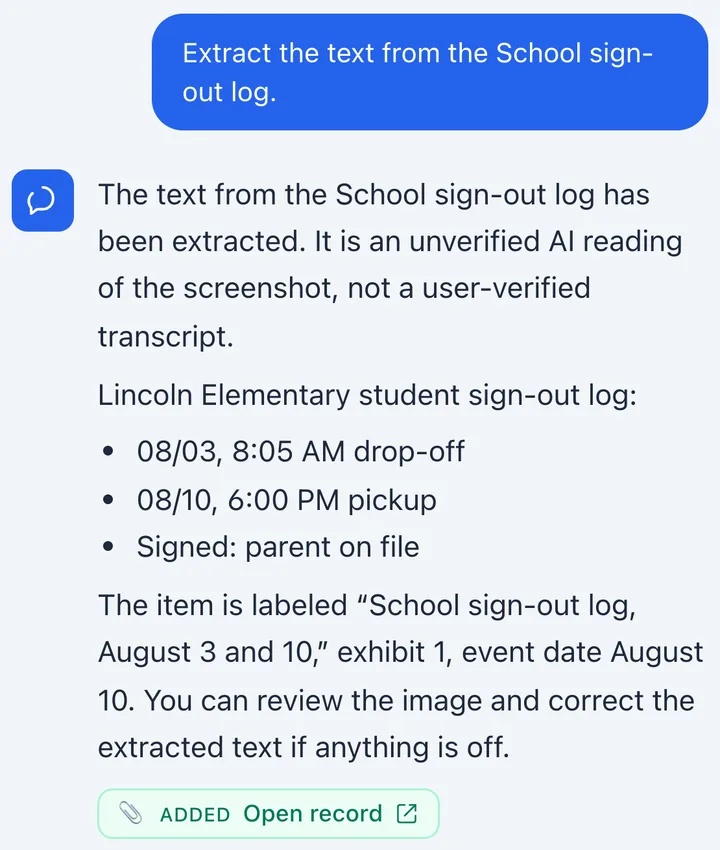
Report cards, teacher emails, appointment summaries, practice schedules and receipts show involvement more clearly than a general statement can. Save the ones that reach you through your own email, school portal or doctor's office, and add each one with the date it happened. A dated file lands on the same timeline as your notes, right next to the entry it supports.
Add photos, screenshots, PDFs, Word files and saved emails from a phone or computer, up to 25 MB each
AI reads the text in a screenshot or scanned page and suggests a date and short label, marked unverified until you check it
Tap a suggested tag such as School or Medical, or type your own, like Practice or Teacher
The original file is kept unchanged, with a SHA-256 fingerprint recorded when you add it
Folders, search, and filters by type, issue or priority
The free plan holds up to 10 evidence items and includes 6 AI actions to try the reading.
3of 5
Communication with the other parent, calm and on the record
Written messages about pickups, school and appointments are often the clearest record of how two parents coordinate. Import your own text, WhatsApp or Messenger exports into one numbered log, and run new drafts through a tone check before you send them yourself. Short, child-focused messages are easier for anyone to read later, including you.
Comms Guard is in the 7-day Full Suite trial and paid plans. The free calm reply checker gives 3 checks a day, no signup.
In the app
Import your own iPhone (through an iMazing export), Android, WhatsApp, Messenger or Instagram exports
Every message numbered from MSG-00001 with date, time, sender and channel; imported text can't be edited
Comms Guard flags tone, escalation and oversharing in a draft and suggests a calm BIFF rewrite
You copy and send replies yourself; nothing is ever sent from the app
Search every message, tag them, and export a date range
4of 5
Exchanges, school events and court dates on one list
Showing up starts with knowing what's next. Put the next exchange, the parent-teacher conference and any hearing date on one list, with reminders, so nothing slips while work and the rest of life carry on.
Reminders with a date, an optional time and notes
Push and email notices only say a reminder is due; the details stay in the app
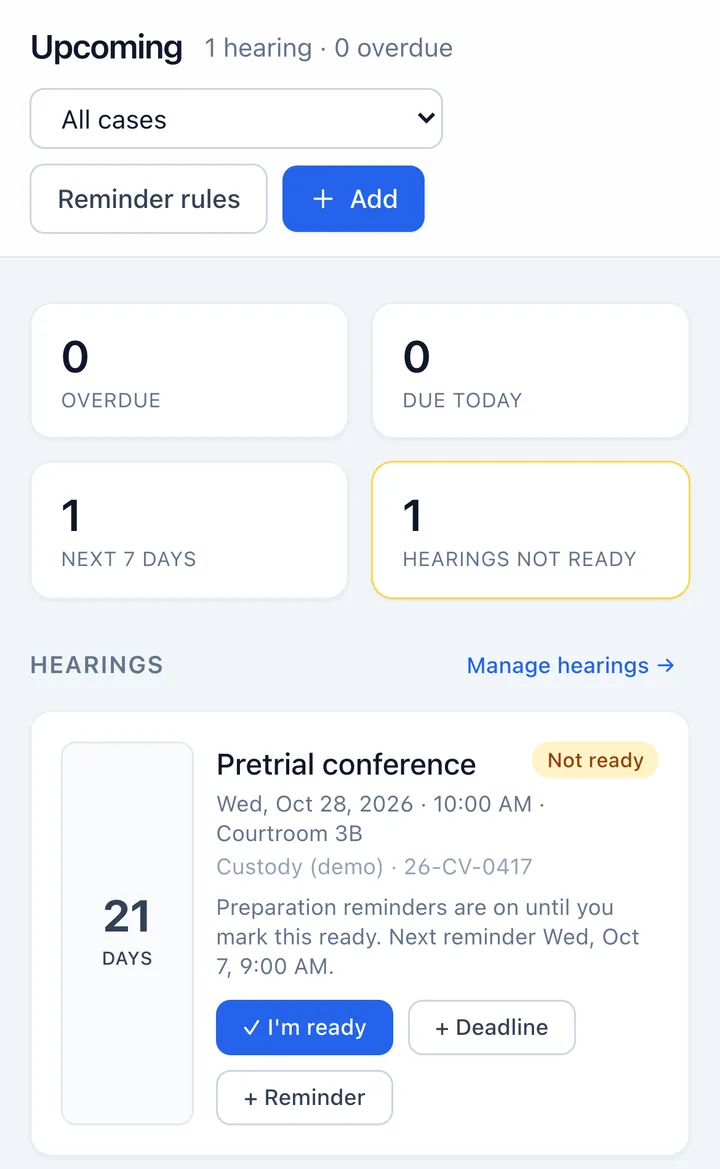
Overdue, due today and next 7 days counts at the top
A countdown for each hearing with its time and courtroom, plus preparation reminders until you tap I'm ready
Questions about a father's rights, parentage or what to ask a court for belong with a licensed attorney where you live, a court self-help center or legal aid. You'll get more from that conversation with your facts already in order. Share selected sections of your case by email, or bring one PDF packet.
Organizing tips, not legal advice. Check your court's local rules.
General organizing tips, not legal advice. Your court's own rules come first.
Plans and pricing
Start free. Upgrade only if you need more.
The free plan needs no credit card and never expires. Case Builder holds the timeline and the assistant; Full Suite adds AI reading of your screenshots and every other tool.
Free
For getting your evidence out of your camera roll and into order.
$0
Free forever — no credit card, nothing to cancel.
One case file, unlimited court case numbers
10 evidence items, 1 GB of storage
Organize, describe, tag, search
Watermarked printable PDF export
6 AI actions to try the tools (one-time, not monthly)
Create your account, then after a short setup you can try Full Suite free for 7 days. Card required; then $24.99/mo or $299/yr (about 82¢ a day) until you cancel. Cancel before day 7 and you pay nothing. Or subscribe now — $299/yr
50% off · 20× the AI
Full Suite Max
Everything in Full Suite, with 20× the AI actions.
$99.99$49.99/mo
or $899/yr$399/yr
Everything in Full Suite: all five tools and the assistant
6,000 AI actions a month (20× Full Suite)
50% off (normally $99.99/mo), locked in as long as you don’t cancel
Already on Full Suite? Get 20× the AI credits for only +$25/mo more (prorated in place)
Clean, printable exports + free attorney & advocate access (on every plan)
$49.99 a month, renews until you cancel. Cancel online in two clicks.
Hearing Pass · one-time
$49 once for 30 days of hearing prep. Nothing renews.
Everything in Full Suite for 30 days from the day you buy it: all five tools, the assistant, AI included, and exports without a watermark. No subscription and nothing to cancel. When the 30 days end you’re back on the free plan, and nothing you added is deleted.
Your case stays private to your account until you invite someone and choose what they see. Data is encrypted in transit and at rest, and we don’t sell your personal information.
Your files stay yours
Originals are kept unchanged. Download your complete Case Bundle, every original file plus a manifest, free on any plan, before or after you cancel.
Cancel anytime, in two clicks
The free plan has nothing to cancel. Paid plans renew until you cancel online in two clicks, and the Hearing Pass never renews.
Organizing software, not a law firm
It organizes the files, dates and messages you provide. It doesn’t give legal advice, choose what you file or predict what a court will do.
Questions, answered straight
Frequently asked questions
What legal rights does a father have in a custody case?
It depends on your state's law, any current order and the facts, and questions such as whether parentage has been legally established can matter. Custody Commander can't tell you your rights or what to ask a court for. A licensed attorney where you live, your court's self-help center or a legal aid office can. The app keeps your own records organized for that conversation.
Do custody courts favor mothers or fathers?
Custody decisions are generally made under a best-interests-of-the-child standard that applies to both parents. How a court weighs the facts in a particular case depends on its own law and what's in front of it, and Custody Commander doesn't predict results. What every parent can do is keep a clear, factual and respectful record.
What kinds of records do fathers often keep?
Many parents keep a parenting time log, school and medical records, activity schedules, receipts for child expenses and written messages with the other parent. Which items matter in your case is a question for a licensed attorney or your court's self-help resources. The app holds all of them in one dated, searchable place.
Will the other parent see what I keep in the app?
No. The other parent never has to join, install or approve anything, and is never contacted or notified. Your case stays private until you invite someone and choose which sections they see.
Is there a free version?
Yes. The free plan needs no card and never expires: one case, up to 10 evidence items, 1 GB of storage, 6 AI actions and exports watermarked DRAFT. Full Suite is $24.99 a month or $299 a year. A 7-day trial with a card shows the price and the first charge date before it starts.
Is this legal advice?
No. Custody Commander is organizing software made by Firmbinder LLC, not a law firm, and nothing in it is legal advice. It never chooses filings, arguments or agreements for anyone, and it doesn't predict outcomes. For advice about your situation, talk to a licensed attorney where you live.
Start your record of involvement today
Add this week's exchanges and the next school event, and keep every date in one place. Free plan, no card needed.