Tools for high conflict parenting: calm messages, dated records
Custody Commander checks each message before you send it, keeps a dated copy of what was sent and received, and gives money questions a log of their own. It works on your own words and records, and the other parent never has to join.
The other parent never has to join or install anything
Nothing is sent from the app: you copy and send it yourself
Logged messages keep their date and time
Free plan, no card needed
1of 4
A second look at every message before it goes out
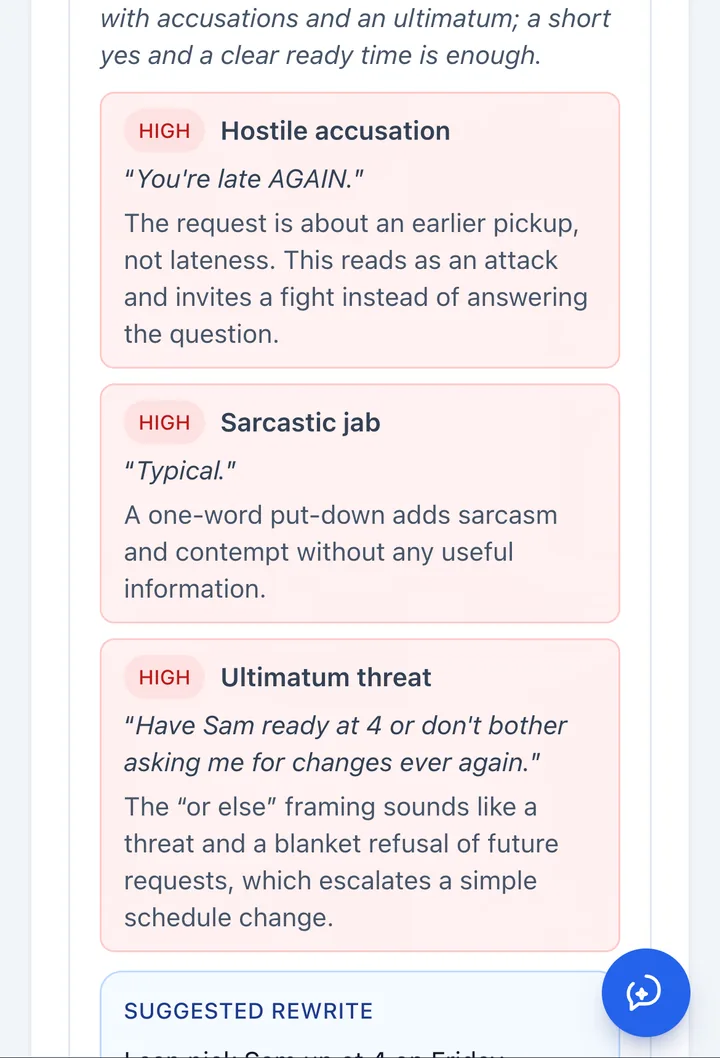
In high-conflict co-parenting, short and neutral messages about the children leave the least to argue with. Comms Guard reads your draft before you send it, points out the words most likely to start an argument and explains each one in plain language. Then it offers a calmer version that you can edit, keep or ignore.
Comms Guard is in the 7-day Full Suite trial and paid plans. To try one check first, the free calm reply checker gives 3 a day, no signup.
In the app
Flags tone, escalation, possible admissions, unclear wording and oversharing
Ranks each flag by severity, with a short reason you can read in seconds
Suggests a BIFF rewrite: Brief, Informative, Friendly and Firm
Works with any channel: copy the final text into a text, an email or a court-ordered co-parenting app
Never says a message will help or hurt your case
2of 4
One dated record of what was sent and received
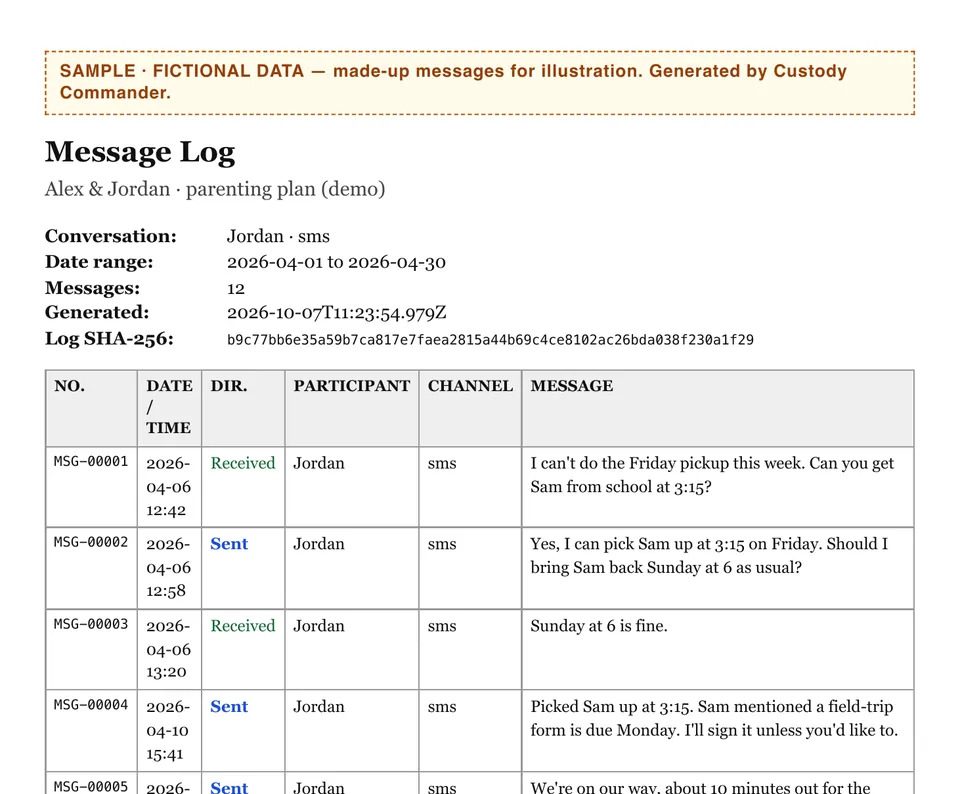
When messages are spread across texts, emails and apps, a simple question like when a time change was agreed means scrolling through all of them. After you send a reply, click Log as sent and it's saved with the date and time to that person's thread. Paste in a message you received and it joins the same thread, so both sides sit in order.
Log as sent saves your message with its date and time
Messages you paste in from your own phone go into the same person's thread
Logged messages flow into the numbered message log, starting at MSG-00001
Whole threads import from iPhone, Android, WhatsApp, Messenger or Instagram exports
A written plan means fewer things to negotiate each week
Some high-conflict families use a parallel parenting structure: each parent runs their own time, and contact is kept to written, child-focused logistics. Writing the routine down, from the message channel to reply times and exchange details, leaves fewer decisions to argue over later. Your court's form and your current order come first; anything you draft is a starting point.
Templates are starting points, not official court forms. Nobody at Custody Commander reviews your document.
In the app
A free parallel parenting plan template on our site, with blanks and neutral prompts only
In the app, a Proposed Parenting Plan template with headings for the schedule, decisions, exchanges and communication
AI drafting that works from your case records and leaves [placeholders] for facts it doesn't have
Export your draft to PDF or Word
4of 4
Money questions in their own log, not in the message thread
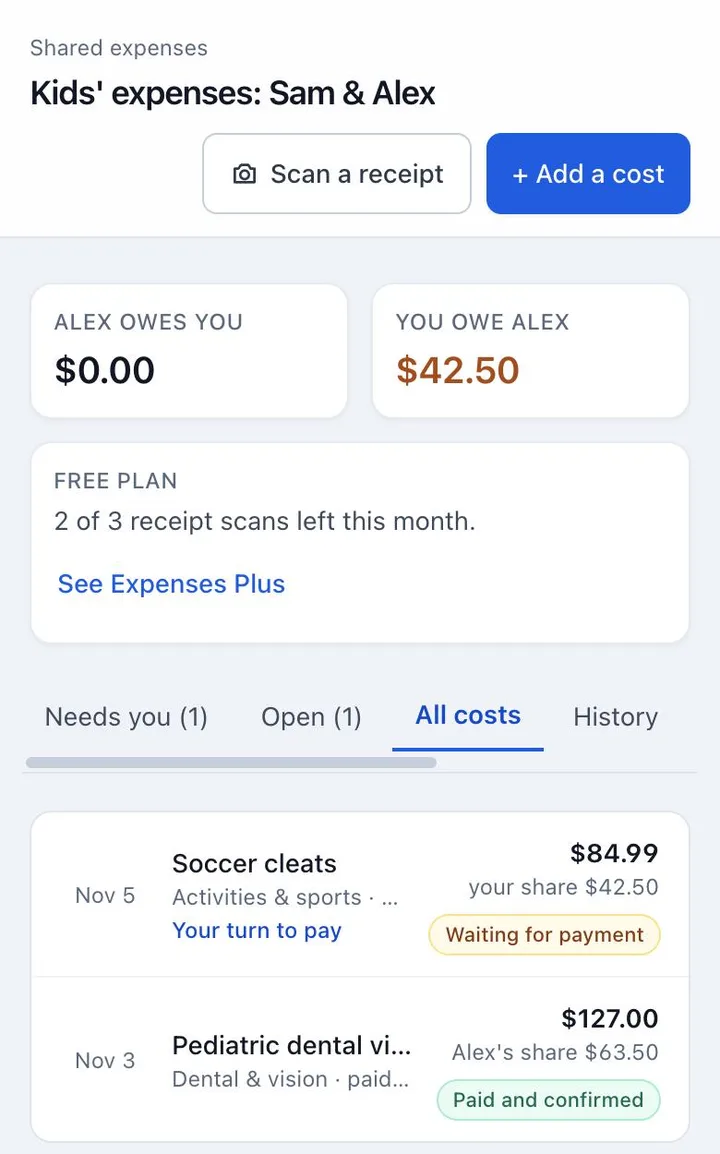
Keeping costs out of the schedule thread keeps both conversations shorter. The shared expense log gives each cost one place: add it, attach the receipt and request reimbursement, and the other parent can mark it paid. It's the one part of Custody Commander built for both parents, and it's free for both.
Add costs and receipt photos, request reimbursement, mark paid and confirm received
Comments on each expense, with a history that can't be edited
The other parent joins free and sees only the expense log, never your case file
CSV and PDF reports of every expense
Records only: it adds up the shares you both enter and never decides what anyone owes
Create your account, then after a short setup you can try Full Suite free for 7 days. Card required; then $24.99/mo or $299/yr (about 82¢ a day) until you cancel. Cancel before day 7 and you pay nothing. Or subscribe now — $299/yr
50% off · 20× the AI
Full Suite Max
Everything in Full Suite, with 20× the AI actions.
$99.99$49.99/mo
or $899/yr$399/yr
Everything in Full Suite: all five tools and the assistant
6,000 AI actions a month (20× Full Suite)
50% off (normally $99.99/mo), locked in as long as you don’t cancel
Already on Full Suite? Get 20× the AI credits for only +$25/mo more (prorated in place)
Clean, printable exports + free attorney & advocate access (on every plan)
$49.99 a month, renews until you cancel. Cancel online in two clicks.
Hearing Pass · one-time
$49 once for 30 days of hearing prep. Nothing renews.
Everything in Full Suite for 30 days from the day you buy it: all five tools, the assistant, AI included, and exports without a watermark. No subscription and nothing to cancel. When the 30 days end you’re back on the free plan, and nothing you added is deleted.
Your case stays private to your account until you invite someone and choose what they see. Data is encrypted in transit and at rest, and we don’t sell your personal information.
Your files stay yours
Originals are kept unchanged. Download your complete Case Bundle, every original file plus a manifest, free on any plan, before or after you cancel.
Cancel anytime, in two clicks
The free plan has nothing to cancel. Paid plans renew until you cancel online in two clicks, and the Hearing Pass never renews.
Organizing software, not a law firm
It organizes the files, dates and messages you provide. It doesn’t give legal advice, choose what you file or predict what a court will do.
Questions, answered straight
Frequently asked questions
What does Custody Commander offer for high conflict parenting?
Three tools that work together. Comms Guard checks your messages before you send them, the message log keeps what was sent and received in numbered, dated order, and the shared expense log gives costs one place both parents can use. Our site also has free templates, including a parallel parenting plan template. The app helps with your own words and records; it doesn't tell you what to agree to.
Does the other parent have to use the app?
No. Comms Guard is one-sided: you draft, check and send through whatever channel you already use, and the other parent is never contacted or notified. The shared expense log is the only part built for both parents. Joining it is free, and a co-parent who joins sees only the expense log.
Will Comms Guard tell me if a message will hurt my case?
No. It flags tone, escalation, possible admissions, unclear wording and oversharing, and explains each flag in plain language. It never says a message will help or hurt a case, because that's a legal judgment. For that kind of question, talk to a licensed attorney where you live.
Can I use it alongside a court-ordered co-parenting app?
Yes. Check and edit your message in Comms Guard, then copy it into the app your order names, or into a text or email. Nothing is ever sent from Custody Commander, so it sits next to any channel. Click Log as sent afterward to keep your own dated copy.
Is it free?
The free plan needs no card: one case, 10 evidence items, 1 GB of storage, message log imports with DRAFT-watermarked exports, and the shared expense log. Comms Guard comes with the 7-day Full Suite trial (card required) and paid plans; Full Suite is $24.99/month or $299/year. Without an account, the free calm reply checker on our site gives 3 checks a day.
Is this legal advice?
No. Custody Commander is organizing software made by Firmbinder LLC, not a law firm, and nothing on this page is legal advice. It helps you write calmer messages and keep your own records; it doesn't choose filings, arguments or agreements for you. For advice about your situation, talk to a licensed attorney where you live.
Calmer messages, and a dated record of every one
Start free, then check your next message with the 7-day Full Suite trial. Every reply you log keeps its date and time.