Mediation for parents: practice staying calm with the other parent there
Mediation Coach plays the other parent, with or without the mediator, so you can rehearse the moments that are hardest to answer calmly. Between sessions, Comms Guard checks the tone of a message before you send it yourself.
In mediation for parents, the hardest moments often come with the other parent sitting across the table. One pointed remark can pull a whole conversation off topic. Mediation Coach voices the other parent, with the mediator present or not, so you can hear that kind of remark in practice and answer it without heat. Each run is a chance to try a different first sentence.
Mediation Coach is on paid plans and the Hearing Pass, not the free plan or the 7-day trial.
In the app
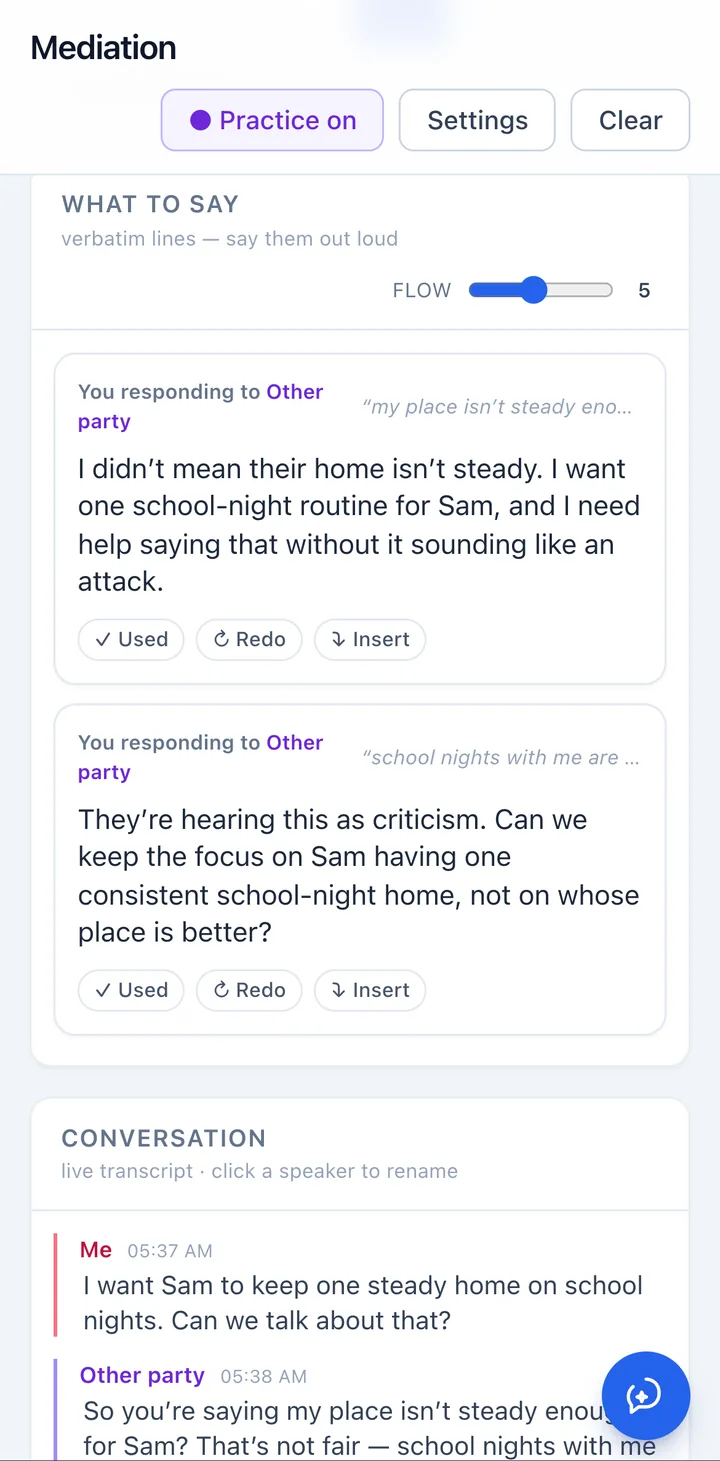
The AI voices the other parent, the mediator, or both
Tell it who's in the room, and the role-play follows that setting
Auto mode trades turns back and forth so it feels like a real exchange
Hear the other parent's lines spoken aloud in practice mode
Each practice turn uses one AI action
2of 4
Coaching you can turn up or down
Some moments need a full sentence handed to you; others need only a nudge. The 1–10 dial sets how much Mediation Coach offers in the live panel, so you can lean on it early and step back as your own words get steadier. It coaches how you say things, never what to agree to.
Mediation Coach on its own is $14.99/mo or $119/yr; Full Suite is $24.99/mo or $299/yr.
In the app
Turn the dial up for more suggested lines, down for fewer
Suggestions are calm, word-for-word and meant to cool things down
Say a line as written, or reshape it in your own words
No suggestions about what to give up, accept or settle
3of 4
Calm messages between sessions
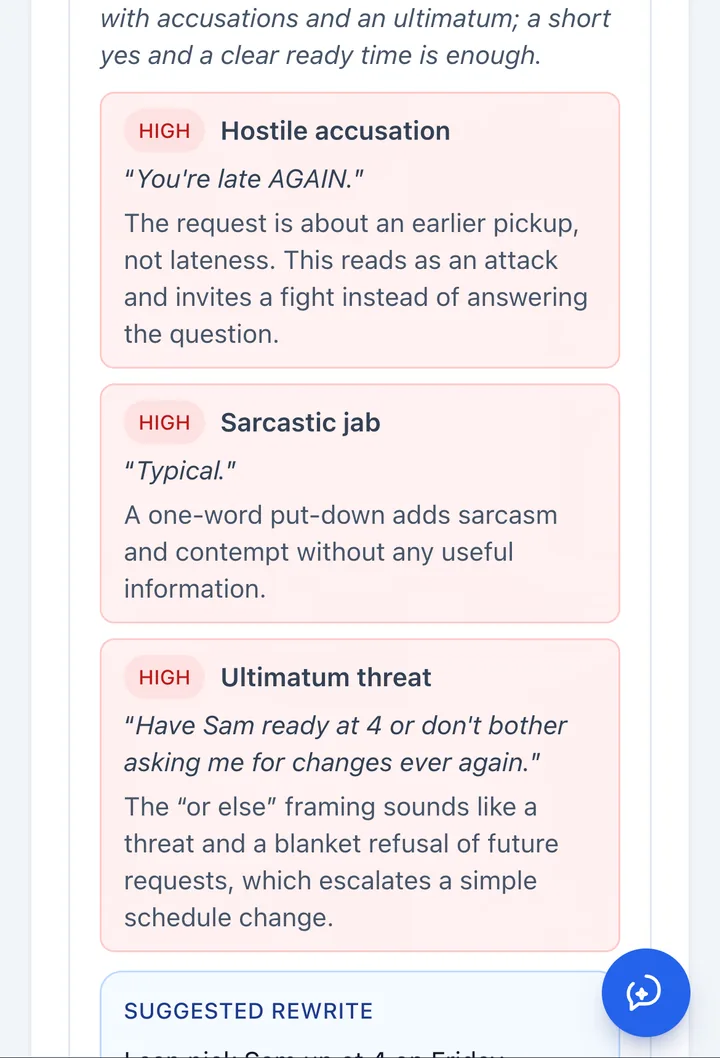
Mediation can take more than one session, and the messages in between matter too. Paste a draft into Comms Guard before you send it. It flags tone, escalation, possible admissions and oversharing with plain reasons, then suggests a BIFF rewrite: brief, informative, friendly and firm.
Flags ranked by severity, each with a plain-language reason
Paste a message you received to log it; reply drafts use it as context and flag a reply that takes the bait
You copy the final text and send it yourself, by text, email or a co-parenting app
Log as sent saves it with the date and time to that person's thread
Comms Guard is in the 7-day trial and paid plans. The free calm reply checker gives 3 checks a day with no signup.
4of 4
Session dates and follow-ups in one list
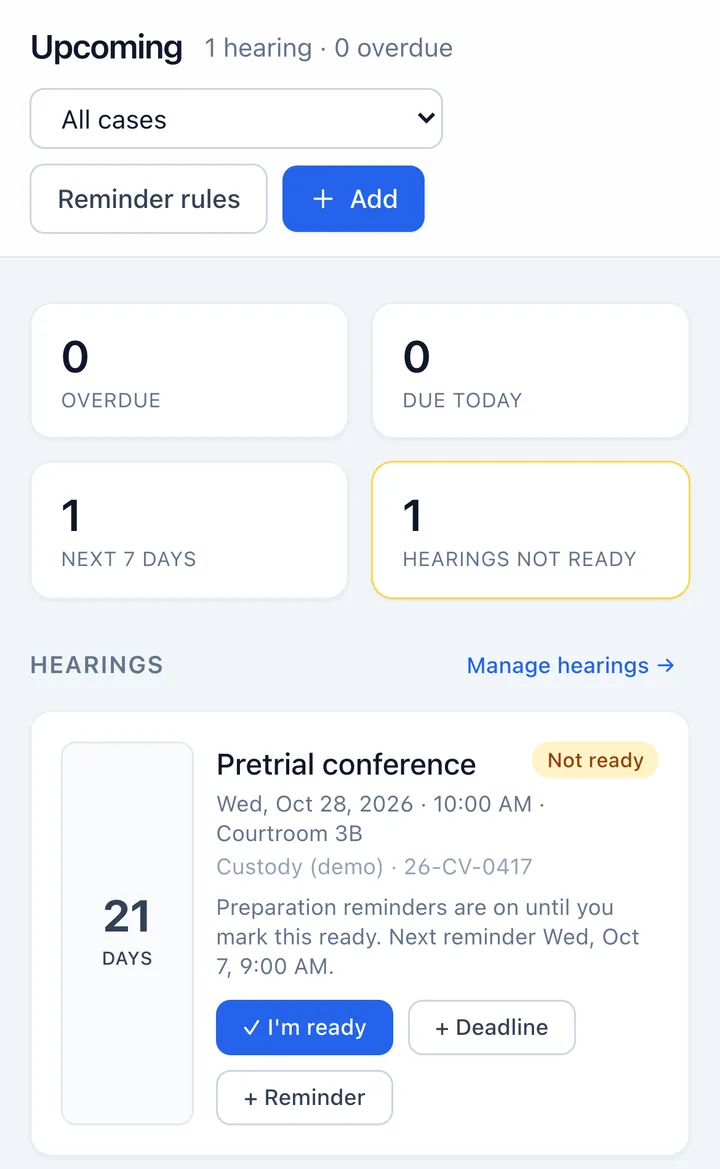
Between sessions there is usually homework: a calendar to send, a school schedule to find, a proposal to think over. Add each session and each task as a reminder, so nothing slips before the next meeting. Session dates sit on the same Upcoming list as any hearings and deadlines in your case.
Reminders with a date, an optional time and notes
Overdue, due today and next 7 days counts at the top
Push and email notices only say a reminder is due; the details stay in the app
Add the session date to your timeline as a key date too
Create your account, then after a short setup you can try Full Suite free for 7 days. Card required; then $24.99/mo or $299/yr (about 82¢ a day) until you cancel. Cancel before day 7 and you pay nothing. Or subscribe now — $299/yr
50% off · 20× the AI
Full Suite Max
Everything in Full Suite, with 20× the AI actions.
$99.99$49.99/mo
or $899/yr$399/yr
Everything in Full Suite: all five tools and the assistant
6,000 AI actions a month (20× Full Suite)
50% off (normally $99.99/mo), locked in as long as you don’t cancel
Already on Full Suite? Get 20× the AI credits for only +$25/mo more (prorated in place)
Clean, printable exports + free attorney & advocate access (on every plan)
$49.99 a month, renews until you cancel. Cancel online in two clicks.
Hearing Pass · one-time
$49 once for 30 days of hearing prep. Nothing renews.
Everything in Full Suite for 30 days from the day you buy it: all five tools, the assistant, AI included, and exports without a watermark. No subscription and nothing to cancel. When the 30 days end you’re back on the free plan, and nothing you added is deleted.
Your case stays private to your account until you invite someone and choose what they see. Data is encrypted in transit and at rest, and we don’t sell your personal information.
Your files stay yours
Originals are kept unchanged. Download your complete Case Bundle, every original file plus a manifest, free on any plan, before or after you cancel.
Cancel anytime, in two clicks
The free plan has nothing to cancel. Paid plans renew until you cancel online in two clicks, and the Hearing Pass never renews.
Organizing software, not a law firm
It organizes the files, dates and messages you provide. It doesn’t give legal advice, choose what you file or predict what a court will do.
Questions, answered straight
Frequently asked questions
What is mediation for parents?
Mediation for parents, often called co-parent mediation, is a meeting or series of meetings where a neutral mediator helps two parents work through parenting topics such as schedules, exchanges and communication. It may be ordered by a court or chosen by the parents. The mediator guides the conversation; the parents decide what, if anything, to agree to.
Does the other parent need to use Custody Commander?
No. The other parent never has to join, install or approve anything, and they're never contacted or notified. Mediation Coach plays their part in practice, so you can rehearse on your own at any hour. The only tool built for both parents is the optional shared expense log, which is free for both.
How do I stay calm when the other parent is in the room?
Rehearsal helps most: hearing a hard remark in practice makes it less of a surprise on the day. Keep answers short, bring the conversation back to the children's routine, and ask for a break when you need one. In practice, the live panel offers a calm line when you can't find your own.
Will Mediation Coach tell me what to agree to?
No. It coaches tone, clarity and composure only, and its suggested lines are drafts you review and own. What to propose, accept or settle is your decision. For advice about terms, talk to a licensed attorney where you live.
Can it help with messages between mediation sessions?
Yes. Comms Guard flags tone and oversharing in a draft and suggests a calmer rewrite, and you send the final message yourself through any channel. It doesn't read messages automatically, sit inside messaging apps or watch anyone's accounts.
Is it free?
Comms Guard is in the 7-day trial and paid plans, and the free calm reply checker on our site gives 3 checks a day with no signup. Mediation Coach is on paid plans and the one-time Hearing Pass, not the free plan or the trial. The free plan itself needs no card and covers one case.
Is this legal advice?
No. Custody Commander is organizing software made by Firmbinder LLC, not a law firm, and it doesn't give legal advice. It helps with how you communicate and keeps your records in order. Check your court's rules about mediation, and talk to a licensed attorney where you live for advice.
Practice parent mediation before the session
Rehearse the hard moments with the other parent's part played by AI, check your messages between sessions and keep every follow-up on your list.