Draft a motion to modify a custody order from a template
The Motion to Modify Order template lays out the existing order, the terms you want changed, the new terms you're requesting and the facts, with [placeholders] for each. Your records since the last order sit on one dated timeline, so the facts are easy to find.
The parts of a modification motion, already in order
A request to change an order usually says which order it is, which terms should change, what they should change to, and the facts behind the request. The Motion to Modify Order template has a heading for each, plus a request section, a signature block and a certificate of service. Many courts have their own modification forms, and those come first.
The existing order: the date it was entered, its title, and a copy attached as an exhibit
The terms to change, quoted or identified by paragraph or page
The exact new terms you're requesting, in your words
Numbered facts in date order, citing exhibits by number
A certificate of service with [placeholders] for the date, the method and the people served
2of 4
Everything since the last order, on one timeline
The facts in a modification request are often about what has happened since the order was entered. Put each event on the timeline with its date, attach the file that shows it, and the paragraphs are already in date order before you start writing. Keep entries factual: what happened, when, and who was there.
Add the order's date as a key date, then each event after it
Dated evidence lands on the same timeline as your notes
Tag files School, Medical, Expense, Late or Missed Visit, or add your own tags, so related items are easy to pull together
Filter by type, year or month to look at one stretch of time
A first draft from your records, with the request left to you
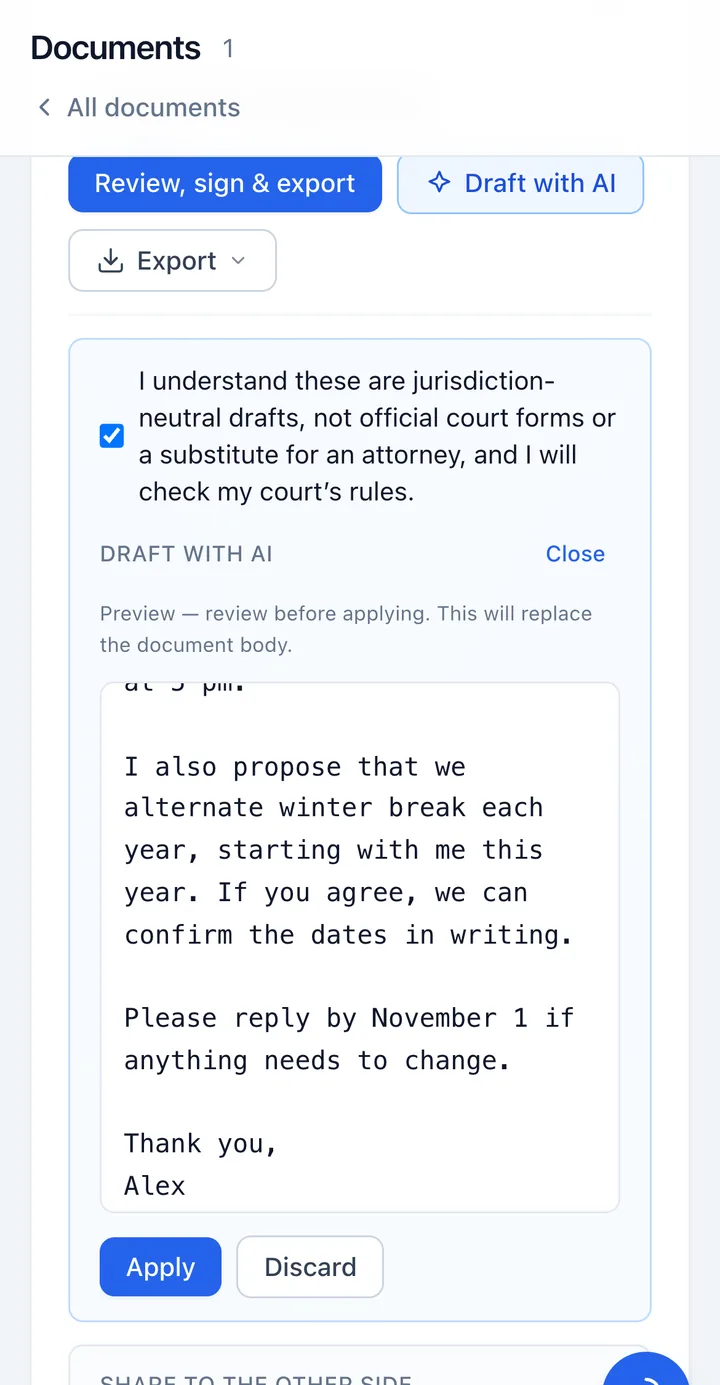
If your timeline and evidence are already in the app, AI drafting can turn them into the facts section of the motion, citing only what's in your records. The terms you request, and anything about your court's own requirements, stay as [placeholders]: you state those in your own words and look up and verify any rule you rely on yourself.
AI drafting uses AI actions. The free plan includes 6 to try it.
In the app
Drafts the motion from your timeline, evidence and notes
Leaves [placeholders] for the terms you request and for anything it can't find
A placeholder paragraph for your court's own requirements, to complete in your words or delete
Preview the draft, then apply or discard it
4of 4
Your review, your signature, your court's forms first
Before you export, read the motion against the order itself and check every date. Compare it with your court's modification forms and local rules, and move your wording onto the court's form if one is required. If your court uses a proposed order or a notice of hearing, those templates are in the same menu.
Create your account, then after a short setup you can try Full Suite free for 7 days. Card required; then $24.99/mo or $299/yr (about 82¢ a day) until you cancel. Cancel before day 7 and you pay nothing. Or subscribe now — $299/yr
50% off · 20× the AI
Full Suite Max
Everything in Full Suite, with 20× the AI actions.
$99.99$49.99/mo
or $899/yr$399/yr
Everything in Full Suite: all five tools and the assistant
6,000 AI actions a month (20× Full Suite)
50% off (normally $99.99/mo), locked in as long as you don’t cancel
Already on Full Suite? Get 20× the AI credits for only +$25/mo more (prorated in place)
Clean, printable exports + free attorney & advocate access (on every plan)
$49.99 a month, renews until you cancel. Cancel online in two clicks.
Hearing Pass · one-time
$49 once for 30 days of hearing prep. Nothing renews.
Everything in Full Suite for 30 days from the day you buy it: all five tools, the assistant, AI included, and exports without a watermark. No subscription and nothing to cancel. When the 30 days end you’re back on the free plan, and nothing you added is deleted.
Your case stays private to your account until you invite someone and choose what they see. Data is encrypted in transit and at rest, and we don’t sell your personal information.
Your files stay yours
Originals are kept unchanged. Download your complete Case Bundle, every original file plus a manifest, free on any plan, before or after you cancel.
Cancel anytime, in two clicks
The free plan has nothing to cancel. Paid plans renew until you cancel online in two clicks, and the Hearing Pass never renews.
Organizing software, not a law firm
It organizes the files, dates and messages you provide. It doesn’t give legal advice, choose what you file or predict what a court will do.
Questions, answered straight
Frequently asked questions
How do I modify a custody order?
The process depends on your court. Many courts have their own forms for asking to change an order, and some require mediation or other steps first. Your court's website, clerk's office or self-help center can explain the steps, and a licensed attorney where you live can advise on your situation.
Will the app tell me whether to ask for a modification?
No. Custody Commander is organizing software, not a law firm. It doesn't decide whether to ask for a change, what to ask for, or how a court might respond. It helps you organize the facts and draft from a template once you've made your own decision.
What does the Motion to Modify Order template include?
Sections for the existing order (its date, its title and a copy as an exhibit), the terms to change, the exact new terms requested, numbered facts, the request and a certificate of service. Every blank is a [placeholder]. A paragraph for your court's specific requirements is left for you to complete and verify yourself, or delete.
Can I use the template if my court has its own modification form?
Your court's form comes first. You can still use the app to organize your facts and work out your wording, then export to Word and copy it onto the court's form where it fits.
What records do people organize for a custody modification?
Commonly the current order, a dated timeline of events since it was entered, and the records behind those events, such as messages, school and medical records and schedules. What a court considers depends on its own law and the facts, so a licensed attorney where you live is the person to ask about yours.
Is it free?
Yes. The free plan needs no card: one case, up to 10 evidence items, the document templates and 6 AI actions, with exports marked DRAFT. Paid plans export clean and remove the evidence limit; Full Suite is $24.99 a month or $299 a year.
Can I draft documents in every state?
In most states the app drafts jurisdiction-neutral documents from templates, with [placeholders] for your court's details, and they aren't official court forms. In a few states, drafting stays off until that state's review is finished; the app says so when you start a draft. Organizing evidence, the timeline and exports work in every state.
Is this legal advice?
No. Nothing on this page is legal advice, and nobody at Custody Commander reviews your documents. For advice about changing your order, talk to a licensed attorney where you live; court self-help centers and legal aid offices can point you to free or low-cost help.
Organize your custody modification
Put every event since the last order on one timeline, then draft from the Motion to Modify Order template. Free plan, no card needed.