Draft a parallel parenting agreement from a template
Start from the Proposed Parenting Plan template, with your case details merged in and [placeholders] for every term only you can decide. Your court's own form and your current order come first; the draft is a starting point you complete and review.
Start with your court's form and your current order
A parallel parenting agreement has to sit inside whatever your court already uses. Many courts have their own parenting plan form or ask for specific wording, and some topics may already be settled in your current order. Look at your court's forms page or self-help center first, then use a template to organize your thinking around it.
The Your court page gathers links to your court's official rules, forms and self-help pages
Saved copies show the date each one was retrieved
Keep your current order in the document library, viewable in the browser and searchable
Templates are skeletons with headings, not official court forms
2of 5
Topics parallel parenting plans often cover
Parallel parenting plans tend to be more detailed than a standard plan, because the aim is fewer things left to work out between parents later. Common topics include the message channel and reply times, exchanges, who decides what, how each parent gets school and medical information, schedule changes and what happens when parents disagree. Which topics apply, and what they say, is for you and your court.
Free plan, no card needed. Free-plan exports are watermarked DRAFT.
In the app
Residential schedule headings for the school year, summer and holidays
Sections for decision-making, exchanges and communication
Case details such as the caption and court case number merged in for you
[Bracketed placeholders] for every term you fill in yourself
3of 5
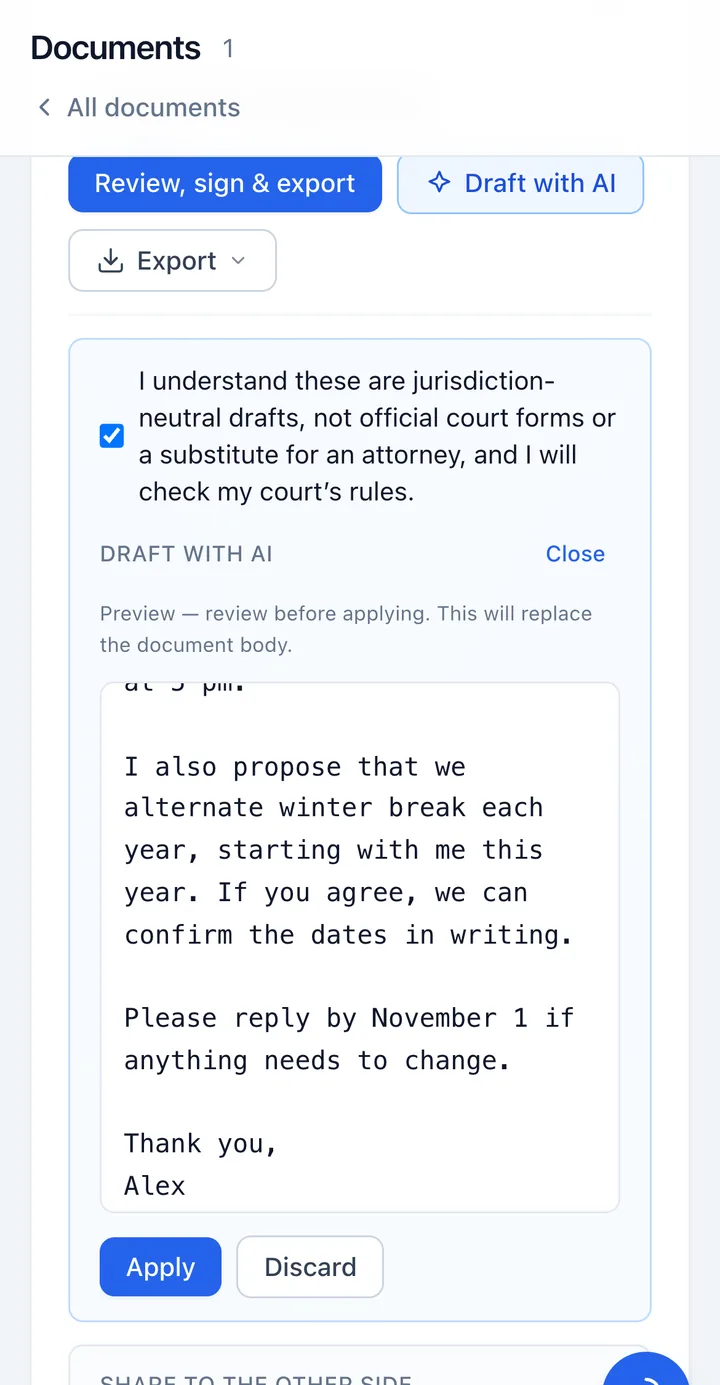
An AI draft from your own records, with blanks left blank
If you've logged exchanges, schedule changes and agreements, the AI drafting tool can use those records to fill in what it knows. Anything it doesn't have stays as a [placeholder] for you to complete. A conservative text check then flags statements to review; it isn't a truth checker or legal analysis.
AI drafting uses AI actions. The free plan includes 6 to try it.
In the app
Drafts or revises the document from your case's own records
Leaves [placeholders] for facts it doesn't have
Flags statements for you to review before you sign or export
At export you confirm you prepared and reviewed every statement, and that the software provider didn't review it or give legal advice
Exports to PDF or Word
4of 5
Real dates make a plan easier to write
A plan is easier to draft with the specifics in front of you: where exchanges happened, which swaps were agreed, how last year's holidays fell. Logging them on the timeline as they happen gives you a record to work from when you sit down to write, and the AI draft can use it too.
Add a dated entry for each exchange, swap or call, with times and place in the detail
Entries group by month and show as Past, Next or Upcoming
Ask the in-app assistant to add an entry from a plain-English description (uses AI actions)
If a mediator, attorney or family member is helping you think a plan through, invite them by email and choose what they can see. Nothing is shared until you send an invite, and you can take access back at any time.
Create your account, then after a short setup you can try Full Suite free for 7 days. Card required; then $24.99/mo or $299/yr (about 82¢ a day) until you cancel. Cancel before day 7 and you pay nothing. Or subscribe now — $299/yr
50% off · 20× the AI
Full Suite Max
Everything in Full Suite, with 20× the AI actions.
$99.99$49.99/mo
or $899/yr$399/yr
Everything in Full Suite: all five tools and the assistant
6,000 AI actions a month (20× Full Suite)
50% off (normally $99.99/mo), locked in as long as you don’t cancel
Already on Full Suite? Get 20× the AI credits for only +$25/mo more (prorated in place)
Clean, printable exports + free attorney & advocate access (on every plan)
$49.99 a month, renews until you cancel. Cancel online in two clicks.
Hearing Pass · one-time
$49 once for 30 days of hearing prep. Nothing renews.
Everything in Full Suite for 30 days from the day you buy it: all five tools, the assistant, AI included, and exports without a watermark. No subscription and nothing to cancel. When the 30 days end you’re back on the free plan, and nothing you added is deleted.
Your case stays private to your account until you invite someone and choose what they see. Data is encrypted in transit and at rest, and we don’t sell your personal information.
Your files stay yours
Originals are kept unchanged. Download your complete Case Bundle, every original file plus a manifest, free on any plan, before or after you cancel.
Cancel anytime, in two clicks
The free plan has nothing to cancel. Paid plans renew until you cancel online in two clicks, and the Hearing Pass never renews.
Organizing software, not a law firm
It organizes the files, dates and messages you provide. It doesn’t give legal advice, choose what you file or predict what a court will do.
Questions, answered straight
Frequently asked questions
What is a parallel parenting agreement?
It's a parenting plan written for low contact: each parent runs their own time, and communication is kept to written, child-focused logistics. These plans often spell out the message channel, reply times, exchanges and how information is shared. Whether a plan like this fits, and what it says, is for the parents and the court to decide.
Is there a free parallel parenting plan template?
Yes. Our Templates page has a free parallel parenting plan template as a Word file and a printable PDF, with blanks and neutral prompts only and no signup. Inside the app, the Proposed Parenting Plan template merges in your case details and leaves [placeholders] for your terms.
Will the AI write the terms for me?
No. It drafts from your case's own records and leaves [placeholders] for anything it doesn't have, and it doesn't decide what to ask for or agree to. You complete the blanks, review every statement, and confirm at export that you prepared the document and read it.
Is the template an official court form?
No. The templates are starting points with headings and placeholders, not official court forms, and nobody at Custody Commander reviews your document. Your court's own forms and local rules come first; check your court's forms page or ask the clerk what it requires.
Can a mediator or attorney see my draft?
Yes, if you invite them. Invite them by email, choose sections such as documents, and set each one to view, comment, download or edit. You can revoke access any time, and invited attorneys and advocates join free.
Is it free?
The free plan needs no card: one case, 1 GB of storage and 6 AI actions to try drafting, with exports watermarked DRAFT. Full Suite, at $24.99/month or $299/year, includes 300 AI actions a month and clean exports. The 7-day Full Suite trial (card required) lets you try it first, with trial exports watermarked TRIAL. The blank template on our Templates page is free with no account at all.
Can I draft documents in every state?
In most states the app drafts jurisdiction-neutral documents from templates, with [placeholders] for your court's details, and they aren't official court forms. In a few states, drafting stays off until that state's review is finished; the app says so when you start a draft. Organizing evidence, the timeline and exports work in every state.
Is this legal advice?
No. Custody Commander is organizing software, not a law firm, and nothing on this page is legal advice. It gives you templates and drafts with [placeholders]; it doesn't choose terms, filings or arguments for you. For advice, talk to a licensed attorney where you live, or ask your court's self-help center or a legal aid office about free help.
Start your parallel parenting plan from a template
Check your court's form, then open the Proposed Parenting Plan template and fill in your own terms.