Parental visitation: keep the schedule and a record of every visit
Custody Commander keeps the visitation schedule from your order where you'll see it, and a dated record of each visit as it actually happened. Add the messages that set or changed a visit, and find any of it later.
Many orders and parents use the word visitation for the time a child spends with a parent, often the parent the child doesn't mainly live with; some courts say parenting time instead. Whatever your order calls it, the schedule written there is the starting point for every record you keep. Store the order itself in your case file, and put the coming visits where you'll see them.
Store the order in the document library with your other filings, searchable and viewable in the browser
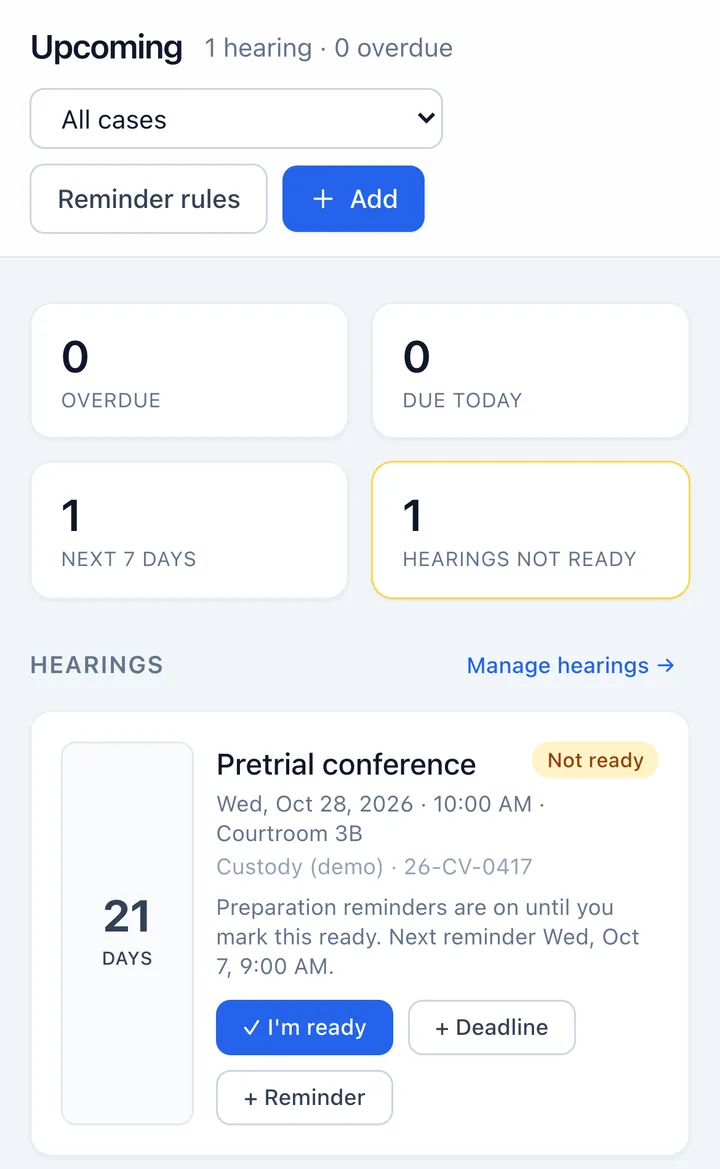
Add each coming visit as a future-dated timeline entry, shown as Next or Upcoming
Reminders with a date, a time and a note about the pickup place
Notices only say a reminder is due; the visit details stay in the app
A visitation record is a list of visits, each with the same few facts: the scheduled start and end, the actual start and end, where it took place and who handled the pickup and return. When a visit is cancelled or cut short, the record notes who cancelled, when, and how much notice was given. Write each entry on the day of the visit, while the times are still exact.
One timeline entry per visit, with the times, place and people in the detail
Tell the assistant "Saturday visit 10 to 4, child returned at 4:20" and it adds the dated entry (uses AI actions)
Quick tags for Late and Missed Visit when you upload a related file
Search for every cancelled visit, or filter by year and month
Entries grouped by month, so you can read one season at a time
Visits are often arranged or changed by text. Those messages belong in the record too, and they're easier to use when they're in order and numbered. Export the conversation from your own phone, import it, and every message gets a number in time order.
Import your own iPhone exports made with iMazing, Android backups from SMS Backup & Restore, WhatsApp chat exports, and Messenger or Instagram downloads
Every message numbered from MSG-00001, with the date, time and who sent it
Search with highlights, tag messages such as "visit change" and export a date range
The assistant can add key dates from the messages to your timeline
Imported text can't be edited in the app; free-plan logs carry a DRAFT mark, and a clean log is a one-time $39 for the case or part of a paid plan
4of 4
Screenshots and papers that back up the record
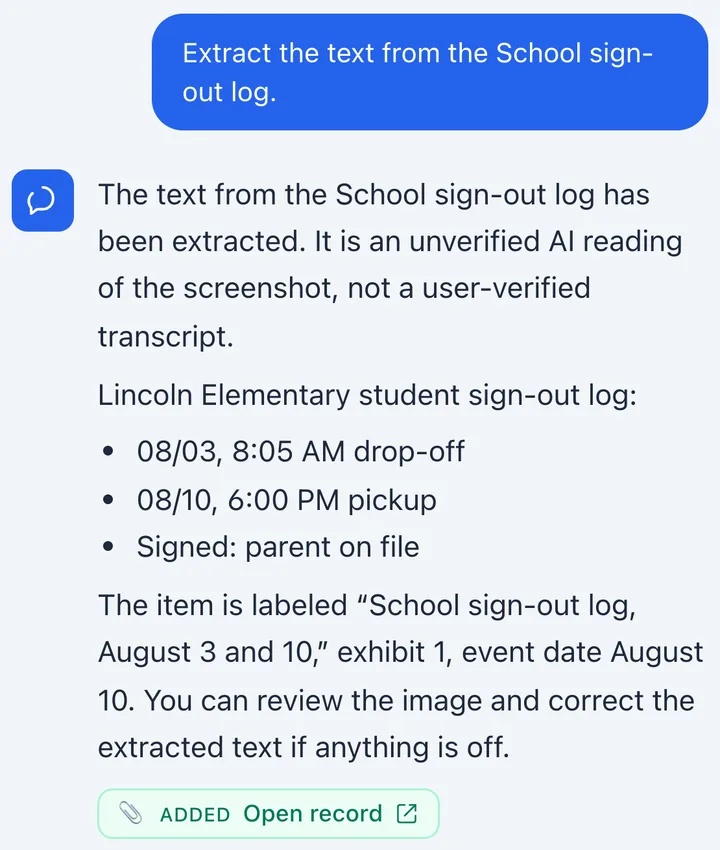
Not every visit leaves a message thread. A photo of a sign-out sheet, an email confirming a pickup or a screenshot of a call log can show what happened. Upload it, set the date, and it sits beside that visit on the timeline.
Upload photos, screenshots, PDFs and saved emails from your phone or computer
AI reads the text in a screenshot or a photo of a paper, marked unverified until you check it
A short factual label is suggested for each item; you keep it or change it
The original stays unchanged, with a SHA-256 fingerprint that's checked again before an exhibit PDF is built
Record-keeping tips, not legal advice. Your order's terms control.
General organizing tips, not legal advice. Your court's own rules come first.
Plans and pricing
Start free. Upgrade only if you need more.
The free plan needs no credit card and never expires. Case Builder holds the timeline and the assistant; Full Suite adds AI reading of your screenshots and every other tool.
Free
For getting your evidence out of your camera roll and into order.
$0
Free forever — no credit card, nothing to cancel.
One case file, unlimited court case numbers
10 evidence items, 1 GB of storage
Organize, describe, tag, search
Watermarked printable PDF export
6 AI actions to try the tools (one-time, not monthly)
Create your account, then after a short setup you can try Full Suite free for 7 days. Card required; then $24.99/mo or $299/yr (about 82¢ a day) until you cancel. Cancel before day 7 and you pay nothing. Or subscribe now — $299/yr
50% off · 20× the AI
Full Suite Max
Everything in Full Suite, with 20× the AI actions.
$99.99$49.99/mo
or $899/yr$399/yr
Everything in Full Suite: all five tools and the assistant
6,000 AI actions a month (20× Full Suite)
50% off (normally $99.99/mo), locked in as long as you don’t cancel
Already on Full Suite? Get 20× the AI credits for only +$25/mo more (prorated in place)
Clean, printable exports + free attorney & advocate access (on every plan)
$49.99 a month, renews until you cancel. Cancel online in two clicks.
Hearing Pass · one-time
$49 once for 30 days of hearing prep. Nothing renews.
Everything in Full Suite for 30 days from the day you buy it: all five tools, the assistant, AI included, and exports without a watermark. No subscription and nothing to cancel. When the 30 days end you’re back on the free plan, and nothing you added is deleted.
Your case stays private to your account until you invite someone and choose what they see. Data is encrypted in transit and at rest, and we don’t sell your personal information.
Your files stay yours
Originals are kept unchanged. Download your complete Case Bundle, every original file plus a manifest, free on any plan, before or after you cancel.
Cancel anytime, in two clicks
The free plan has nothing to cancel. Paid plans renew until you cancel online in two clicks, and the Hearing Pass never renews.
Organizing software, not a law firm
It organizes the files, dates and messages you provide. It doesn’t give legal advice, choose what you file or predict what a court will do.
Questions, answered straight
Frequently asked questions
What is parental visitation?
Visitation is a word many orders and parents use for the time a child spends with a parent, often the parent the child doesn't mainly live with. Some courts call it parenting time. What your visitation looks like, and what it's called, comes from your own order or agreement, so read it closely or ask a licensed attorney where you live.
How do I keep a visitation log?
Write one entry per visit: the date, the scheduled and actual start and end times, the place, and who handled the pickup and return. Add cancellations and make-up visits the same way. Keep it all in one place, on paper with the free exchange and visitation log or on the Custody Commander timeline.
Is there a free visitation log?
Yes. The free custody exchange and visitation log on our Templates page comes as a PDF and an Excel file, with columns for scheduled time, actual time, who showed, late or missed, and notes. The Custody Commander app also has a free plan with no card needed.
Can I keep my visitation order in the app?
Yes. Upload it to the document library with your other filings and orders, where you can view it in the browser and search it. Keep older orders too, labeled with their dates, so it's clear which one covered which period.
Will the other parent know I'm keeping a record?
Custody Commander never contacts or notifies the other parent, and your case stays private until you invite someone. You choose who sees what, section by section, and you can revoke access at any time.
Is this legal advice?
No. Custody Commander is organizing software, not a law firm. It helps you keep a dated record of your own visits and messages; it doesn't interpret your order or tell you what to do about a missed visit. For that, talk to a licensed attorney where you live or your court's self-help center.
Keep the schedule and every visit in one record
Store your order, put the coming visits on your list and log each one as it happens. Free plan, no card needed.