A parenting plan template you fill in, section by section
Start a Proposed Parenting Plan from a template with headings for the school-year and summer schedule, holidays, decision-making, exchanges and communication. Your caption and case number fill in from your case, and a [placeholder] marks every term you write yourself.
Every topic a parenting plan usually covers, already laid out
A blank page is the hardest part of a parenting plan. The Proposed Parenting Plan template gives you the headings many plans use, in a sensible order, with a [placeholder] wherever a term or a fact goes. You decide what goes in each section; the template only holds the structure.
Free plan, no card needed. Free-plan exports carry a DRAFT mark.
In the app
Residential schedule for the school year, with a line for each parent's days and nights
Summer and school-break schedule, kept separate from the school-year pattern
Holidays and special days: winter break, spring break, Thanksgiving, each child's birthday, Mother's Day and Father's Day
Decision-making for education, health care and religious upbringing
Transportation and exchanges, communication, and a section for other provisions
2of 4
Your case details filled in, your terms in your own words
Typing the same caption on every page invites mistakes. When you start the plan inside your case, the template merges in details you've already saved, such as the court, the case number and the parties. Everything that is a decision, from the weekly pattern to the holiday rotation, stays a [placeholder] until you write it.
Caption, court case number and parties merged from your case
[Bracketed placeholders] for the children's names, each parent's days and every holiday
Edit any heading or line in the browser, on your phone or computer
Rename or remove sections so the draft lines up with your court's own form
3of 4
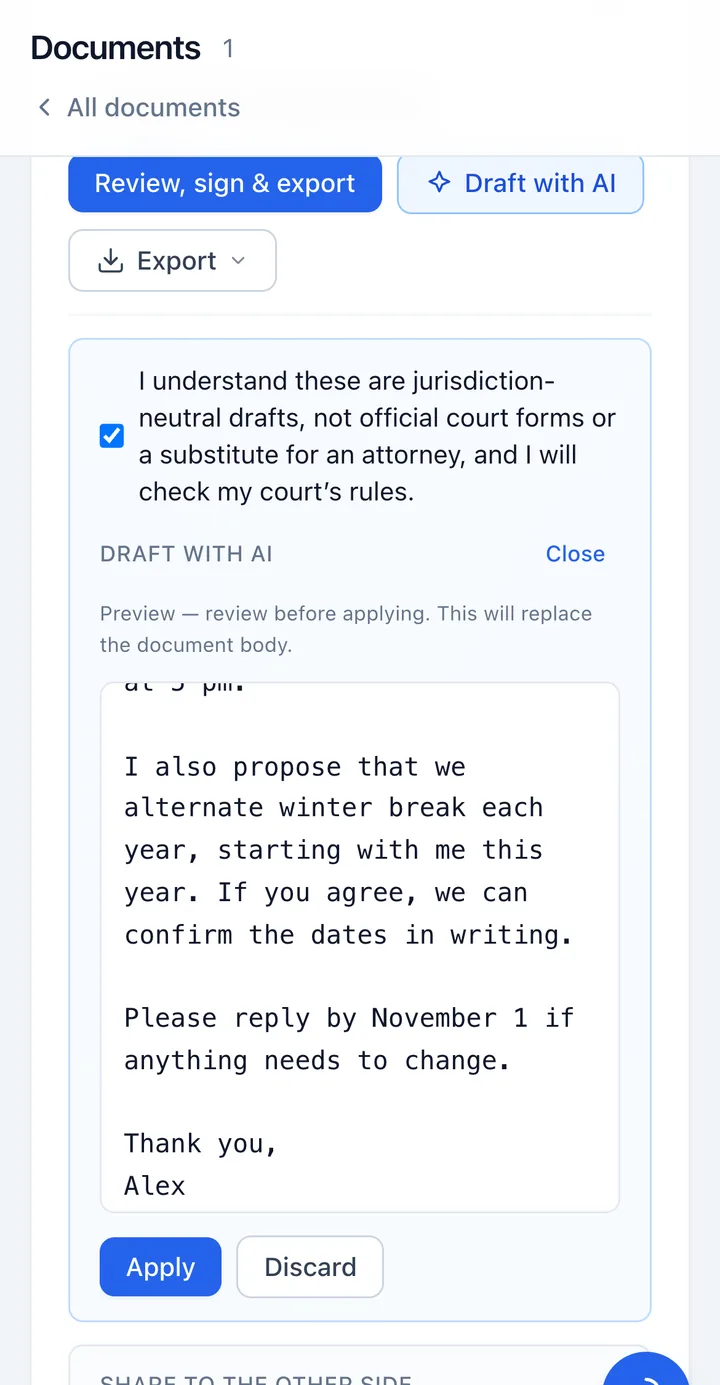
An AI first draft from your own notes, with the gaps left open
If you've already written down the schedule you have in mind, AI drafting can turn those notes into a draft of the plan. It works only from what's in your case and leaves a [placeholder] for anything it doesn't know, instead of filling gaps with guesses. You see a preview first and choose whether to apply it or discard it.
AI drafting uses AI actions. The free plan includes 6 to try it; Full Suite includes 300 a month.
In the app
Drafts or revises the plan from your case's own records
Leaves [placeholders] for facts it doesn't have
Before drafting, you confirm you understand these are jurisdiction-neutral drafts, not official court forms
A conservative text check flags statements to review; it isn't a truth checker or legal analysis
4of 4
Review it, confirm it's yours, and export to Word or PDF
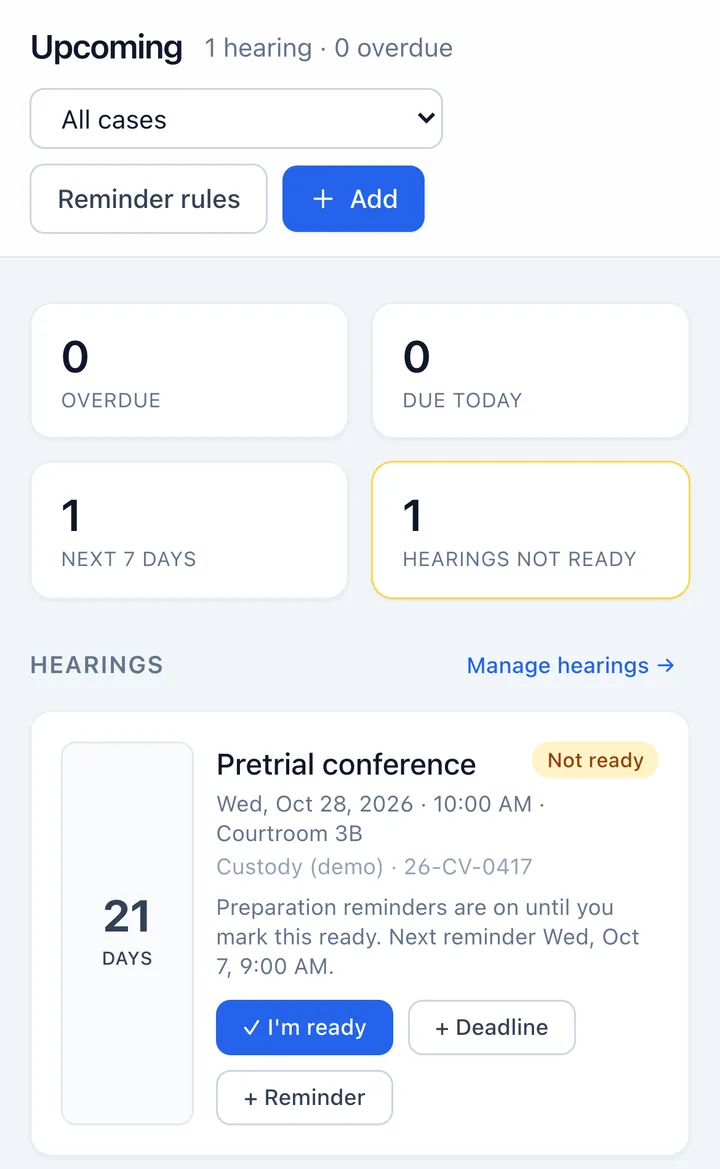
Before a plan leaves the app, you read it, confirm it, and pick a format. Word is handy when your court wants its own form, because you can copy each section across. Keep the hearing, the mediation session and any deadline for the plan on the Upcoming list so the draft is finished in time.
At sign and export you confirm: "I prepared this document. I have read and reviewed every statement…"
The same confirmation says the software provider did not review it and has not given you legal advice
Export to PDF or Word
Hearings, deadlines and reminders on one Upcoming list
Create your account, then after a short setup you can try Full Suite free for 7 days. Card required; then $24.99/mo or $299/yr (about 82¢ a day) until you cancel. Cancel before day 7 and you pay nothing. Or subscribe now — $299/yr
50% off · 20× the AI
Full Suite Max
Everything in Full Suite, with 20× the AI actions.
$99.99$49.99/mo
or $899/yr$399/yr
Everything in Full Suite: all five tools and the assistant
6,000 AI actions a month (20× Full Suite)
50% off (normally $99.99/mo), locked in as long as you don’t cancel
Already on Full Suite? Get 20× the AI credits for only +$25/mo more (prorated in place)
Clean, printable exports + free attorney & advocate access (on every plan)
$49.99 a month, renews until you cancel. Cancel online in two clicks.
Hearing Pass · one-time
$49 once for 30 days of hearing prep. Nothing renews.
Everything in Full Suite for 30 days from the day you buy it: all five tools, the assistant, AI included, and exports without a watermark. No subscription and nothing to cancel. When the 30 days end you’re back on the free plan, and nothing you added is deleted.
Your case stays private to your account until you invite someone and choose what they see. Data is encrypted in transit and at rest, and we don’t sell your personal information.
Your files stay yours
Originals are kept unchanged. Download your complete Case Bundle, every original file plus a manifest, free on any plan, before or after you cancel.
Cancel anytime, in two clicks
The free plan has nothing to cancel. Paid plans renew until you cancel online in two clicks, and the Hearing Pass never renews.
Organizing software, not a law firm
It organizes the files, dates and messages you provide. It doesn’t give legal advice, choose what you file or predict what a court will do.
Questions, answered straight
Frequently asked questions
Is this parenting plan template free?
Yes. The free plan needs no card and never expires, and it includes the document templates, the Proposed Parenting Plan among them. Free-plan exports carry a DRAFT mark; paid plans export clean copies and include more AI actions. Our Templates page also has a free parallel parenting plan template in PDF and Word, with no signup.
Is the template an official court form?
No. It's a starting point with headings and [placeholders], not an official form from any court. Many courts require their own parenting plan form or specific wording, so check your court's forms page or self-help center first. You can organize your terms in the template and then copy them onto the form your court uses.
What's the difference between a parenting plan, a parenting agreement and a co-parenting plan?
People use these names for similar documents that set out schedules, decisions and communication. Courts use different names, and some handle a plan both parents sign differently from one that a single parent proposes. Your court's forms and rules decide which document applies, so check them or ask a licensed attorney where you live.
Does the app suggest what schedule to propose?
No. The template holds the structure and you write the terms. AI drafting works from the notes and records you've added and leaves [placeholders] where facts are missing; it doesn't suggest what to ask for or agree to.
Can I keep editing the plan in Word?
Yes. Export to Word to keep working on your computer, or to PDF to print or share. Free-plan exports carry a DRAFT mark, exports made during the 7-day Full Suite trial carry a TRIAL mark, and paid plans export clean copies.
Can the other parent see or edit my draft?
No. Your case, every draft included, stays private to your account until you invite someone. You can invite an attorney, mediator or family member to view, comment on, download or edit only the sections you choose, and revoke access any time.
Can I draft documents in every state?
In most states the app drafts jurisdiction-neutral documents from templates, with [placeholders] for your court's details, and they aren't official court forms. In a few states, drafting stays off until that state's review is finished; the app says so when you start a draft. Organizing evidence, the timeline and exports work in every state.
Is this legal advice?
No. Custody Commander is organizing software, not a law firm. It gives you a structure and keeps your own words in order; it doesn't choose terms, review your plan or predict how a court will see it. For advice about your situation, talk to a licensed attorney where you live, or ask your court's self-help center about free help.
Start your parenting plan from a template
Pick the Proposed Parenting Plan template, fill in each [placeholder] in your own words, and export to Word or PDF. Free plan, no card needed.