Right of first refusal: the clause, every offer and a dated record
A right of first refusal clause in a parenting plan sets out when a parent offers parenting time to the other parent before using another caregiver. Custody Commander keeps a dated record of each offer and reply, and helps you draft the clause with [placeholders].
Some parenting plans include a right of first refusal: if a parent can't care for the child during their own time for longer than a set period, they offer that time to the other parent before arranging another caregiver. Clauses vary a lot, and your order's exact wording is what applies. Our free guide walks through example wordings; a licensed attorney where you live can explain how yours works.
Trigger: how long an absence has to be before an offer is needed, such as a number of hours or an overnight
Notice: how the offer is made (text, email or call) and how far ahead
Reply time: how long the other parent has to accept or decline
Exceptions: caregivers or times that may not count, such as relatives, school or planned activities
Transport: who picks up and returns the child when an offer is accepted
2of 5
A dated record of every offer and reply
A right of first refusal record is mostly about timing: when an offer was made, how, for which hours, and when the reply came. Writing the same fields for every offer keeps that timing clear months later, without relying on memory.
One timeline entry per offer, like "Offered Saturday 2 to 8 pm by text at 9:14 am; declined at 10:02 am"
Upload the screenshot of the offer and reply, set its date, and it sits beside the entry
Search "first refusal", or give the items a custom tag, to pull up every offer at once
Filter by year and month, and export to PDF or Word
The original screenshot is kept unchanged, with a SHA-256 fingerprint
Offers are often made by text. Importing your own exported conversation puts every message in numbered time order, so each offer and its reply can be found by date and quoted exactly.
Free-plan logs carry a DRAFT mark; a clean log is $39 one time for the case, or part of a paid plan.
In the app
Import your own text exports: iPhone through iMazing, Android through SMS Backup & Restore, or a WhatsApp chat export
Every message numbered from MSG-00001, with the date, time and sender
Tag offers and replies, then filter by tag or export just a date range
Search with AI for every message about a weekend or a caregiver, with answers that quote the exact messages (AI actions; trial and paid plans)
The assistant can add the key dates it finds to your timeline
4of 5
Offers worded calmly, and sent by you
An offer is easier to read, and to answer, when it's short and plain: the dates, the hours and a reply-by time. Comms Guard checks a draft for tone, escalation and ambiguity and suggests a calmer rewrite. You edit it, copy it and send it yourself; nothing is ever sent from the app.
Comms Guard is in the 7-day Full Suite trial and paid plans.
In the app
Flags tone, escalation, possible admissions, ambiguity and oversharing, ranked by severity
A suggested BIFF rewrite: brief, informative, friendly and firm
"Log as sent" saves the message with its date and time to that person's thread
A free calm reply checker on our site gives 3 checks a day with no signup, and your text isn't saved
5of 5
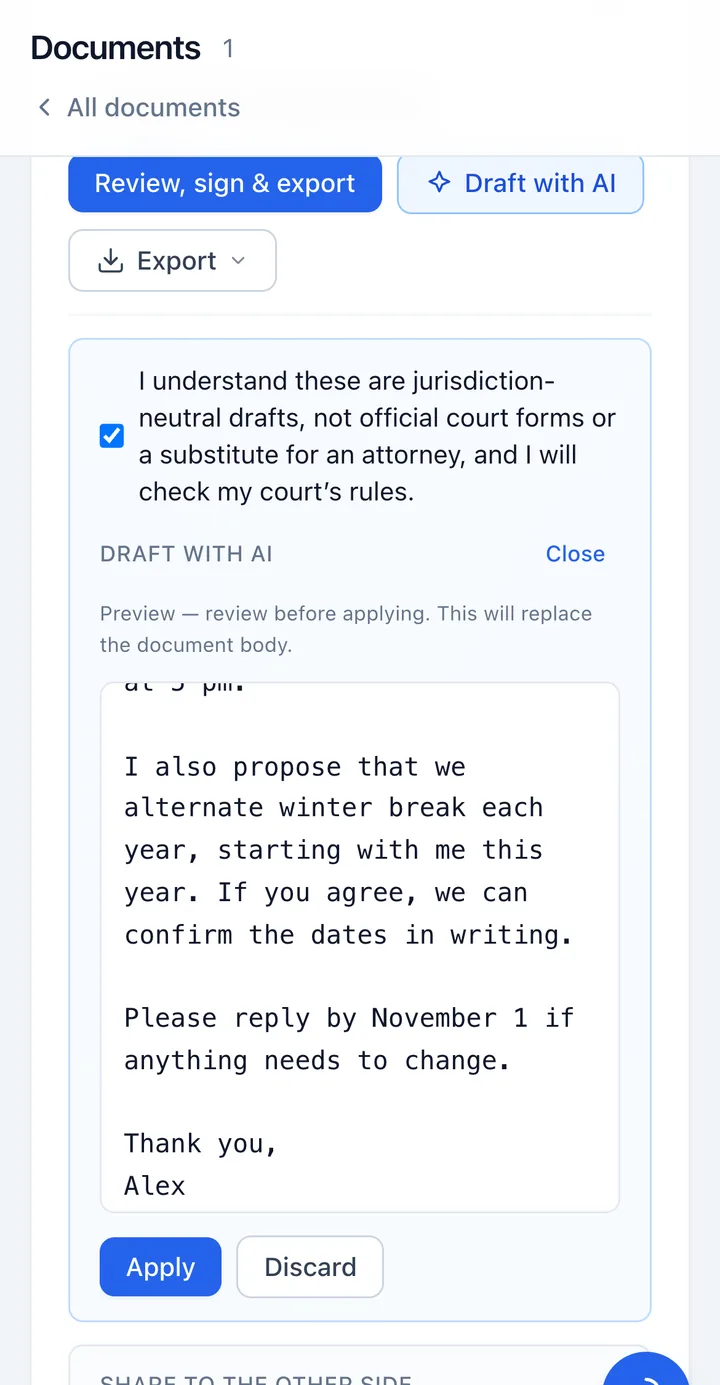
Draft the clause with [placeholders]
If you're preparing a proposed parenting plan, the Proposed Parenting Plan template has an other provisions section that names right of first refusal as an example. AI drafting can write a first version from your notes and leave [placeholders] for the hours, notice and reply time. You decide every term; the software doesn't suggest one.
An other provisions section in the Proposed Parenting Plan template
AI drafting with [placeholders] for facts it doesn't have (uses AI actions)
A text check flags statements to review; it isn't legal analysis
You confirm at export that you prepared and reviewed the document; nobody at Custody Commander reviews it
Export to PDF or Word; your court's forms and local rules come first
Record-keeping tips, not legal advice. Your order's wording controls.
General organizing tips, not legal advice. Your court's own rules come first.
Plans and pricing
Start free. Upgrade only if you need more.
The free plan needs no credit card and never expires. Case Builder holds the timeline and the assistant; Full Suite adds AI reading of your screenshots and every other tool.
Free
For getting your evidence out of your camera roll and into order.
$0
Free forever — no credit card, nothing to cancel.
One case file, unlimited court case numbers
10 evidence items, 1 GB of storage
Organize, describe, tag, search
Watermarked printable PDF export
6 AI actions to try the tools (one-time, not monthly)
Create your account, then after a short setup you can try Full Suite free for 7 days. Card required; then $24.99/mo or $299/yr (about 82¢ a day) until you cancel. Cancel before day 7 and you pay nothing. Or subscribe now — $299/yr
50% off · 20× the AI
Full Suite Max
Everything in Full Suite, with 20× the AI actions.
$99.99$49.99/mo
or $899/yr$399/yr
Everything in Full Suite: all five tools and the assistant
6,000 AI actions a month (20× Full Suite)
50% off (normally $99.99/mo), locked in as long as you don’t cancel
Already on Full Suite? Get 20× the AI credits for only +$25/mo more (prorated in place)
Clean, printable exports + free attorney & advocate access (on every plan)
$49.99 a month, renews until you cancel. Cancel online in two clicks.
Hearing Pass · one-time
$49 once for 30 days of hearing prep. Nothing renews.
Everything in Full Suite for 30 days from the day you buy it: all five tools, the assistant, AI included, and exports without a watermark. No subscription and nothing to cancel. When the 30 days end you’re back on the free plan, and nothing you added is deleted.
Your case stays private to your account until you invite someone and choose what they see. Data is encrypted in transit and at rest, and we don’t sell your personal information.
Your files stay yours
Originals are kept unchanged. Download your complete Case Bundle, every original file plus a manifest, free on any plan, before or after you cancel.
Cancel anytime, in two clicks
The free plan has nothing to cancel. Paid plans renew until you cancel online in two clicks, and the Hearing Pass never renews.
Organizing software, not a law firm
It organizes the files, dates and messages you provide. It doesn’t give legal advice, choose what you file or predict what a court will do.
Questions, answered straight
Frequently asked questions
What is a right of first refusal in custody?
It's a clause some parenting plans include: if a parent can't care for the child during their time for longer than a set period, they offer that time to the other parent before using another caregiver. Each clause is worded differently, and your order's wording is what applies.
How many hours trigger a right of first refusal?
There's no single answer. Clauses set different thresholds, some in hours and some by overnight, and some list exceptions. Read your own order, and ask a licensed attorney where you live if the wording is unclear.
Does a right of first refusal apply to grandparents or babysitters?
It depends on the clause. Some name exceptions such as relatives, school or planned activities, and others don't. Custody Commander can't interpret your clause; your order's wording, and a licensed attorney where you live, can answer that.
How do I document right of first refusal offers?
Log each offer with the date and time it was sent, the hours offered and how it was sent, then the reply and when it came. Keep the screenshot of the message with the entry. In Custody Commander, each offer goes on the timeline, and imported texts are numbered in time order.
Can the app write a right of first refusal clause?
It can draft one with you. Start from the Proposed Parenting Plan template, and AI drafting writes a first version from your notes, leaving [placeholders] for the terms. You decide every term and review every line, and your court's own forms come first. Nobody at Custody Commander reviews the document.
Is it free?
There's a free plan with no card needed: one case, the timeline, up to 10 evidence items and 6 AI actions, with DRAFT-marked exports. Comms Guard and Search with AI are in the 7-day Full Suite trial and paid plans. Full Suite is $24.99 a month or $299 a year.
Is this legal advice?
No. Custody Commander is organizing software, not a law firm. It keeps your record and helps you put your own words on the page; it doesn't say what a clause means, what to propose or whether it was followed. For that, talk to a licensed attorney where you live.
Keep every offer and reply on the record
Log each offer the day it's made, keep the message beside it, and draft the clause with [placeholders] if you need one. Free plan, no card needed.