
School and medical records

School and medical records for custody, in one organized place

Add report cards, attendance records, school emails and medical visit summaries as PDFs or photos. Custody Commander suggests School and Medical tags and a date for each, keeps every file private until you share it, and numbers the ones you choose as exhibits.

Start free

Free plan, no card needed. Organizing software, not a law firm; not legal advice.

See plans: Free, single tools, Full Suite
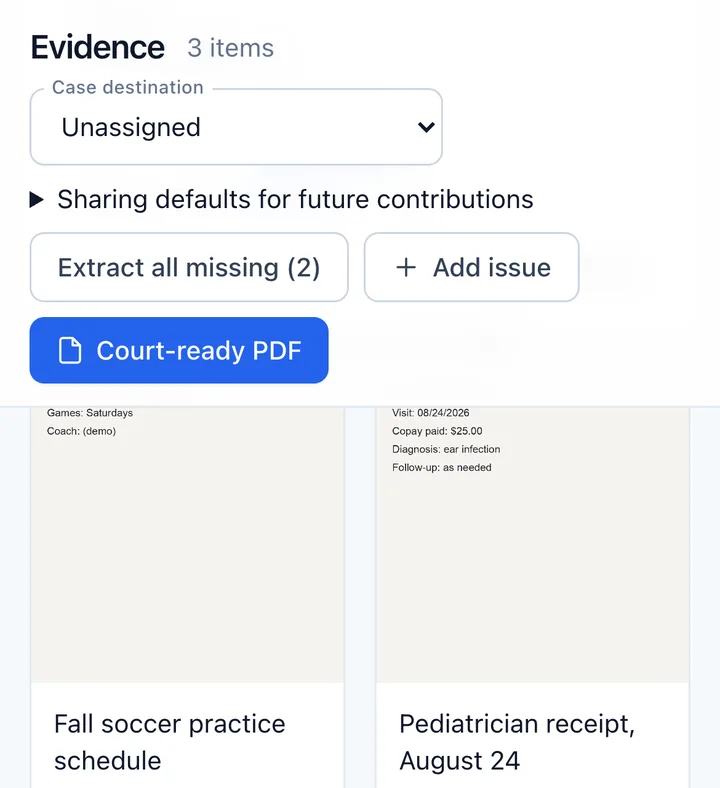
The Evidence page with 3 items and a Court-ready PDF button above cards for a fall soccer practice schedule and a pediatrician receipt dated August 24 showing the copay and diagnosis
App screen from a demo case with made-up names.
  • Suggested School and Medical tags
  • Folders for each child or school year
  • Private until you choose to share
  • Free plan, no card needed

1of 4

Start with copies from the school and the doctor's office

For school records in a custody case, copies straight from the source are clearer than notes about them. Many schools and medical offices let a parent download report cards, attendance records or visit summaries from a parent portal, or ask for copies through a records request. Once you have them as PDFs or photos, add them to the app just as they are. Keep the portal download or the office's cover letter too, since it shows where the copy came from.

Add my school records

The free plan holds up to 10 evidence items.

In the app

  • Add PDFs from a parent portal, photos of paper records, or saved emails
  • Upload one file, a batch or a whole folder, up to 25 MB per file
  • Originals kept unchanged, each with a SHA-256 fingerprint
  • Word, text and spreadsheet files too, such as a homework or appointment log you keep

2of 4

Dated, labeled and tagged School or Medical

A stack of report cards and visit summaries is easier to use when every item has a date and a topic. The app reads the text in each PDF or photo, suggests a likely date and a short, factual label, and suggests tags such as School, Medical or Expense. You check each reading, and nothing is tagged until you tap.

  • Reads text in PDFs and in photos of paper records, marked unverified until you review it
  • Suggests a date from the text, the photo details or the file name
  • Suggested tags include School, Medical and Expense, and you can make your own
  • Search, filter by type or issue, and sort by date
Tag my records

AI reading uses AI actions. The free plan includes 6 to try it.

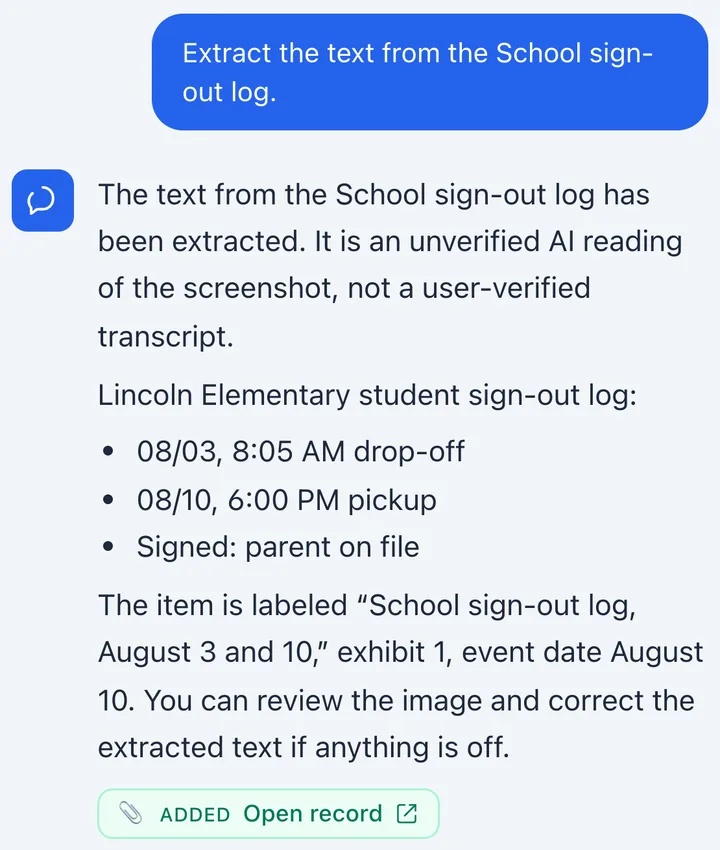
The assistant extracting text from a school sign-out log: a drop-off at 8:05 AM on August 3 and a pickup at 6:00 PM on August 10, marked as an unverified AI reading the user can review and correct

3of 4

A folder for each child, an issue for each topic

Records add up quickly across several children and school years. Make a folder for each child, with subfolders for school and medical, or group items into issues you name yourself, such as homework or appointments. Dated records also land on your master timeline, so a report card sits next to the events around it. Mark the records you expect to use as high priority, and filter to just those later.

In the app

  • Folders and subfolders, for example one per child, then School and Medical inside
  • Issues you name, each with your own summary and the records you tag to it
  • Filter by type, issue or priority; sort by date, name or type
  • Dated records appear on your timeline automatically

4of 4

Number the records you'll use, and share only what you choose

School and medical records hold private details about your children, so you decide who sees them. Your case stays private until you invite someone, and you pick the sections they can see and whether they can view, comment, download or edit. When you're ready, the records you choose get exhibit numbers and print into one PDF.

  • Exhibit numbers in date order, EX-001 onward, in one PDF with a cover and index page
  • Invite an attorney, paralegal or advocate to only the sections you pick
  • Revoke access at any time; invited attorneys and advocates join free
  • Encrypted in transit and at rest, with two-factor sign-in
Number my school records

Free-plan PDFs are watermarked DRAFT. Paid plans export clean.

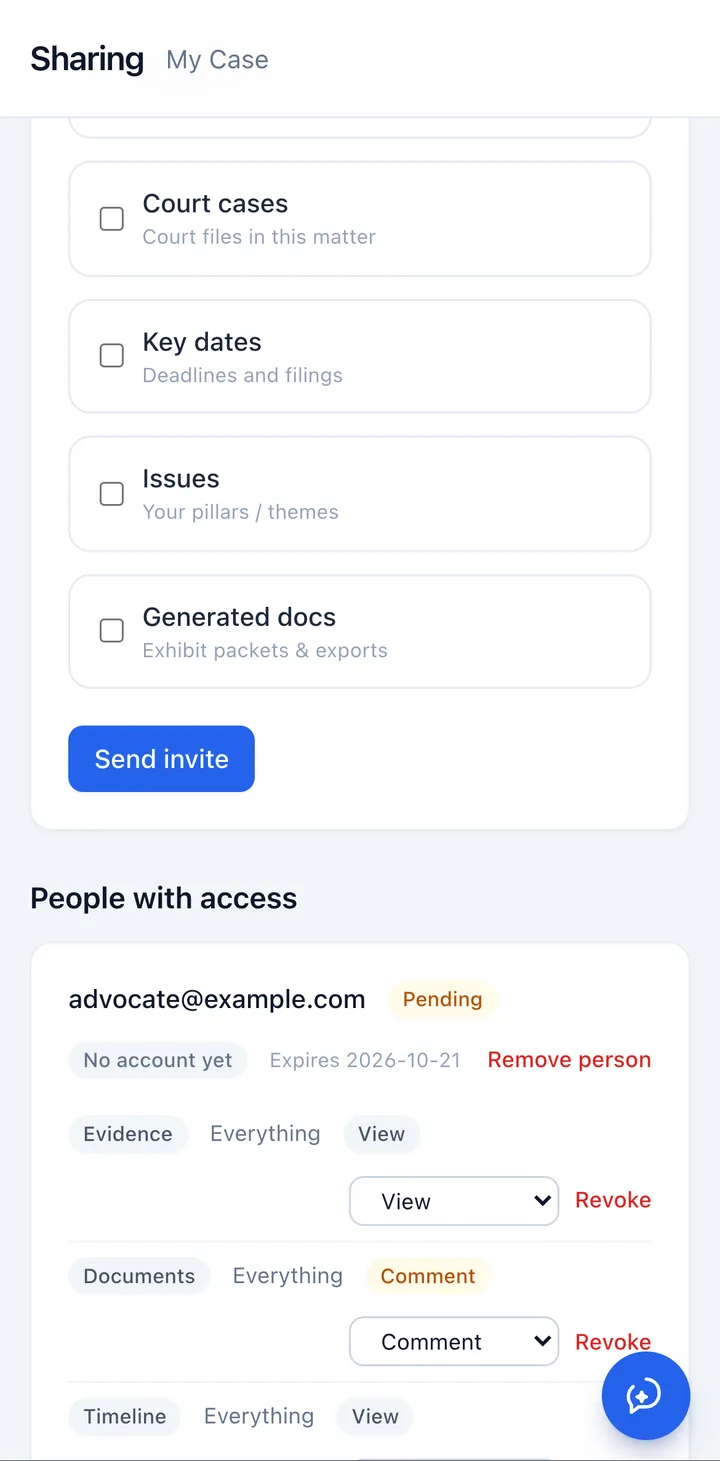
The Sharing screen with checkboxes for court cases, key dates, issues and generated docs, a Send invite button, and a pending invite with View access to evidence and Comment access to documents

How it works

School and medical records in order in 3 steps

  1. Gather the copies

    Download records from parent portals or photograph the paper copies you have.

  2. Add and tag

    Upload them, confirm each date and tap School, Medical or a tag of your own.

  3. Sort and share

    File them by child, number the ones you'll use, and share only what you choose.

Start free

Start free today — no credit card required.

Free checklist · no sign-up

School and medical records: a gathering checklist

A neutral list of records parents often collect, plus habits that keep them tidy. Your court's rules come first.

Tick them off as you go. Nothing you tick is saved or sent.

Organize my children's records

Free plan, no card needed.

Plans and pricing

Start free. Upgrade only if you need more.

The free plan needs no credit card and never expires. Evidence Helper removes the 10-item limit and the DRAFT watermark; Full Suite adds every tool.

Free

For getting your evidence out of your camera roll and into order.

$0

Free forever — no credit card, nothing to cancel.

  • One case file, unlimited court case numbers
  • 10 evidence items, 1 GB of storage
  • Organize, describe, tag, search
  • Watermarked printable PDF export
  • 6 AI actions to try the tools (one-time, not monthly)

Best fit for organizing evidence

Single Product

Evidence Helper

Just the one tool you need right now. Switch or upgrade anytime.

$14.99/mo

or $119/yr per product

  • Evidence Helper on its own: reads and dates screenshots, numbers exhibits and prints one PDF
  • 80 AI actions a month for that tool
  • Unwatermarked exports from that tool
  • Everything still lands in one case file
Get Evidence Helper

$14.99 a month, renews until you cancel. Cancel online in two clicks.

50% off · 20× the AI

Full Suite Max

Everything in Full Suite, with 20× the AI actions.

$99.99$49.99/mo

or $899/yr $399/yr

  • Everything in Full Suite: all five tools and the assistant
  • 6,000 AI actions a month (20× Full Suite)
  • 50% off (normally $99.99/mo), locked in as long as you don’t cancel
  • Already on Full Suite? Get 20× the AI credits for only +$25/mo more (prorated in place)
  • Clean, printable exports + free attorney & advocate access (on every plan)
Get Full Suite Max

$49.99 a month, renews until you cancel. Cancel online in two clicks.

Hearing Pass · one-time

$49 once for 30 days of hearing prep. Nothing renews.

Everything in Full Suite for 30 days from the day you buy it: all five tools, the assistant, AI included, and exports without a watermark. No subscription and nothing to cancel. When the 30 days end you’re back on the free plan, and nothing you added is deleted.

Get the Hearing Pass — $49
  • No card for the free plan
  • Plans renew until you cancel. Cancel online anytime, in two clicks.
  • Only you pay — the other parent never joins

Compare all plans on the pricing page →

Good to know before you start

  • Private by default

    Your case stays private to your account until you invite someone and choose what they see. Data is encrypted in transit and at rest, and we don’t sell your personal information.

  • Your files stay yours

    Originals are kept unchanged. Download your complete Case Bundle, every original file plus a manifest, free on any plan, before or after you cancel.

  • Cancel anytime, in two clicks

    The free plan has nothing to cancel. Paid plans renew until you cancel online in two clicks, and the Hearing Pass never renews.

  • Organizing software, not a law firm

    It organizes the files, dates and messages you provide. It doesn’t give legal advice, choose what you file or predict what a court will do.

Questions, answered straight

Frequently asked questions

Can school records be used in a custody case?

Your court decides what it accepts and how records should be presented, including whether certified copies are needed. Check your local rules or ask a licensed attorney where you live. Custody Commander doesn't decide what to use; it keeps the records you collect dated, tagged and numbered.

How do I get my child's school or medical records?

Many schools and medical offices have a parent portal or a records request process, so ask the front office or the records department. What you can request may depend on your court order and the office's own policies. Once you have copies, add them to the app as PDFs or photos.

Can I keep records separate for each child?

Yes. Make a folder for each child with subfolders inside, such as School and Medical, or group records into issues you name. Filter by type, issue or priority, and sort by date to see each child's records in order. Dated records also appear on your timeline, so you can see them alongside other events.

Who can see my children's records?

Only you, until you invite someone. You choose the sections each person sees and whether they can view, comment, download or edit, and you can revoke access at any time. Data is encrypted in transit and at rest, and our AI providers may not use your content to train their models.

Can I keep track of school and medical costs too?

Tag receipts as Expense in your evidence. For sharing child costs with the other parent, the shared expense log is free for both parents, with receipt photos, reimbursement requests and an uneditable history. It records what you both enter; it doesn't decide what anyone owes.

Is it free?

Yes. The free plan needs no card and never expires: one case, up to 10 evidence items, 1 GB of storage, 6 AI actions to try the reading, and PDF exports watermarked DRAFT. Paid plans remove the item limit and the watermark.

Is this legal advice?

No. Custody Commander is organizing software, not a law firm, and it doesn't give legal advice. It helps you keep your own records in order. For questions about what your court expects, check your local rules or talk to a licensed attorney where you live.

Bring your children's school and medical records together

Add the records you already have, tag them and file them by child. Start free, no card needed.

Start free today — no credit card required