TalkingParents alternative: calm replies and a numbered log of your texts
TalkingParents keeps a shared message record for two matched parents. Custody Commander is a one-parent tool: check any reply before you send it, in any channel, and turn the texts on your own phone into a numbered, dated log. The other parent never has to join.
TalkingParents plans and the free plan, as of October 14, 2026
When we checked TalkingParents' pricing page and FAQ on October 14, 2026, a paid plan had been required to use the app since March 30, 2026. Each parent has their own plan, co-parents can choose different plans, and there was a 30-day free trial plus a fee waiver for parents experiencing financial hardship. The shared record works when both parents match their accounts. Prices change, so confirm on TalkingParents' own site.
Custody Commander's free plan needs no card and doesn't expire.
In the app
Essentials: $7 a month per parent, with Secure Messaging, Shared Calendar, Info Library and Personal Journal
Enhanced: $16 a month per parent, with the extra features its pricing page lists
Ultimate: $32 a month per parent, adding Sentiment Scanner + Writing Assist and unlimited Accountable Calling
Annual billing listed at a discount; the 30-day trial lets you test first
2of 4
When an order names TalkingParents, Comms Guard works alongside it
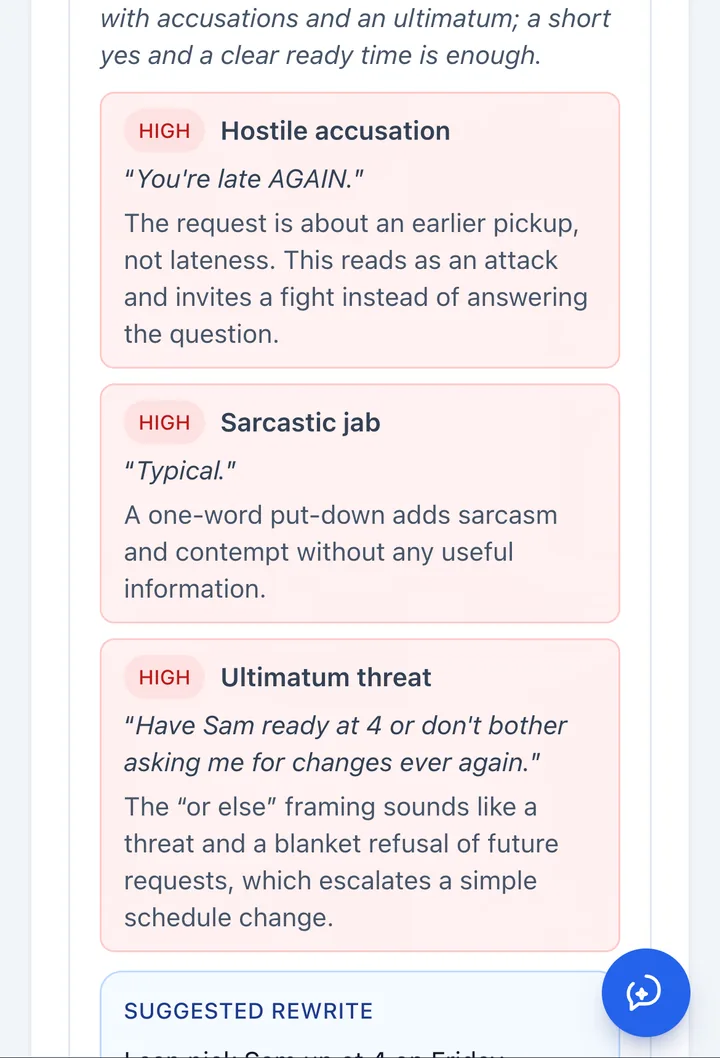
If a court order names TalkingParents, keep using it for what the order covers until the order changes. You can still get help with what you write. Draft or paste your reply into Comms Guard, read the flags, take or leave the suggested rewrite, then paste the final text into TalkingParents and send it there.
Comms Guard is in the 7-day Full Suite trial and paid plans. The free calm reply checker on our site gives 3 checks a day, no signup.
In the app
Flags tone, escalation, possible admissions, unclear wording and oversharing, with plain reasons
Suggests a BIFF rewrite (Brief, Informative, Friendly, Firm) that you edit
Log a message you received so the next draft is checked in context
Works on any message, wherever you plan to send it; nothing is sent from Custody Commander
Never says whether a message will help or hurt your case
3of 4
Texts from outside any app, in one numbered log
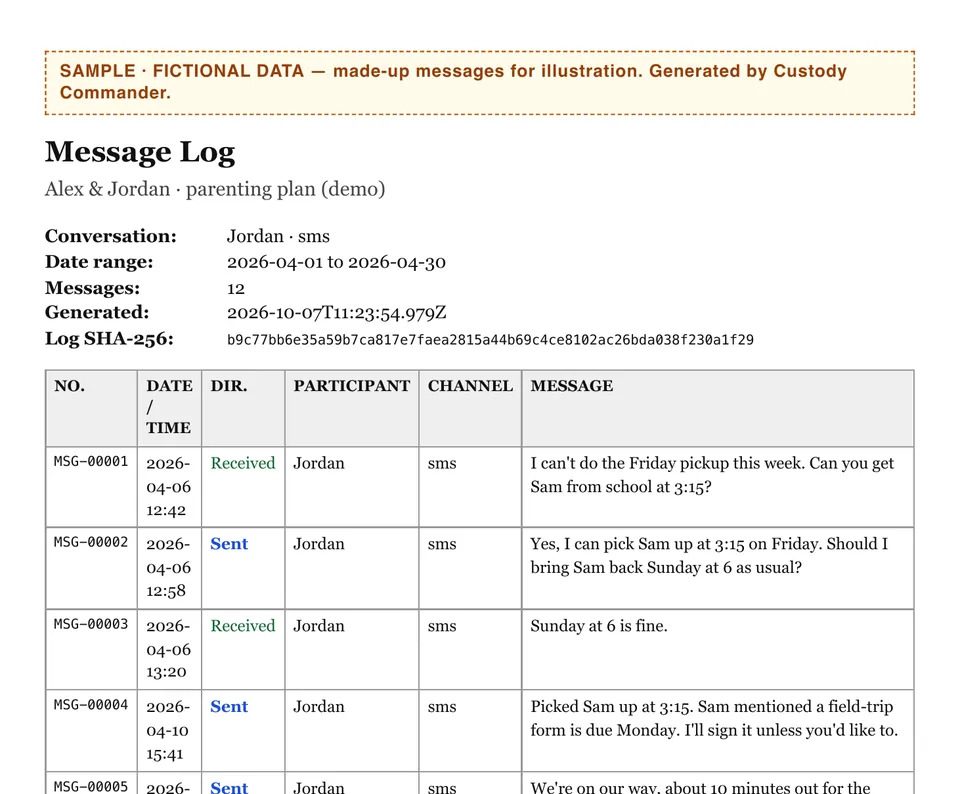
Not every conversation happens inside a co-parenting app. Texts, WhatsApp chats and Messenger threads on your own phone can be exported and imported into Custody Commander. Each message gets a number, a date and a time, in a page-numbered PDF you can print. The message text comes in as exported and can't be edited in the app.
Imports iPhone (CSV or PDF via iMazing), Android (SMS Backup & Restore XML), WhatsApp, Messenger and Instagram
Numbered from MSG-00001 with date, time, sent or received, participant and channel
A participant index and SHA-256 fingerprints for each source file and the whole log
Ends with a records declaration template that you complete
PDF times are listed in UTC, so note that on any copy you hand over
Free-plan logs are watermarked DRAFT. A clean log is a one-time $39 Message Log package, the Hearing Pass or a paid plan.
4of 4
TalkingParents vs. a one-parent tool: what each keeps
The two kinds of tool keep different records. A shared app like TalkingParents holds one platform-kept conversation that both matched parents use; as of October 14, 2026, its FAQ said messages can't be edited or deleted after sending. A one-parent tool keeps your own side: what you drafted, what you sent, what you received and the files around it, private to you.
Create your account, then after a short setup you can try Full Suite free for 7 days. Card required; then $24.99/mo or $299/yr (about 82¢ a day) until you cancel. Cancel before day 7 and you pay nothing. Or subscribe now — $299/yr
50% off · 20× the AI
Full Suite Max
Everything in Full Suite, with 20× the AI actions.
$99.99$49.99/mo
or $899/yr$399/yr
Everything in Full Suite: all five tools and the assistant
6,000 AI actions a month (20× Full Suite)
50% off (normally $99.99/mo), locked in as long as you don’t cancel
Already on Full Suite? Get 20× the AI credits for only +$25/mo more (prorated in place)
Clean, printable exports + free attorney & advocate access (on every plan)
$49.99 a month, renews until you cancel. Cancel online in two clicks.
Hearing Pass · one-time
$49 once for 30 days of hearing prep. Nothing renews.
Everything in Full Suite for 30 days from the day you buy it: all five tools, the assistant, AI included, and exports without a watermark. No subscription and nothing to cancel. When the 30 days end you’re back on the free plan, and nothing you added is deleted.
Your case stays private to your account until you invite someone and choose what they see. Data is encrypted in transit and at rest, and we don’t sell your personal information.
Your files stay yours
Originals are kept unchanged. Download your complete Case Bundle, every original file plus a manifest, free on any plan, before or after you cancel.
Cancel anytime, in two clicks
The free plan has nothing to cancel. Paid plans renew until you cancel online in two clicks, and the Hearing Pass never renews.
Organizing software, not a law firm
It organizes the files, dates and messages you provide. It doesn’t give legal advice, choose what you file or predict what a court will do.
Questions, answered straight
Frequently asked questions
Is TalkingParents still free?
Based on its FAQ and pricing page as of October 14, 2026, TalkingParents has required a paid plan since March 30, 2026. It offered a 30-day free trial and a fee waiver for parents experiencing financial hardship. Check its site for current terms.
How much does TalkingParents cost?
As of October 14, 2026, its pricing page listed Essentials at $7, Enhanced at $16 and Ultimate at $32 a month, per parent, with a discount for annual billing. Each parent has their own plan, and co-parents can be on different plans.
Is Custody Commander a TalkingParents alternative?
For some jobs. TalkingParents is a shared app: both parents match accounts and message inside it. Custody Commander is for one parent: it checks your drafts, logs the texts on your own phone and keeps your private case file. It doesn't send messages, so it isn't a substitute for a shared app an order requires.
Do both parents have to join?
For TalkingParents' shared record, both parents need to use it. For Custody Commander, no: you sign up alone and the other parent is never contacted. The only shared part is the expense log, which they can join free if you invite them.
Can I bring my TalkingParents records into Custody Commander?
The message log imports exports from iPhone, Android, WhatsApp, Messenger and Instagram, not from TalkingParents. A PDF you download from TalkingParents can still be added to your evidence like any other document, with the original kept unchanged and a SHA-256 fingerprint recorded, and given a date on your timeline.
Is Custody Commander free?
The free plan needs no card and never expires: one case, up to 10 evidence items, 1 GB and 6 AI actions, with DRAFT-marked exports. Comms Guard is in the 7-day Full Suite trial (card required) and paid plans; Full Suite is $24.99 a month or $299 a year.
Is this legal advice?
No. Custody Commander is organizing software, not a law firm, and isn't affiliated with TalkingParents. Nothing here is legal advice. Whether an order lets you change apps depends on its wording; your court's self-help center or a licensed attorney where you live can help.
Add a one-parent tool to the channel you already use
Check your next reply and number the texts on your phone, without the other parent joining. Free plan, no card needed.