Print text messages for court as a dated, numbered log
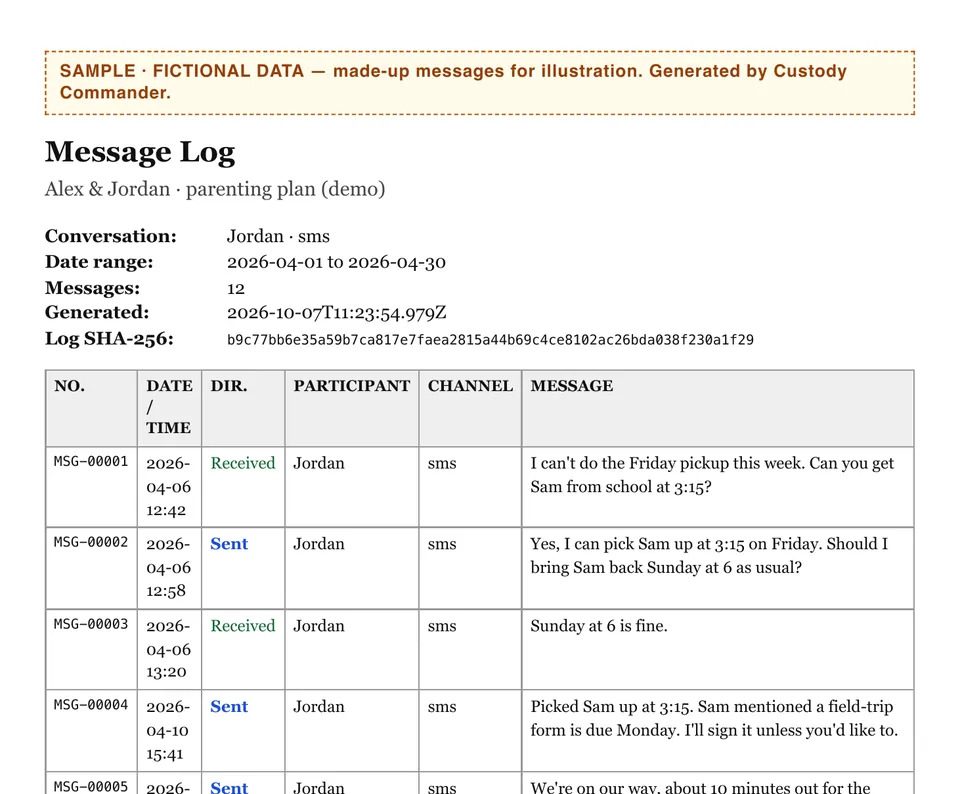
Import a whole text thread from your phone or messaging app. Every message is numbered from MSG-00001 with its date, time, sender and channel, in a page-numbered PDF you can print.
Imports iPhone, Android, WhatsApp, Messenger and Instagram exports
Every message numbered and dated, in time order
Imported message text can't be edited in the app
Start free — no credit card required
1of 4
Every message gets a number, a date and a time
A numbered log lets anyone find a message by its number, like MSG-00412, instead of flipping through a stack of screenshots. Keeping the whole thread in time order also keeps the context around each message. The log is built straight from your export, with nothing retyped.
Numbers every message in time order, from MSG-00001
Shows the date and time, sent or received, participant and channel for each one
Adds an index of who is in the thread, with each person's message-number range
Lists each source file with the SHA-256 fingerprint recorded at import, plus a fingerprint for the whole log
Ends with a records declaration template that you complete, with page numbers on every page
2of 4
Bring in the whole thread from your phone or app
Phones and messaging apps can export a full conversation as a file, which keeps every message and timestamp in one place. The app shows step-by-step export instructions for each source, then reads the file and works out dates, direction and participants for you. One conversation per file keeps things tidy.
iPhone texts and iMessage: a CSV or PDF export made with iMazing on a Mac or PC
Android texts: an XML backup from the free SMS Backup & Restore app
WhatsApp: the chat's own Export chat file (.txt), without media
Facebook Messenger and Instagram: the JSON message download from Accounts Center
Each export file can be up to 50 MB, so long threads come in at once
3of 4
Find the messages that matter without scrolling for hours
A long thread is easier to work with when you can search it and mark what matters. Tags such as "schedule change" or "pickup" let you pull up every related message in seconds. Pick a date range when you export, so the log holds just the months you need.
Search any word or phrase in a conversation, with matches highlighted
Tag messages and filter the conversation by tag
Export just a date range, from one date to another
Ask questions across every message with Search with AI, and get answers that quote the exact messages
Ask the assistant to add key dates from your messages to your timeline
AI search uses AI actions, included in Message Extractor, Full Suite and the 7-day Full Suite trial.
4of 4
Write calmer replies, and keep a dated copy of what you sent
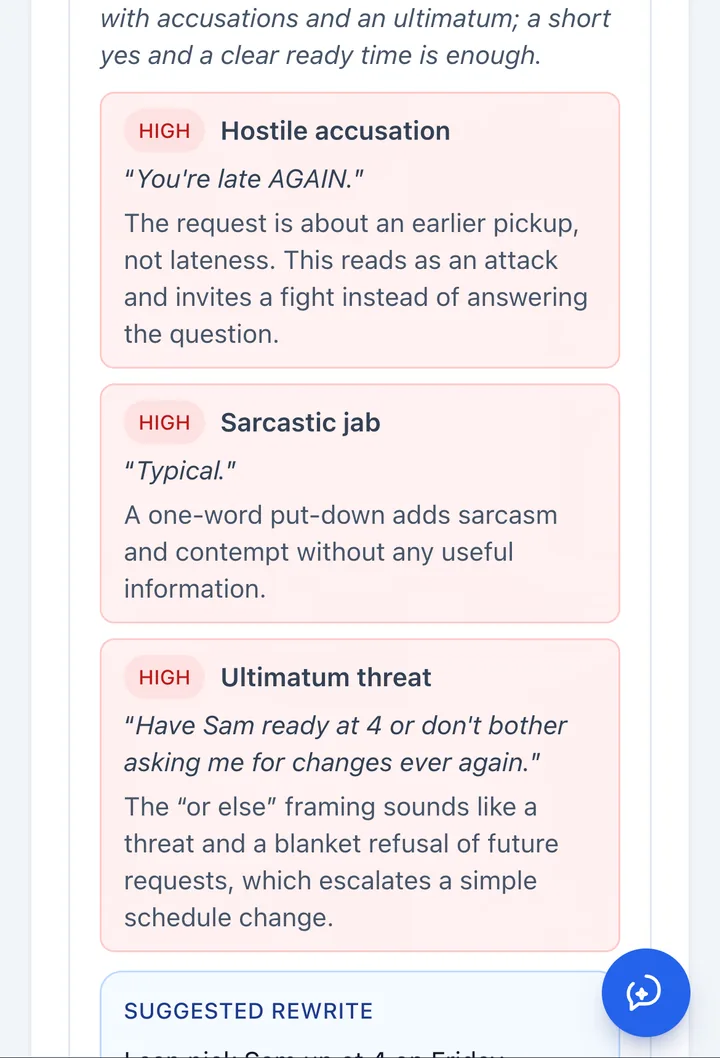
Short, factual, friendly messages are easier to read later, by anyone. Comms Guard checks a draft before you send it, flags heated or unclear wording in plain language and suggests a calmer version. You edit it, copy it and send it yourself, through any channel.
Flags tone, escalation and unclear wording, each with a short reason
Suggests a rewrite that you can edit or ignore
Never sends anything for you: you copy and send it yourself
Log as sent saves your message with its date and time to that person's thread, and into the numbered log
Create your account, then after a short setup you can try Full Suite free for 7 days. Card required; then $24.99/mo or $299/yr (about 82¢ a day) until you cancel. Cancel before day 7 and you pay nothing. Or subscribe now — $299/yr
50% off · 20× the AI
Full Suite Max
Everything in Full Suite, with 20× the AI actions.
$99.99$49.99/mo
or $899/yr$399/yr
Everything in Full Suite: all five tools and the assistant
6,000 AI actions a month (20× Full Suite)
50% off (normally $99.99/mo), locked in as long as you don’t cancel
Already on Full Suite? Get 20× the AI credits for only +$25/mo more (prorated in place)
Clean, printable exports + free attorney & advocate access (on every plan)
$49.99 a month, renews until you cancel. Cancel online in two clicks.
$39 — just your texts
Need your messages as a PDF without a subscription? One message log from Message Extractor: chronological, Bates-numbered (MSG-00001…), with a SHA-256 fingerprint and a declaration template you complete. One-time, no subscription. See a sample (PDF)
$49 once for 30 days of hearing prep. Nothing renews.
Everything in Full Suite for 30 days from the day you buy it: all five tools, the assistant, AI included, and exports without a watermark. No subscription and nothing to cancel. When the 30 days end you’re back on the free plan, and nothing you added is deleted.
Your case stays private to your account until you invite someone and choose what they see. Data is encrypted in transit and at rest, and we don’t sell your personal information.
Your files stay yours
Originals are kept unchanged. Download your complete Case Bundle, every original file plus a manifest, free on any plan, before or after you cancel.
Cancel anytime, in two clicks
The free plan has nothing to cancel. Paid plans renew until you cancel online in two clicks, and the Hearing Pass never renews.
Organizing software, not a law firm
It organizes the files, dates and messages you provide. It doesn’t give legal advice, choose what you file or predict what a court will do.
Questions, answered straight
Frequently asked questions
What's free, and what do I pay for?
The free plan needs no credit card and never expires: import, read, search and tag your messages, and export a log watermarked DRAFT. A clean, unwatermarked log comes with a one-time $39 Message Log for your case, the $49 Hearing Pass or a paid plan. Message Extractor on its own is $14.99 a month or $119 a year, with 80 AI actions a month for AI search. Full Suite, $24.99 a month or $299 a year, adds Comms Guard and every other tool.
Do I need a credit card to start?
No. You sign up for the free plan with your name, email and a password, and nothing is ever charged on it. A card is needed only if you choose to pay: a paid plan, the $49 Hearing Pass or the 7-day Full Suite trial. The trial screen shows the price and the date of the first charge before you confirm, we email you 3 days and 1 day before it, and if you cancel online before then you pay nothing.
Does it work with iPhone and Android texts?
Yes. Apple doesn't let any app read the Messages app directly, so on iPhone you export the conversation on a Mac or PC with iMazing (as CSV or PDF) and import that file. On Android, the free SMS Backup & Restore app saves your texts as an XML file. Regular texts are imported; picture and group messages (MMS) aren't included yet. The app walks you through each export step by step.
Can I import WhatsApp, Messenger or Instagram chats?
Yes. In WhatsApp, open the chat, choose Export chat and pick Without Media, then import the .txt file and select which name is you. For Messenger and Instagram, request a JSON download of your messages in Accounts Center and import the conversation's message_1.json, then any further numbered files. Attachments are listed by reference; the media files themselves aren't uploaded.
How many messages can I import?
Long threads are fine. Each export file can be up to 50 MB, which holds thousands of text-only messages, and there's no cap on the number of messages in a conversation. Import each conversation file once to avoid duplicates. The free plan includes 1 GB of storage for your case.
Does the app change my messages?
No. Message text comes in exactly as it appears in your export, and it can't be edited in the app. You can add tags and choose the display name for each person, which never changes the message itself. The original file is kept with the SHA-256 fingerprint recorded at import, and the log lists it.
Who can see my messages?
Only you, plus anyone you choose to invite to your case, such as an attorney or advocate, and only the parts you share with them. The other person in the conversation is never contacted or notified, and nothing is sent from the app. You can delete an import or a whole conversation at any time.
Can I print the log or save it as a PDF?
Yes. Open a conversation, choose Export conversation and, if you like, a from and to date. The log downloads as a PDF with page numbers on every page, ready to print at home or at a print shop. Times in the PDF are listed in UTC (Coordinated Universal Time), which can differ from your phone's clock, so note that on any copy you hand to someone.
Every message in the thread, numbered and dated
Import your conversation free, then read, search and tag it in one place. The free plan needs no credit card. Download the numbered log whenever you need it.