Child custody evidence checklist: your records, sorted by type
A plain list of the kinds of records parents often gather, from messages and schedules to school, medical and expense records. Custody Commander gives each type a folder or tag, suggests a date for every item for you to check, and keeps it all in one place.
Screenshots, photos, PDFs, documents, spreadsheets, audio and video
Originals kept, each with a SHA-256 fingerprint
Free plan, no card needed
1of 4
Messages and emails, kept whole
On a child custody evidence checklist, written messages between parents are often the biggest pile of records. Exporting whole conversations keeps every message dated and in order, which is easier to work with than scattered screenshots. The Message Extractor numbers each imported message, and screenshots or saved emails can go straight into Evidence. Use exports from your own phone and accounts only.
Import text threads from your own iPhone, Android, WhatsApp, Messenger and Instagram exports
Each message numbered from MSG-00001 with its date, time and sender
Saved emails and screenshots added to Evidence, each with a suggested date
Schedules, exchanges and attendance on one timeline
Calendars, exchange notes and school sign-out sheets show when things happened. Add them as files, or write a one-line entry for each exchange, and dated items land on one master timeline you can export. Suggested tags such as Late and Missed Visit make them quick to find later. Record the on-time exchanges as well as the late ones, so the timeline is complete.
One master timeline for events, evidence, key dates and hearings
Late and Missed Visit tags suggested, applied only when you tap
Tell the assistant what happened in plain English and it adds the dated entry
Export the timeline to PDF or Word
3of 4
School, medical and expense records, tagged as you add them
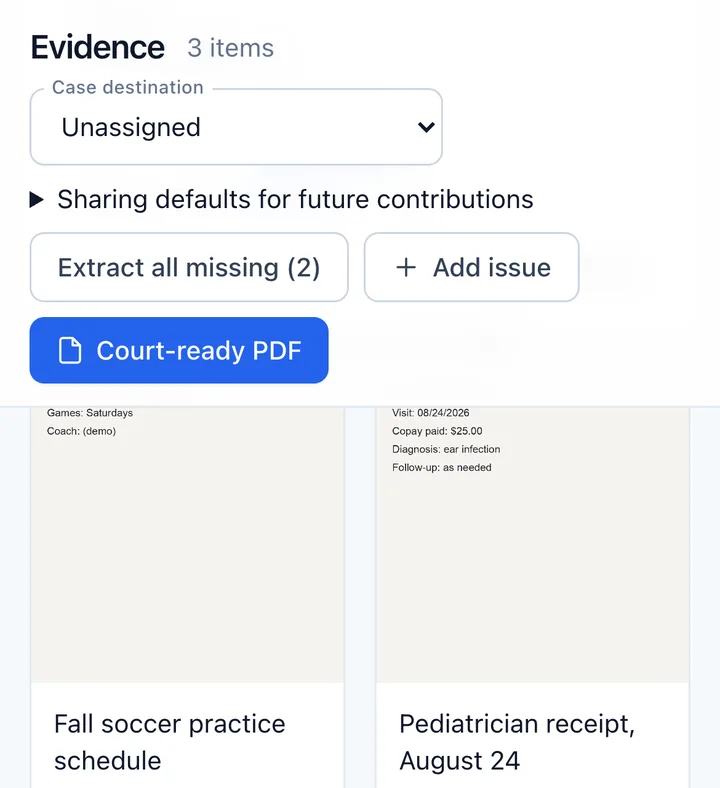
Report cards, attendance records, visit summaries and receipts each come from a different place. When you add them, the app reads the text, suggests a date and suggests a School, Medical or Expense tag. Give each child a folder of their own if that helps you find things. If you share child costs with the other parent, receipts can also go into the shared expense log.
AI reading uses AI actions. The free plan includes 6 to try it.
In the app
Reads PDFs and photos of paper records; readings are marked unverified until you check them
School, Medical and Expense tags suggested, plus tags you create
Folders and subfolders for each child or each school year
A shared expense log, free for both parents, for receipts and reimbursements
4of 4
Photos and documents, numbered when you need them
Photos, scanned papers and other documents round out the record. Every original stays unchanged with a SHA-256 fingerprint. When you're ready, each item gets an exhibit number in date order, for one printable PDF with a cover and index page. Court papers belong in the document library, sorted by type, where you can view and search them.
Child custody evidence checklist: records parents often gather
A neutral list of common record types. Which ones matter, if any, depends on your case and your court, so treat it as a starting inventory, not advice.
Tick them off as you go. Nothing you tick is saved or sent.
Want a list to print? The free Child Custody Evidence Checklist has tick boxes under seven headings, from messages and parenting time to court papers and people. Not every case needs every item. No sign-up.
Create your account, then after a short setup you can try Full Suite free for 7 days. Card required; then $24.99/mo or $299/yr (about 82¢ a day) until you cancel. Cancel before day 7 and you pay nothing. Or subscribe now — $299/yr
50% off · 20× the AI
Full Suite Max
Everything in Full Suite, with 20× the AI actions.
$99.99$49.99/mo
or $899/yr$399/yr
Everything in Full Suite: all five tools and the assistant
6,000 AI actions a month (20× Full Suite)
50% off (normally $99.99/mo), locked in as long as you don’t cancel
Already on Full Suite? Get 20× the AI credits for only +$25/mo more (prorated in place)
Clean, printable exports + free attorney & advocate access (on every plan)
$49.99 a month, renews until you cancel. Cancel online in two clicks.
Hearing Pass · one-time
$49 once for 30 days of hearing prep. Nothing renews.
Everything in Full Suite for 30 days from the day you buy it: all five tools, the assistant, AI included, and exports without a watermark. No subscription and nothing to cancel. When the 30 days end you’re back on the free plan, and nothing you added is deleted.
Your case stays private to your account until you invite someone and choose what they see. Data is encrypted in transit and at rest, and we don’t sell your personal information.
Your files stay yours
Originals are kept unchanged. Download your complete Case Bundle, every original file plus a manifest, free on any plan, before or after you cancel.
Cancel anytime, in two clicks
The free plan has nothing to cancel. Paid plans renew until you cancel online in two clicks, and the Hearing Pass never renews.
Organizing software, not a law firm
It organizes the files, dates and messages you provide. It doesn’t give legal advice, choose what you file or predict what a court will do.
Questions, answered straight
Frequently asked questions
What evidence do I need for custody?
There's no single list. It depends on the questions in your case, your court's rules and the facts, and only a licensed attorney where you live can advise you on that. Court self-help centers and legal aid offices can point you to free or low-cost help. Custody Commander is organizing software, not a law firm: it keeps whatever you gather in order, and it doesn't decide what's relevant.
What are the main types of custody evidence?
Parents commonly gather written communication, schedule and exchange records, school and medical records, expense records, photos and videos, court papers and a personal journal. Which of these matter, if any, depends on the case. The checklist on this page is a neutral starting inventory you can print. Many people also keep a list of people who saw events firsthand, such as teachers or coaches, with their contact details.
How should I organize custody evidence?
Keep everything in one place, grouped by type or by child, with a date and a one-line description for each item and the original saved untouched. In the app, folders, issues and tags handle the grouping, dates are suggested for you to confirm, and exhibit numbers are added in date order when you're ready.
Can I print this child custody evidence checklist?
Yes. Use the print button on the checklist on this page; nothing you tick is saved or sent. In the app, the printable evidence index lists each item's exhibit number, date, description and fingerprint, plus your note, and the timeline exports to PDF or Word.
Is my evidence private?
Yes. Your case stays private until you invite someone and choose what they can see. The other parent never has to join anything and is never contacted or notified. Data is encrypted in transit and at rest, and we don't sell personal information.
Is it free?
Yes. The free plan needs no card and never expires: one case, up to 10 evidence items, 1 GB of storage, 6 AI actions and exports watermarked DRAFT. Full Suite is $24.99 a month or $299 a year, and a new account can try it free for 7 days with a card, with the price and first charge date shown first.
Is this legal advice?
No. The checklist is a general organizing list, not a list of what any court requires or what will matter in your case. Custody Commander doesn't tell anyone what to gather, file or argue. For advice, talk to a licensed attorney where you live.
Turn the checklist into one organized case file
Add the records you already have, and let the app date, tag and number them. Start free, no card needed.