
Custody schedule template

A custody schedule template: free calendars and a parenting plan draft

Print a free pattern calendar to see the schedule night by night. Then write it out in words with Custody Commander's Proposed Parenting Plan template, which leaves [placeholders] for the school year, summer, holidays and exchanges.

Start free

Free plan, no card needed. Organizing software, not a law firm; not legal advice.

See plans: Free, single tools, Full Suite
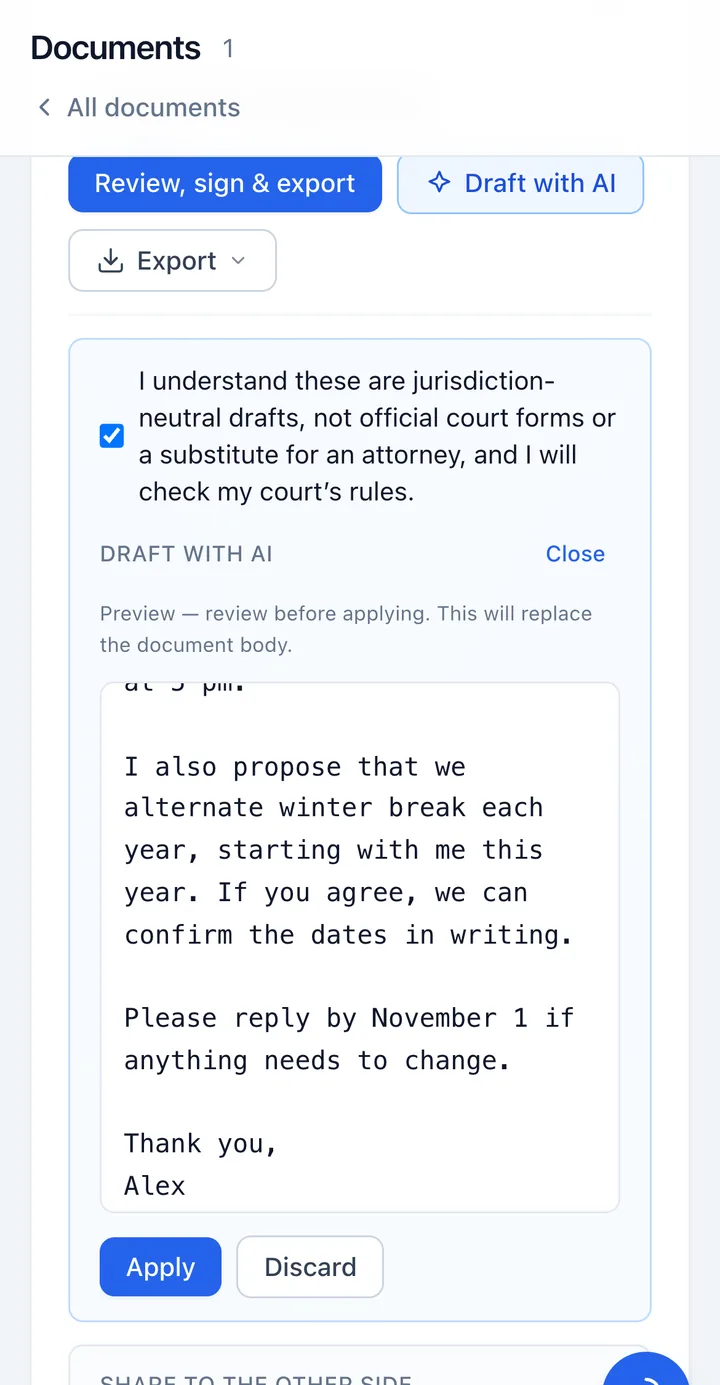
A document in Custody Commander with Review, sign and export and Draft with AI buttons, a checked box confirming the drafts are jurisdiction-neutral and not official court forms, and an AI preview proposing to alternate winter break each year, with Apply and Discard buttons
App screen from a demo case with made-up names.
  • Free calendars in Excel and PDF, no signup
  • [Placeholders] for the facts only you know
  • Export to PDF or Word
  • Templates are a starting point, not official court forms

1of 4

See the schedule night by night first

Before you settle on wording, it helps to see the pattern. Our free calendar templates show each night as a letter for the parent the child sleeps with, so a schedule written in words can be checked against a calendar, line by line.

Draft my parenting plan schedule

Calendar downloads are free. The app's free plan needs no card.

In the app

  • Pre-filled calendars for 2-2-3, week on week off and every other weekend, for 2026 and 2027
  • A blank year-at-a-glance calendar and a blank month page for any other pattern
  • A key page for who A and B are, the exchange day, time and place, and holidays and breaks
  • Excel files that colour each parent's nights and count them by month and year; they open in Google Sheets
  • Free, with no signup or email

2of 4

Write the schedule out with [placeholders]

A calendar shows the nights; a written schedule explains them. The Proposed Parenting Plan template in Custody Commander is a skeleton with headings and [bracketed placeholders] for the facts you supply. Your case caption and court case number are merged in from your case, so you start with the details already in place.

  • Residential schedule for the school year, with a line for each parent's days and nights
  • Summer and school breaks, including any changes from the school-year pattern
  • Holidays and special days: winter break, spring break, Thanksgiving, each child's birthday, Mother's Day and Father's Day
  • Transportation and exchanges: where and when they happen, and who drives
  • Decision-making, communication, and a section for other provisions
Start my schedule from a template

One of 26 templates on the New from template menu.

An AI draft preview inside a document, proposing that the parents alternate winter break each year and confirm the dates in writing, with Apply and Discard buttons below

3of 4

A first draft from your own records

If a blank page is the hard part, AI drafting can write or revise a section using the facts already in your case, and it leaves [placeholders] for anything it doesn't know. You read every line, fill in each placeholder and decide what stays. The software never chooses the schedule for you.

Draft my schedule section

Full Suite includes 300 AI actions a month; the free plan has 6 to try.

In the app

  • Drafts grounded in your case's own records, with [placeholders] for missing facts (uses AI actions)
  • Preview a draft before applying it, or discard it
  • A conservative text check flags statements to review; it isn't a truth check or legal analysis
  • At sign and export, you confirm you prepared and reviewed the document and that the software provider didn't review it or give legal advice
  • Export to PDF or Word

4of 4

Your court's own form comes first

Many courts publish their own parenting plan forms and rules for what a plan has to cover. A template is a starting point for your wording, not an official court form, and nobody at Custody Commander reviews what you write. The Your court page collects links to your court's official rules, forms and self-help pages.

  • Links to your court's official rules, forms and self-help pages, with the date each was retrieved
  • Orders, filings and drafts in one searchable document library you can view in the browser
  • Deadlines and reminders with a date and time on your Upcoming list
  • Invite an attorney or mediator to view or comment on the sections you choose
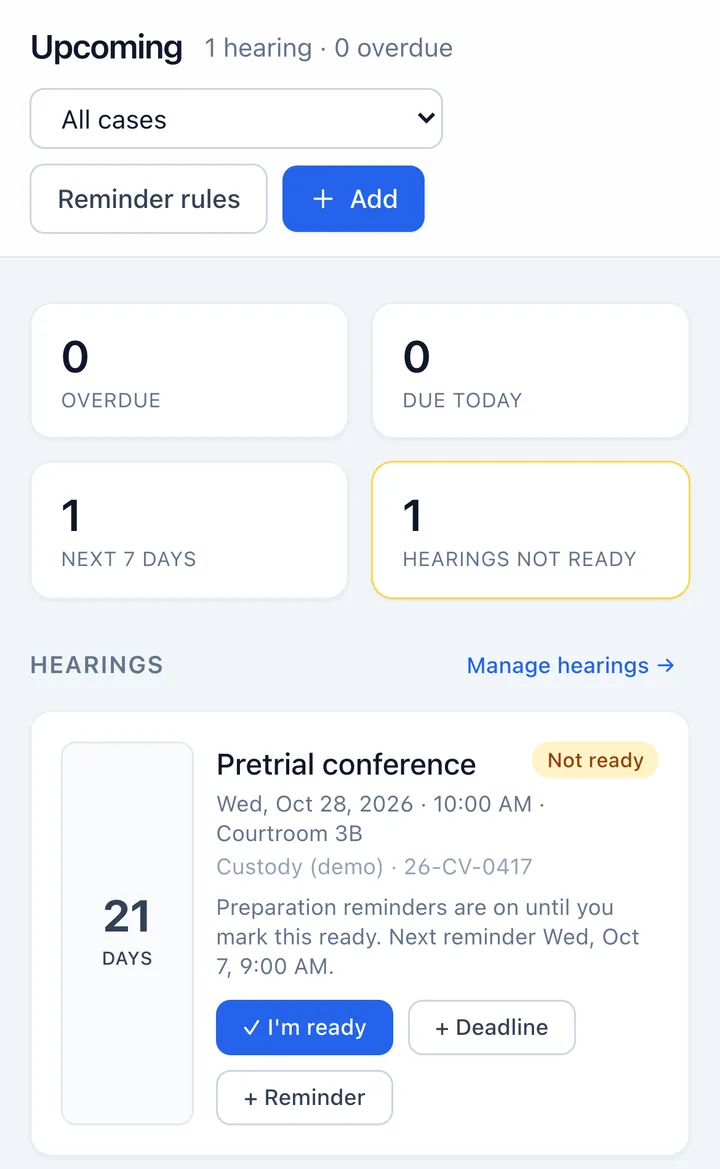
The Upcoming page with counts for overdue, due today and next 7 days, and a pretrial conference card with Deadline and Reminder buttons

How it works

From a calendar to a written schedule in 3 steps

  1. Pick a calendar

    Download a pattern calendar, or mark your own nights on the blank one.

  2. Fill the template

    Open the Proposed Parenting Plan template and complete each [placeholder].

  3. Check and export

    Compare it with your court's form and rules, then export a PDF or Word copy.

Start free

Start free today — no credit card required.

Free checklist · no sign-up

What a written custody schedule spells out: a fill-in checklist

Fill in each line in your own words, on paper or in the template. Your court's form may ask for more.

Tick them off as you go. Nothing you tick is saved or sent.

Fill in my schedule template

Drafting prompts, not legal advice. Your court's forms and local rules come first.

Plans and pricing

Start free. Upgrade only if you need more.

The free plan needs no credit card and never expires. Case Builder holds your documents, timeline and the assistant; Full Suite adds every other tool.

Free

For getting your evidence out of your camera roll and into order.

$0

Free forever — no credit card, nothing to cancel.

  • One case file, unlimited court case numbers
  • 10 evidence items, 1 GB of storage
  • Organize, describe, tag, search
  • Watermarked printable PDF export
  • 6 AI actions to try the tools (one-time, not monthly)

Best fit for court paperwork

Single Product

Case Builder

Just the one tool you need right now. Switch or upgrade anytime.

$14.99/mo

or $119/yr per product

  • Case Builder on its own: your timeline, documents, hearings, to-dos and the assistant
  • 80 AI actions a month for that tool
  • Unwatermarked exports from that tool
  • Everything still lands in one case file
Get Case Builder

$14.99 a month, renews until you cancel. Cancel online in two clicks.

50% off · 20× the AI

Full Suite Max

Everything in Full Suite, with 20× the AI actions.

$99.99$49.99/mo

or $899/yr $399/yr

  • Everything in Full Suite: all five tools and the assistant
  • 6,000 AI actions a month (20× Full Suite)
  • 50% off (normally $99.99/mo), locked in as long as you don’t cancel
  • Already on Full Suite? Get 20× the AI credits for only +$25/mo more (prorated in place)
  • Clean, printable exports + free attorney & advocate access (on every plan)
Get Full Suite Max

$49.99 a month, renews until you cancel. Cancel online in two clicks.

Hearing Pass · one-time

$49 once for 30 days of hearing prep. Nothing renews.

Everything in Full Suite for 30 days from the day you buy it: all five tools, the assistant, AI included, and exports without a watermark. No subscription and nothing to cancel. When the 30 days end you’re back on the free plan, and nothing you added is deleted.

Get the Hearing Pass — $49
  • No card for the free plan
  • Plans renew until you cancel. Cancel online anytime, in two clicks.
  • Only you pay — the other parent never joins

Compare all plans on the pricing page →

Good to know before you start

  • Private by default

    Your case stays private to your account until you invite someone and choose what they see. Data is encrypted in transit and at rest, and we don’t sell your personal information.

  • Your files stay yours

    Originals are kept unchanged. Download your complete Case Bundle, every original file plus a manifest, free on any plan, before or after you cancel.

  • Cancel anytime, in two clicks

    The free plan has nothing to cancel. Paid plans renew until you cancel online in two clicks, and the Hearing Pass never renews.

  • Organizing software, not a law firm

    It organizes the files, dates and messages you provide. It doesn’t give legal advice, choose what you file or predict what a court will do.

Questions, answered straight

Frequently asked questions

Is there a free custody schedule template?

Yes. Our free calendar templates come as Excel files and printable PDFs: pre-filled 2-2-3, week on week off and every other weekend calendars, plus a blank year-at-a-glance calendar. No signup is needed. The written Proposed Parenting Plan template is inside the app, which has a free plan with no card needed.

What goes in a parenting plan schedule?

It depends on your court's form and rules, so check those first. Many written schedules cover the regular school-year pattern, summer and school breaks, holidays and special days, and exchange times and places. The template has a section for each, with [placeholders]; it doesn't suggest which schedule to propose.

Is the template an official court form?

No. It's a drafting starting point with headings and [placeholders], not an official form. If your court has its own parenting plan form, use that form. Nobody at Custody Commander reviews your document, and you confirm at export that you prepared and reviewed it yourself.

Can AI write my custody schedule?

AI drafting can write or revise a section using the facts already in your case, leaving [placeholders] for what it doesn't know. You decide the schedule, check every statement and complete every placeholder. It doesn't choose a schedule or say what a court would approve.

Can I use it as a visitation schedule template?

Yes. Many orders and parents use the word visitation for the same thing. Write the days, times and exchange details in the residential schedule and holiday sections, in the words your court uses. The blank calendar works for any visitation pattern, regular or not.

Is it free?

The calendar templates are free downloads with no signup. The app's free plan needs no card, includes 6 AI actions to try drafting, and its exports carry a DRAFT mark. Full Suite is $24.99 a month or $299 a year with 300 AI actions a month, or a one-time Hearing Pass is $49 for 30 days.

Can I draft documents in every state?

In most states the app drafts jurisdiction-neutral documents from templates, with [placeholders] for your court's details, and they aren't official court forms. In a few states, drafting stays off until that state's review is finished; the app says so when you start a draft. Organizing evidence, the timeline and exports work in every state.

Is this legal advice?

No. Custody Commander is organizing software, not a law firm. It gives you a template and a drafting tool for your own words; it never tells you what to propose, file or agree to. For advice about a schedule, talk to a licensed attorney where you live or your court's self-help center.

Write your custody schedule down, clearly

Print a free calendar, then fill in the parenting plan template's [placeholders] in your own words. Free plan, no card needed.

Start free today — no credit card required